With Jotform’s Unique ID widget, you can generate a custom ID for each form submission that’s different than the default submission ID. This custom ID can be used to create a sequential order number, invoice number, registration code, ticket ID, or any other identifier you need to track or organize submissions.
Here are a few ways to use it:
- Generate unique reference numbers for orders, bookings, or purchases.
- Track and organize submissions across registration or application forms.
- Issue invoice or receipt IDs for sales, services, or transactions.
- Manage support requests by assigning unique ticket numbers.
- Improve record-keeping and retrieval with clear, searchable identifiers.
Note
The Unique ID widget is available in both Classic and Card Forms. You can check out our guide on When to Use Card Forms to learn more.
Whether you’re creating a new form or updating an existing one, you can add and customize the format of the generated ID in a few easy steps. Here’s how to do it:
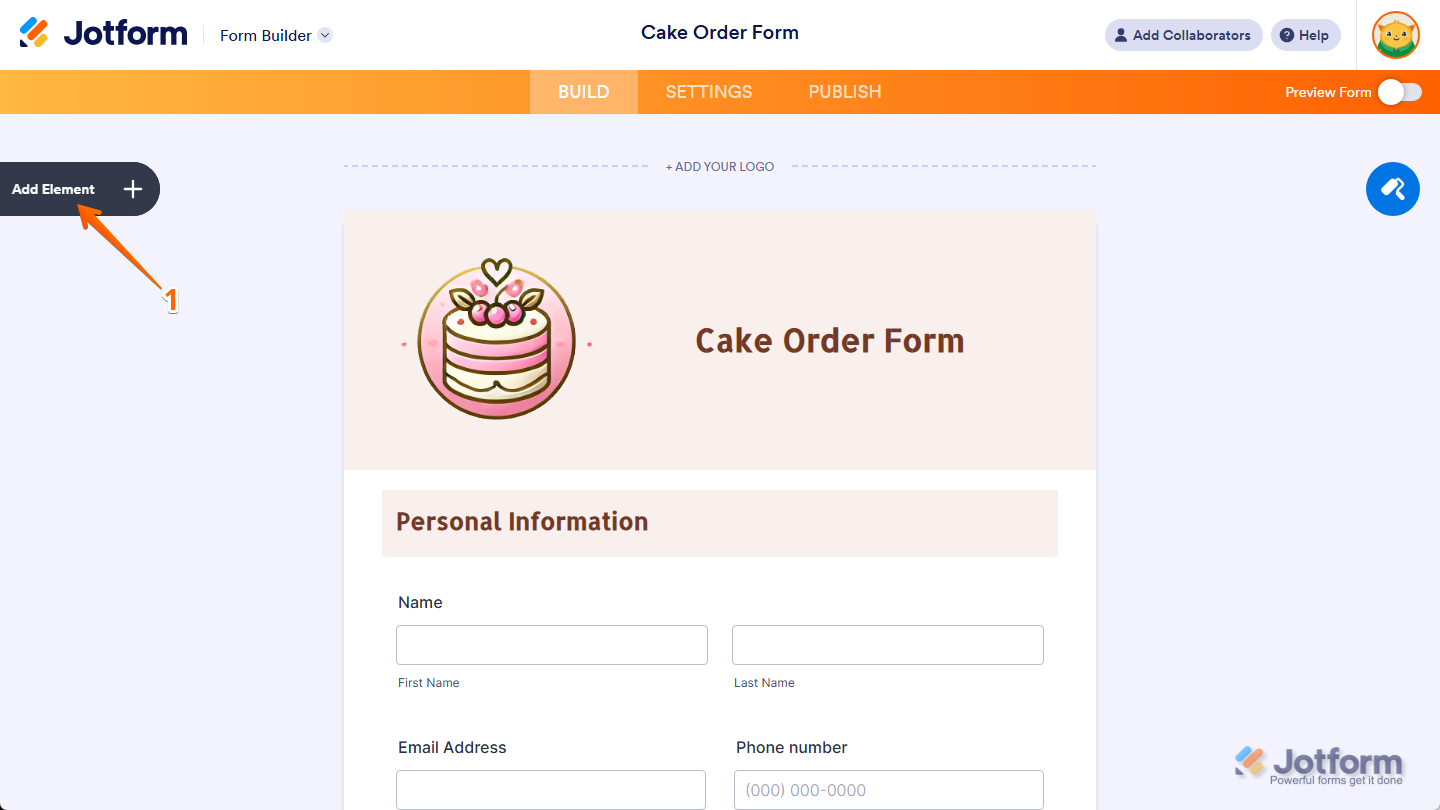
- In Form Builder, click on Add Element on the left side of the page.
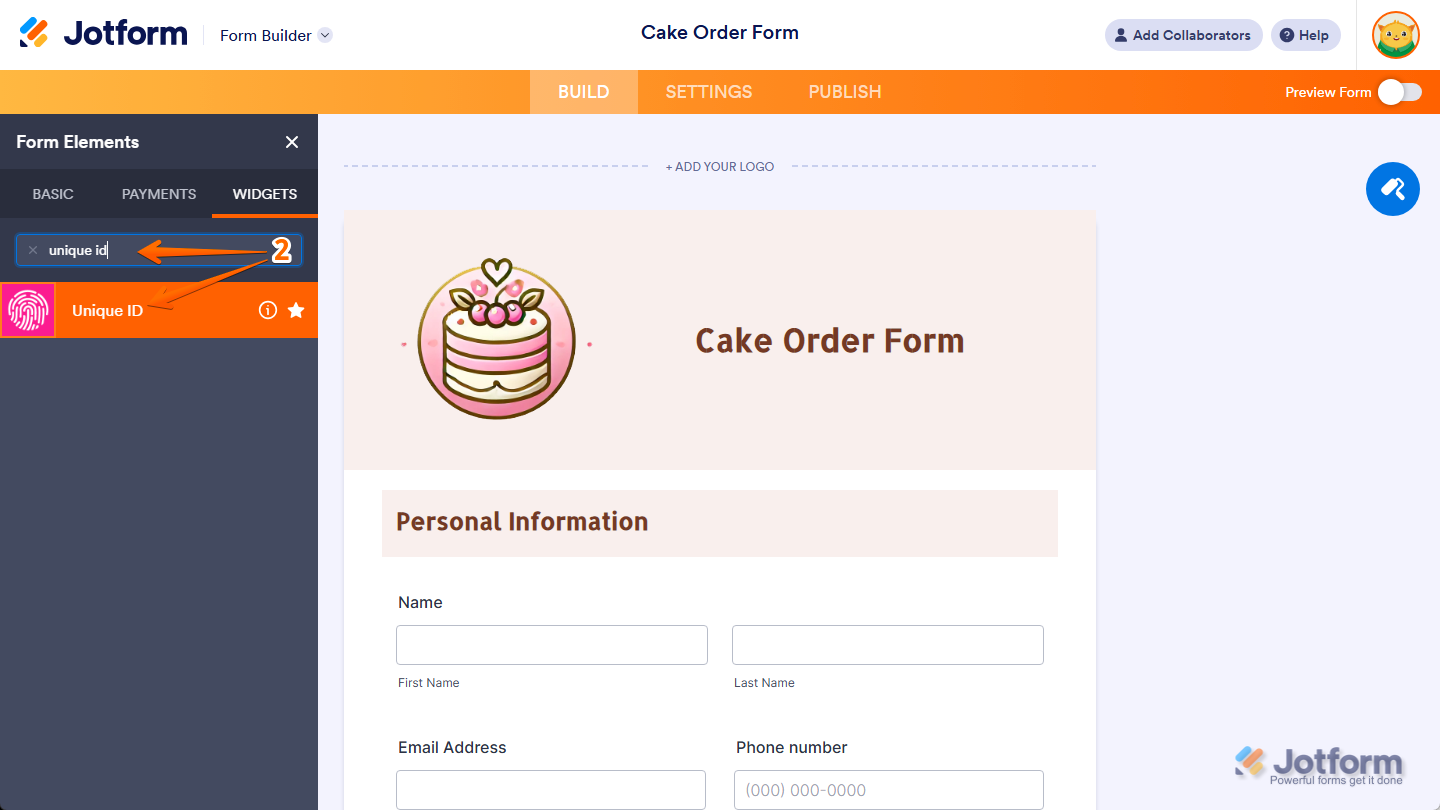
- Now, in the Form Elements menu, under the Widgets tab, search for Unique ID and click on it. Or, just drag and then drop it to where you want it to be on your form.
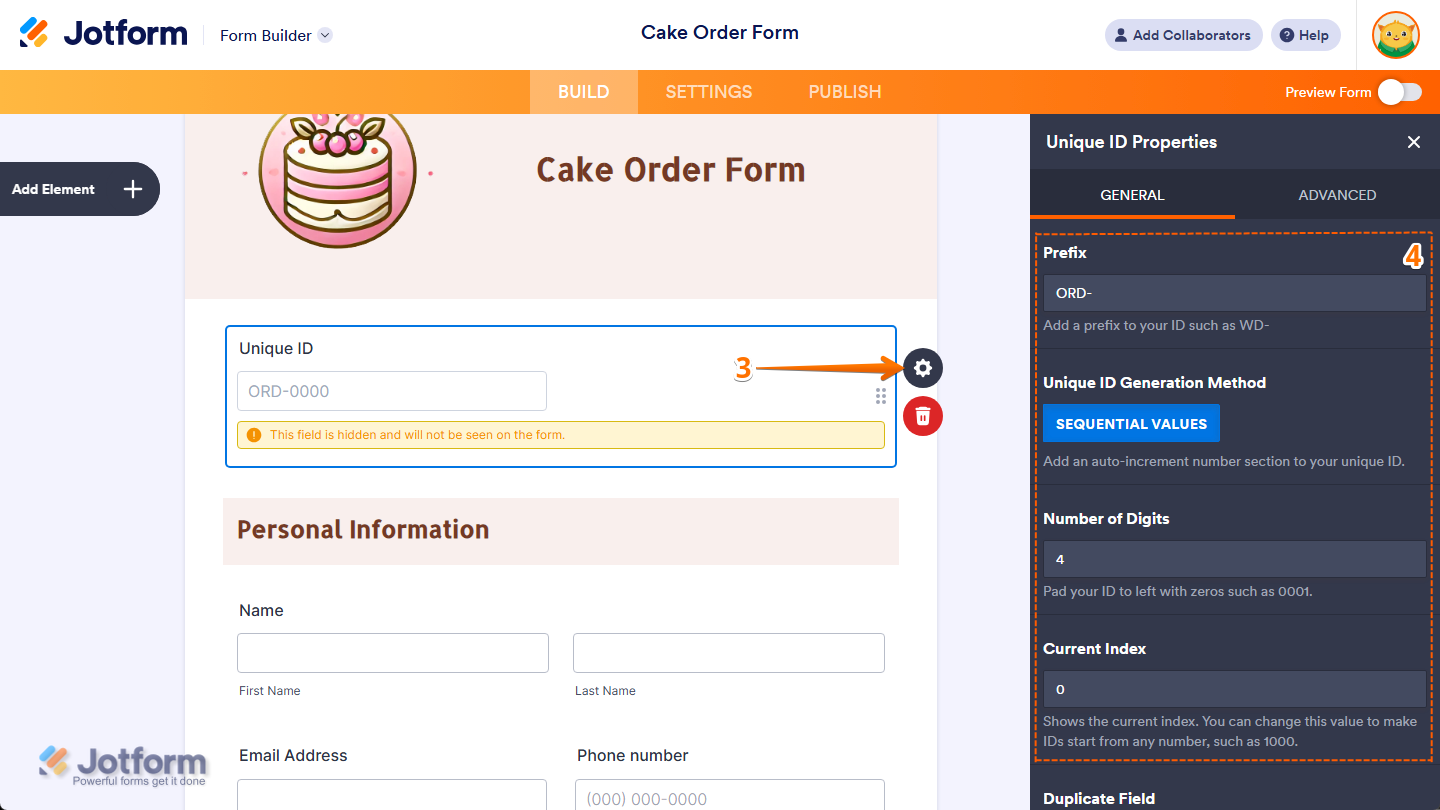
- Next, on the right side of the Unique ID widget, click on the Gear icon.
- Then, in the Unique ID Properties window, configure the following things:
- Prefix — This adds a fixed set of characters at the beginning of each unique ID. For example, using ORD- as the prefix would generate IDs like ORD-0001, ORD-0002, and so on.
- Unique ID Generation Method — This automatically generates a unique number for each submission using a sequential counting method. This setting always uses sequential values and can’t be changed.
- Number of Digits — This sets how many digits the numeric portion of the ID should have. The number is padded with leading zeros if needed. For example, setting it to 4 will give you 0001, 0002, etc.
- Current Index — This displays the current value in the sequence. You can update this to start your IDs from any number, such as 1000, which would make the next ID 1000, then 1001, and so on.
Notes
- Changes in the Unique ID Properties window save automatically.
- The unique ID field won’t appear to the person filling out the form, but it will be included in your submission table, Email Notifications, and any connected integrations. You can check out our guide on How to Set up Sub-Folders in Dropbox Using the Unique ID Widget to learn more about it.
- Be careful when changing the Current Index—it can break the existing ID sequence or cause duplicates if the new index overlaps with previous entries.

Send Comment:
102 Comments:
March 13, 2026
Im using unique ID but i want the numbers to be in 4 digits ie so its 0001 , 0002, 0003, 0004. my issues is that when the 1st form is done the second form goes from 0001, 2 , 3
January 11, 2026
How do I put these unique ids into my Canva form
November 20, 2025
If this field is hidden, why does the accessibility checker flag it as a problem?
February 12, 2025
Can we make this field not hidden?
November 14, 2024
Hi, I want to be able to display the unique ID in my google calendar integration so the event created starts with the ID number, is that possible?
February 24, 2024
Hi, is this widget also useful to generate unique IDs (in our case: invoice numbers) across forms? We have different forms for different products/website pages, but want the invoice ID to increment independent of the form. Is this possible with this widget?
December 13, 2023
Y si ocupo multiples ID Único puedo controlar el autoincremento dependiente de alguna selección que haga?
Porque en un formulario en especifico estoy ocupando 5 ID Único pero todos se autoincrementan al mismo tiempo.
gracias
July 4, 2023
Puedo crear un QR con el ID único?
March 2, 2023
The problem is I need from 1 to 6 unique ID / based on the selection done by the user for every submission.
So the unique id is ok to identify the user but I need to build&add a secondo part of this code that identifies the items, a range from 1 to 6, related to the user.
Now I split the codes in two field, the unique id plus a talking code, but this is a workaround with some limitations. The best for me is a unique code for every items in a specific field, 1/to/6
February 25, 2023
Necesito que el ID se muestre en el formulario, como puedo hacerlo
November 4, 2022
Hi. i dont want the unique ID to be hidden i want it to be shown on the pdf is this possible
October 3, 2022
Is there any way of ensuring that this unique custom ID appears on excel exports - at the moment when I attempt to export it just says 'unique ID' rather than the actual ID
September 30, 2022
Could you please clarify whether the IDs are incremented when a user begins the form, or when their response is submitted? Right now, we seem to have a situation where if user A starts the form, and then user B starts it before user A has submitted, they both receive the same ID when using the "Sequential Numbers" method.
May 11, 2022
Question Regarding a unique id.
How do i add a unique id to a form each time its submitted.
Lets say i have a list of numbers could be like this: 2019-90/35-4947, 2020-90/47-6605, 2020-90/47-7080, etc. (random and in no particulary order)
But I want each submitted form, to pick a unique number from this list. Never useing the same number twice, and in the end I should be ending up with a list that is empty.
Limiting the amount of times a form can be used by the amount of numbers in this text file each seperated by a , when its empty the submit button does not work as its required for a submit.
And it does not have to be a txt file i could be a table aswell i guess. If that would make it possible, how would this be possible within jotform?
May 6, 2022
I can't get the value of the Unique ID to be converted to a QR code, how can I do it? I am using the "dynamic QR code" widget
May 3, 2022
Is there a way to pass the number generated by this widget to another form using the prefill option with approvals? I'm trying to have 1 form generate the number, and then have that number prefilled in on another form, but it appears this widget doesn't work w/ the prefill capabilities?
April 4, 2022
We are a patient foundation and when a person signs up for one of our projects they have to fill in different forms. What we would like is for each of these people to have a different ID and that would be the way to identify them in the forms they fill in. Is this possible? Thank you
February 3, 2022
Is there a way to use the unique ID so that participants can obtain their unique ID after submission of a baseline survey and then use the Unique ID again in a follow up survey?
December 9, 2021
My customer is able to see the Unique ID. Can you advise how this is enabled cos the Unique ID is not supposed to be noticed by the audience or customer?
September 19, 2021
Hi! I was looking at the Unique ID widget as a way to identify our unique members within our non-profit organization. Members currently register using our JotForm. My question is; once a unique ID is given to their member record, is there a way that we can use that unique ID to incorporate into a different Jotform allowing that person to use that ID number to gain access to "member price discounts"? I saw that there is a way to establish subfolders using those ID's. If you set up a sub-folder with all the unique ID's can those be used to pull from to verify the member status? Hope that makes sense! Thanks in advance.
July 16, 2021
Hi! I want to show the people what random numbers they get after they submit.
June 4, 2021
is there a way to display the unique id in the pdf file as I tried to see if the id would reflect onto my attached pdf file after submission
May 4, 2021
is there a way to make unique id using condition in one form? for example there's two option type, A and B. if user choose A, the unique id will use A-001. and if user choose B, the unique id will use B-001
April 2, 2021
Is there a way to link a person to a unique ID and the unique ID is associated and used for that person every time the person logs in?
March 2, 2021
Is there a way to have this information pulled through into the Jotform Tables?
I've tried creating a new column and connecting it up but nothing seems to pull through.