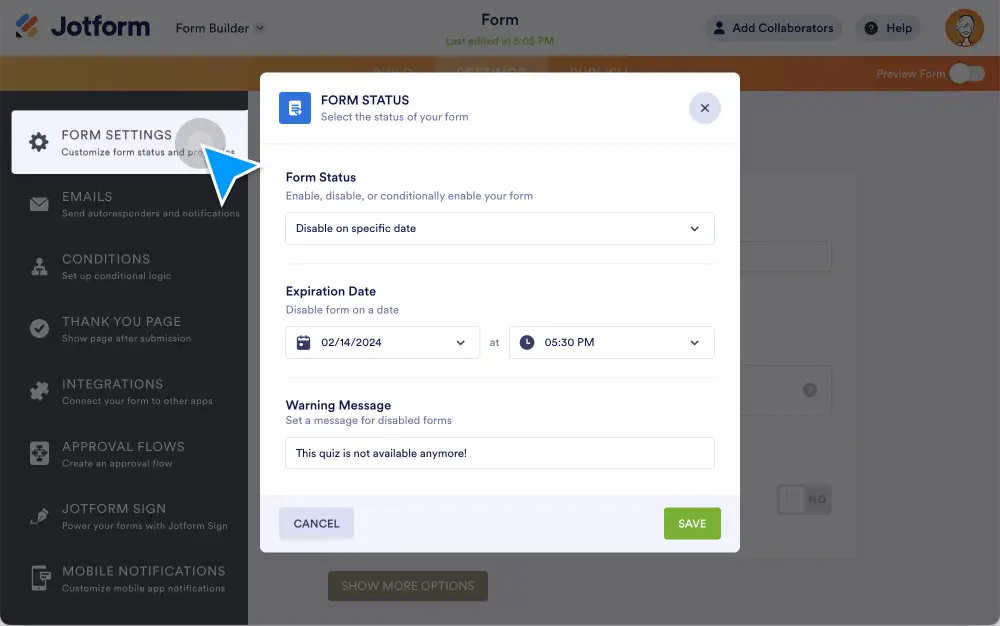
Maintain control over your data and forms! With our Expiration Date and Time feature, you can improve data accuracy, enhance form security, and automate your form management. Users will see exactly when the form expires so they can get their submissions in on time.
Collect time-sensitive information with ease
Set a deadline for your form responses so you can get information when you need it. This feature works great for time-sensitive surveys, event registrations, limited-time offers, and more. Plus, it gives your users a push to submit their forms ASAP — no more chasing down responses!
Send customized warning messages
Keep your users in the loop by sending them customized messages about when the form will close. Jotform automatically sends out your message with the expiration date and time, so you can focus on more important things. Plus, these messages are fully customizable to your exact needs.
Manage forms with flexible controls
Whether you need to collect form responses for a few hours, days, or weeks, the Expiration Date and Time feature is designed to suit your specific requirements. Automate your form’s availability to meet your timelines and objectives and get the information you need.
How can I set an expiration date and time?
You can set an expiration date and time for your form in just a few quick steps. Just select the Settings tab at the top of the Form Builder, and under the Form Status dropbox, specify your desired expiration date and time. Then, you have the option to customize a Warning Message. Click Save, and you’re good to go!
For more detailed instructions, watch our quick tutorial video and visit How to Remove or Reset Your Form's Expiration Date.