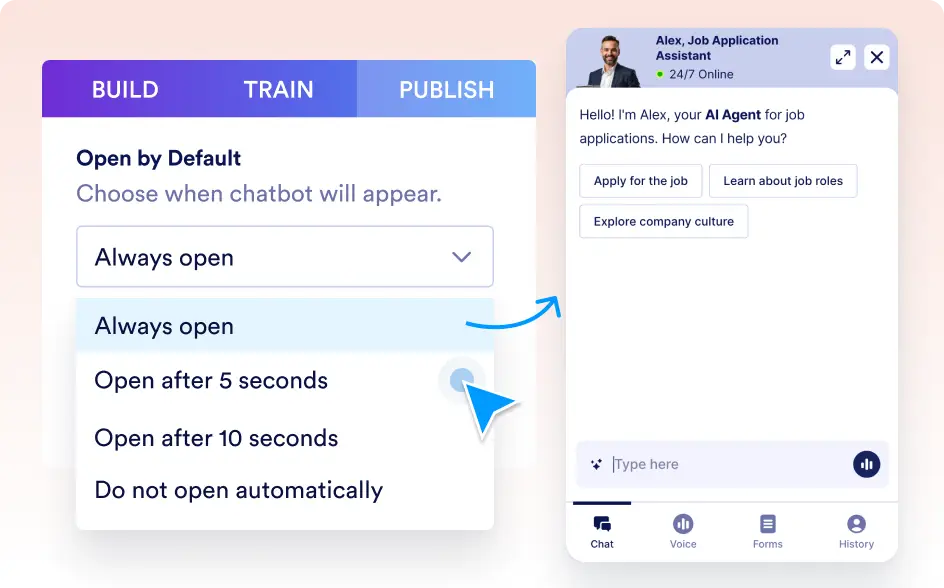
Decide When Your Chat Area Appears
Take control of how your chatbot engages visitors from the moment they land on your site. With our "Open by Default" feature, you decide if the chat area appears immediately, after a brief delay, or only when the user clicks the avatar. This flexibility lets you create the perfect balance between proactive engagement and a non-intrusive browsing experience.

Enhance user interaction by choosing when your chatbot's conversation window should be visible. Whether you want it open by default for immediate assistance or prefer a timed reveal, our feature adapts to your website’s flow and user expectations.
Customize Your Chat Window's Default State
Enhance user interaction by choosing when your chatbot's conversation window should be visible. Whether you want it open by default for immediate assistance or prefer a timed reveal, our feature adapts to your website’s flow and user expectations.
Chat Window
Always Open
Keep the chat section open as soon as visitors arrive, ensuring immediate access to assistance and boosting engagement from the start.
Timed Auto-Open
Schedule your chatbot to automatically open after a set interval (e.g., 5 or 10 seconds). This subtle delay helps visitors absorb your content first while still offering prompt support shortly thereafter.
Do Not Open Automatically
Opt for a minimalist approach where only the chatbot avatar is visible. Visitors can click the avatar to open the chat window at their own pace, creating a less intrusive experience.