Name Documents for Clarity and Control
Efficient organization starts with meaningful file names. With PDF Editor, each document can be named in a way that reflects its content, purpose, or recipient; making file management simpler and more intuitive. Whether it’s a certificate, invoice, or submission summary, the right name ensures clarity and traceability.
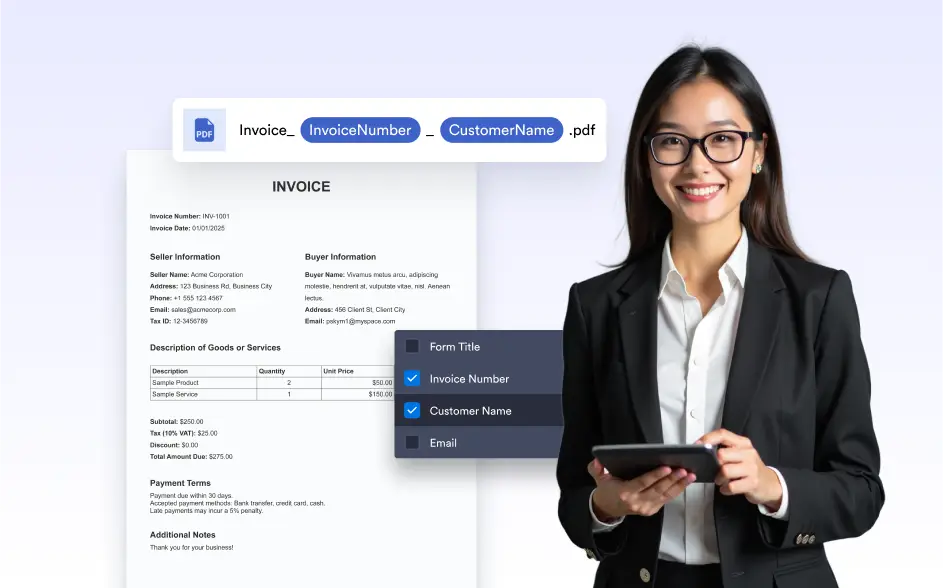
Customize the file name of each generated PDF using or dynamic form data, like submission ID, user name, or date. This helps , improve searchability, and maintain consistency across your document management process.
Control How Your Files Are Named
Create document names manually or pull from submission data to automate file labeling. Choose between static text, dynamic form data, or a combination to create meaningful and unique document names.
Maintain Clear Naming Standards Across Workflows
Apply consistent naming rules to ensure every document follows the same structure. Whether generated manually or automatically, standardized file names help teams stay organized, reduce confusion, and manage documents at scale with confidence.
Easily Manage and Identify Your Documents
Naming documents makes it simple to find the right version, share the correct file, and keep your document list clean and organized.