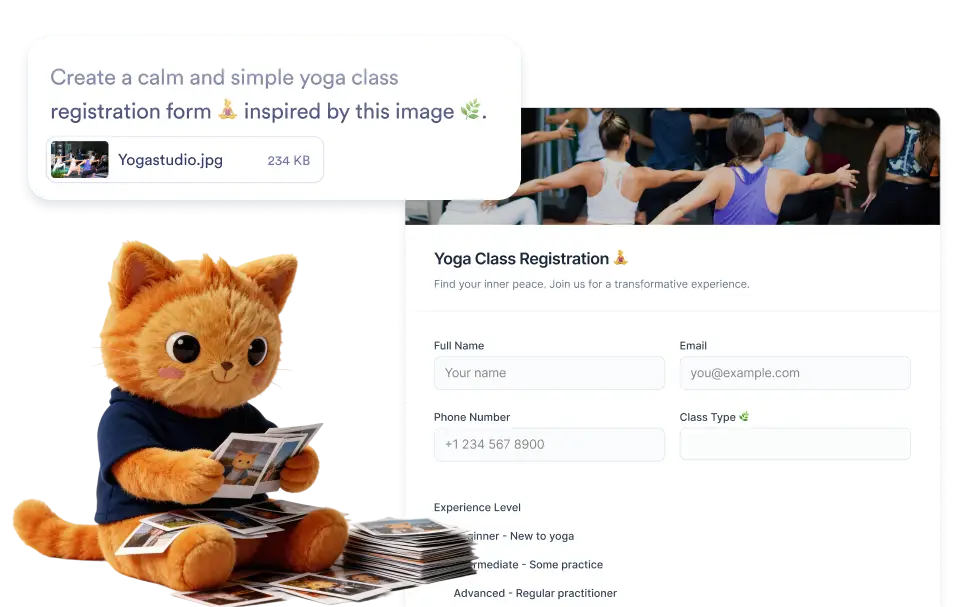
Upload an image that represents your idea or use case and optionally describe the form you want to build. AI uses both the visual cues and your instructions to generate a structured form with relevant questions and fields.
Generate Forms Using Any Image
To improve the results, you can also describe the form you want to create while uploading the image. Jotform AI uses both the visual context from the image and your written instructions to generate a more accurate form structure.
Create Forms Using Image Context
Start by uploading any image that provides context for the form you want to build. Jotform AI analyzes the image and uses detected details to generate a structured form with relevant fields automatically.

Frequently Asked Questions
Upload an image that represents your idea or use case, then optionally add a short description explaining the form you want to create. Jotform AI analyzes the visual content and your instructions together to generate a structured online form with relevant fields that you can edit before publishing.
You can upload many types of images such as product photos, visual concepts, event posters, menus, sketches, or screenshots. Jotform AI analyzes the visual context of the image and uses it to generate a form that matches the theme or purpose suggested by the image.
Yes. Once the form is generated, you can fully customize it in the Jotform form builder. Edit field labels, add or remove questions, adjust field types, reorganize sections, and customize the form design so the final version fits your workflow perfectly.