Learn how to easily generate form QR codes using Jotform. You can share your form with a QR code, add a QR code to your form, or add a QR code reader widget to your form.
Easily Generate Form QR Codes
Create unique QR codes for your forms with no coding required. Use Jotform instead of Google Forms and benefit from Jotform's easy-to-use QR Code feature.
How can I generate a QR code to share my forms?
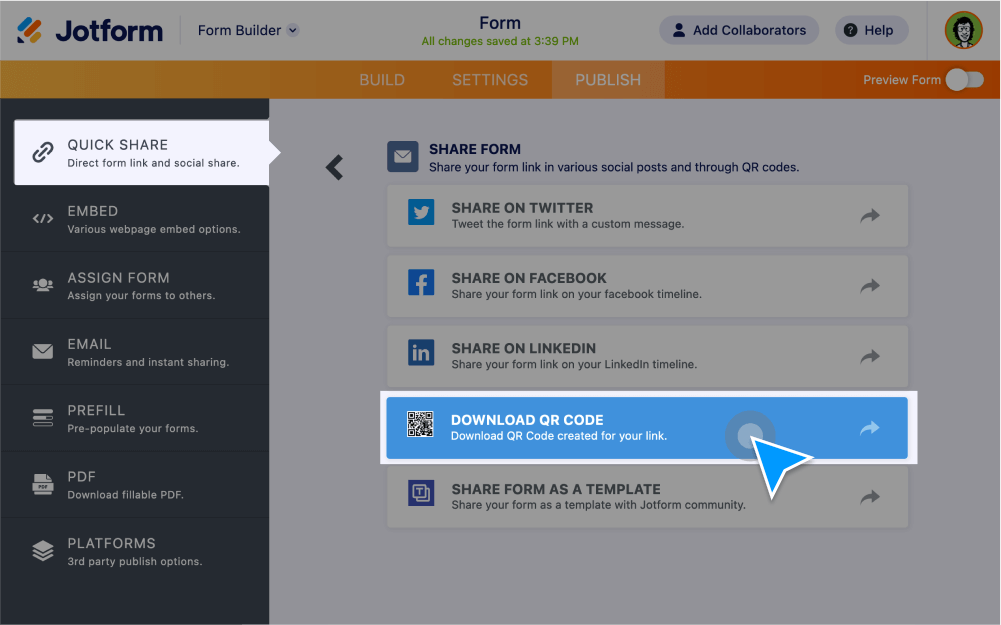
1. Go to the Publish tab in the Jotform Form Builder.
2. Select Quick Share from the menu on the left.
3. Select Share Options.
4. Select Download QR Code.
Power your forms with QR widgets
Include QR code functionality in your forms.
Add a QR code to your form
Share links, images, documents, and more directly within your form using our QR code widget.
Add a QR code reader to your form
Let form users scan QR codes from your forms using a QR code reader widget. Just drag and drop to add it to your form!
Everything you need to know about QR codes
QR codes have made a major impact to assist organizations during the COVID-19 pandemic. Learn more about what a QR code is, benefits, use cases, how to get started, and more.
