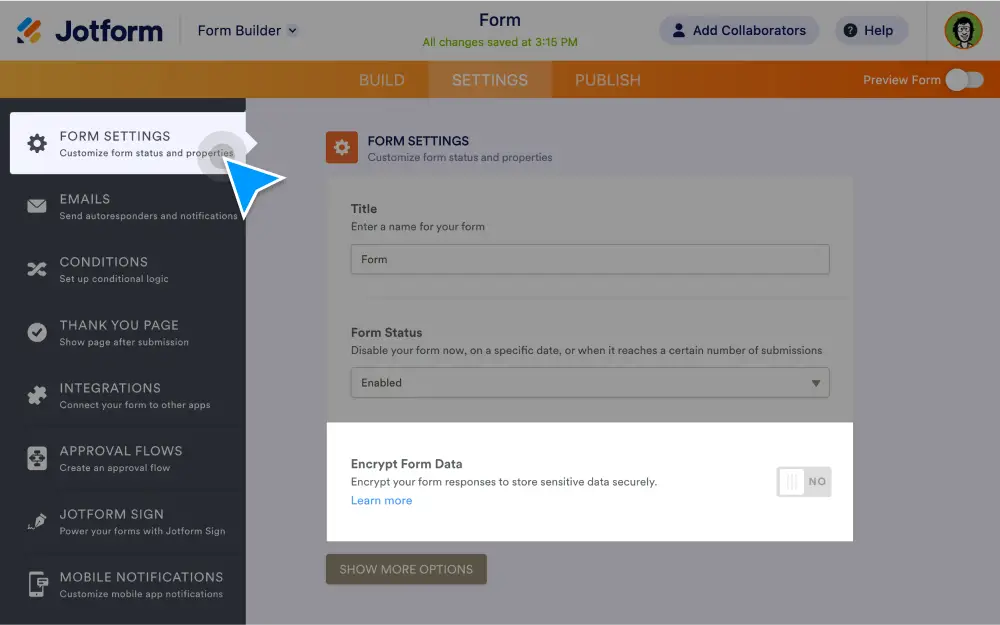
For extra security, enable end-to-end form encryption by creating an access code for your form. , get submission notifications, manage encrypted data in Inbox or Tables, and more with Encrypted Forms 2.0.
How can I enable form encryption?
Encrypting your forms is as easy as 1-2-3. All you have to do is enable encryption from the Form Settings tab, verify your Jotform account, and create a custom access code.
Enable form encryption
Simply enable form encryption in the Form Settings tab, then verify your account and create an access code. It’s that easy!
Create an access code
When you encrypt a form, you’ll be prompted to create an access code to access your form data.
Get notified of encrypted submissions via email
Receive email notifications whenever you get a new encrypted submission. You can access these submissions in your secure Jotform account using your custom access code.
Manage encrypted submissions via Inbox and Tables
Enter your access code to access encrypted form submissions in Jotform Inbox or Jotform Tables — perfect for managing and reviewing data.
How secure is my data with Jotform?
At Jotform, ensuring the privacy and security of your data is a top priority. Encrypted Forms 2.0 ensures that your submission data stays secure and is accessible only to you via your access code.