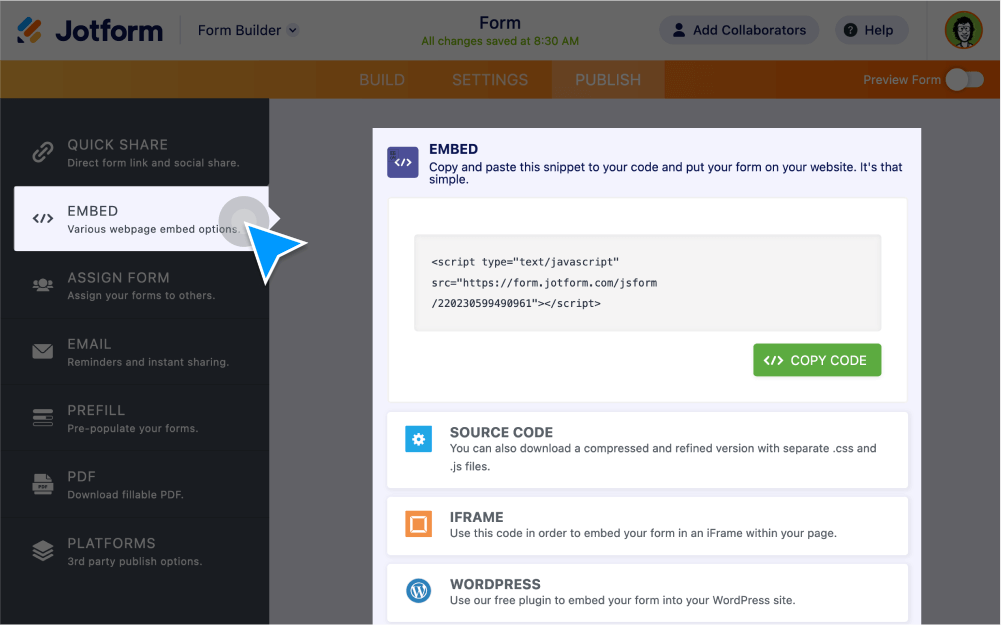
Embed forms into any web page without coding. Simply copy and paste your form embed code into your site builder. Jotform even offers form embed codes so you can publish your form on third-party platforms such as , Squarespace, and more!
Publish Your Form Anywhere
Create the perfect online form and add it to your website without writing a line of code. Embed your form directly into a web page or display it as a popup, lightbox, or button.
Embed with JavaScript
Jotform’s default embed option is a simple single line of JavaScript code designed for any web page. All you have to do is copy and paste it into your website HTML.
Embed with iFrame
Copy and paste your form’s iFrame code to embed your form within an iFrame on your web page.
Embed with Source Code
Get the full source code of your form. Use the HTML code to host form files on your own server.
Create a Popup Form
Grab users’ attention with a popup. Turn your form into a popup window that automatically appears over your web page.
Create a Lightbox Form
Get more leads with a lightbox. When site visitors click on a link, your lightbox form will open as a popup window.
Embed in Third-Party Platforms
Publish your form on 40+ third-party services. From plug-ins to third-party embed codes, Jotform makes it easy to share your form with your audience.
Embed in WordPress
Add your online forms to WordPress with our WordPress Embed Form Plug-in, or copy and paste your form’s WordPress embed code.
Embed in Facebook
Add a custom contact form to your Facebook page by creating a Jotform page tab in one click.
Get Third-Party Embed Codes
Copy and paste form embed codes specifically generated for third-party services like Google Sites, Blogger, Zoey, and more.
Embed Reports and Charts
Visualize your form data as reports, charts, and presentations with Jotform Report Builder, and share them on your website.
Embed the Visual Report
The Embed feature of Jotform's Report Builder page offers an easy way to embed reports on your website or content platforms like Medium posts or WordPress without any coding.