Adding Form to Facebook

Last Update: October 9, 2011

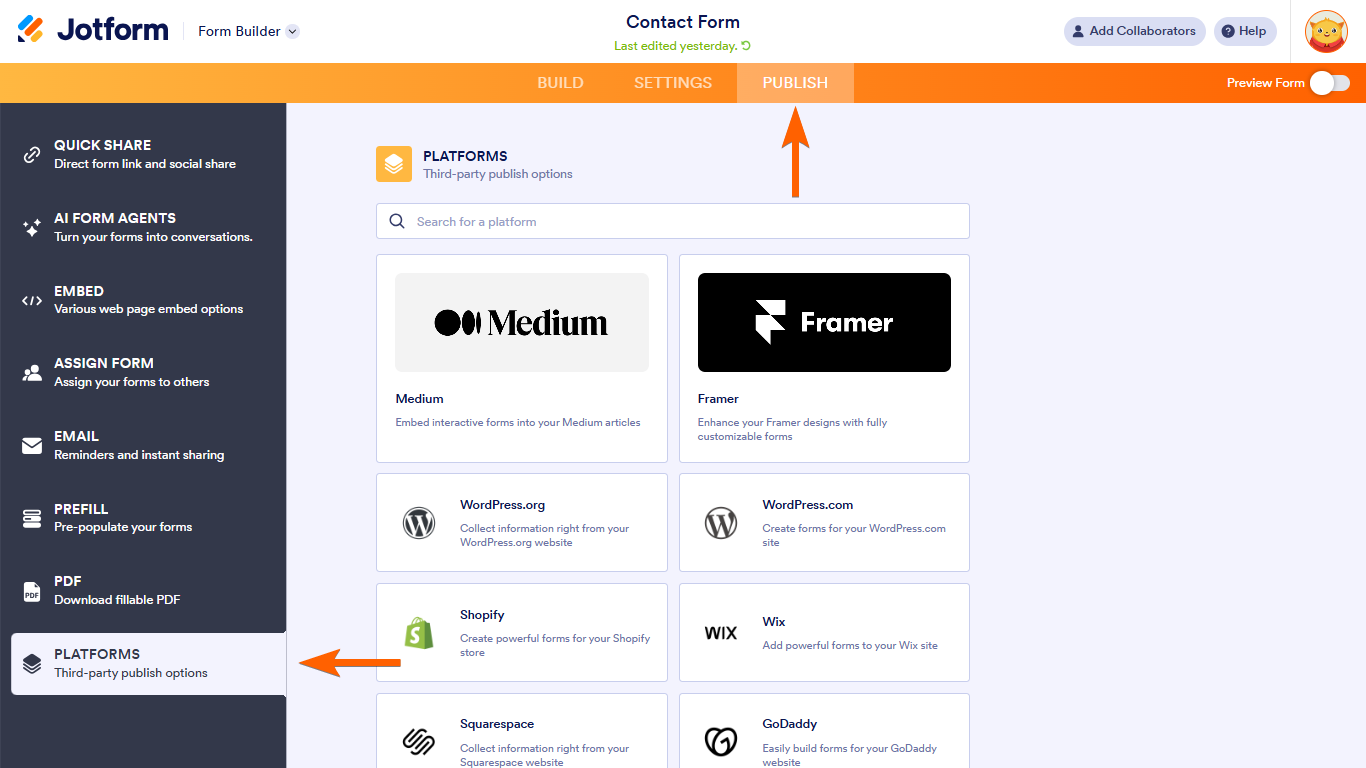
Adding web forms to your Facebook Page is quick and easy using JotForm Form Builder. First create your form on the Form Builder. Then follow the instructions below.

To add forms to your Facebook Page, you first need to create a page on your Facebook site. To do that, you can use TabPress Facebook application.

Here is how you can add a form to your Facebook Page:

1) Create your form on Jotform. Set the form's width to 520 (maximum width allowed by Facebook)


2) Open "Setup & Embed" tab on toolbar then click on "Embed Form",

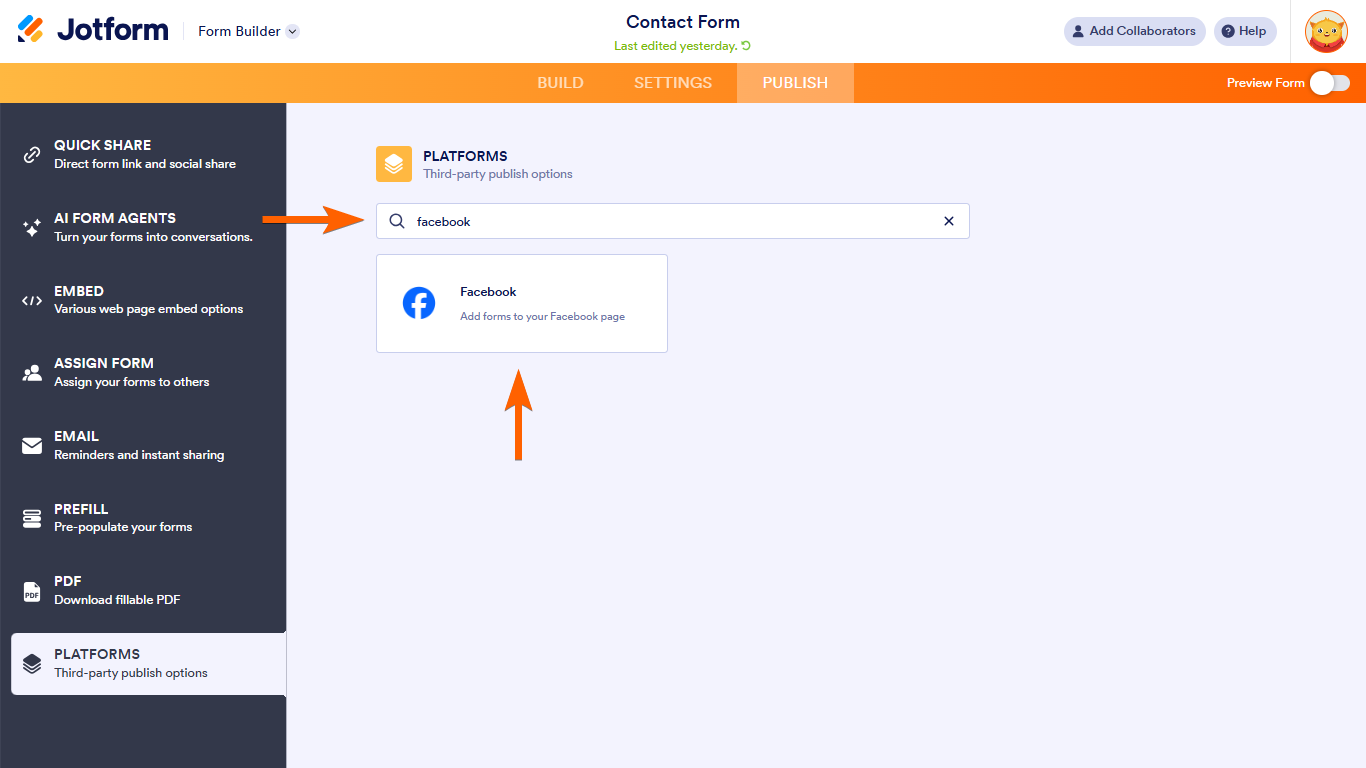
3) Click on "Facebook" option,


4) Copy the form code,

5) Go to your page on Facebook and Click on "Edit Info",


6) On the left hand side click on Apps,

7) On the right hand side panel scroll down the page if necessary and click on "Browse more applications" on the bottom of the right panel.

(fxr- 09/10/11: Facebook seem to have changed how applications are accessed, this is a direct link to the TabPress app for users affected by this -> 
http://www.facebook.com/apps/application.php?id=176217385757369 )


8) Search for TabPress and Click on TabPress result (Go to application's page)


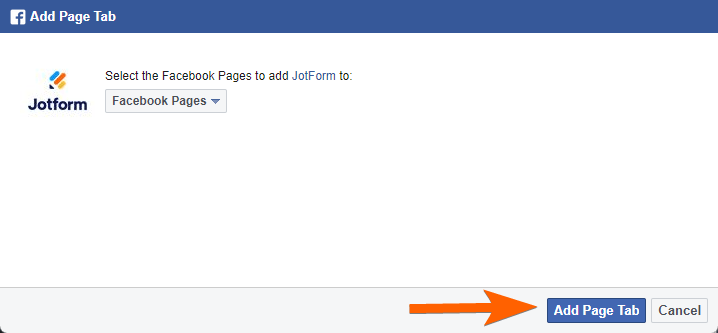
9) On the left hand side Click on Add to My Page. Select your page on the opened Lightbox and Click "Add to Page".
(For the ones who couldn't find, "Add to My Page" is on the bottom left hand corner of the screenshot below)


10) Go to your application and Click on Welcome.


11) On the right side, there are two textareas to paste codes. One is for fans, one for non-fans of your page. If you would like everyone to be able to see your Facebook Form, add the code to non-fans textarea. Scroll down the page and Click on Save.

Congratulations!
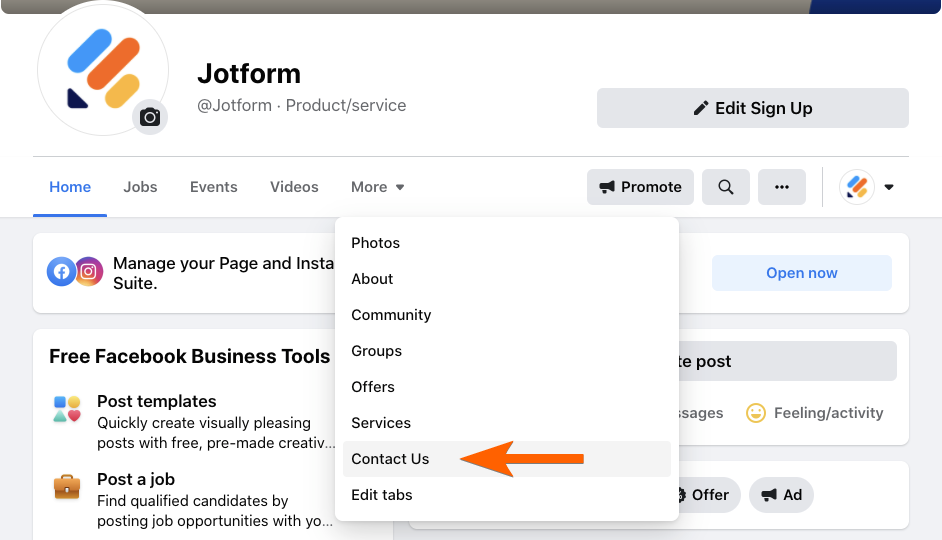
Your form is now live on your Facebook page!

12) Change the "Welcome" page name on the left side:
 a. Click on Edit Info link at the top,
 b. Click on Apps on the left side,
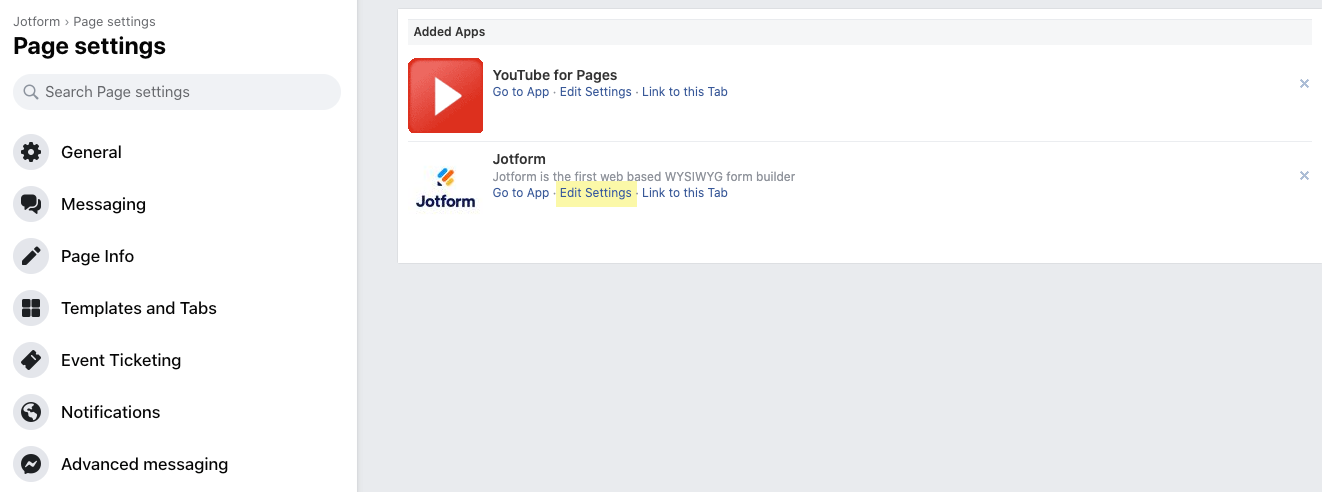
 c. Click on TabPress on the right side,
 d. Click on Edit Setting link of your TabPress Application,
 e. Change the title of your facebook form page.


Here are some other iframe Applications for facebook that you can use with your forms:

1. iFrame Wrapper (can add multiple tabs) - http://www.facebook.com/iFrameWrapper
2. iFrame Apps - http://www.facebook.com/iframe.apps
3. Static iFrame Tab (can add multiple tabs) - http://www.facebook.com/iframehost


You have already voted for this item. Your vote was: 1

127 Comments...


(August 29, 2010 at 12:18 AM)

I GOT IT


marc76 (August 29, 2010 at 09:39 AM)

which part in FBML application will i insert the facebook code?


Jotform Support (August 29, 2010 at 03:10 PM)

Can you explain more? Have you seen the screenshots in 1. and 2. above?


Violeta Silviano (August 30, 2010 at 05:58 AM)

cool, thank you,


Jairo Alfonso (August 30, 2010 at 07:08 PM)

hice en jot form el formulario con campos requeridos y lo pego en la pagina facebook, pero al dar click en el boton summit manda los datos asi esten los campos en blanco, por favor solucionar


sgiordano (August 31, 2010 at 07:40 AM)

This is great and the survey looks awesome on our page, but these dimensions are off and some of the questions or answer options are cut off? How can I chance the size? I tried looking for the size within the coding but then realized I had no idea what I was looking for...


Cindy Molloy (September 20, 2010 at 10:05 PM)

I have went to the link and tried to add it to my page. When the pop up comes up it says "no results". What could I be doing wrong?

Thank you and an FYI - you have made my life easier since I help with a non-profit organization and I am self taught. Thank you again!!


jodie250 (September 28, 2010 at 06:05 AM)

Thank you, thank you. I have been trying to add a Contact Form to Facebook for ages, this worked a treat!


asiso (October 06, 2010 at 08:55 PM)

Hi, I'm doing all steps just like the instructions but when I go to the FBML the page crash and display this:

(removed)


aytekin (October 07, 2010 at 08:42 AM)

So, this happens when you go to FBML before you had a chance to add the JotForm code?


eroms4xel (October 09, 2010 at 09:38 PM)

This information was very helpful to me. Thank You


stylevolution (October 13, 2010 at 10:29 AM)

very informative indeed! the walk through was clear and simple.


chmarine (October 25, 2010 at 12:24 PM)

Many thanks

All sorted
CH Marine


Stunning (November 03, 2010 at 06:03 AM)

easy and fab thanks
stunning photography


swoozies (November 09, 2010 at 10:53 AM)

I set the font formatting and the size and color is not coming through on FB. It seems to keep defaulting to the original for I set up.


healthygreen (November 09, 2010 at 03:29 PM)

Hoe To run script to fields are requarieds files... any one can help.. because i don't want to recieve data empty on from
thank's


healthygreen (November 09, 2010 at 03:34 PM)

Validation fields... is not working...
can any one help... i has copy paste form jotform advance on facebook code..
but... validation can't...


azcup (November 09, 2010 at 09:44 PM)

Instructions were very clear! Form looks and works great. Changed form width to 510 and no problems.


shobhna (November 20, 2010 at 02:54 PM)

its nice work


Tavengwa (November 23, 2010 at 03:32 AM)

I've added my contact form but however some people have tried to contact me using it but I do not receive any of their messages, how do i fix that


JotForm Support (November 23, 2010 at 04:06 AM)

Please post your questions to the forum. This place is comment area for user guide.


Anup Setty (December 13, 2010 at 01:47 AM)

When the form is submitted, it will stay on a "thank you page". How can I make it return to my facebook page after the form submission?

Thanks in advance.
Anup Setty


sanjj (December 15, 2010 at 02:14 PM)

how do i add a background image and align the entire form position to the center.

Thanks,Sanjay


bellarougedesign (December 25, 2010 at 12:14 PM)

For some reason no matter what I do or what size I use (I started at a width of 510 and went all the way to 425) it seems to cut exactly the same amount off the right edge. I do not understand this though I suspect it has something to do with the new Facebook layout. I love having a form on my fan page though - I hope I can figure out this sizing thing!


theman_600 (December 29, 2010 at 07:04 AM)

cool but the required option dont work you can click on submit,it take u automatically to the next page without giving an error to put up the required fields


JotFormSupport (December 30, 2010 at 09:47 AM)

@bellarougedesign

Please post this question to the forum. You should also state the facebook page's link.


geeneeyes (January 10, 2011 at 10:44 AM)

captcha image doesnt load


nikiphotos (January 18, 2011 at 09:29 PM)

My form is too wide. how do i resize it?


JotFormSupport (January 19, 2011 at 02:13 AM)

open your form in edit mode.
On the top toolbar click on Form Style tab. Then Click on "Form Width" button


cafereena (January 25, 2011 at 03:01 AM)

how can i make the form return to my facebook page after the submission of the form... rather than the default jotform page....!!


aytekin (January 25, 2011 at 03:34 AM)

cafereena:
1. Click on "Setup and Share" tab on the form builder toolbar
2. Click on "Thank You"
3. Select "Custom URL" option and enter a URL from your own web site.


marcel iordan (January 27, 2011 at 01:47 PM)

Hello,
How can I put text in form like in htt://www.facebook.com/photoboothco in Free Copies tab?
Is this made with jotform?
http://www.facebook.com/photoboothco?v=app_4949752878#!/photoboothco?v=app_4949752878
Thank you,
Marcel


derrrumbe (February 03, 2011 at 02:28 PM)

Hola, pego el codigo en facebook hasta ahi todo ok, pero si al formulartio le pongo algun temp, color de fondo o algo lo deja blanco, que puedo hacr? mil gracias


timkarnold (February 09, 2011 at 10:29 AM)

The theming on my fb page doesn't seem to work :/

http://i.imgur.com/Rq48z.png


onemancreative (February 09, 2011 at 05:21 PM)

@Marcel I'm the one that put the form together on the photobooth facebook page. It's just a simple jot form with a re-direct after you complete it.


onemancreative (February 09, 2011 at 05:24 PM)

@timkarnold I'm having the same issue... Wondering if Facebook made some changes that killed the styling of Jotforms embed code.


JotFormSupport (February 10, 2011 at 06:09 AM)

@timkarnold
Please send us the form's address and your facebook page's address so that we can examine. You can post it in forum.


feetnlegs (February 10, 2011 at 04:32 PM)

My form on my Facebook page looks nothing like it's supposed to, and I have a newspaper article coming out in 3 days that refers to it. Help! My Facebook page is http://www.facebook.com/pages/Serena-Hinkel-Photography/196801053678988?v=app_4949752878

My JotForm page is: http://www.jotform.com/form/10400020226

Please tell me what I'm doing wrong!


undertaker (February 13, 2011 at 06:22 AM)

to mohamed keane


carmels (February 24, 2011 at 06:10 AM)

i have set up a contact me form in facebook. is anyone able to tell me where the submission goes? i would like to receive response via email. thks


JotFormSupport (February 24, 2011 at 08:28 AM)

The submission goes to your e-mail and to the jotform servers. It is like using a normal Jotform form.


vendita (February 28, 2011 at 06:34 AM)

you need to adjust the width of the form to the new width of facebook fanpages (520px).Check on my page the layout: is visible only half of the form.
http://www.facebook.com/venditavinoitaliano?v=app_4949752878

But, after that, your forms are awesome!!!!!!!!


vendita (February 28, 2011 at 06:42 AM)

after the css declaration and before the script add the following code:


It'll fix the width of the form to the new facebook layout


vendita (February 28, 2011 at 06:44 AM)

(style type="text/css")
(!--
.form-all {width:520px !important}--)
(/style)

replace ( with < and ) with >.
the system does not allow me to post html code


sickoner (February 28, 2011 at 04:32 PM)

Hello, I asked U how can I integrate my form as an "Apllication" and not with "static fbml" cause fbml gonig to disapear the 10th of march.
Please answer me as soon as you can.

Thank you,
best regards


JotFormSupport (March 01, 2011 at 02:12 AM)

We are working on that.

Plus the static fbml will not disappear. The current users using static fbml will continue to use it but adding fbml application from beginning will not be possible.

See the post please:
http://developers.facebook.com/blog/post/462

Existing users of static FBML will not be effected.


fanaticpages (March 03, 2011 at 09:28 PM)

im using facebook app also, with iframe i try the iframe code by uploading it to my server but that did not work any advice?


JotFormSupport (March 04, 2011 at 02:50 AM)

Please use the code as provided. Iframe code does not work in Static FBML.


TGIG (March 12, 2011 at 09:00 PM)

We changed the form theme but are still seeing the old one on Facebook, despite saving it and checking the style number. Is this something you've seen before?


JotFormSupport (March 14, 2011 at 07:18 AM)

You can try deleting the tab and recreating it. I alsoadvice you to change the version number carefully again to a number like 9.9.95


herbaleats (March 26, 2011 at 06:07 AM)

after adding to my page when i click edit theres no fields to enter in. I never even get up to pasting my code. Help please. Thanks gino


stellacyan (March 29, 2011 at 09:46 AM)

so what to do that fbml doesn't work anymore? do you have any other way? thanks!


syfo02 (March 29, 2011 at 07:59 PM)

go wthe me to the frensh


TheCraftyMom (March 30, 2011 at 09:44 AM)

hello,

I added the form to Facebook, but I don't see a contact button on my facebook page. How can I correct that or where do my fans need to go on my page to use the form?

here is my page: http://www.facebook.com/pages/The-Crafty-Mom-Yulie-Diaz-Rodriguez/200311589993915?sk=wall


cogdell (March 30, 2011 at 04:59 PM)

same question as "stellacyan" and may others.... What do we do now to add forms to our FB pages since we cant use FBML any more?


JotFormSupport (March 31, 2011 at 04:29 AM)

Until we release our solution you can use this Static FBML application. You can put the code, which we have given to you for Static FBML, in the application https://apps.facebook.com/tabpress

Thanks


Radiance (March 31, 2011 at 03:58 PM)

Hello,

Is there a way to customize the tab's favicon ? The Usual FBML one is ugly...


Mildred Nad (April 03, 2011 at 10:00 AM)

I cannot see "my page" on my facebook account? where can I add the FBML to my account?
Please please help


NeilVicente (April 04, 2011 at 07:24 PM)

@Radiance there is no way to customize the icon. it is built-in with the fbml application

@Mildred you need to have a facebook page to embed a form into an fbml application. go to this url to create your own facebook page - http://www.facebook.com/pages/create.php


monaoriaslarrobis (April 06, 2011 at 05:49 AM)

i already did evey step as instructed, but it says, it cant find the url, what happened?


LDMedia (April 17, 2011 at 03:37 AM)

Facebook seem to have discontinued Static FBML for pages and are migrating to use of IFrames for the same purpose.

Old pages will still have FBML but you cannot add it to new pages.

You can bypass the lockout using this link for now:

http://www.facebook.com/add.php?api_key=fdfd01c9df7d644a68a4e989ae861e44&pages=1&page=102938863123295


LDMedia (April 17, 2011 at 03:45 AM)

This blog post describes a more complete workaround to create custom tabs for your form by creating an app linking to your content hosted elsewhere and displayed as an Iframe.

@Jotform: This is the best I can come up with! An updated protocol for forms on FB would be ace.


LDMedia (April 17, 2011 at 04:36 AM)

Link:

http://www.kimwoodbridge.com/how-to-make-a-custom-facebook-page-tab-with-iframes/


Maima Minor (May 05, 2011 at 03:57 PM)

Can You pls help to get on facebook.Pls send me the code

See Answer for This Question...


rishilink (May 06, 2011 at 11:16 AM)

when i click add to my page,then appear a page "No Results" plz. help me...

See Answer for This Question...


Digitel DSL (May 10, 2011 at 03:46 AM)

Its easy to use.. :)
drag and drop...
embed ur url(choose F for facebook) and paste it on ur FBML or Static FBML


anshul bhardwaj (May 17, 2011 at 02:42 AM)

wow


anshul bhardwaj (May 17, 2011 at 02:43 AM)

wow


raza_93 (May 18, 2011 at 08:50 AM)

hmmmm


desporto (May 20, 2011 at 02:16 PM)

When i click in Tabpress to add my fb page, no page is show to select. Please help!!!

See Answer for This Question...


fashionworld (June 09, 2011 at 10:24 AM)

it there other option aside the tabpress.... i thinks the tabpres some sort of problem now... but i barely needed my form to share from my facebook?

See Answer for This Question...


Daniel (June 13, 2011 at 02:19 PM)

how do I change the icon that shows up automatically with tabpress?

See Answer for This Question...


martiano (June 17, 2011 at 10:51 PM)

Pay for multiple-tabs is the ONLY way how can I on one facebook page have more then one form?

Or is here another way?

source: http://www.hyperarts.com/social-media-consulting/facebook-multiple-subtab-navigation-templates.html

thank you

See Answer for This Question...


zimox (June 23, 2011 at 06:03 PM)

123


حكاية Funny (June 24, 2011 at 08:06 AM)

المحبه عنوان الحكاية


Patty Williams (June 24, 2011 at 02:38 PM)

Could someone provide me a a link or screen shot of a jotform added to their Facebook page for visual reference? Thanks!


richardpagulayan (June 25, 2011 at 01:30 AM)

Thank you so much


susanm79hotmailcom (June 29, 2011 at 12:51 PM)

How do you take the Tagpress Header off and how do I get the link to completely embed in my Welcome? I pasted the link, but it is just showing the link until I preview. Obviously I'd like it to just pop up automatically. http://www.facebook.com/picsphotography

See Answer for This Question...


I8 (July 07, 2011 at 11:31 AM)

How can i make this Submitted Message to be sent to a specific E-Mail .>???

See Answer for This Question...


jayske (July 07, 2011 at 02:52 PM)

I've copied my link into the tab press non-fan field and saved the form. Now when I click on the tab in Facebook the page opens up to the tabpress edit window and not the form. How do I get it the page to open to my form only?

See Answer for This Question...


I8 (July 08, 2011 at 09:07 AM)

in Composing the E-mail Message
when i should to click on the Form Fields to Add them and be Ppulated with their real values , to Be Sent

The Menu " Form Fields " is Empty !!!
i cant see The fields Name in the Menu to Add Them in My Message !!!!
Any Help Please !!!! :(

See Answer for This Question...


I8 (July 08, 2011 at 09:09 AM)

*Populated


cheap rayban sunglasses (July 09, 2011 at 08:29 AM)

Thanks for sharing


Sarab Yashq (July 19, 2011 at 06:21 AM)

hi


Sarab Yashq. (July 19, 2011 at 06:25 AM)

hi


hastyar (July 21, 2011 at 03:03 PM)

i dont know could you guys help me

See Answer for This Question...


kamille (July 22, 2011 at 07:48 AM)

where can i see the fors that was submitted to me?

See Answer for This Question...


donlebi (July 25, 2011 at 10:18 PM)

Hi, in order to add the jotform to Contact Us page of facebook Plexustheme I was ask to copy the Static FBML of the form into script of that page.
But you don't provide it anymore, do you?
Now, how can I do it using the iframe for the tabpress app.

Thank you


haval (July 29, 2011 at 06:20 PM)

slaw


francinec (August 02, 2011 at 11:21 AM)

I followed all the step, but I am getting a 'Navigation Cancelled" and it does not show the form using tabpress.

Please assist. I'm not sure what I am doing wrong.

See Answer for This Question...


balen (August 05, 2011 at 08:30 AM)

chebkam nazanm

See Answer for This Question...


mhia villaflores (August 09, 2011 at 09:24 AM)

hi! which is the code to be paste?.. please help me!


Chi (August 10, 2011 at 03:01 PM)

This form builder is great. For those of us who need a map on our fan pages, this is the one I use: http://www.facebook.com/storefinder


Rinson t.t (August 11, 2011 at 04:11 AM)

miss u all


sy (August 18, 2011 at 01:08 AM)

can c the form in my page


Joyce (August 20, 2011 at 12:24 AM)

Thanks so much,.. I hv done it ...


advatex (August 25, 2011 at 07:42 AM)

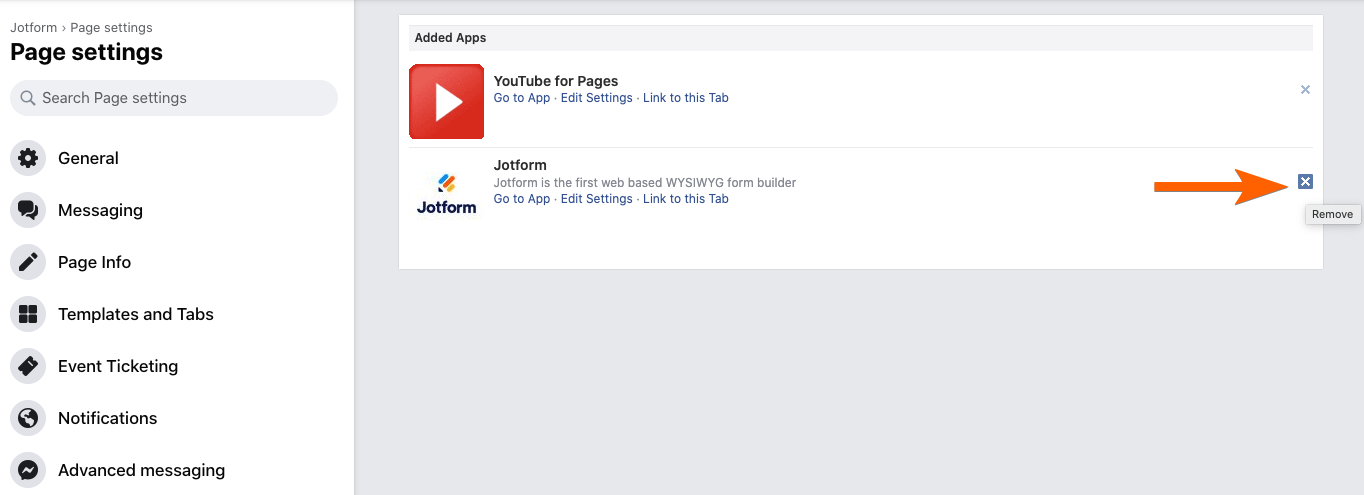
How do I un-integrate from Facebook?

See Answer for This Question...


advatex (August 25, 2011 at 07:50 AM)

How do I remove my form from Facebook and just have the normal Submit Form button on my website?

See Answer for This Question...


daylirn (August 25, 2011 at 02:50 PM)

i had add the form that i want but i cant add another tab which your link cant search my page when i want to put in the code... any solution please?

See Answer for This Question...


advatex (August 26, 2011 at 05:21 AM)

Hi there, I have succesfully added the TabPress App and copied and pasted the code. In the preview the form shoes perfectly but not when I click on the edited "Welcome" tab.
Please be so kind as to visit http://www.facebook.com/pages/Advatex-Pty-Ltd/112677405452537?sk=wall and click on the TabPress icon name "Quote Request". Your help would be greatly appreciated! Thanks!

See Answer for This Question...


yakamoz (August 31, 2011 at 11:37 AM)

hi I do not want the scroll bar

http://www.facebook.com/pages/Sende-Kat%C4%B1L/157897690958295?sk=app_176217385757369

See Answer for This Question...


yakamoz (August 31, 2011 at 12:00 PM)

does not turn on automatically ?

http://www.webpagescreenshot.info/img/160886-831201165653PM

See Answer for This Question...


Ashwani Kumar Sinha (September 02, 2011 at 04:23 PM)

I get an error
"Given URL is not allowed by the Application configuration."

Please assist.

http://www.facebook.com/pages/Investors-Aid-Co-operative-of-Canada/207931005934887?sk=app_176217385757369

See Answer for This Question...


Sweetiepie Bowtiques (September 08, 2011 at 09:55 AM)

I went thru instruction to exact. when I got to, pasted code under non fan content and then clicked save. at top it said in red: save before previewing but in green below it said: content has been saved. But when you click on the tab on my facebook page it just says the code (that I pasted) in the content box... No Form.... please help to how i fix this problem. Thanks

See Answer for This Question...


PECScards (September 10, 2011 at 11:13 AM)

i Have more than 1 form that i would like to add to my facebook page, is it possible? or i am limited to just one form at a time?

See Answer for This Question...


Helene (September 17, 2011 at 01:32 AM)

Hi, would love this form to work for us, however I cannot seem to see our form?

Get below error message

Content was blocked because it was not signed by a valid security certificate.

For more information, see "About Certificate Errors" in Internet Explorer Help.

I am worried this will put off people using this form, can you please advise?

http://www.facebook.com/pages/ET-Australia-Links-to-Learning/174355379245543?sk=app_176217385757369

See Answer for This Question...


lebaus (September 22, 2011 at 03:25 PM)

LOVE IT. WAS SO EASY TO DO.
THANKS


sdesai (September 26, 2011 at 04:17 PM)

Tab Press Application response time is extremely slow..Page never loads...are there any other methods to use Jotform without Tab Press? Thanks

See Answer for This Question...


born (September 28, 2011 at 05:23 AM)

could it possibly be more complicated?


Anthea. b (October 03, 2011 at 12:55 AM)

hi i am up to step 7 on Adding Form to Facebook and can not find the browse more apps button is there some think else i need to do to find this button?

See Answer for This Question...


Evadan (October 03, 2011 at 10:35 AM)

How do i change my submission form logo? it asking my FB details? help please?

See Answer for This Question...


Shazwani Binti Abdullah (October 04, 2011 at 04:28 AM)

thankyou...love it!


SteveMoreels (October 07, 2011 at 12:40 PM)

Hi guys,
Did everything by the book. Form is only showing in preview mode. When i press the Tabpress app i only see the two textfields.When i loo at the preview en try to log in with the facebook bottom i get 'GIVEN URL IS NOT ALLOWED BY THE APPLICATION CONFIGURATION' What am i doing wrong?

See Answer for This Question...


grisu59 (October 08, 2011 at 01:17 PM)

I haven't the button MORE APPLICATIONS in the application options of my FB page, so I can't add TabPress.
What can I do?

See Answer for This Question...


maivutan (October 25, 2011 at 06:17 AM)

Oh, it cannot use as app anymore? :(

See Answer for This Question...


akolankowski (November 03, 2011 at 02:32 PM)

I followed the steps exactly and all I see is my code in both boxes. I checked from another FB account I have and it shows the code not the form. I have been trying to make this work for hours.

https://secure.jotform.com/form/13060523399

See Answer for This Question...


shameera (November 05, 2011 at 06:23 AM)

I want to be on facebook


neerajmas (November 13, 2011 at 01:58 AM)

this is a good way for friendship


coolvending (December 05, 2011 at 12:55 AM)

A bit involved but got it going. Thanks


catherine (December 08, 2011 at 12:07 AM)

after they have submitted the form, where can i find them ?

See Answer for This Question...


BRWA (December 21, 2011 at 04:03 PM)

BRWA


askamahkum (January 09, 2012 at 12:43 PM)

ekle


KARIM ZEROUAL (January 18, 2012 at 11:28 AM)

KAMEL


naren karwan (January 25, 2012 at 05:57 PM)

s


tariku hasen (January 30, 2012 at 11:15 AM)

good


tarikye hasen (January 30, 2012 at 11:19 AM)

The sweet part of life is love.'


b36h (February 03, 2012 at 09:04 AM)

hi


Send Comment