What’s so important about form widths?
Imagine filling out a form that’s too wide for your mobile device. It’d be frustrating, right? Think about your forms and your audience. Do you provide a positive user experience? Do you know which devices your visitors commonly use?
Not knowing these things could affect your conversion rates. However, with some simple research and tweaks, you’ll be able to give your visitors a better experience with your forms and increase your conversion rates.


Note
Jotform forms are already mobile responsive by default. You don’t need to optimize your form width if your website or the page where you will embed the form is also mobile responsive.
Know Your Audience
Gather data about your audience with an analytics tool to better understand which devices your visitors are using. It is imperative to have this data, so you can outline your next steps towards making your page or form flexible across devices.
Know the Device Widths
Design your forms based on your audience data. If most of your visitors are mobile users and use portrait view when viewing your website, use 320px for your forms.
Here’s a list of common widths:
- Mobile: 320px for portrait view, 480px for landscape view.
- iPads: 768px for portrait view, 1024px for landscape view.
- Desktop and Laptops: 960px horizontal.
Change the Form Width
You can change the width of your form in three simple clicks. Please see the steps below.
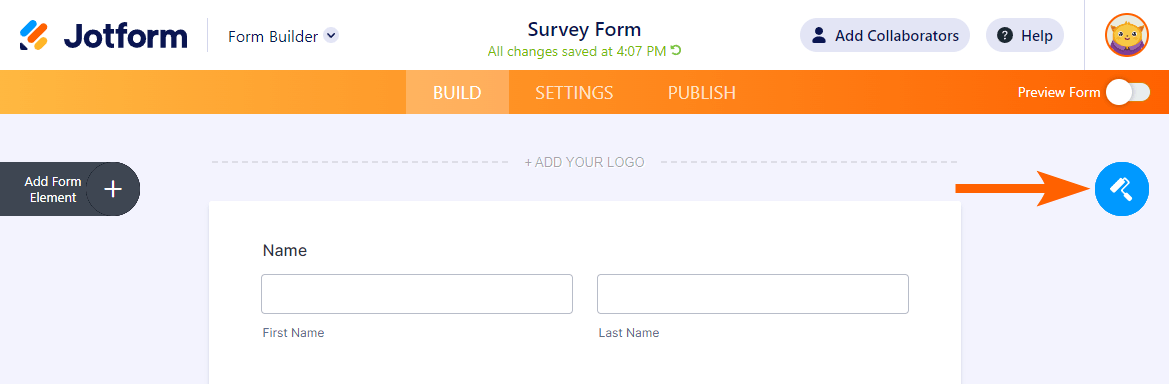
- In the Form Builder, click the Form Designer icon.
- Go to the Styles tab.
- Change the value of Form Width.
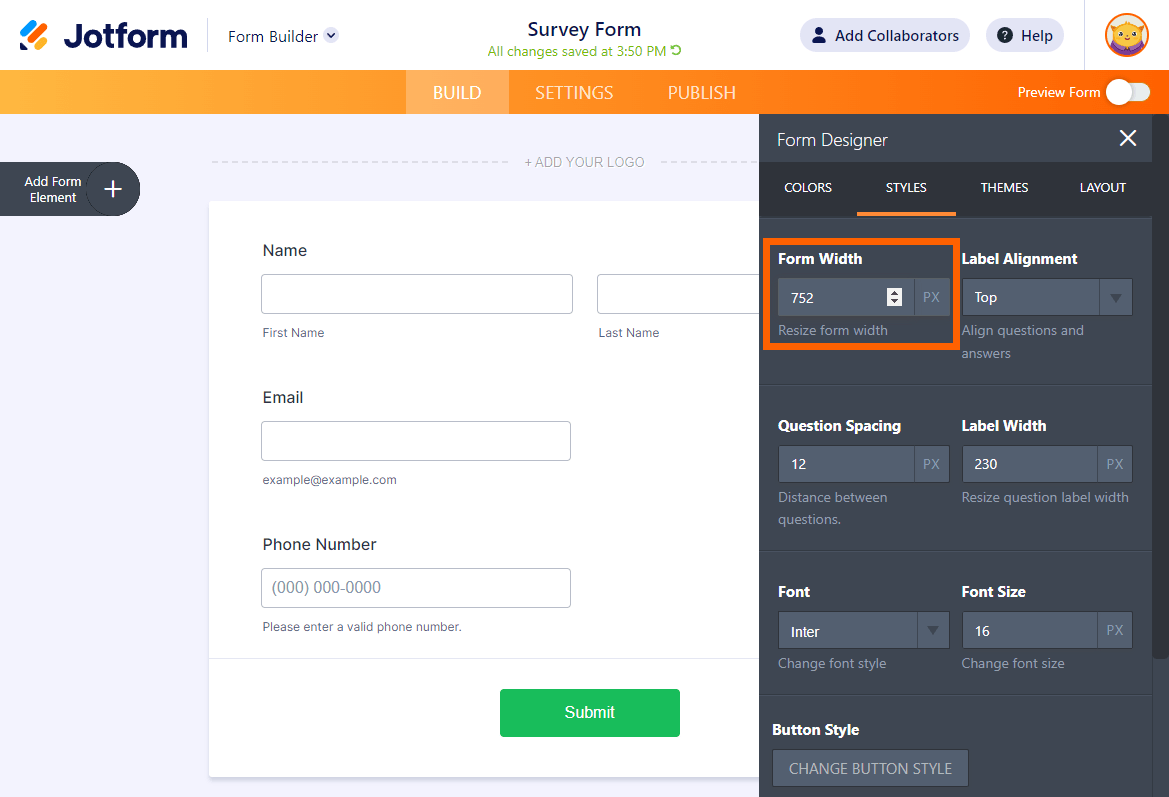
And that’s it. That’s all it takes to change your form width. The changes are automatically saved for you.
How effective was the change for you? Please share your thoughts and experiences in the comments section below.

Send Comment:
41 Comments:
October 1, 2025
I cannot get my form to show properly on a desktop. It is showing as a very narrow column with a scroll bar. I watched the video about how to change widths and it did nothing. Please assist.
August 29, 2022
I cannot get my form to show properly on a desktop. It is showing as a very narrow column with a scroll bar. I watched the video about how to change widths and it did nothing. Please help.
May 19, 2022
I'm still unable to change the form width. No matter what I put in the 'width' field, the form is still narrow with scroll bars on our website page. Has anyone else also had this problem? Keen to solve it.
January 31, 2022
Your video on YouTube shows that I can change the width of information being input into the forms by specifying how many characters can be entered into the space, etc. Yet, I cannot for the life of me find how and where to do this. I have awkward headings where they stack because I need to use more characters for my form heading/questions. I also have places where I am worried that the form input will not allow enough characters or if it will allow too many. I used Jotform a long time ago for my clients, and came back to you today to create a form for a medical client needing a LONG employment form. It is going to look atrocious at this rate. I am VERY disappointed. The old Jotform was easier to find my way around and figure out how to do what I needed. (I basically taught myself at that time.) Your help feature is of very little use, as I have asked my question MULTIPLE ways and have yet to find answers I need. HELP! I am VERY FRUSTRATED. {:(
May 23, 2020
Under your new system I am trying to set the width of a field in my form regardless of how many characters I set it to, the length (width) remains unchanged. Am I missing something? I have used your system for years and never had this problem before.
September 26, 2019
Re jotform - https://www.jotform.com/build/63126951034855
I am trying to place 3 fields on a line - U13(1), U13(2) and U13(3) to mirror the U12(1), U12(2) and U12(3) fields below them. I have turned on the "Shrink" and "Move to a New Line" options but I still can't move them. Can you please help me
August 25, 2019
Hello, I can´t center the form in the mobile view. How can I centre align the form?
August 24, 2019
How can I get a form to display in "Desktop View" by default on all devices?
And how do I centre align the form itself using CSS?
December 26, 2018
I cannot locate the design tab or the Form designer button. I have one form I have not had a problem, but the next form which is going to be basically the same it won't let me get the third short text field in. April challenge worked fine, but Pomeranian rescue does not
September 25, 2018
I'm trying to get my form to fit on a mobile screen. The form width setting seems to have no effect...
August 13, 2018
Hi - struggling with my form found at
One of our customers pointed out that the right side of the form (after you expand "year 1" and "year 2") gets cut off...there should be a total of six units. I expanded the width of our form from 690 to 960, but the right-most columns still get cut off...and there is not way to scroll farther to the right. How do I make the columns narrower to fit this form? Thanks!
June 1, 2018
Hello,
I cannot find the "STYLES" or "CSS" tabs on my form, only "THEMES" and "CUSTOM" appear. Is there a reason these would be missing?
November 1, 2017
BIG PROBLEM - get one form that is satisfactory for BOTH mobile and laptop.
October 30, 2017
Hi, I made the change but the for doesn't "take" it. If I put 1000px, the frame remain 500px.
What happen?
This is the link:
thank you,
Martina
May 23, 2015
Thanks
I became able to change width of form
October 18, 2013
How to reduce the width of the space/field made for emails/names and other?
The outline of the form seems to reduce by changing "form width" but not these fields.
Any help would be appreciated.
Thanks.
September 16, 2013
is there a way to make them dynamic to be used on both mobile and desktop?
August 22, 2012
what about telephone number - there are two columns. I need more width in area field. Please describe
February 24, 2012
how can I get away the two white side bars and the background transparent?
October 16, 2011
Maybe the DDoS is not from phishers, but from phish victims. Your service is perfect for them, especially considering you don't make it easy to report abuse.
Here's one for you, form id #12882142124
Happily collecting user data and sending it off to who knows where.
Back to searching for a "report abuse" link...
October 4, 2011
You are an awesome service and your dedication to us users is a rare find here in cyberspace. thanks!
September 27, 2011
My forms aren't working. The code to embed them isn't right. I'm going to have to use another form builder.
September 24, 2011
We switched from "www.jotform." to "secure.jotform." solution this past week, but our orders were coming in text format, not html. Our only solution was to manually download each to .pdf and forward (ugh!) Also, we have one user in CA that cannot connect. We had her go to another work station where whe was able to submit. What's up with that? Finally, I switched back to the "www.jotform." prefix this a.m. Do you think our problems will be over come Monday a.m.??? Sure hope so - thanks guys - go Colts!
September 22, 2011
Thanks for the speedy reply. I'm so glad your system is alright. You guys do an amazing job. I'm so glad I found you!
September 20, 2011
Thanks for all the hard work. I am a premium member and rely heavily on Jotform for my start-up. I am not a techie and am not even really sure what a DDoS attack is. Which is testimony of how easy Jotform is to use... But sounds pretty bad and hope you'll fully recover from this soon. Most of all, I sincerely appreciate the transparency. Jotform totally rocks. Keep up the excellent work!!!