Proper capitalization demonstrates attention to detail and makes the content more readable and polished. Capitalizing the initial letter of field values in your notification or autoresponder email enhances the overall appearance and professionalism of your communication.


Pro Tip
Sign up for a free Jotform account to fully customize notification and autoresponder emails.
To capitalize the first letter of a field value
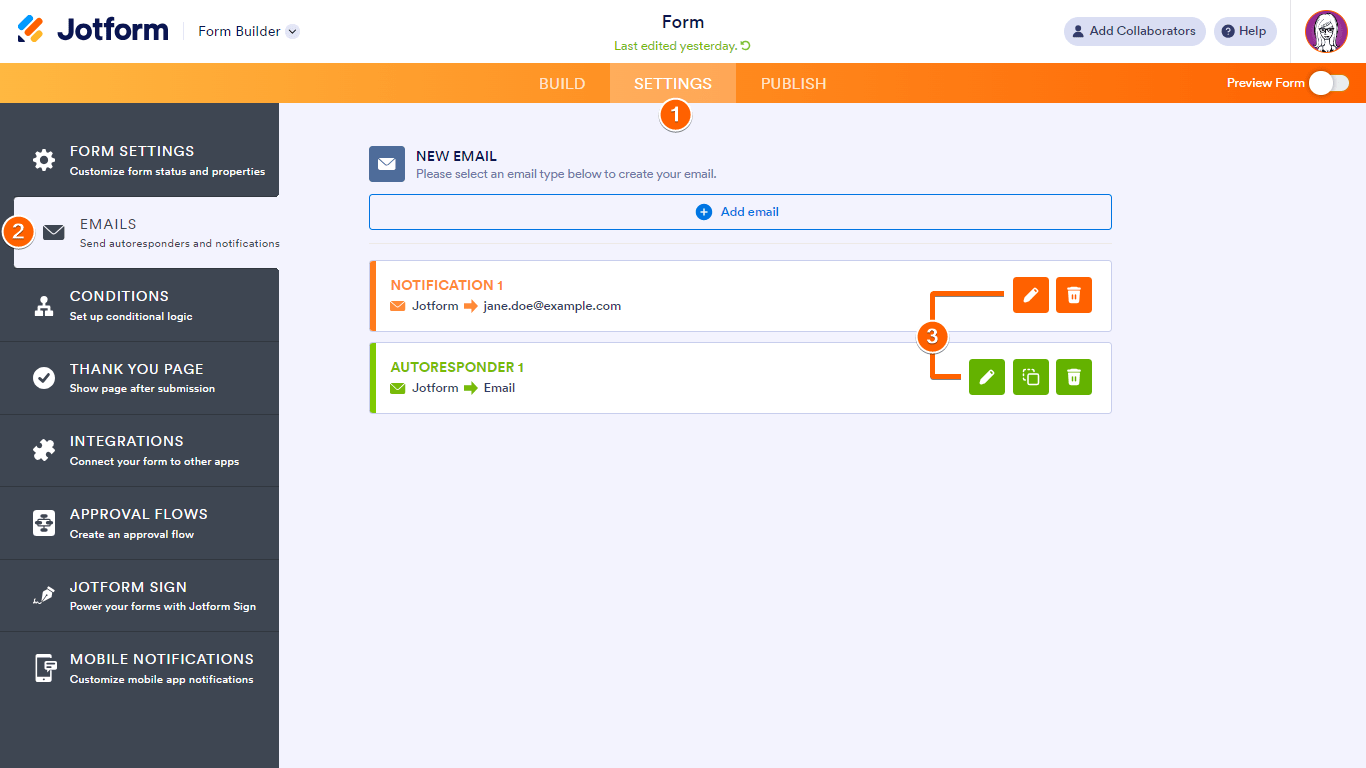
- In the Form Builder, go to Settings at the top.
- Select Emails on the left.
- Edit or create your email alert.
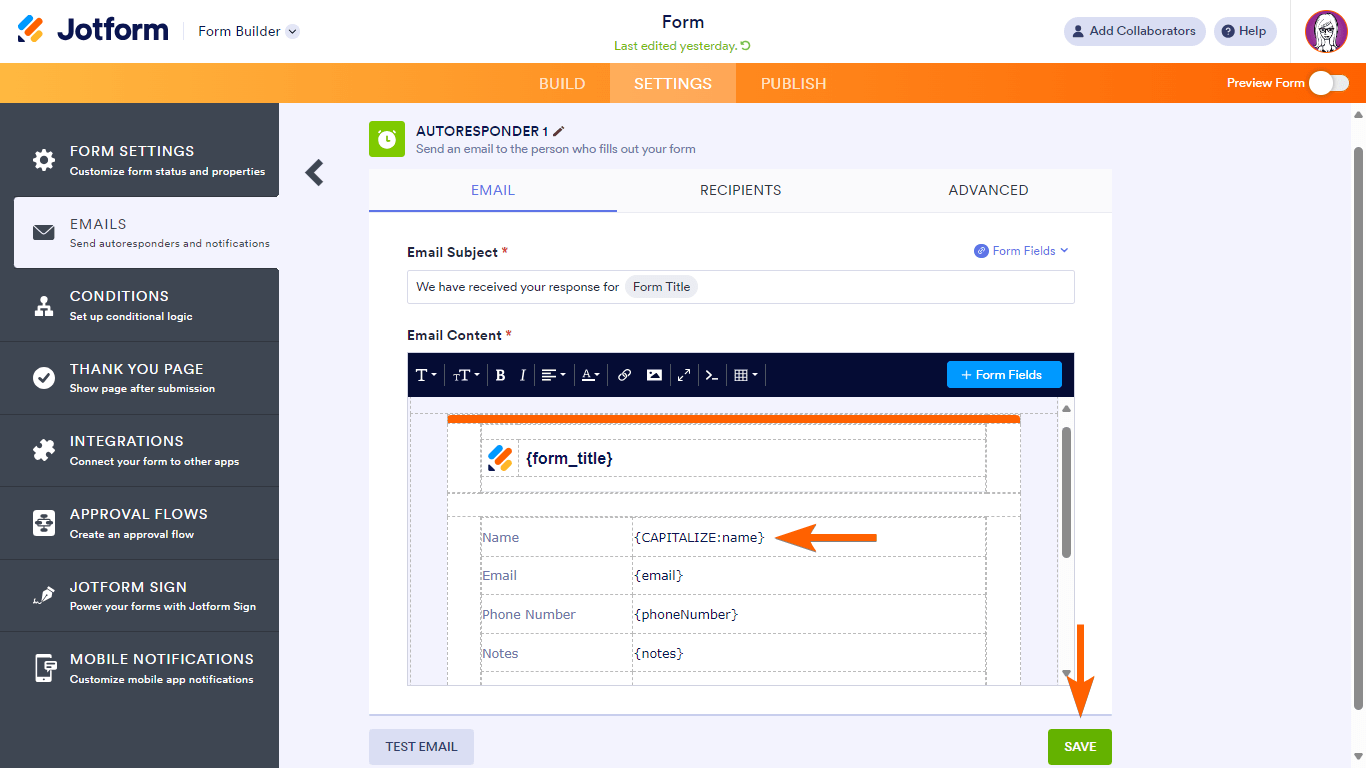
- In the editor, locate the unique name of the field you want to capitalize and append CAPITALIZE: (e.g., {CAPITALIZE:name}).
- Once you’re done, select Save at the bottom.
By applying consistent capitalization rules, your emails maintain a uniform style. This consistency reflects positively on your brand or organization.



Send Comment:
25 Comments:
August 13, 2024
Why isn't this an option for Forms? I waste SO much time correcting names entered in lower case!
September 11, 2020
This one is working through direct form link, But this is not working in Production. Any suggestion for this ?
July 30, 2020
Could we get a user guide post on how to change form input values to uppercase and lowercase in both the form and the email notifications? This seems to be a common request in the forum.
I found many forum post responses that explained how to update the form fields but only one forum post that explained how to update the string casing in the emails.
December 26, 2017
Hi,
Is it possible to create a form based on a PDF? I need to create a form so people who have access to it can fill the PDF with information and signature.
I also need several degrees of access to this form.
Can I do this with your application ?
Best regards
Nicolas
December 12, 2017
Created an encrypted form from link off of a promo page. When I went into the form's settings, the Encrypt Form Data option was set to No. So I selected Yes and went through the process of downloading the Key and then closed out of that window by clicking the X in the upper right(didn't see any "save" button, and then selected the Show Less button to reduce down what can be seen on Settings. Then I clicked Show More Options and then again the Encrypt Form Data option was set to No. I did this multiple times including resetting cookies. And then I decided to go select at the account level: "Create New forms as encrypted forms." Went through the same process, and after closing the X, watched that box uncheck itself. Is there a bug or something else in the process that I'm missing? Thanks!
October 17, 2017
Can I add encryption to forms already created or do I need to start the process all over?
August 9, 2017
Please consider making the PDF download available for encrypted forms. Point is the data are encrypted on your servers and one has to use encryption and SSL connection to view the data, hence downloading the data in PDF format via SSL connection should be fine. Knowing that the PDF File is not encrypted becomes then our business decision to either accept that such PDF files on our own systems are not encrypted or we use encryption storage for storing the PDF on our systems. We mainly care that the submission and storage outside of our own systems is encrypted. Having the ability to get the data in PDF format is still important for most businesses.
View Answer
February 23, 2017
Please consider making the PDF download available for encrypted forms. Point is the data are encrypted on your servers and one has to use encryption and SSL connection to view the data, hence downloading the data in PDF format via SSL connection should be fine. Knowing that the PDF File is not encrypted becomes then our business decision to either accept that such PDF files on our own systems are not encrypted or we use encryption storage for storing the PDF on our systems. We mainly care that the submission and storage outside of our own systems is encrypted. Having the ability to get the data in PDF format is still important for most businesses.
January 21, 2017
What is the level of encryption used ?
October 25, 2016
Do all sub-user accounts have their own unique keys? or will there be 1 key for all users?
December 28, 2015
Can the private encryption key be used with the API interface and an app that grabs the data?
November 21, 2015
Encrypted forms no longer working. I have created a new key and tried to upload....will not work.
This just happened on 11/20/2015. Previous to that date it was working just fine. Need help..thanks.
August 4, 2015
Hi I have problems adding the public key of my client to the key wizard, it doesn't appear even cleaning browser and module cache... how can I change the key uploaded before? do I have to create a new profile for this encrypted form to put the right key?
Please let me know...
August 1, 2015
Nevermind, seems to have been a fluke. perhaps just needed to re-embed the form on my site.
August 1, 2015
i'm having a problem with these forms "hanging" after clicking submit. The button changes to "please wait" and then seems to never send a few minutes later. I changed the form back to un-encrypted and it sends immediately.
July 27, 2015
Can we use this to receive credit card information?
July 23, 2015
Is there step by step instructions with how to use the key to view the content of a spreadsheet... I don't know much about this stuff. Thanks.
July 23, 2015
Hi I set my account to encrypted forms and created a form and turned on the encyption for that form. I aslo downloaded my key. I got my first submission and it's encrypted like I wanted it to be but I don't get asked for the my key. What am I missing? I've read through the forum but I don't see an answer. Please help
July 17, 2015
What format must the private key be stored?
Have closed the browser by mistake, can I regenerate the private key?
Thanks
July 17, 2015
Could you explain the difference between the public key and private key options?
Thanks
July 16, 2015
If I change the form preference for "Encrypt Form Data" from YES to NO, will it unencrypt my data?
July 16, 2015
Is it possible to encrypt all forms at once or do we have to individually encrypt them?
April 11, 2014
I want an autoresponder to include the first name of the person who submitted the form, but I want the first letter capitalized. Right now my form says {name:first}, how do I adjust it properly to add the CAPITALIZE feature?
I figure it's not just {CAPITALIZE:name:first} but please let me know.
Thanks!
Form can be seen at
March 21, 2014
But isn't that will enable empty/blank fields to be shown? How do I avoid this?
December 22, 2013
Thanks for that.
So the same should apply to UPPERCASE then for all alphabetical to APPEAR
{UPPERCASE:fullname}
I got the Capitalize to work OK but Uppercase is problem now.