
UPDATE
As of 2025, a new flow to share forms as templates is in effect. Refer to the user guide on how to share a form as a template.
Hello Friends! No, this is not a new feature announcement. Sometimes, all you need to do is to combine tiny bits of functionality to come up with your own features. Jotform users are especially great at this. We have seen it on Inject Custom CSS. We thought that adding custom CSS code would be a feature for only most advanced users. But, to our amazement, as soon as we released it Jotformers started building amazing things using this features.
If you are like all other Jotform users, you are probably very busy with your web site or business. You need that form yesterday.
That’s why we always ask ourselves two questions:
1. How can we make things simpler? So that our users do not waste time on confusion.
2. How can we make things faster?
One of our users has come up with a great way to speed up the time it takes to create forms. Today, I wanted to share his recipe with all.
1. Create a “Templates” folder
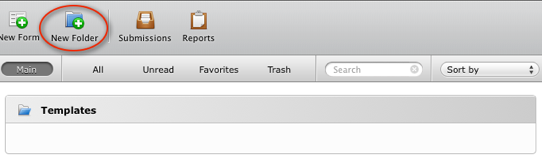
This folder will hold the templates we will create. Open your My Forms page, click on “New Folder” button on the toolbar.
2. Create a New Template Form
Next, create a new form and make all of the changes you usually do on your forms.
- Change the Form Theme,
- Add your Logo to the top of the form,
- Customize style such as background color, font type etc.
- Setup Emails,
- Setup Thank You page,
- If you have common questions on all of your forms, add these questions.
You get the idea. If you need to do something when you create a new form, do it now.
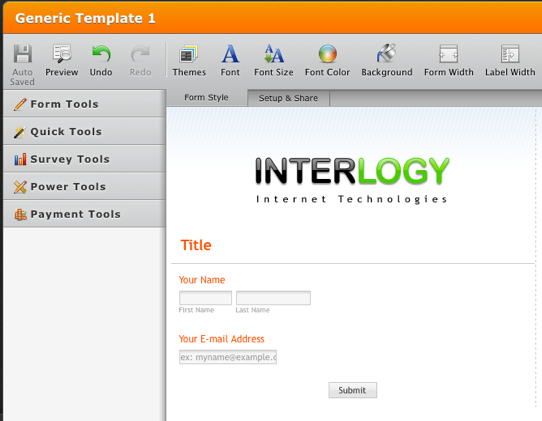
3. That’s All. Your template is ready to be served.
When you need to create a new form, just right click on one of your templates and select “Clone Form”.

I hope this will help you save time in the future. If you have similar time-saving tips please feel free to share with us below.










Send Comment:
26 Comments:
April 10, 2017
pbugmzd
Lacoste Scarpe Offerta
Scarpe Dsquared Uomo Trovaprezzi
Scarpe Hogan Donne
Scarpe Fila Torino
Rivenditore Vibram Fivefingers
November 6, 2013
isto e´muito bom vocês estão ajudando muitas gente como eu !
October 3, 2013
good
September 3, 2013
eu queria um templates identico do trabalhe conosco
menos a parte que envia curriculum e empresaJuly 3, 2013
You have made an amazing opportunity for internet users.
Thank you !
July 2, 2013
I have Been developing websites for about six years,
but jotform makes my life simple and I use it for all of my clientsits so easy thank you
June 12, 2013
perfect!
April 7, 2011
Please post your questions to the forum.
April 6, 2011
Thanks for your help and expertise! I successfully created a form though I am newbie. My problem is that I want the input comments to be displayed on the website after submission (like guestbook) instead of receiving it by email.
Is it possible?Thousand thanks!
March 29, 2011
awesome.so user frndly.i love this site
March 20, 2011
I can show in my web site the comments than the visitors write. I write my comment here now and quickly I'll see outside of the form above.
I can do that in my web site.Thank you
March 20, 2011
Can't you create a folder where we can store Forms which we want to share with other users, so they can use them as template also?
Best regards
Chris
March 15, 2011
Can you please help me loading a logo into the Title field.
Thanks,John
March 12, 2011
gracias!!
March 9, 2011
Very interesting. I'm a beginner. Let's see how it goes.
February 25, 2011
a lil off topic... not really commenting about the forms but just wanted to drop in a word that have loved using jotform... its changed the way we've looked at creating forms on our website... great work there !!
February 22, 2011
injoy
February 21, 2011
Thank you this is great stuff. I am excited to try out my first form with your program. All the best.
February 16, 2011
Lol!! I just sent a question to the support desk and then found this discussion thread that completely answered my question:-) I'm really loving Jotform!
February 15, 2011
Super Site !
perfect !!!
February 6, 2011
cool
February 4, 2011
Jotform is a great product! I have test it for free and it works amazingly. I have installed forms in youtube (clicking in a link) and Facebook (using FBML) and they work great for getting leads. So, now that I started to generate sales from those leads I don't mind paying for it.
February 1, 2011
;)
January 31, 2011
Thank You for the much needed help I'm a jr to creating forms but can follow good instruction very well your company is very good at let us show you.
January 31, 2011
I am Peruvian:
I have no idea of computers! but I have understood you, thank you ...I do not speak English, but this video helped me a lot of you tube ( but would be good to update the video in Spanish (for the graph ...) ps. Ringtone = google