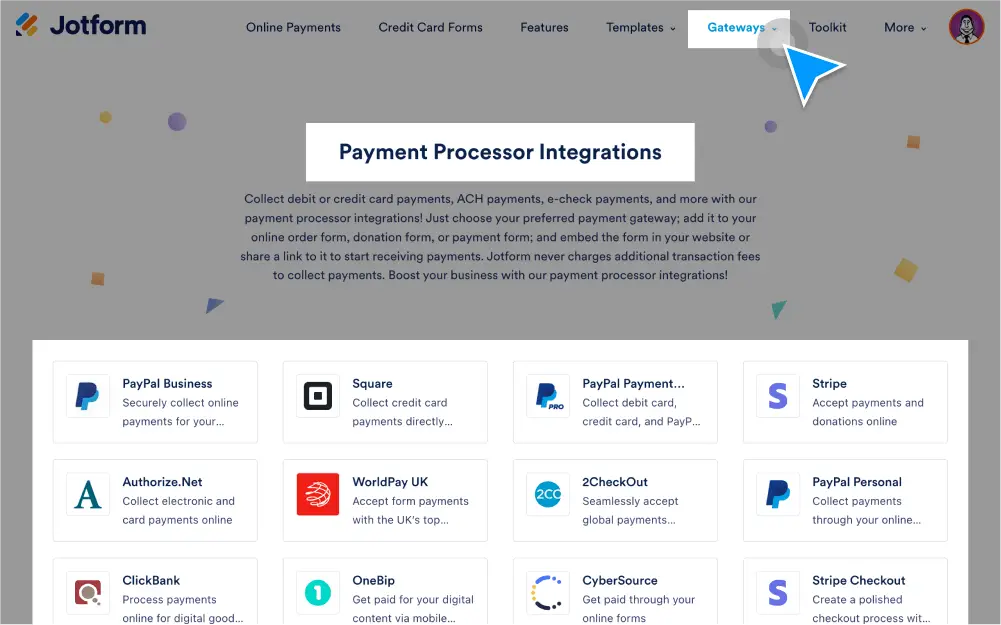
Pilih dari 40 prosesor pembayaran
Connect your payment form with your choice of 40+ popular payment gateways , including Square, Stripe, PayPal, and Authorize.net, to securely accept payments online.
Accept recurring subscription payments
Set up and process recurring payments for products or services through your preferred payment gateway. Add your unique subscription plans to choose how often you’d like to receive payments.
Accept recurring donations
Give donors an easy way to support your nonprofit with a recurring donation option that automatically processes donations monthly, quarterly, or annually based on each donor’s selection.
Add taxes
Jotform’s payment integrations allow you to add sales tax to your products — whether they’re physical or digital. You can set a base tax rate, set tax rates based on state/province and country, and exempt certain products from being taxed.
Add shipping costs
Specify a cost for shipping each item, or set a weight value for each item. If shipping multiple items, you can charge a flat rate or include an additional cost per item.
Add coupons
Create coupons to use as an additional payment option. You can add coupon details such as the coupon code, coupon limit, discount type, discount rate, and more.
Create multiple product categories and options
Make it easier for customers to navigate your store. Break up what you’re selling into multiple categories and offer multiple buying options for your products.
Manage product stock
Set up a payment order form with limited product stock by linking Jotform widgets to your payment field. You can sell products in bulk or as single purchases.
Authorize payments
Dapatkan otorisasi untuk memproses pembayaran di kemudian hari. Banyak integrasi pembayaran Jotform yang mendukung otorisasi pembayaran, termasuk PayPal, Square, Stripe, Braintree, dan banyak lagi.
Set up incomplete payment notifications
Send email alerts to notify customers if their payment was incomplete or unsuccessful. You’ll be able to send pending payment emails if your payment form is integrated with PayPal Standard or PayPal Personal.
Securely process payment data
Jotform protects cardholder data with PCI compliance, CCPA compliance, GDPR compliance, a 256-bit SSL connection, and the option to encrypt your forms. Healthcare providers can also opt into HIPAA compliance.
Buat faktur
Turn each form submission into a PDF invoice or receipt for your customers. Invoices can be used to keep track of payments you’re due to receive at a later date.
Collect e-check & ACH payments
Collect electronic check payments directly through your form with eCheck.Net from Authorize.net. You can also receive payment deposits directly from your customers’ bank accounts with Jotform and Stripe ACH.
Enable sandbox mode
Ensure that your payment integration is successful by testing payments with sandbox mode. Create a secure environment that simulates the payment experience on your form so you can detect any errors.
Send and receive automated emails
Set up email notifications to keep track of submitted orders or payments in your inbox. Automatically send confirmation emails or invoices to customers after their purchases.