Accepting files through your form is incredibly easy thanks to the File Upload element. Once someone submits a file, you’ll get a notification email with a direct link to download it, so you can access everything right away. If you prefer, you can even have the files as actual attachments, making it even more convenient to keep things organized in your inbox.
And if you ever need to review or download multiple files at once, you can head over to your Tables, where every upload is neatly stored for you. It’s a simple, streamlined way to collect documents, images, or any files you need—without the back-and-forth.
When downloading, you can choose to:
- Download All Uploaded Files At Once
- Download a Specific Set of Files
- Download File Uploads Based on a Time Range
- Download Individual Files
Downloading All Uploaded Files
You can download all the files people have uploaded through either Tables or Inbox. If you prefer using Tables, here’s how you can quickly get your files from there:
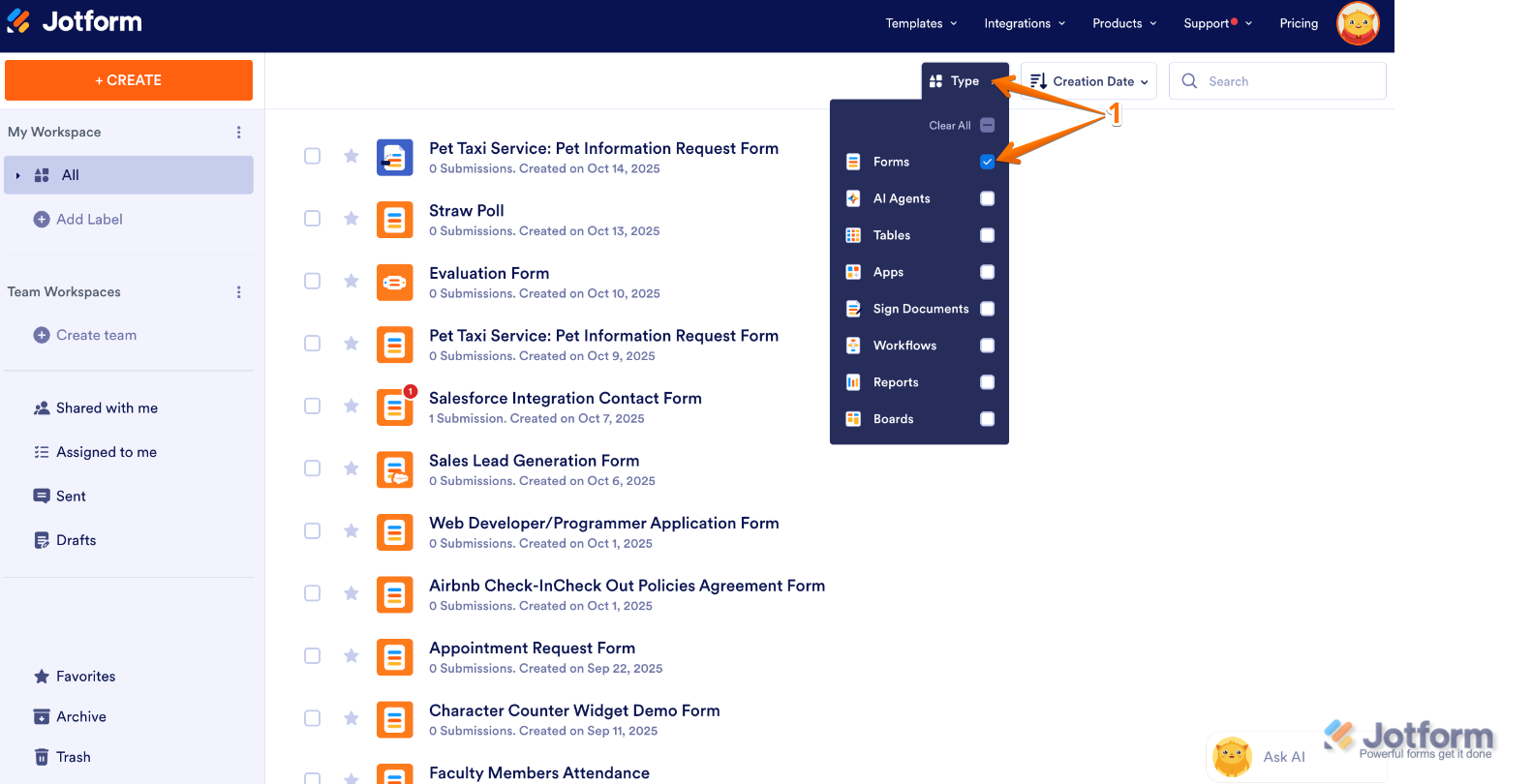
- On your Workspace page, click on Type at the top and in the Dropdown menu that opens, uncheck the boxes next to all the assets except Forms, so only they’ll be shown on the page.
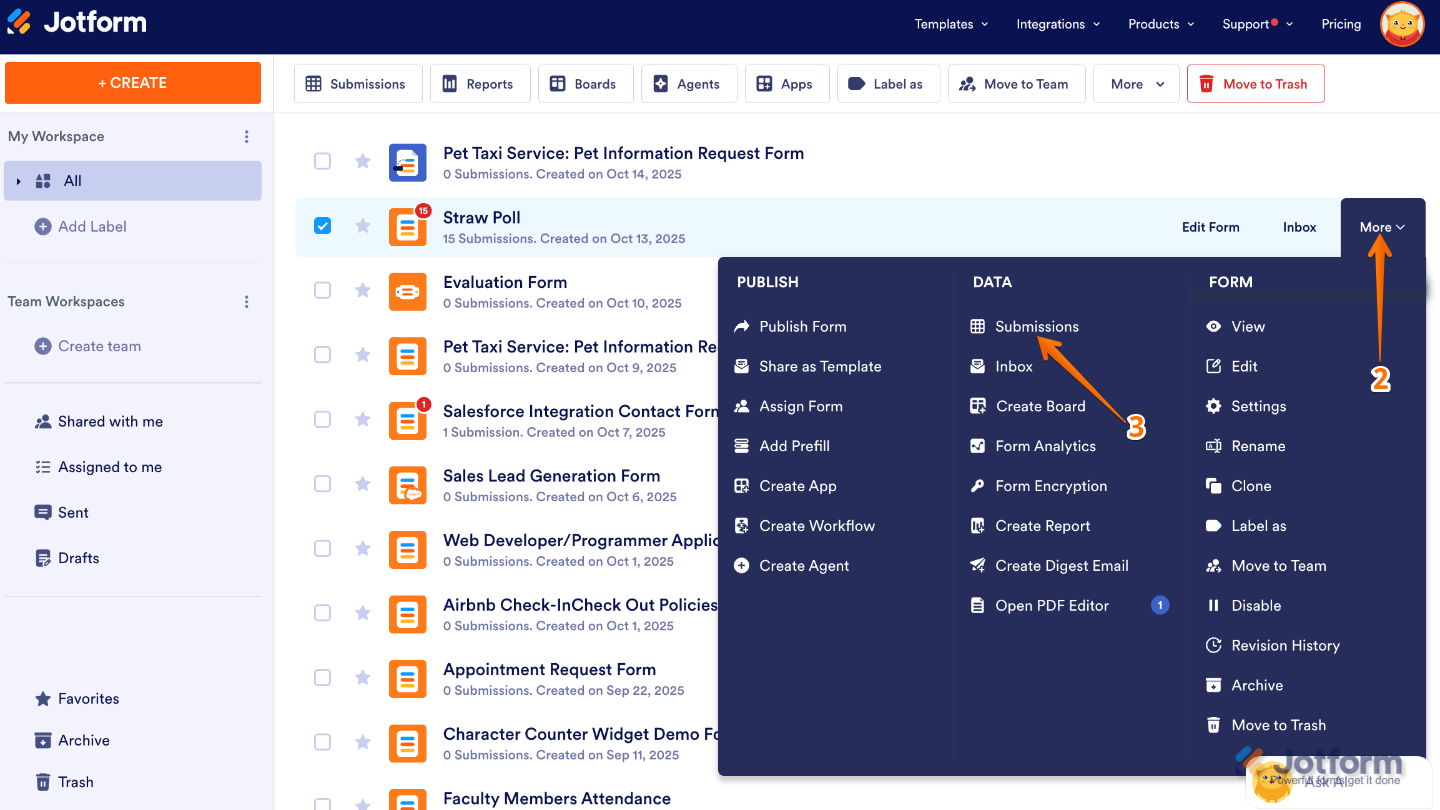
- Now, hover your mouse over the form you want to manage, and click on More on the right side of the page.
- Next, in the Dropdown menu, under the Data column, click on Submissions.
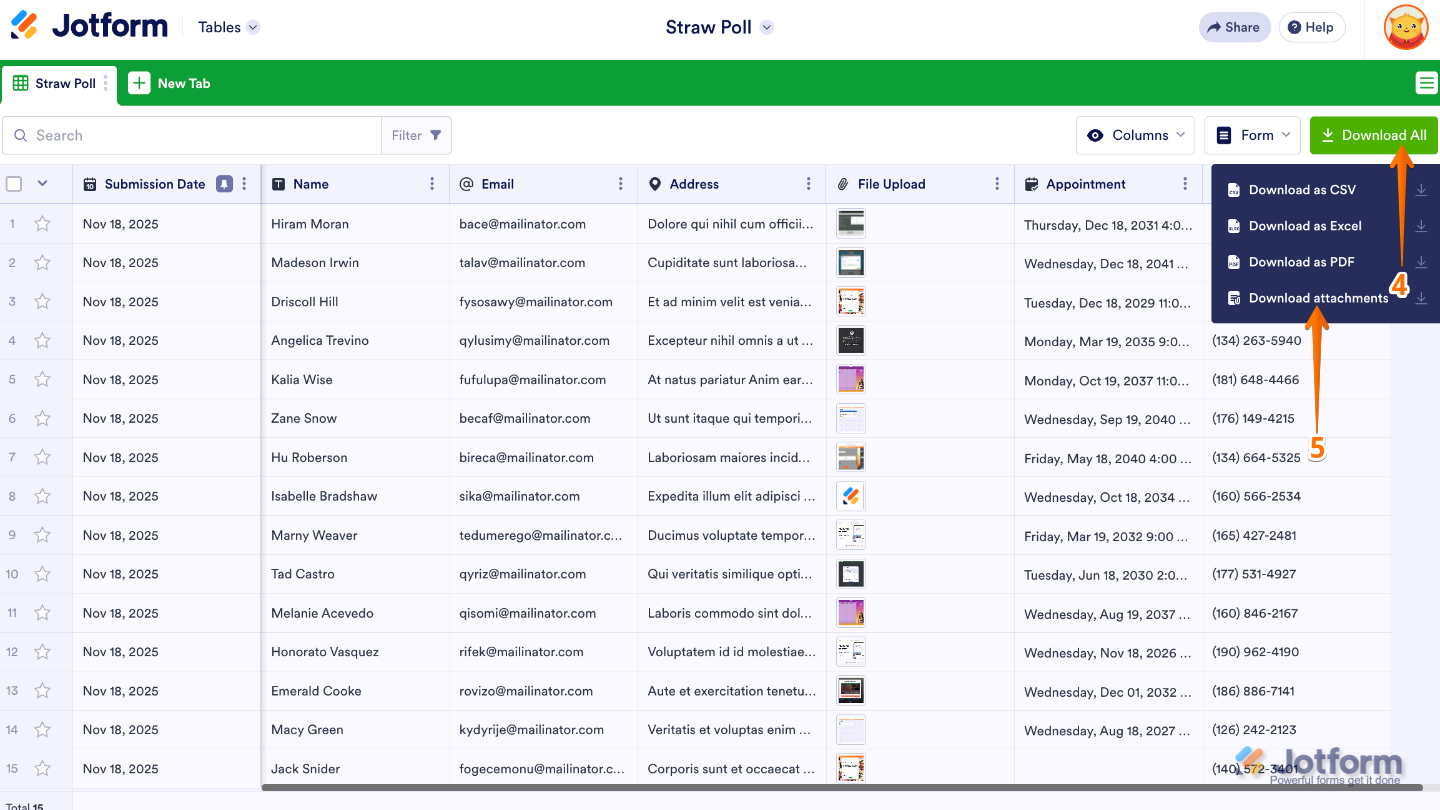
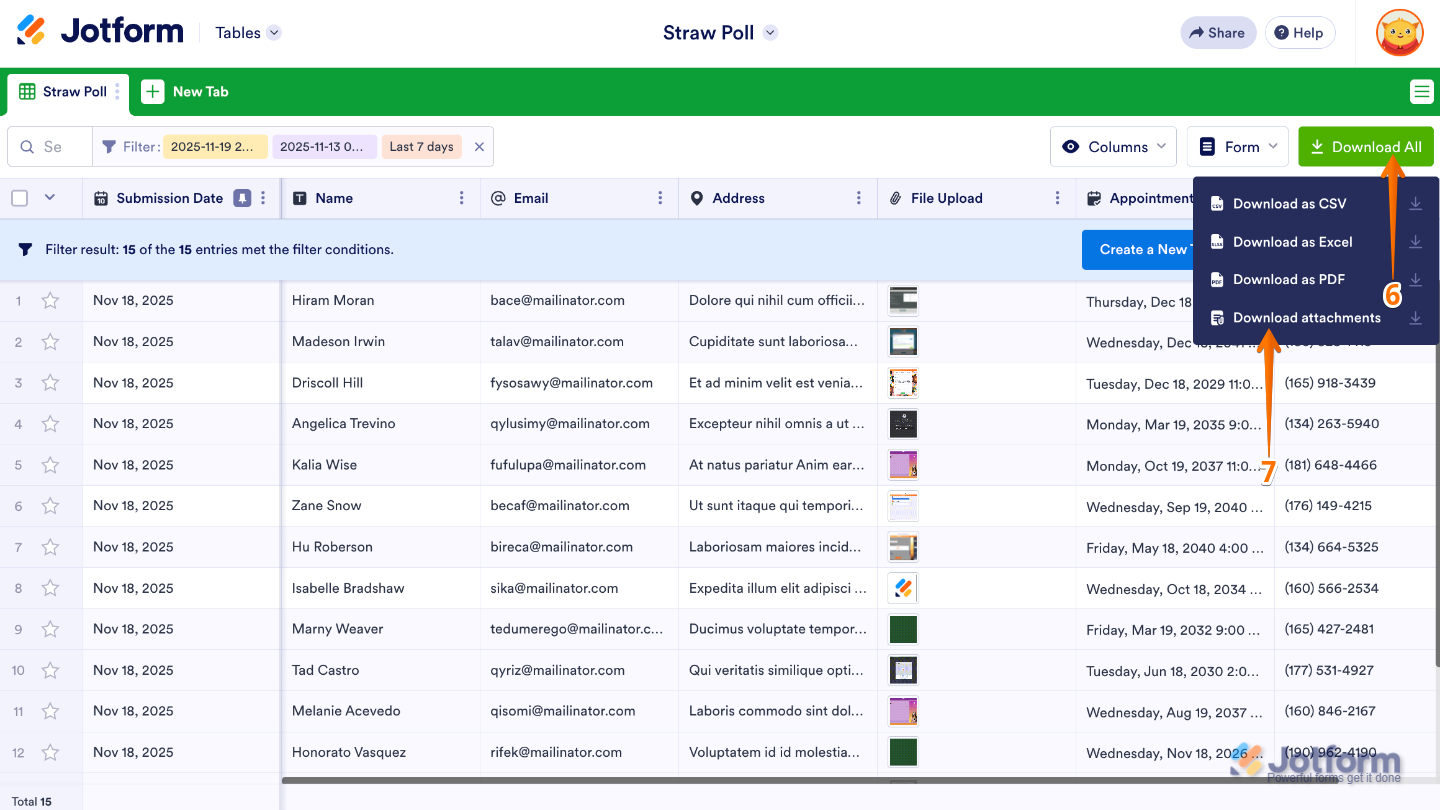
- In Jotform Tables, click on the Download All button on the right side of the page to open the download options.
- Then, in the menu that opens, choose the Download Attachments option.
If you’d rather download everything at once, you can grab all the uploaded files from that tab in a single go. Here’s how to do it:
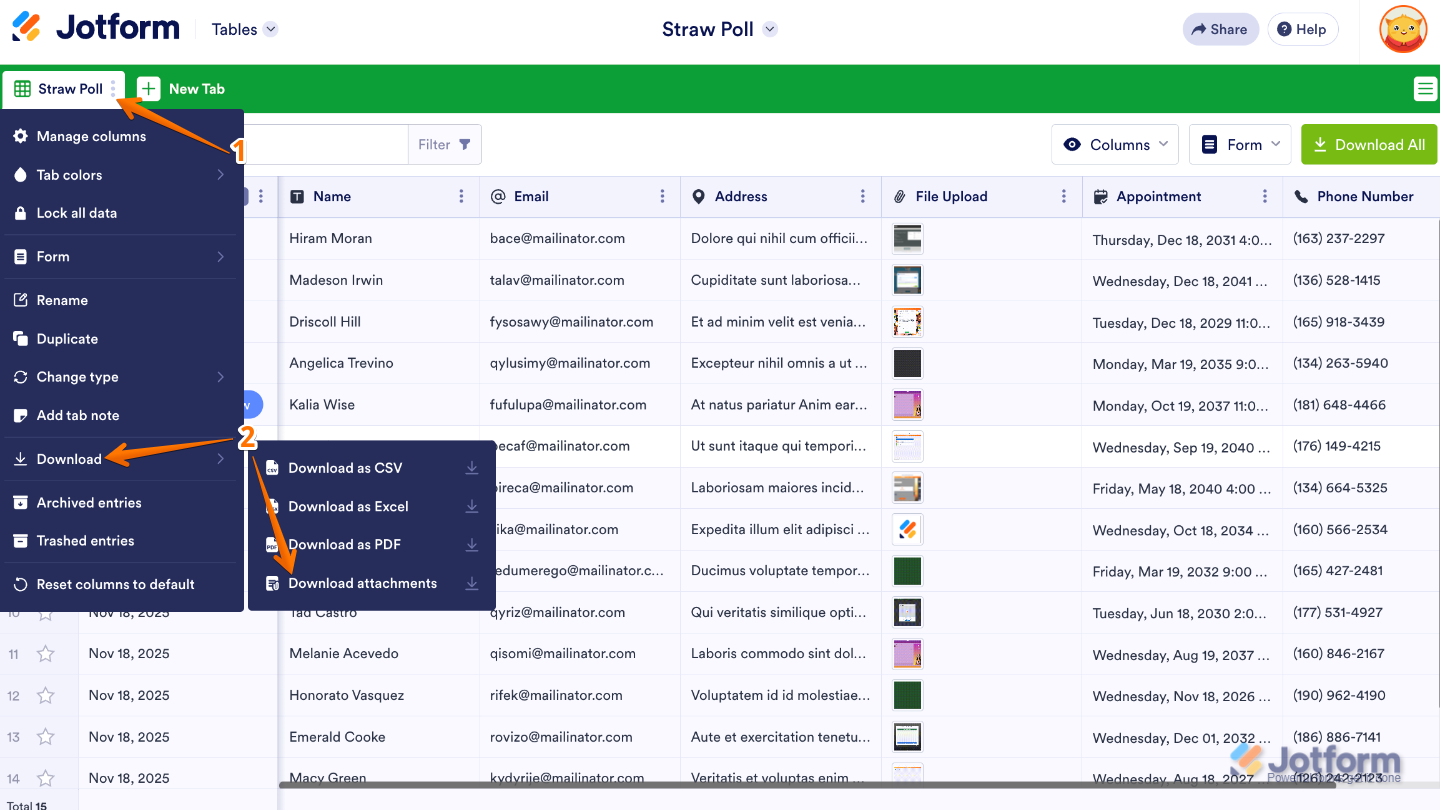
- In Jotform Tables, click on the Three Dots icon next to the main submissions tab.
- Next, hover your mouse over Download, and then select Download Attachments.
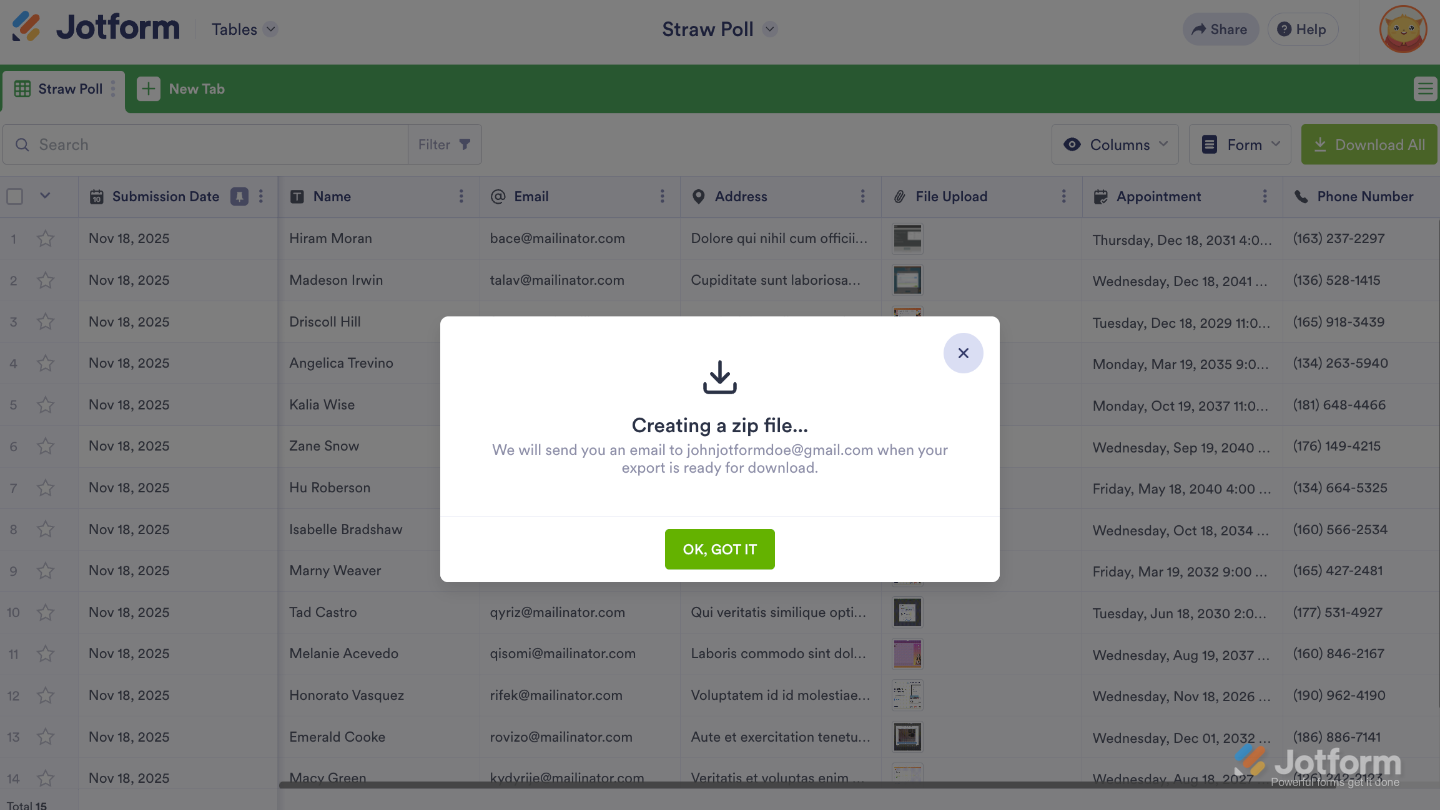
The system will start zipping your uploaded files. A pop-up will appear letting you know that once it’s ready, you’ll receive an email with a link to download the zipped file.
Note
If your form has a lot of uploaded files, the process might take a little longer—but don’t worry, the system will handle everything for you.
Downloading a Specific Set of Files
You can also download only the files you need by selecting them directly from the list. Here’s a quick how-to:
- In Jotform Tables, select the submissions from the table. You’ll see the number of selected submissions on the Download button.
- Click on the Download button on the upper-right side of the page.
- Now, click on the Download Attachments option to begin the download process.
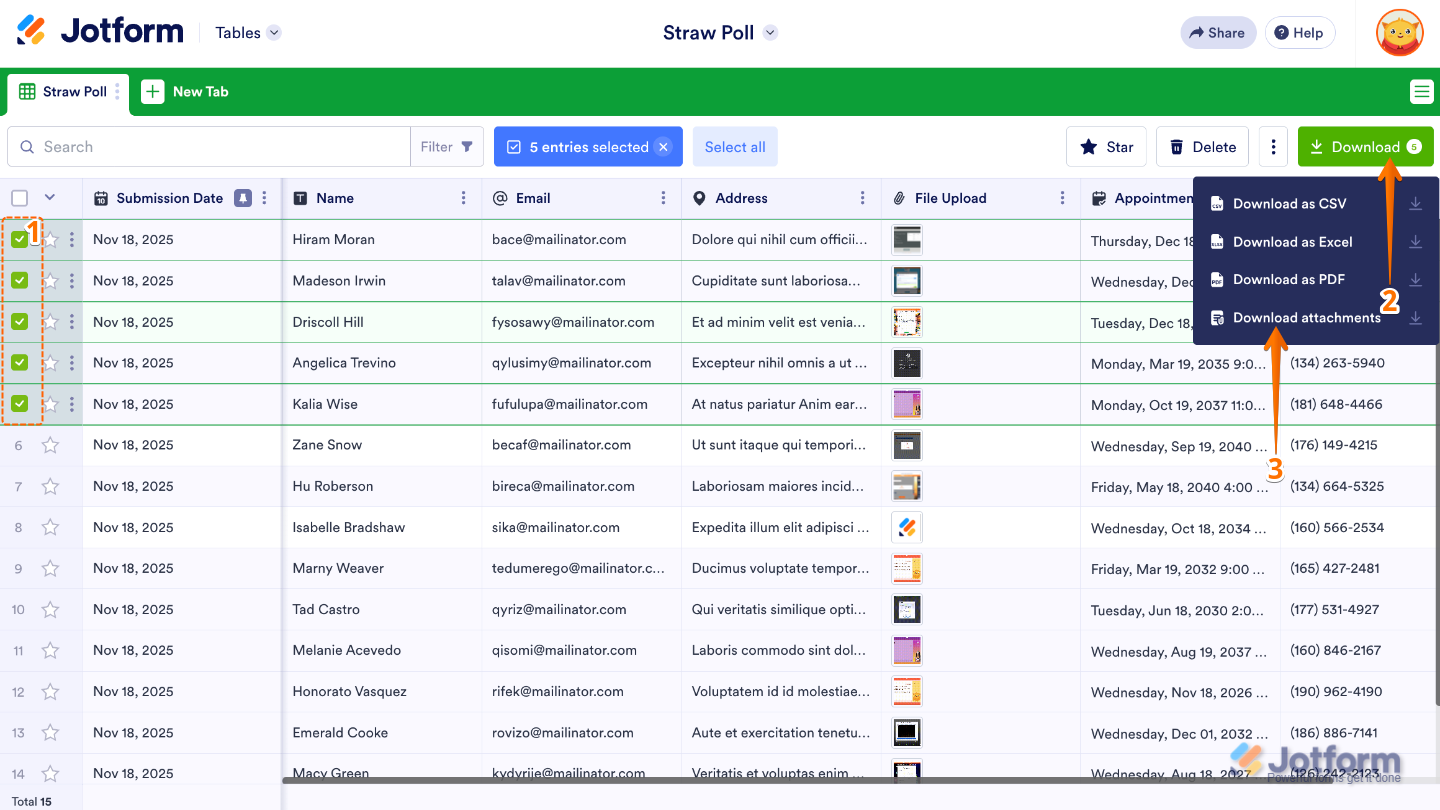
Just like when downloading all uploads, this method isn’t instant. The system will gather your selected files, zip them up, and then send you an email with a link to download the zipped folder once it’s ready.
Downloading File Uploads Based on a Time Range
You can also download files from a specific time range by applying filters in Jotform Tables. This makes it easy to focus only on the submissions you need. You’ll just need to do this:
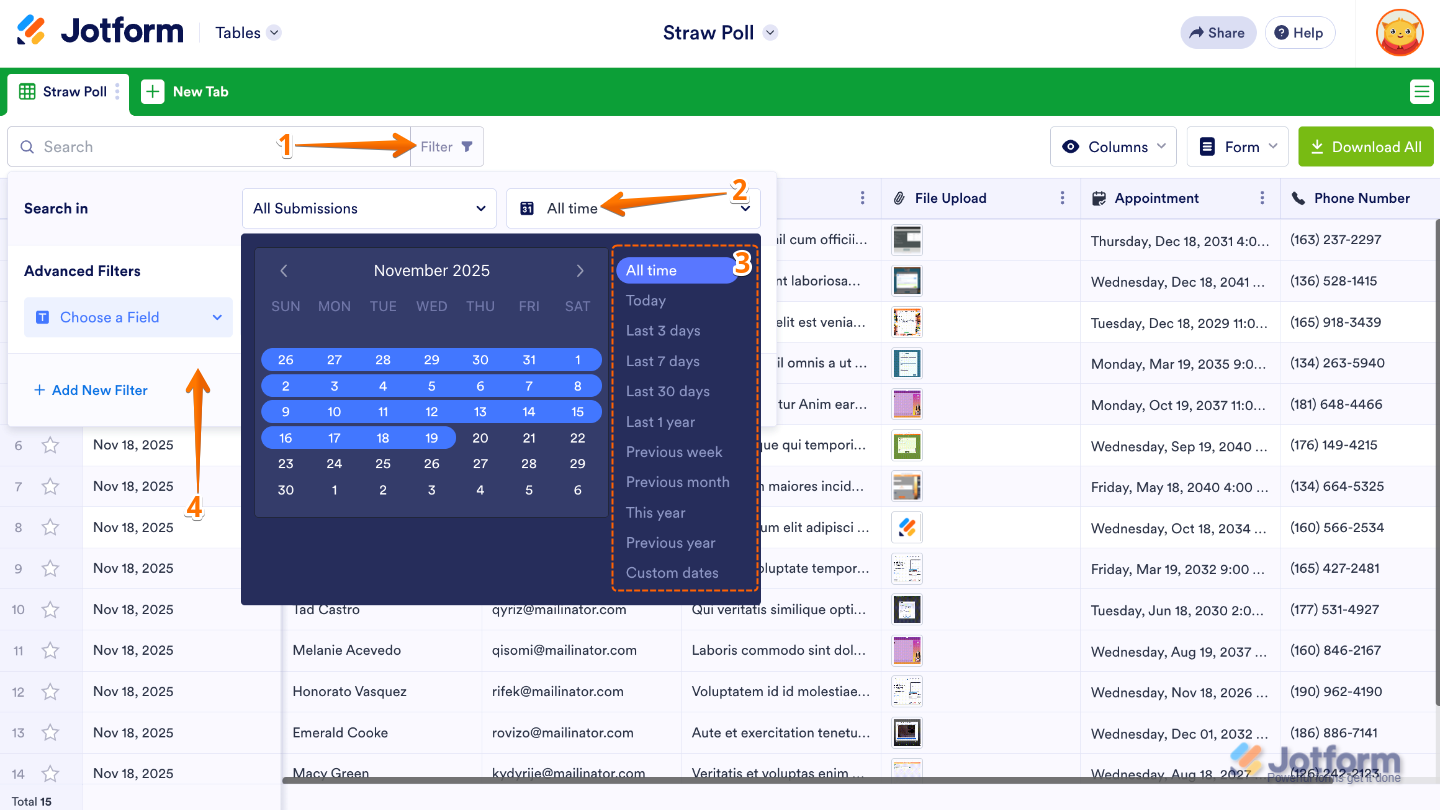
- In Jotform Tables, click on Filter on the left side of the page.
- Then, in the Search In section, click on the All Time dropdown.
- Choose and click on a time range from the list beside the calendar.
- Now, click anywhere in the Search In menu to set your time filter.
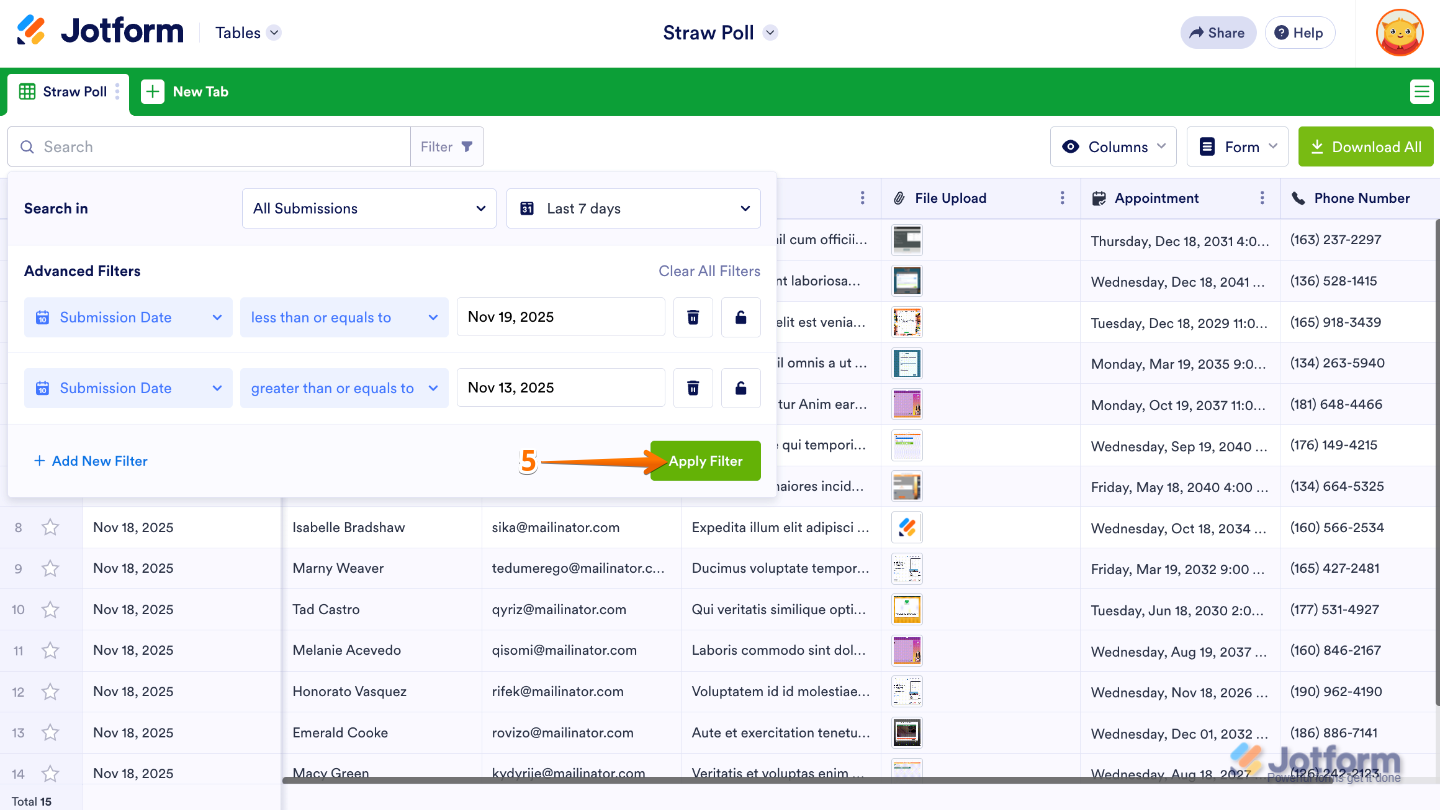
- Next, click on the Apply Filter button to activate your filter.
- Finally, click on the Download All button on the right side of the page to open the download options.
- Then, in the menu that opens, choose the Download Attachments option.
Downloading Individual Files
Sometimes you only need to download a single file instead of the whole batch. In that case, you can easily grab individual uploads right from your submissions. Here’s the quick way to do it:
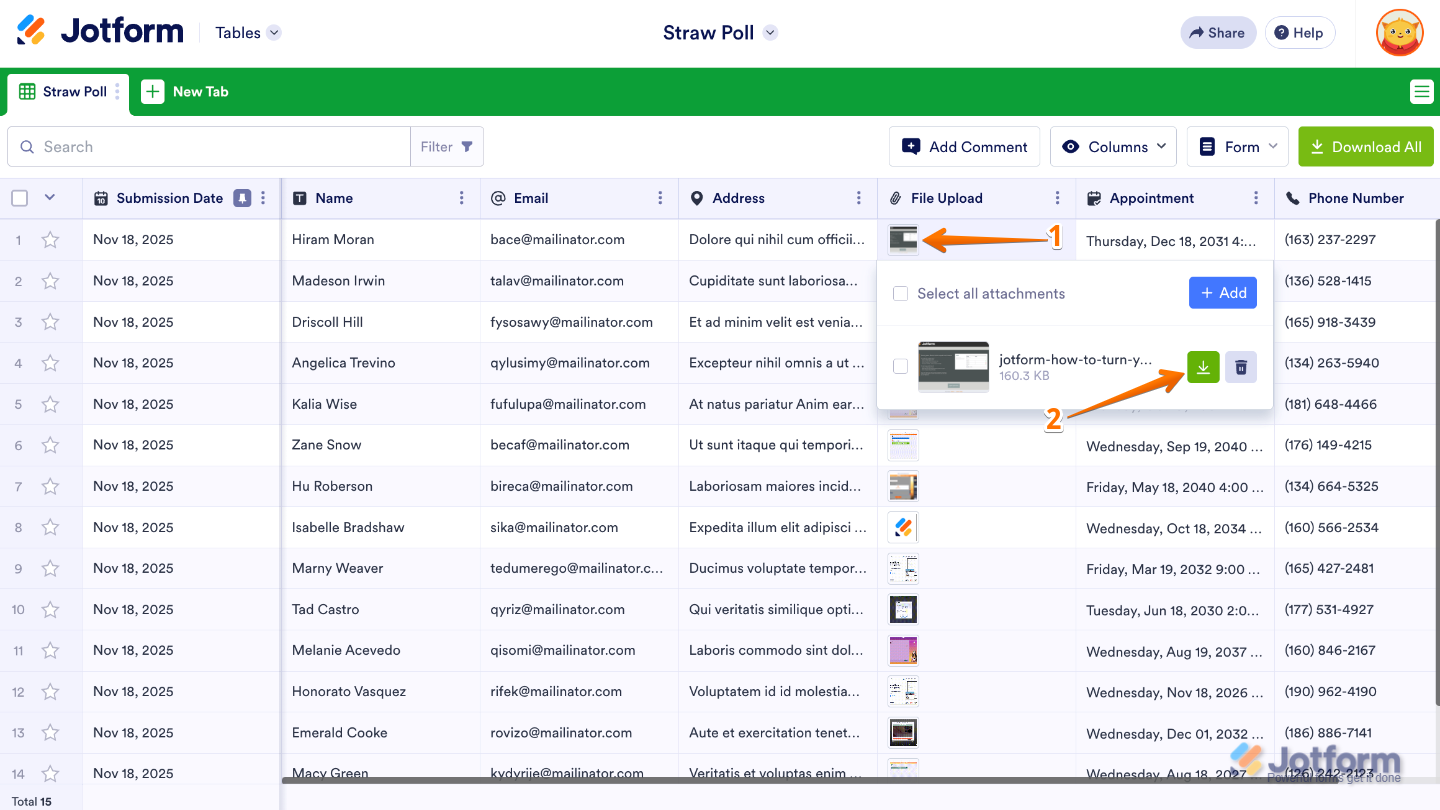
- In Jotform Tables, click on the uploaded file you wish to download.
- In the menu that comes up, click on the Download icon to save the file.

Send Comment:
19 Comments:
October 23, 2025
I'm unable to download submissions. This stopped working and I now get an error. How can I enable downloads while viewing submissions?
September 26, 2025
I am still not getting all the files to download. It only downloads the first image.
April 2, 2025
When I download to .PDF using the Download button, there is information missing. Not all the columns are coming through. When I view the form, they show up, and when I print as a .pdf, they show up, but when I use the green Download button, several columns of information are missing.
March 11, 2025
Is it possible to download the table on a schedule and save the download to e.g. SharePoint or OneDrive?
March 2, 2025
Hi,
Is there any way to change the separator character for the CSV-download. I need to use a semicolon and not a comma.
Thank You!
Scott
August 27, 2024
HI There, I am trying to download the files from our submission form but it only allows me the option of downloading as Excel or CSV file - I cannot see the option to "download attachments". Can you please help.
July 25, 2024
Does this work for audio files? When I click 'Download All', it doesn't show the 'Download Attachments' option.
September 19, 2023
Can I send zip file to our back up email address?
May 9, 2023
Hi, I log in using our charity login. I am in the process of uploading cat adoption submission forms to our database. I had no issues with Jan or Feb ones, I got an easy system going, where I told it to download the form then uploaded it from my downloads folder. Now, it simply refuses to download any more. It says 'waiting for jotform.eu.com' and doesn't do anything at all. It's broken! I've put my personal email address on here for ease of access to your reply, as I'll be working now until this evening. Thanks
April 5, 2023
Would love in the future to be able to download the submission table and have the uploads hyperlinked in the table. Even if there was a way to vlookup and sync the two would be helpful.
March 29, 2023
Can I setup up downloads with a filename that is based on data in the table? It's very manual to link the download content to the file submission as the down;aod name is not included in the submission file.
September 17, 2022
di jotform sy kok tidak ada untuk download attacment, hanya ada download csv, excel, pdf
September 1, 2022
Can I setup up downloads with a filename that is based on data in the table?
June 22, 2022
My company has shared access to a jotform table with me and I have every download option except for Download as PDF. I'm brainstorming with my colleagues on how to remedy this. Any ideas how they can share that option? It doesn't say Read Only or Collaborator for me. See below and thanks in advance.
March 25, 2022
Can I download all attachments into one file I can print out ... versus the Zip file giving me 100 different files to open to just prin the waiver form and the vax card?
February 16, 2022
I'm having the same issue as Hassan. The hpotos taken by the Take Photo widget are not considered attachements, so there is no option to download them
September 27, 2021
HI,
I am using take photo widget for my Performance Management survey 6.2 version. The problem I am facing is that I need to download all images that are being uploaded on the form. But there is no option for download attachment. When i download using download using excel or text file, i only get link of the picture.
Previously when i was using upload document option, i was able to download all images that were uploaded on the form.
please help me in resolving this issue.
Regards,
Hassan Saleem Malik
August 26, 2021
Hi, is there a way to download just the submission info and not all the other language in the form?
August 19, 2021
Cecile_A,
Perfect information, thanks so much for the actual steps in tutorial. They covered my whole spectrum of questions, including downloading and converting to Excell. Great work, thanks a bunch.