
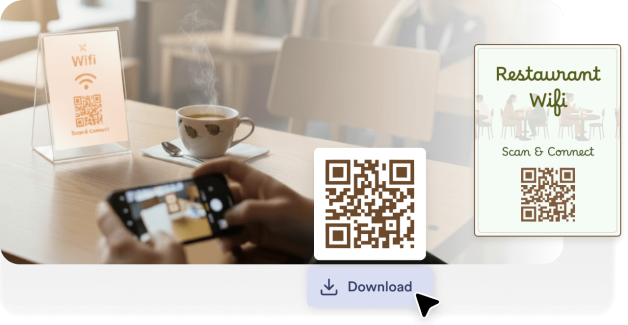
WiFi QR kodlarını masalara, menülere veya tezgahlara yerleştirin, böylece müşteriler personelden parola istemeden bağlanabilir.
Wi-Fi ağınız için bir QR kodu oluşturun, böylece misafirler parola girmeden anında bağlanabilir. Evler, ofisler, restoranlar, oteller, etkinlikler ve halka açık alanlar için idealdir.
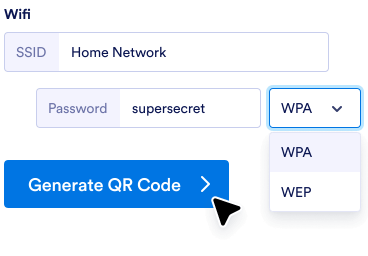
Ağ adınızı, parolanızı ve güvenlik türünüzü QR kod oluşturucuya ekleyin.
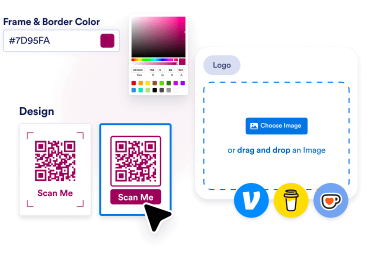
Renkleri ayarlayın, logonuzu ekleyin veya mağazanızın markalaşması ve tarzıyla uyumlu bir çerçeve seçin.
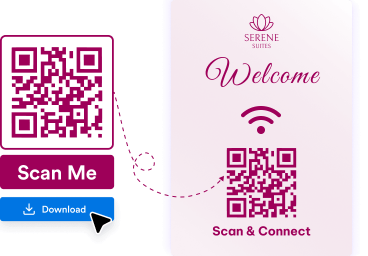
QR kodunuzu indirin ve insanların hızlıca tarayıp bağlanabilmesi için masalara, duvarlara, menülere, tabelalara veya basılı materyallere yerleştirin.
Misafirler uzun parolaları manuel olarak yazmak yerine hızlı bir taramayla ağınıza anında bağlanabilir.
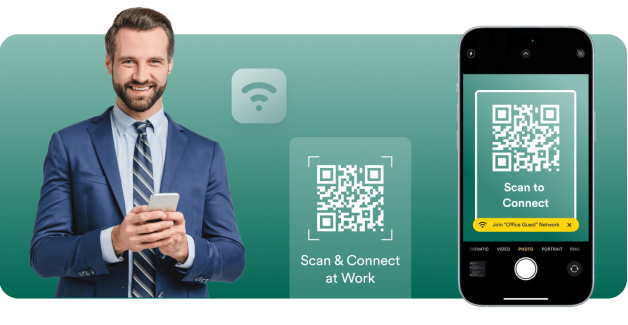
WiFi QR kodları; müşterilerin, ziyaretçilerin ve katılımcıların kafelerde, ofislerde, otellerde ve etkinliklerde daha hızlı online olmasına yardımcı olur.

Jotform, teknik kurulum veya ekstra yazılım olmadan yalnızca birkaç tıklamayla WiFi QR kodu oluşturmanıza olanak tanır.
QR kodları kolayca oluşturun, özelleştirin ve paylaşın
İhtiyaçlarınıza uygun mükemmel QR kodu bulun.
QR kod oluşturucu
Bağlantılar, web sayfaları ve daha fazlası için sınırsız özelleştirmeyle kişiselleştirilmiş QR Kodları oluşturun!
Bağlantıdan QR koda
Herhangi bir bağlantı veya web sayfası için hızlıca QR Kod oluşturun.
Google Form QR kodu
Doğrudan Google Formunuza bağlanan bir QR Kodu oluşturun.
LinkedIn QR kodu
Bir LinkedIn profili veya şirket sayfası QR Kodu oluşturun.
Instagram QR kodu
Instagram profilinizi veya gönderinizi kolayca taranabilen bir kod ile paylaşın.
Facebook QR kodu
Kullanıcıları anında Facebook sayfanıza veya gönderinize yönlendirin.
Logolu QR kod
Markalı ve kişiselleştirilmiş QR Kodlar için logonuzu ekleyin.
YouTube QR kodu
YouTube bağlantınız için bir QR kod oluşturarak videoları kolayca paylaşın.
Şeffaf QR kodu
Şeffaf arka planlı QR kodlar oluşturun.
Beyaz QR kodu
Minimal ve temiz beyaz QR kodlar oluşturun.
Statik QR kodu
Kalıcı veriyi kodlayan, uzun süreli kullanım için ideal, değişmeyen ve güvenilir QR kodları oluşturun.
QR kodunuzu hem dijital hem de basılı kullanıma uygun, yüksek kaliteli PNG formatında indirebilirsiniz.
Kullanıcıları hızlıca Google Dokümanlar sayfalarınıza yönlendirin.
Venmo QR kodu
Venmo profilinizi kolayca paylaşın veya özelleştirilmiş bir QR koduyla ödeme talep edin.
Spotify QR kodu
Spotify'da en sevdiğiniz çalma listelerini, şarkıları veya sanatçı profillerini anında paylaşmak için bir QR kodu oluşturun.
Ödeme QR kodu
Zahmetsizce ödemeleri kabul etmek için hızlıca özel bir QR kod oluşturun. Anında ödemeleri almak için herkesle paylaşın.
Sosyal medya QR kodu
Sosyal medya profilinizi veya içeriğinizi hızlı ve kolay bir tarama ile anında paylaşın!
Linktree QR kodu
Linktree profilinizi kolayca paylaşın ve özelleştirilebilir bir QR kod kullanarak tüm bağlantılarınızla bağlantı kurun.
Video QR kodu
Videolarınızı zahmetsizce paylaşmak için anında bir QR kodu oluşturun. İstediğiniz zaman, istediğiniz yerde izlemek için tarayın!
Restoran Menüsü QR Kodu
Restoran menünüz için QR kodları oluşturun ve anında dijital erişimle yemek deneyiminizi dönüştürün.
PayPal QR kodu
PayPal QR kodları oluşturarak sorunsuz işlemler gerçekleştirin. Müşterileriniz, danışanlarınız veya arkadaşlarınızla kodları paylaşın ve nakit veya kart kullanmadan güvenli bir şekilde ödeme alın.
Etsy QR kodu
Anında mağaza erişimi için Etsy Mağazası QR kodları oluşturun. Kodları müşterilerle paylaşın ve mağazanıza trafiği zahmetsizce yönlendirin.
Özgeçmiş QR kodu
Anında profesyonel erişim için Özgeçmiş QR kodları oluşturun. Kodları işe alım uzmanlarıyla paylaşın ve niteliklerinizi zahmetsizce sergileyin.
Ses QR kodu
Müziğinize, podcast'lerinize veya ses kayıtlarınıza, herkesin dinlemeye başlamak için tarayabileceği bir QR kod ile bağlantı verin. Ses içeriğini kolaylıkla paylaşmak isteyen sanatçılar, eğitimciler, pazarlamacılar ve işletmeler için mükemmel.
TikTok QR kodu
TikTok profilinizi, videolarınızı veya mağazanızı hayranlarınızın ve müşterilerinizin anında erişebileceği taranabilir bir QR koda dönüştürün. İçerik üreticisi, fenomen veya işletme sahibi olmanız fark etmez, TikTok QR kodları hedef kitlenizi ve etkileşiminizi artırmanızı kolaylaştırır.
Siyah QR kod
QR kodlarınızı tüm ortamlarda çalışan temiz, profesyonel, siyah bir tasarımla öne çıkarın. Kodunuzun hem işlevsel hem de şık olmasını istediğiniz işletmeler, etkinlikler veya kişisel projeler için mükemmeldir.
X (Twitter) QR kodu
X (Twitter) QR kodu ile insanların sizi takip etmesini, tweetlerinizi okumasını veya konuşmanıza katılmasını kolaylaştırın. Erişimini ve etkileşimini artırmak isteyen içerik üreticiler, markalar ve pazarlamacılar için mükemmeldir.
Google Haritalar QR kodu
Taranabilir bir Google Haritalar QR koduyla insanların sizi bulmasını kolaylaştırın. Bir konumu anında paylaşmak istediğinizde işletmeler, etkinlikler ve kişisel kullanım için mükemmeldir.
Zoom QR kodu
Zoom toplantılarınızı, web seminerlerinizi veya kayıtlarınızı taranabilir bir QR kod ile anında paylaşın. Hızlı ve sorunsuz erişim isteyen uzaktan çalışan ekipler, etkinlik organizatörleri ve eğitimciler için mükemmeldir.
Google İşletme değerlendirmeleri QR kodu
Google İşletme değerlendirme QR kodları oluşturarak anında geri bildirim toplayın. Müşterilerinizle kodları paylaşın ve online itibarınızı zahmetsizce artırın.
Shopify Mağazası QR kodu
Shopify mağazanızı; doğrudan mağazanıza, ürün sayfalarınıza veya indirim kampanyalarınıza bağlanan bir QR kod ile taranabilir bir deneyime dönüştürün. Hem çevrim içi hem de çevrim dışı trafiği artırmak ve satışları artırmak için mükemmeldir.
TripAdvisor QR kodu
Tripadvisor listenizi müşterilerinizin kolayca bulması, yorum bırakması veya QR kod ile hizmetlerinizi keşfetmesi için fırsat yaratın. Güven oluşturmak ve görünürlüğünü artırmak isteyen restoranlar, oteller, turistik mekanlar ve seyahat işletmeleri için mükemmeldir.
WiFi QR kodlarını masalara, menülere veya tezgahlara yerleştirin, böylece müşteriler personelden parola istemeden bağlanabilir.

Çalışanların ve ziyaretçilerin ağa hızlıca katılmasına yardımcı olurken destek taleplerini ve giriş karmaşasını azaltın.

İnternet erişimini kolaylaştırmak için WiFi QR kodlarını misafir odalarında, resepsiyon alanlarında veya karşılama rehberlerinde gösterin.

QR kodlarını kimlik kartlarına, posterlere veya sunum ekranlarına yerleştirerek katılımcıların etkinlik WiFi'sine anında bağlanmasını sağlayın.
WiFi QR kodu, kullanıcıları otomatik olarak bir kablosuz ağa bağlayan taranabilir bir koddur. Kullanıcılar ağ adını ve parolayı manuel olarak girmek yerine kodu telefonlarıyla tarayıp anında bağlanabilir.
WiFi QR kodları, misafirlere daha hızlı ve daha kullanışlı internet erişimi sağlamak için restoranlarda, ofislerde, otellerde ve halka açık alanlarda yaygın olarak kullanılır.
Misafirlerin, müşterilerin ve ziyaretçilerin WiFi ağınıza basit bir taramayla bağlanmasını kolaylaştırın. WiFi QR kodunuzu saniyeler içinde oluşturun ve dilediğiniz yerde paylaşın.