Web siteniz için Etkinlik Takvimi Widget'ı
Etkinlikleri elle ekleyin veya Google Takvim ile senkronize edin, ardından ziyaretçilere etkinlik ayrıntıları, Takvime Ekle ve kayıt bağlantılarıyla net ve duyarlı bir program sunun.
Hemen oluşturun - Ücretsiz!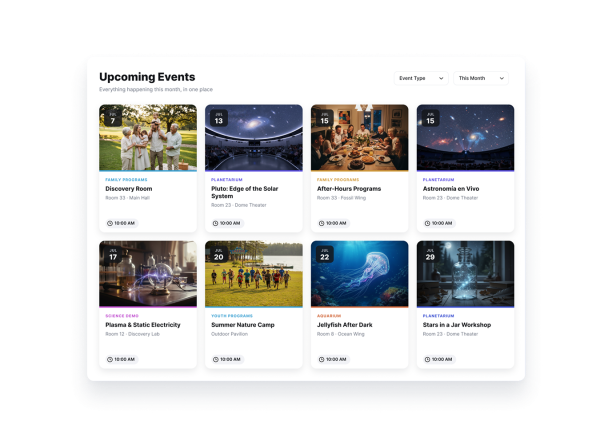

Etkinlik Oluşturma widget'ı nasıl oluşturulur

Etkinliklerinizi ekleyin veya senkronize edin
Tek günlük veya çok günlük etkinlikleri elle oluşturun ya da programınızı her iki yönde senkronize etmek için Google Takvim'i bağlayın.

Takvimi özelleştirin
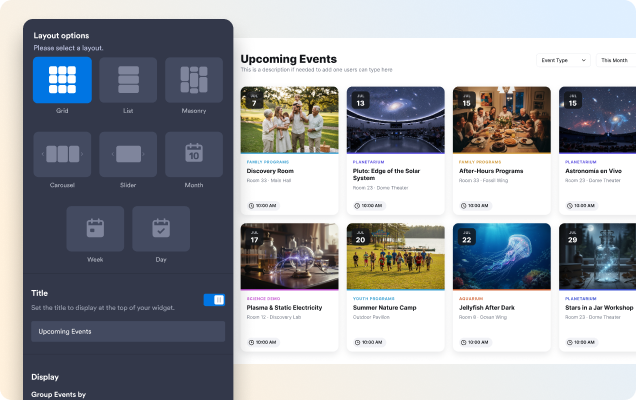
Izgara, liste, döngü, kaydırmalı, aylık veya haftalık bir düzen seçin, ardından temayı, butonları, kart ögelerini ve açılır pencere ayrıntılarını ayarlayın.

İstediğiniz her yerde yayınlayın
Widget'ı önizleyin, yerleştirme kodunu kopyalayın ve etkinlik takviminizi herhangi bir web sitesi sayfasına ekleyin.
Etkinlikleri sayfanıza uygun düzende gösterin
Gezinmek için liste veya ızgara, öne çıkan etkinlikler için döngü veya kaydırmalı görünüm ya da tarihe dayalı programlar için Ay ve Hafta görünümlerini kullanın.
Ziyaretçilerin doğru etkinliği daha hızlı bulmasına yardımcı olun
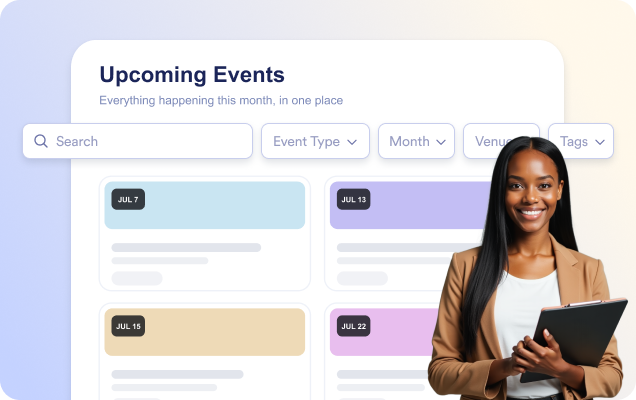
Ziyaretçilerin yazarken etkinlikleri başlık, açıklama, konum veya etiketlere göre bulabilmesi için aramayı etkinleştirin.
Etkinliğin eksiksiz ayrıntılarını açılır pencerede paylaşın
Tarih ve saat, konum, açıklama, medya, etiketler, bir CTA butonu ve Takvime Ekle seçeneğiyle odaklanmış bir etkinlik açılır penceresi açın.

Takvimi web sitenizle uyumlu hale getirin
Açık, koyu veya özel bir tema seçin, ardından kart, metin ve buton renkleri ile köşe yuvarlaklığını özelleştirin.

Jotform Web Site Widget'ları neden öne çıkıyor
Jotform'un widget'ları web sitenizi daha etkileşimli hale getirir ve dönüşümleri artırır. Yıldızlı değerlendirmelerden ve kullanıcı görüşü kaydırıcılarından sosyal kanıt açılır pencerelerine ve medya yerleştirmelerine kadar birçok araç mevcut. Veri toplamak, kanıt göstermek ve potansiyelmüşteri yakalamak için kod yazmanıza gerek olmadan formlarınıza veya açılış sayfalarınıza widget'lar ekleyin.
Basit bir yerleştirme koduyla Jotform widget'larını web sitenize ekleyin. Bir geliştiriciye ihtiyaç duymadan widget'ı özelleştirin, nasıl göründüğünü önizleyin ve özel HTML ya da yerleştirme bloklarını destekleyen herhangi bir sayfaya yapıştırın.
Potansiyel müşterileri toplamak, müşteri geribildirimlerini göstermek, sosyal kanıt sunmak, medya içeriklerini yerleştirmek veya kullanışlı web sayfası araçları eklemek için Jotform Website Widget'larını kullanın. Her widget, ziyaretçilerin işletmenizle doğrudan web sitenizden etkileşime geçmesine yardımcı olur.
Widget'ınızı kurma, özelleştirme, yerleştirme veya sorun giderme konusunda yardıma ihtiyacınız olursa, Jotform'un müşteri destek ekibi 7/24 hizmetinizdedir. İhtiyacınız olduğunda yardımın hazır olduğunu bilerek güvenle ilerleyebilirsiniz.
Jotform Form Oluşturucu ile müşteri adaylarını ödeme yapan müşterilere dönüştürün
Jotform ile etkileşimi eyleme dönüştürün. Potansiyel müşterileri yakalayan, ödemeleri alan ve yanıtları otomatikleştiren güçlü formları tek bir yerde oluşturun. Her yanıt, takip edebileceğiniz veya favori uygulamalarınızla bağlantı kurabileceğiniz Jotform Gelen Kutusu'na ulaşır.
Hemen Başla — Ücretsiz!
SSS
Jotform Etkinlik Takvimi Widget'ı nedir?
Jotform Etkinlik Takvimi Widget'ı, yaklaşan etkinlikleri görsel olarak düzenlenmiş bir takvimde veya listede görüntülemenizi sağlar. Etkinlik tarihlerini, saatlerini, konumlarını, açıklamalarını, görsellerini ve kayıt bağlantılarını sergileyerek ziyaretçilerin etkinliklerinizi keşfetmesini ve katılmasını kolaylaştırır.
Widget'ı Google Takvim'e bağlayabilir miyim?
Yinelenen ve çok günlü etkinlikler ekleyebilir miyim?
Ziyaretçileri bir etkinlik kayıt sayfasına yönlendirebilir miyim?
Etkinlik Takvimi Widget'ının görünümünü özelleştirebilir miyim?
Ziyaretçiler etkinlik arayabilir mi?