
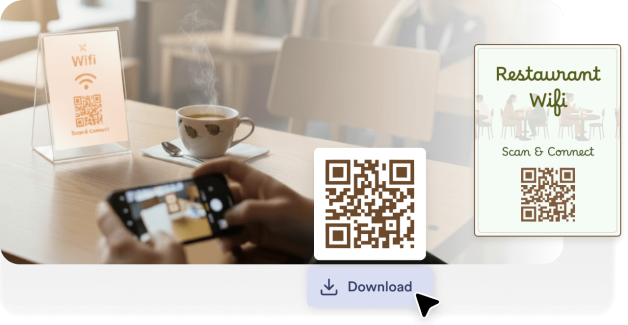
ضع رموز QR الخاصة بشبكة الواي فاي على الطاولات أو قوائم الطعام أو على المنضدات حتى يتمكن العملاء من الاتصال بالشبكة دون الحاجة إلى طلب كلمة المرور من الموظفين.
أنشئ رمز QR لشبكة الواي فاي الخاصة بك حتى يتمكن الضيوف من الاتصال بها على الفور دون الحاجة إلى إدخال كلمة مرور. إنه مثالي للمنازل والمكاتب والمطاعم والفنادق والفعاليات والأماكن العامة.
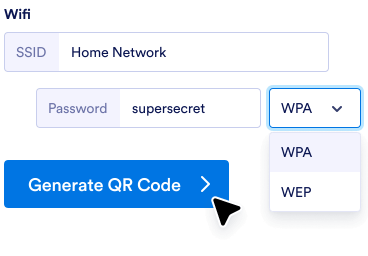
أدخل اسم الشبكة وكلمة المرور ونوع الأمان في أداة إنشاء رمز الاستجابة السريعة.
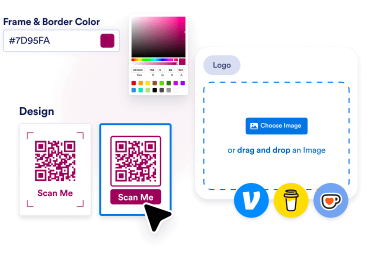
اضبط الألوان، وأضف شعارك، أو اختر إطاراً يتناسب مع العلامة التجارية لمتجرك وأسلوبه.
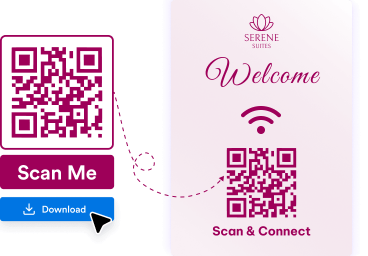
قم بتنزيل رمز الاستجابة السريعة الخاص بك وضعه على الطاولات أو الجدران أو قوائم الطعام أو اللافتات أو المواد المطبوعة حتى يتمكن الناس من مسحه ضوئيًا والاتصال بك بسرعة.
يمكن للضيوف الاتصال بشبكتك على الفور من خلال مسح سريع، بدلاً من كتابة كلمات المرور الطويلة يدويًّا.
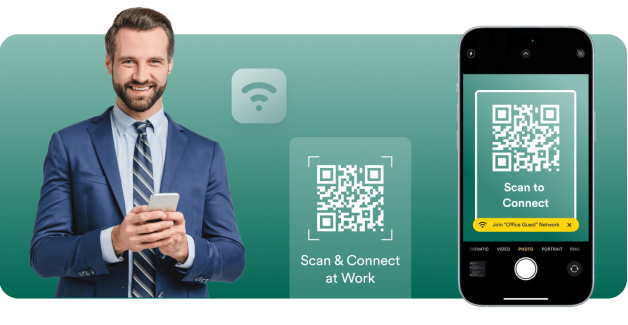
تساعد رموز QR الخاصة بشبكة الواي فاي العملاء والزوار والحاضرين على الاتصال بالإنترنت بشكل أسرع في المقاهي والمكاتب والفنادق والفعاليات.
يتيح لك Jotform إنشاء رمز QR لشبكة WiFi ببضع نقرات فقط دون الحاجة إلى إعدادات تقنية أو برامج إضافية.
أنشئ، وخصص، وشارك رموز QR بكل سهولة
ابحث عن رمز الاستجابة السريعة (QR) المثالي لاحتياجاتك.
مولد رمز QR
أنشئ رموز QR مخصصة مع خيارات لا نهائية لتخصيص الروابط وصفحات الويب والمزيد!
رابط لرمز QR
إنشاء رمز الاستجابة السريعة QR بسرعة لأي رابط أو صفحة ويب.
رمز الاستجابة السريعة لنموذج Google
إنشاء رمز الاستجابة السريعة QR الذي يرتبط مباشرة بنموذج Google الخاص بك.
رمز QR لـLinkedIn
أنشئ ملفاً شخصياً على LinkedIn أو رمز الاستجابة السريعة لصفحة الشركة.
رمز الاستجابة السريعة لـ Instagram
شارك ملفك الشخصي أو منشورك على إنستجرام باستخدام رمز سهل المسح.
رمز QR لـFacebook
قم بتوجيه المستخدمين إلى صفحتك على Facebook أو قم بالنشر على الفور.
رمز QR مع شعار
أضف شعارك للحصول على رموز QR ذات العلامة التجارية والشخصية.
رمز QR لـYouTube
شارك مقاطع الفيديو بسهولة عن طريق إنشاء رمز الاستجابة السريعة لرابط YouTube الخاص بك.
رمز QR شفاف
إنشاء رموز QR بخلفيات شفافة.
رمز QR أبيض
إنشاء رموز QR بيضاء ونظيفة وبسيطة.
رمز QR الثابت
أنشئ رموز QR ثابتة وموثوقة تقوم بتشفير دائم للبيانات، مثالية للاستخدام طويل الأمد.
رمز Google Docs QR
قم بتوجيه الآخرين بسرعة إلى صفحات Google Docs الخاصة بك.
Venmo رمز الاستجابة السريعة
شارك بسهولة ملفك الشخصي على Venmo أو اطلب المدفوعات باستخدام رمز QR مخصص.
رمز QR لـ Spotify
أنشئ رمز QR لمشاركة قوائم التشغيل أو الأغاني أو ملفات تعريف الفنانين المفضلة لديك فورًا على Spotify.
رمز QR لـ Payment
أنشئ رمز QR مخصص بسرعة لاستلام المدفوعات بسهولة. شاركه مع أي شخص لتلقي المدفوعات فورًا.
رمز QR لـ Social media
شارك ملفك أو محتواك على وسائل التواصل الاجتماعي فورًا عبر مسح سريع وسهل!
رمز QR لـ Linktree
شارك ملفك على Linktree بسهولة وتواصل مع جميع روابطك باستخدام رمز QR قابل للتخصيص.
فيديو رمز الاستجابة السريعة
أنشئ رمز QR على الفور لمشاركة مقاطع الفيديو الخاصة بك دون عناء. امسح ضوئيًا للمشاهدة في أي وقت وفي أي مكان!
قائمة المطعم رمز الاستجابة السريعة
أنشئ رموز QR لقائمة مطعمك وحوِّل تجربة تناول الطعام إلى تجربة رقمية فورية.
PayPal رمز الاستجابة السريعة
قم بإنشاء رموز QR لـ PayPal لإجراء معاملات سلسة. شارك الرموز مع العملاء أو الزبائن أو الأصدقاء وقم بقبول المدفوعات بأمان دون الحاجة إلى النقود أو بطاقات الائتمان.
Etsy رمز الاستجابة السريعة
أنشئ رموز QR لمتجر Etsy للوصول الفوري إلى المتجر. شارك الرموز مع عملائك واجذب الزيارات إلى متجرك بسهولة.
مولّد رمز QR لـ Resume
أنشئ رموز الاستجابة السريعة للسيرة الذاتية للوصول الاحترافي الفوري. شارك الرموز مع مسؤولي التوظيف واستعرض مؤهلاتك بسهولة.
رمز QR لـ Audio
اربط موسيقاك أو بودكاستك أو تسجيلاتك الصوتية برمز الاستجابة السريعة الذي يمكن لأي شخص مسحه ضوئيًا لبدء الاستماع. مثالي للفنانين والمعلمين والمسوقين والشركات التي ترغب في مشاركة المحتوى الصوتي بسهولة.
رمز QR لـ TikTok
حوّل ملفك الشخصي أو فيديوهاتك أو متجرك على تيك توك إلى رمز استجابة سريعة قابل للمسح الضوئي، يُمكن للمعجبين والعملاء الوصول إليه فورًا. سواءً كنتَ منشئ محتوى أو مؤثرًا أو شركة، تُسهّل رموز الاستجابة السريعة على تيك توك زيادة جمهورك وتفاعلك.
رمز QR باللون Black
اجعل رموز الاستجابة السريعة (QR) الخاصة بك مميزة بتصميم أنيق واحترافي باللون الأسود، يناسب جميع الوسائط. مثالي للشركات والفعاليات والمشاريع الشخصية التي ترغب في أن يكون رمزك عمليًا وأنيقًا في آنٍ واحد.
رمز QR الخاص بـ X (Twitter)
سهّل على الآخرين متابعتك وقراءة تغريداتك والانضمام إلى محادثتك باستخدام رمز الاستجابة السريعة X (Twitter) مثالي للمبدعين والعلامات التجارية والمسوّقين الذين يتطلعون إلى توسيع نطاق وصولهم وتفاعلهم.
رمز QR الخاص بـ Google Maps
اجعل من السهل على الاشخاص العثور عليك باستخدام رمز QR لخرائط Google. مثالي للشركات، الفعاليات، والاستخدام الشخصي عندما ترغب بمشاركة موقعك فورًا.
رمز QR الخاص بـ Zoom
شارك اجتماعاتك أو ندواتك أو تسجيلاتك على Zoom فورًا عبر رمز QR قابل للمسح. مثالي للفرق التي تعمل عن بعد، منظمي الفعاليات، والمعلمين الذين يرغبون في وصول سريع وسلس.
رمز QR الخاص بـ Google Business review
أنشئ رموز QR لمراجعات Google Business لجمع التعليقات بشكل فوري. شارك الرموز مع العملاء وقم بالإرتقاء بسمعتك على الإنترنت بسهولة.
رمز QR لمتجر Shopify
قم بتحويل متجرك على Shopify إلى تجربة سهلة بمجرد مسح رمز QR يربط مباشرة بمتجرك، أو صفحات المنتجات، أو حملات الخصومات. مثالي لجذب الزيارات وزيادة المبيعات سواء أونلاين أو أوفلاين.
TripAdvisor رمز الاستجابة السريعة
قم بالتسهيل على العملاء العثور على صفحتك في Tripadvisor، وترك التعليقات، أو استكشاف خدماتك من خلال رمز QR. مثالي للمطاعم، الفنادق، الأماكن السياحية، وشركات السفر التي ترغب في بناء ثقتها ونمو ظهورها.
ضع رموز QR الخاصة بشبكة الواي فاي على الطاولات أو قوائم الطعام أو على المنضدات حتى يتمكن العملاء من الاتصال بالشبكة دون الحاجة إلى طلب كلمة المرور من الموظفين.

ساعد الموظفين والزوار على الانضمام إلى الشبكة بسرعة، مع تقليل طلبات الدعم وحالات الارتباك المتعلقة بتسجيل الدخول.

اعرض رموز QR الخاصة بشبكة الواي فاي في غرف الضيوف ومناطق الاستقبال أو في أدلة الترحيب لتسهيل الوصول إلى الإنترنت.

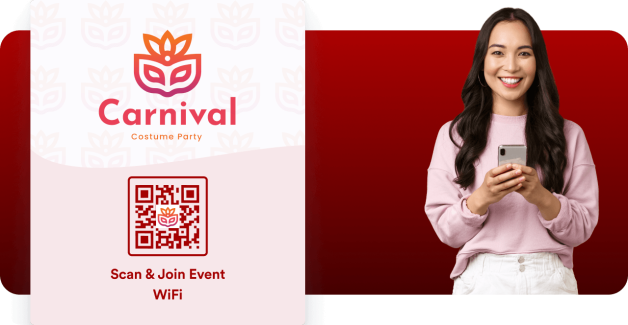
اسمح للحضور بالاتصال بشبكة الواي فاي الخاصة بالحدث على الفور من خلال وضع رموز QR على الشارات أو الملصقات أو شاشات العروض التقديمية.
رمز QR الخاص بشبكة الواي فاي هو رمز قابل للمسح الضوئي يعمل على توصيل المستخدمين تلقائيًا بشبكة لاسلكية. وبدلاً من إدخال اسم الشبكة وكلمة المرور يدويًّا، يمكن للمستخدمين مسح الرمز ضوئيًّا باستخدام هواتفهم والانضمام إلى الشبكة على الفور.
تُستخدم رموز QR الخاصة بشبكة الواي فاي بشكل شائع في المطاعم والمكاتب والفنادق والأماكن العامة لتوفير اتصال أسرع وأكثر راحة بالإنترنت للضيوف.
سهّل على الضيوف والعملاء والزوار الاتصال بشبكة الواي فاي الخاصة بك بمجرد مسح رمز QR. أنشئ رمز QR لشبكة الواي فاي الخاصة بك في ثوانٍ وشاركه في أي مكان.