أداة مراجعات متجر التطبيقات لموقعك على الويب
اعرض التقييمات الحقيقية لتطبيق iOS وتعليقات المستخدمين حيث يقوم الزوار بتقييم منتجك. وتتيح لك أداة «تقييمات متجر التطبيقات» من Jotform ربط صفحة التطبيق العامة في متجر التطبيقات، وعرض التقييمات الجديدة تلقائيًا، وتخصيص التصميم، وتضمين الأداة دون الحاجة إلى البرمجة.
كيفية إنشاء عنصر واجهة مراجعات متجر التطبيقات
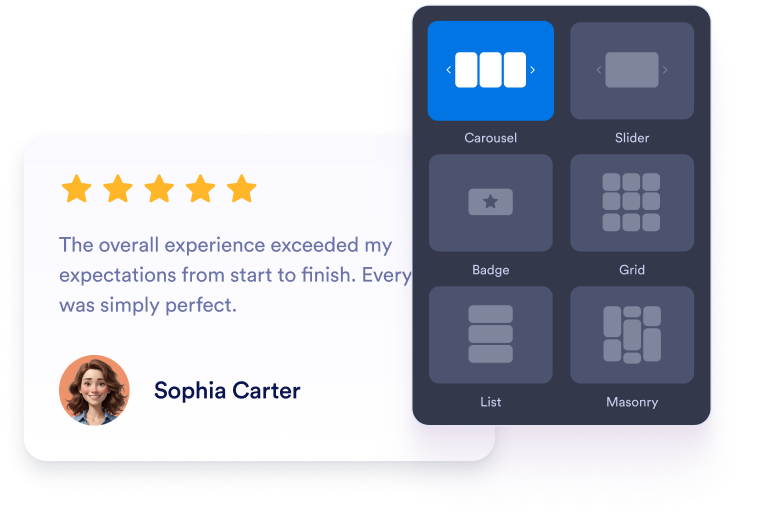
تخصيص عنصر واجهة المستخدم الخاص بك
اختر المحتوى والتصميم والألوان وطريقة العمل بحيث تتناسب الأداة مع تصميم موقعك الإلكتروني.
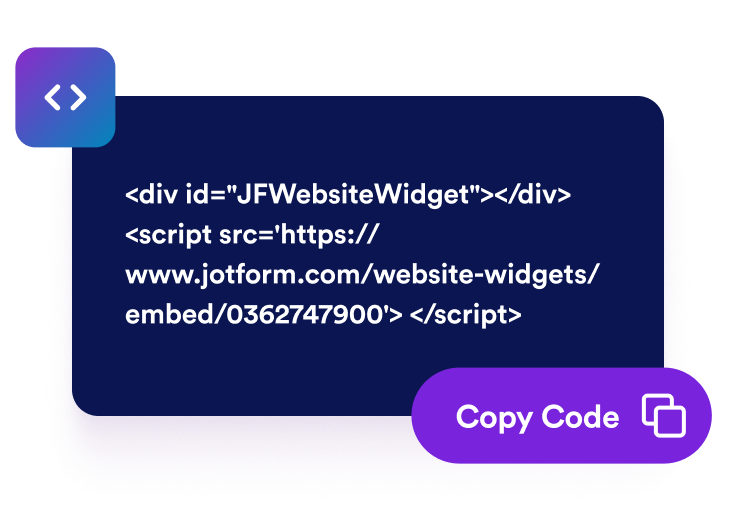
احصل على رمز التضمين
انسخ كود التضمين الجاهز للاستخدام الذي تم إنشاؤه بواسطة Jotform. لا حاجة إلى إعداد أو برمجة.

تضمينه في أي مكان
الصق الكود في موقعك الإلكتروني وانشره. وستظهر تقييماتك على متجر التطبيقات على الفور.
حوّل تقييمات App Store إلى قرارات واثقة بشأن التطبيقات
شجع الزوار على استكشاف تطبيقك
ضع التقييمات الإيجابية من متجر التطبيقات بجوار أزرار التنزيل أو نماذج التسجيل أو تفاصيل المنتج. يمكن لتعليقات المستخدمين الحقيقية أن ترد على المخاوف الشائعة وتساعد الزوار على تحديد ما إذا كان تطبيقك يلبي احتياجاتهم.

اكتسب ثقة المستخدمين من خلال تقييمات حقيقية للتطبيقات
اعرض التقييمات والتعليقات الحقيقية من مستخدمي iOS مباشرةً على موقعك الإلكتروني. فالتجارب المباشرة توفر للزوار معلومات إضافية وتسهل تقييم سمعة تطبيقك.

الحفاظ على تحديث محتوى المراجعات تلقائيًا
قم بربط صفحة تطبيقك في متجر التطبيقات (App Store) مرة واحدة فقط، وستظل الأداة المصغرة متزامنة مع التقييمات والتعليقات الجديدة. وبذلك، يمكن لموقعك الإلكتروني عرض تعليقات المستخدمين الحالية دون الحاجة إلى إجراء تحديثات يدوية متكررة.

تعزيز ظهور التطبيق من خلال محتوى التقييمات
يمكن أن تجعل تعليقات المستخدمين ذات الصلة صفحات تطبيقك أكثر فائدة وإفادة للزوار. ورغم أن التقييمات لا تضمن حصولك على تصنيفات أعلى في نتائج البحث، إلا أنها يمكن أن تثري صفحتك بمحتوى حديث ومخصص للمنتج.

لماذا تتميز أدوات Jotform لمواقع الويب؟
تجعل أدوات Jotform موقع الويب الخاص بك أكثر تفاعلية وتساعد على زيادة معدلات التحويل. تتوفر العديد من الأدوات، بدءًا من تقييمات النجوم وأشرطة تمرير تقييمات العملاء، وصولًا إلى النوافذ المنبثقة التي تعرض تقييمات العملاء وتضمين الوسائط. أضف الأدوات إلى نماذجك أو صفحاتك المقصودة لجمع البيانات، وعرض آراء العملاء، وجمع العملاء المحتملين — دون الحاجة إلى كتابة أكواد.
أضف أدوات Jotform إلى موقعك الإلكتروني باستخدام كود تضمين بسيط. خصّص الأداة، واعرض معاينة لشكلها، ثم أدرجها في أي صفحة تدعم HTML المخصص أو حزم التضمين، وكل ذلك دون الحاجة إلى مطور.
استخدم أدوات مواقع الويب من Jotform لجمع بيانات العملاء المحتملين، وإظهار تقييمات العملاء، وعرض الآراء الاجتماعية، وتضمين ملفات الوسائط، أو إضافة أدوات مفيدة لصفحات ويب. تقوم كل أداة بمساعدة الزوار على التفاعل مع خدماتك مباشرةً من موقعك الإلكتروني.
إذا كنت بحاجة إلى مساعدة في إعداد أداتك أو تخصيصها أو تضمينها أو استكشاف المشكلات وإصلاحها، فإن فريق دعم العملاء في Jotform متاح على مدار الساعة طوال أيام الأسبوع. يمكنك المتابعة بثقة، مع العلم أن المساعدة متاحة عندما تحتاج إليها.
أين يمكنك استخدام ويدجت مراجعات متجر التطبيقات الخاصة بك
أضف تقييماتك إلى الصفحات التي يبحث فيها الزوار عن تطبيقك ويقررون ما سيفعلونه بعد ذلك.
صفحات الهبوط الخاصة بتطبيقات iOS لمساعدة المستخدمين في اتخاذ قرارات التنزيل.
أقسام الصفحة الرئيسية لعرض تقييمات المستخدمين الحقيقيين في وقت مبكر.
صفحات مميزة لتسليط الضوء على مزايا المنتج من خلال تجارب العملاء.
صفحات الأسعار أو الاشتراكات لمعالجة تردد العملاء قبل الشراء.
صفحات الإصدارات والتحديثات لتوضيح كيفية تفاعل المستخدمين مع تطبيقك.
صفحات الدعم أو الأسئلة الشائعة لتوفير مزيد من الطمأنينة للمستخدمين الجدد.
حوّل العملاء المحتملين إلى مبيعات حقيقية باستخدام منشئ النماذج من Jotform
حوّل التفاعل إلى نتائج فعلية مع Jotform. أنشئ نماذج قوية لجمع بيانات العملاء المحتملين، واستلام المدفوعات، وأتمتة الردود، كل ذلك في مكان واحد. تصل جميع البيانات المرسلة إلى صندوق الوارد في Jotform الخاص بك، حيث يمكنك المتابعة أو الربط مع تطبيقاتك المفضلة.
ابدأ - إنه مجاني!
أسئلة متكررة ومتداولة
ما هي أداة عرض تقييمات متجر التطبيقات؟
تعرض أداة «تقييمات متجر التطبيقات» التقييمات والتعليقات العامة الواردة من صفحة التطبيق في متجر تطبيقات Apple على موقعك الإلكتروني. وهي توفر للزوار طريقة سهلة لاستكشاف تجارب مستخدمي iOS الحقيقية دون الحاجة إلى مغادرة الصفحة.
كيف يمكنني إضافة تقييمات متجر التطبيقات إلى موقعي الإلكتروني؟
ما هي تخطيطات المراجعة التي يمكنني استخدامها؟
هل يمكنني تخصيص أداة «تقييمات متجر التطبيقات»؟
هل ستظهر التعليقات الجديدة في متجر التطبيقات تلقائيًا؟
هل يمكنني اختيار التعليقات التي يتم عرضها من متجر التطبيقات؟
ماذا أفعل إذا كان رابط صفحة التطبيق الخاصة بي في متجر التطبيقات لا يعمل؟
هل أحتاج إلى كتابة كود لاستخدام عنصر الواجهة؟
هل الأداة متوافقة مع الأجهزة المحمولة؟
هل يمكنني إنشاء أداة عرض تقييمات متجر التطبيقات مجانًا؟
ما منصات المواقع الإلكترونية التي تدعم الأداة؟
هل يمكنني الحصول على مساعدة في إعداد الأداة المصغرة؟