-
 icire
icireMerhaba,
Jotform hesabıma giriş yaptığım e‑posta adresi: ilknurduntas@xn--ilknurdnta-geb50j.com.
Bu adresin alan adı DNS hatası nedeniyle sistemde “bounce listesinde / Host veya alan adı bulunamadı” uyarısı çıkıyor ve bu yüzden güvenlik/doğrulama kodları dahil hiçbir e‑postayı alamıyorum.
Hesabıma giriş yapabiliyorum ancak kod gelmediği için e‑posta ve telefon numaramı kendim güncelleyemiyorum.
Lütfen hesabımın e‑posta adresini manuel olarak şu çalışan adresle günceller misiniz: id@ilknurduntas.com
Teşekkürler.
-
 Podo: Destek Uzmanı
Merhaba, ben Podo.
Hesabınıza giriş yapabiliyor olmanız çok iyi, ancak mevcut e‑posta adresiniz DNS/alan adı hatası nedeniyle bounce listesine düştüğü için bizim taraftan manuel olarak e‑posta adresi değiştirme işlemi yapamıyorum.
Bu durumda aşağıdaki adımları izlemenizi rica edeceğim:
- Lütfen şu rehberdeki formu doldurun: Recover Your Jotform Account
- Formda, erişemediğiniz mevcut e‑posta adresinizi (ilknurduntas@xn--ilknurdnta-geb50j.com) ve kullanmak istediğiniz yeni e‑posta adresinizi (id@ilknurduntas.com) açıkça belirtin.
- Açıklama kısmında, alan adınızın DNS hatası nedeniyle bounce listesine düştüğünü ve doğrulama kodu alamadığınız için e‑posta ve telefon numaranızı güncelleyemediğinizi mutlaka yazın.
Bu form doğrudan hesap kurtarma ve e‑posta güncelleme ekibimize iletilir; onlar gerekli kimlik/doğrulama kontrollerini yaparak hesabınızın e‑posta adresini sizin için güncelleyebilir.
Formu doldururken takıldığınız bir yer olursa, hangi adımda kaldığınızı yazarsanız birlikte üzerinden geçebiliriz.
-
 Eliza Enterprise Support
Hi İlknur,
Thanks for reaching out to Jotform Support. Our Turkish Support agents are busy helping other Jotform users right now, so I'll try to help you in English using Google Translate, but you can reply in whichever language you feel comfortable using. Or, if you'd rather have support in Turkish, let us know and we can have them do that. But, it might take a while until they're available again.
Now, coming back to your question, the account email change needs to be initiated on your end. Since you have successfully removed your email address from the Bounce list, can you try changing your account email again and see how it goes?
But if you'd like to keep the same email address and prevent having it in the Bounce list again, we recommend that you set up a custom SMTP to use your email sender as provider. Let me walk you through it:
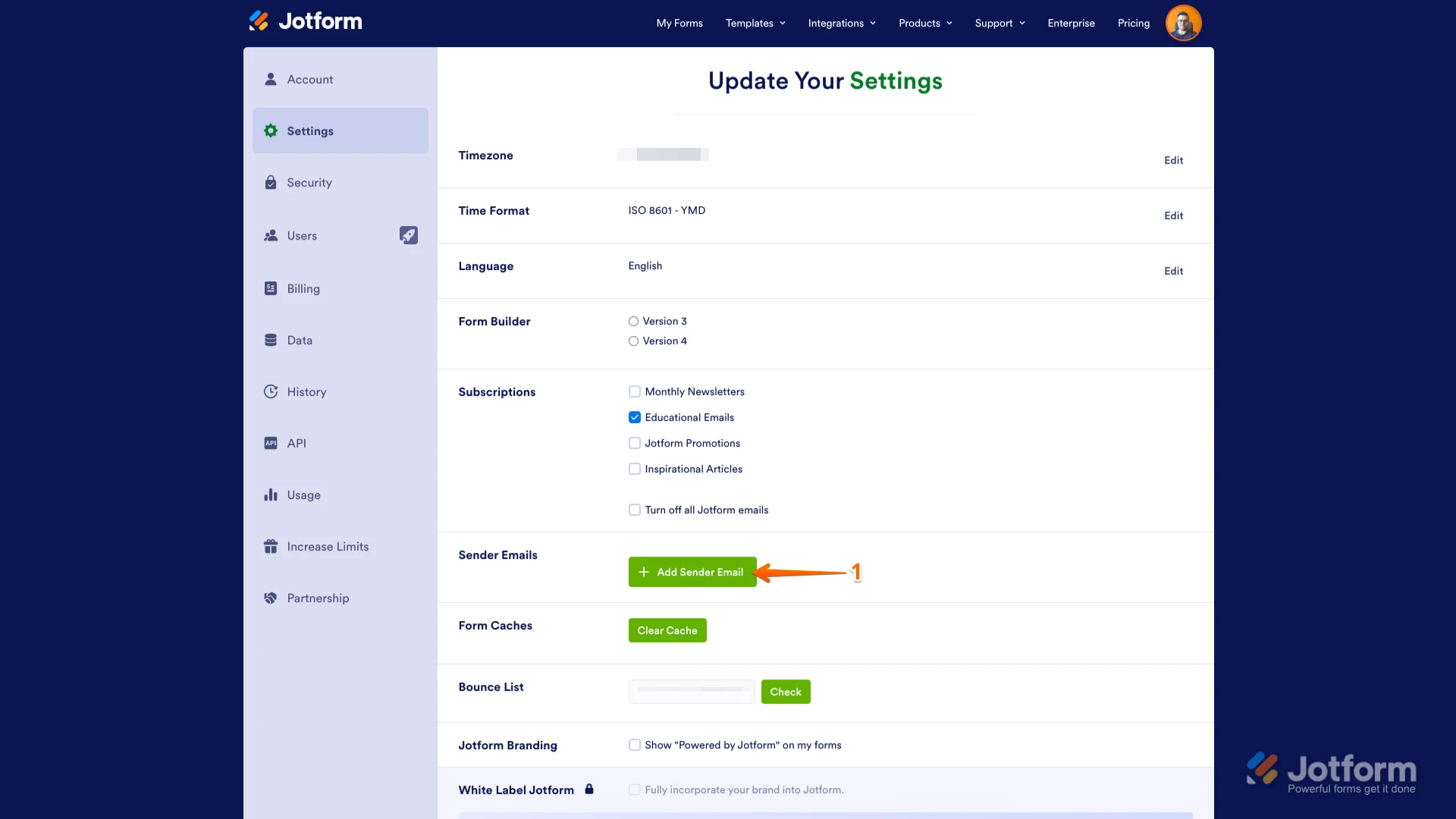
1. Go to the Settings page while logged in to your Jotform account and click on Add Sender Email in the Sender Emails section.

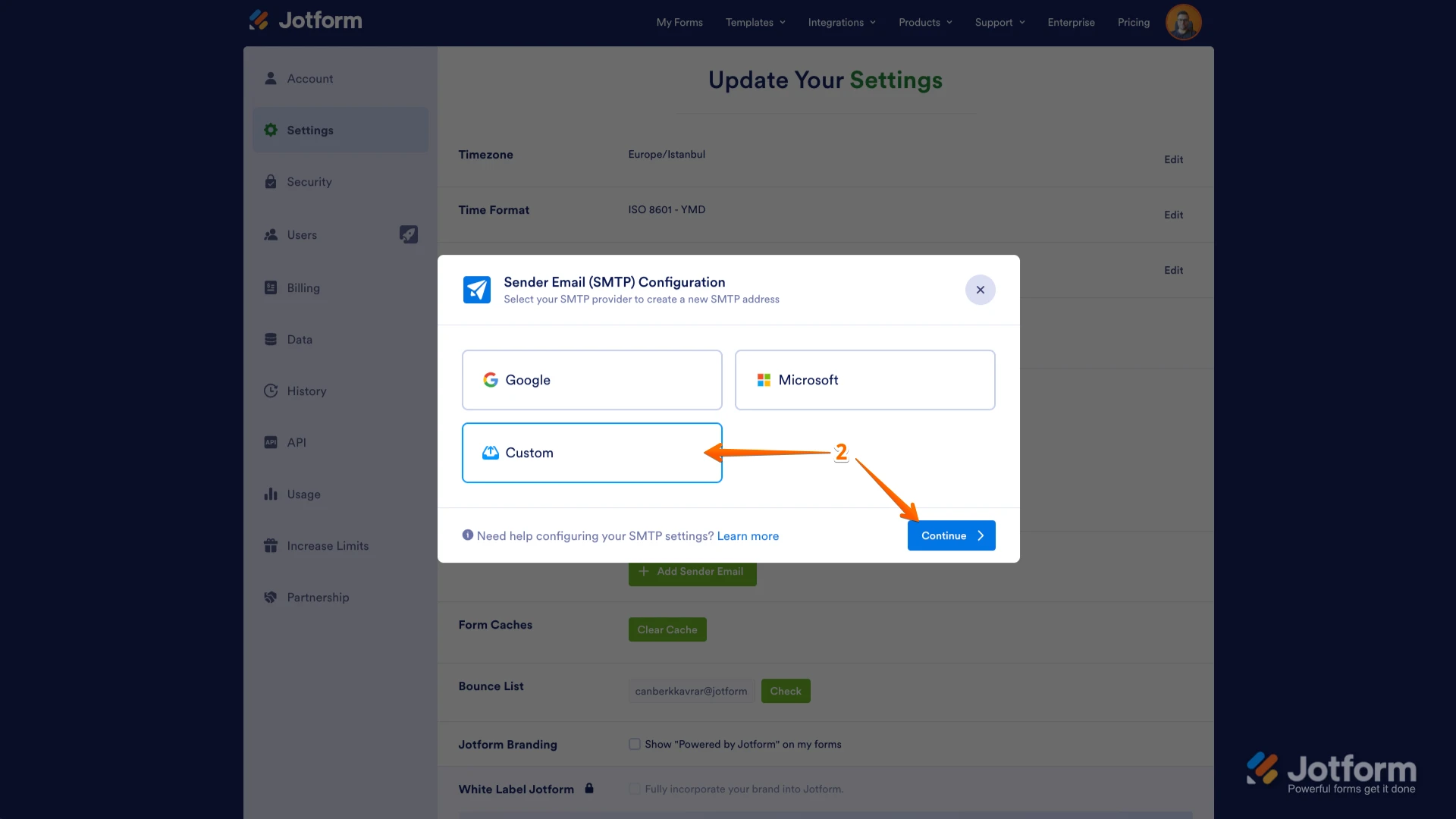
2. In the window that opens, select Custom and click on the Continue button.
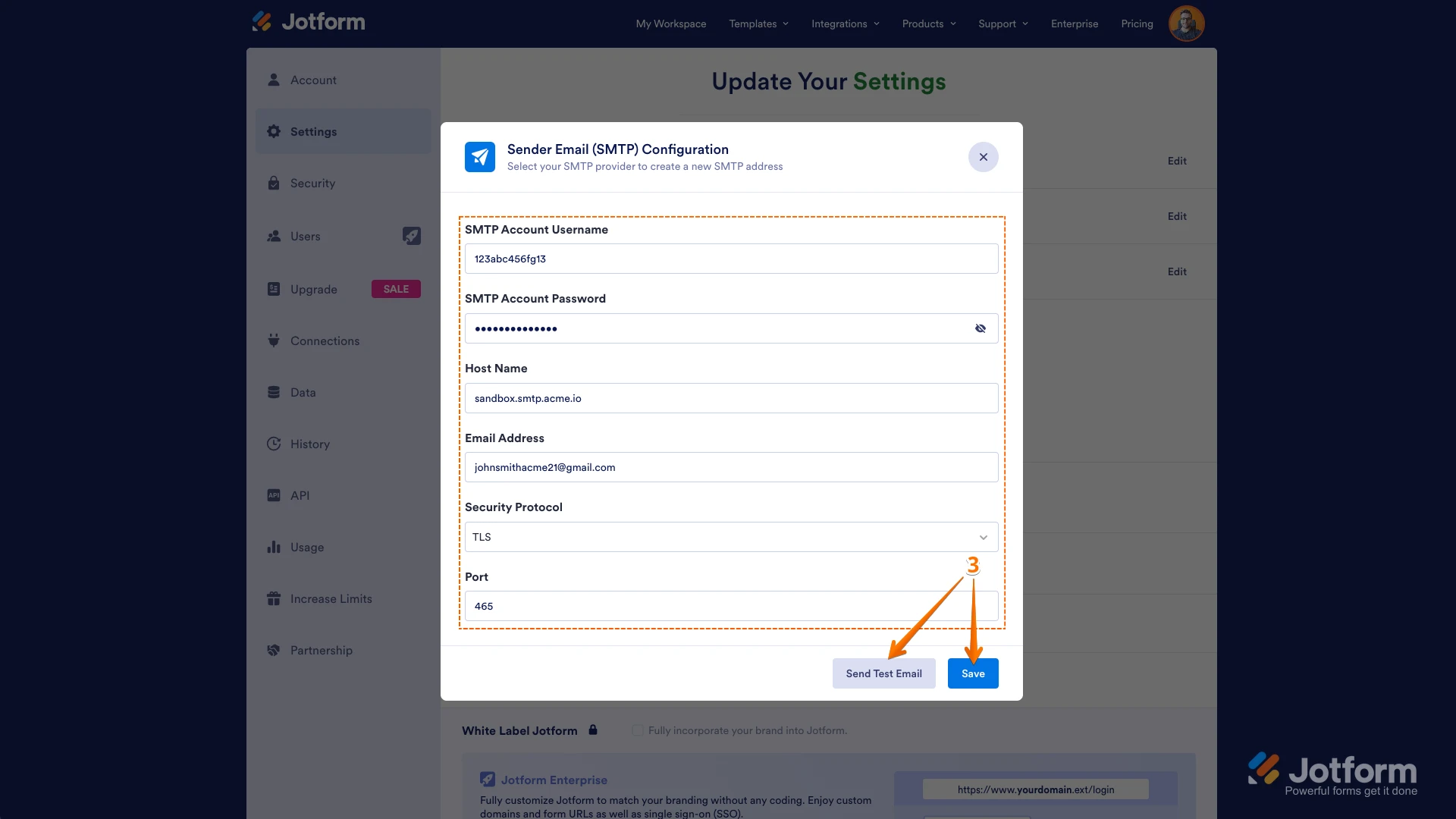
3. Enter your email provider's details, click on Send Test Email to check if it’s set up correctly, and then click on Save.
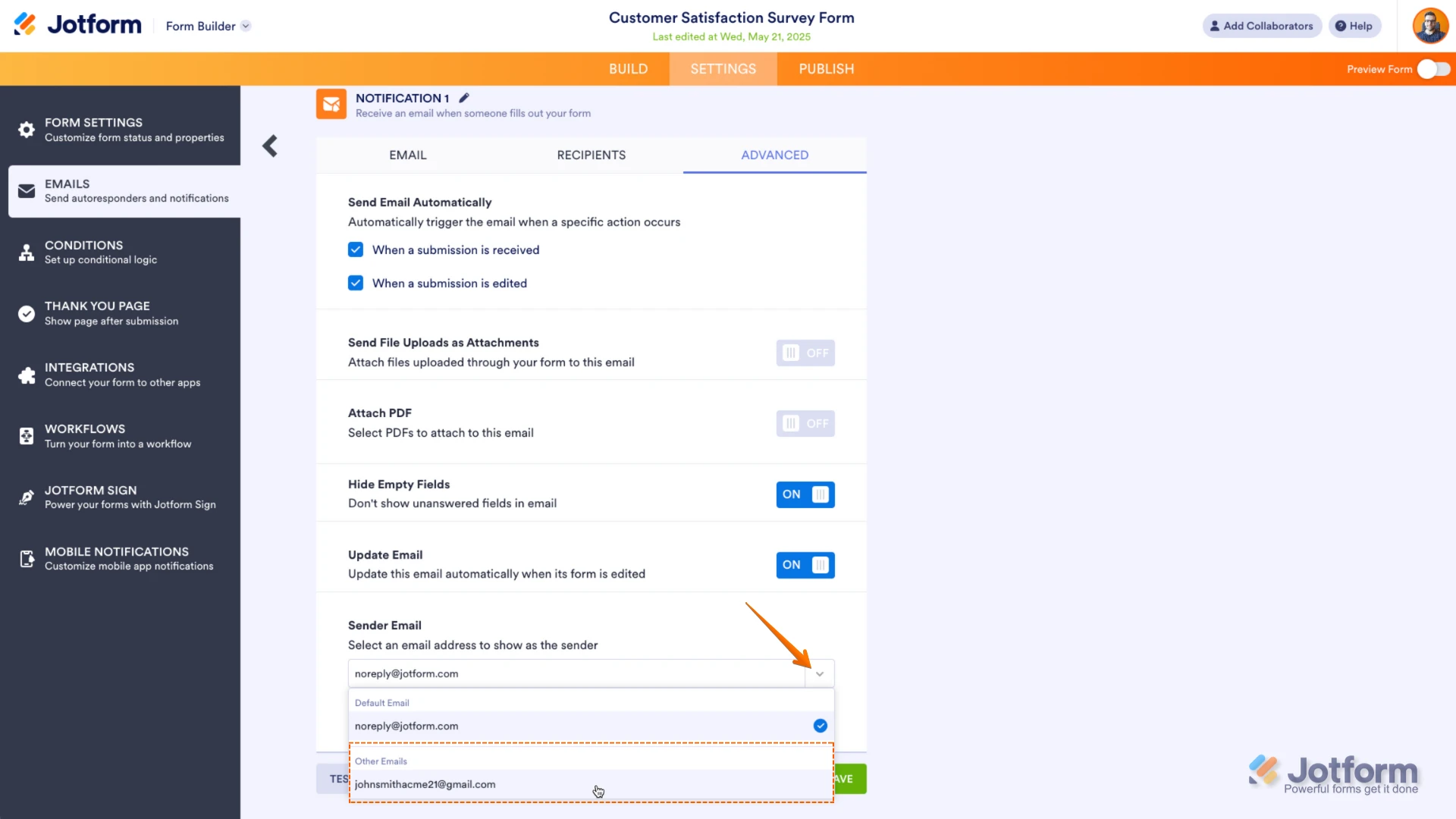
Now you should select your custom SMTP in your email properties under email settings in Form Builder, and if you’re using Workflow Builder, do the same there. Check below to see how it looks in Form Builder:And here’s how it looks in Workflow Builder:Give it a try and let us know if you need any help.

 Now you should select your custom SMTP in your email properties under email settings in Form Builder, and if you’re using Workflow Builder, do the same there. Check below to see how it looks in Form Builder:
 And here’s how it looks in Workflow Builder:
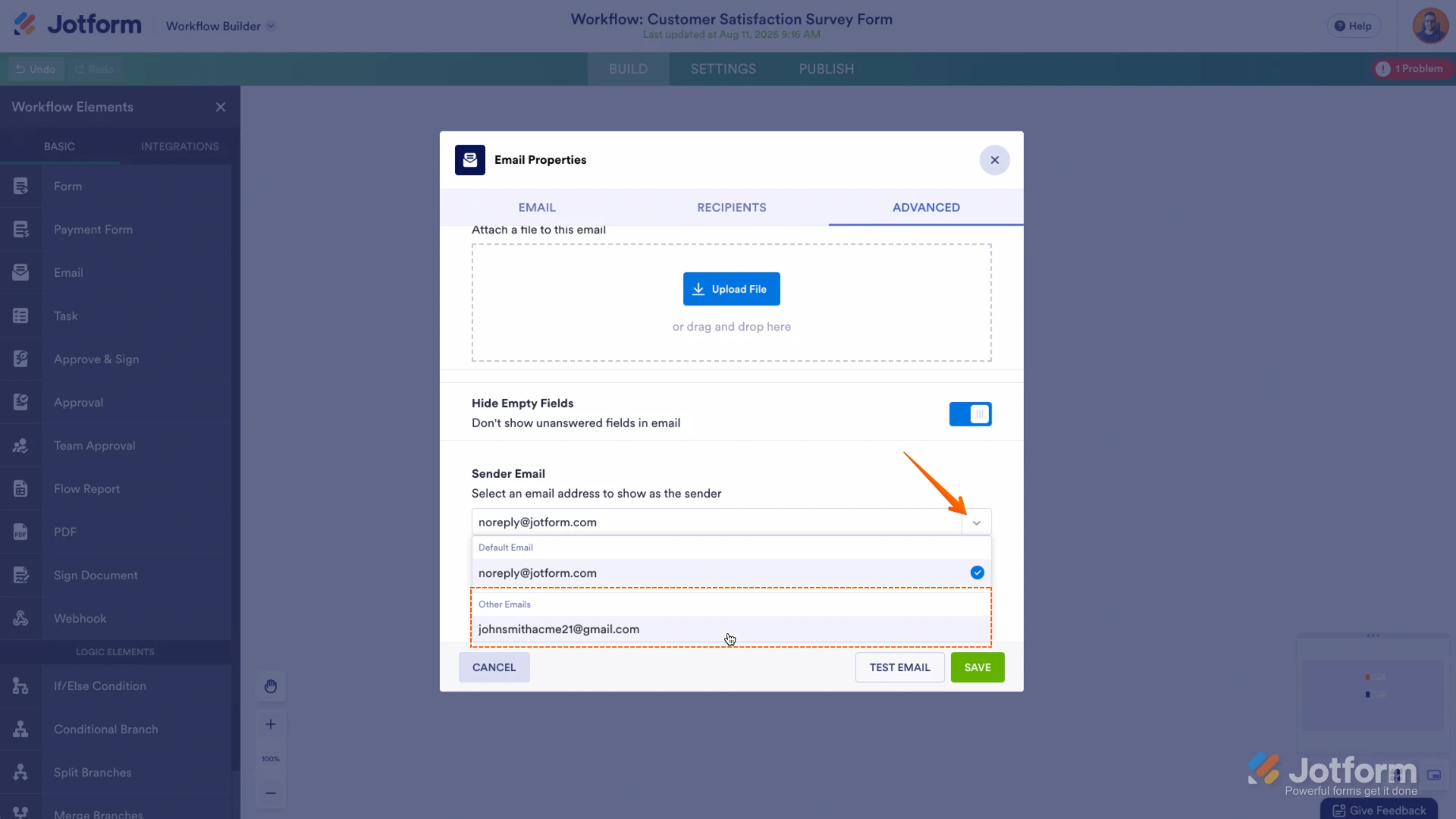 Give it a try and let us know if you need any help.