Google Reviews Widget لموقعك الإلكتروني
أضف Google Reviews widget مباشر إلى موقعك الإلكتروني واعرض آراء العملاء الحقيقية في المكان الأكثر أهمية. قم بإعداده في ثوانٍ باستخدام أداة Jotform المجانية بدون برمجة. قم بمزامنة مراجعات Google Business الخاصة بك تلقائيًا، وخصّص التخطيط، ودع أفضل شهادات العملاء تعزز الثقة ومعدلات التحويل.
كيفية إنشاء عنصر واجهة تقييمات Google
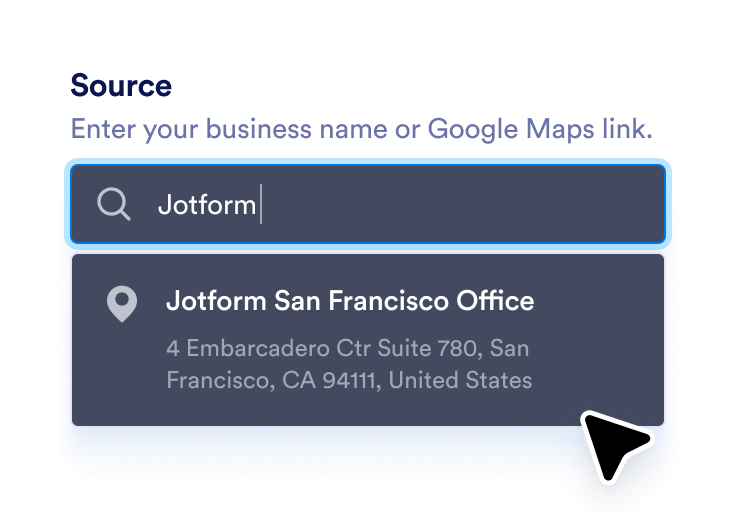
اربط نشاطك التجاري على Google
أدخل اسم نشاطك التجاري أو رابط Google Maps لمزامنة أحدث مراجعاتك تلقائيًا.
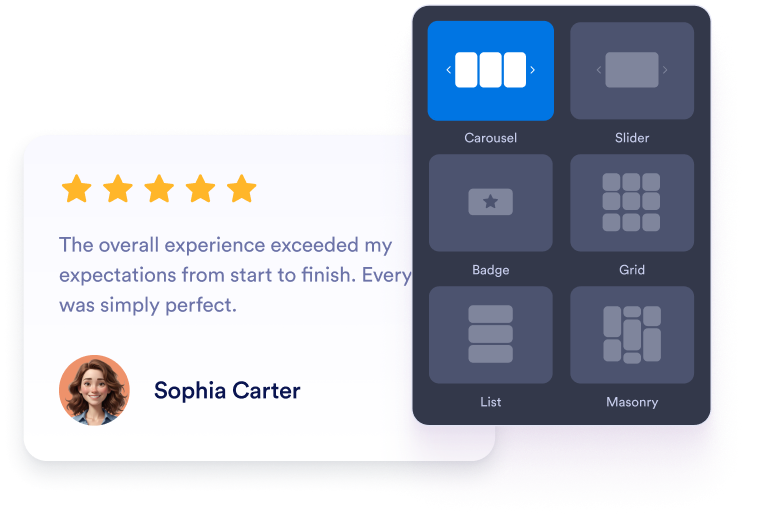
تخصيص عنصر واجهة المستخدم الخاص بك
اختر التصميم والألوان والمظهر العام المفضل لديك ليتناسب مع تصميم موقع الويب الخاص بك.
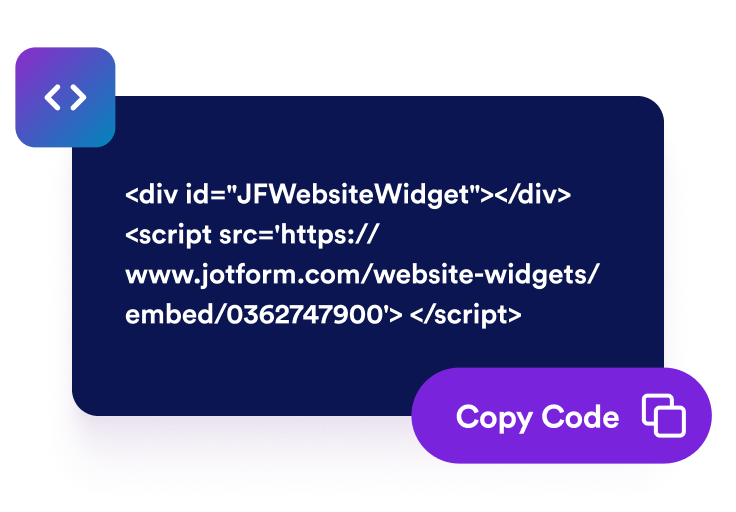
احصل على رمز التضمين
انسخ كود التضمين الذي تم إنشاؤه تلقائيًا والصقه في أي مكان على موقع الويب الخاص بك.
حوّل التعليقات الإيجابية إلى نمو حقيقي للأعمال
بناء المصداقية من خلال شهادات حقيقية
تُسهم تقييمات Google الحقيقية في تعزيز سمعة عملك بشكل فوري. يثق الزوار بتجارب العملاء الآخرين أكثر من أي محتوى تسويقي، مما يساعدك على بناء ثقة فورية وإثبات اجتماعي.

تحويل المزيد من الزوار إلى عملاء يدفعون
تؤثر التقييمات الإيجابية على قرارات الزوار في اللحظة التي يكونون فيها مستعدين للشراء. من خلال تسليط الضوء على رضا العملاء، تساعد أداتك على تحويل المتصفحين العاديين إلى عملاء أوفياء.

حافظ على تحديث المراجعات باستخدام التحديثات التلقائية
تتزامن أداتك مباشرةً مع ملفك الشخصي على Google Business، ما يعني ظهور التقييمات الجديدة تلقائيًا. لا حاجة للتحديثات اليدوية، ما يعني أن صفحتك تعرض دائمًا أحدث التقييمات وأكثرها صلة.

تحسين محركات البحث والظهور في البحث المحلي
يعكس عرض تقييمات Google التي تم التحقق منها على موقعك الإلكتروني لمحركات البحث أن نشاطك التجاري يتمتع بالنشاط والموثوقية. ويمكن أن يحسن ذلك ترتيبك في نتائج البحث المحلية ويجذب العملاء القريبين.

لماذا تتميز أدوات Jotform لمواقع الويب؟
تجعل أدوات Jotform موقع الويب الخاص بك أكثر تفاعلية وتساعد على زيادة معدلات التحويل. تتوفر العديد من الأدوات، بدءًا من تقييمات النجوم وأشرطة تمرير تقييمات العملاء، وصولًا إلى النوافذ المنبثقة التي تعرض تقييمات العملاء وتضمين الوسائط. أضف الأدوات إلى نماذجك أو صفحاتك المقصودة لجمع البيانات، وعرض آراء العملاء، وجمع العملاء المحتملين — دون الحاجة إلى كتابة أكواد.
أضف أدوات Jotform إلى موقعك الإلكتروني باستخدام كود تضمين بسيط. خصّص الأداة، واعرض معاينة لشكلها، ثم أدرجها في أي صفحة تدعم HTML المخصص أو حزم التضمين، وكل ذلك دون الحاجة إلى مطور.
استخدم أدوات مواقع الويب من Jotform لجمع بيانات العملاء المحتملين، وإظهار تقييمات العملاء، وعرض الآراء الاجتماعية، وتضمين ملفات الوسائط، أو إضافة أدوات مفيدة لصفحات ويب. تقوم كل أداة بمساعدة الزوار على التفاعل مع خدماتك مباشرةً من موقعك الإلكتروني.
إذا كنت بحاجة إلى مساعدة في إعداد أداتك أو تخصيصها أو تضمينها أو استكشاف المشكلات وإصلاحها، فإن فريق دعم العملاء في Jotform متاح على مدار الساعة طوال أيام الأسبوع. يمكنك المتابعة بثقة، مع العلم أن المساعدة متاحة عندما تحتاج إليها.
حوّل العملاء المحتملين إلى مبيعات حقيقية باستخدام منشئ النماذج من Jotform
حوّل التفاعل إلى نتائج فعلية مع Jotform. أنشئ نماذج قوية لجمع بيانات العملاء المحتملين، واستلام المدفوعات، وأتمتة الردود، كل ذلك في مكان واحد. تصل جميع البيانات المرسلة إلى صندوق الوارد في Jotform الخاص بك، حيث يمكنك المتابعة أو الربط مع تطبيقاتك المفضلة.
ابدأ - إنه مجاني!
أسئلة متكررة ومتداولة
كيف أضيف تقييمات Google إلى موقعي الإلكتروني؟
يمكنك إضافة مراجعات Google إلى موقعك باستخدام أداة مراجعات Google من Jotform. ما عليك سوى ربط حساب Google Business الخاص بك عن طريق لصق رابط Google Place الخاص بك في حقل المصدر في أداة العرض. اختر التخطيط المفضل لديك مثل الكاروسيل، أو شريط التمرير، أو الشارة، وخصص الألوان، والسمات، والعرض لتتوافق مع تصميم موقعك الإلكتروني. بعد الانتهاء، انقر على Continue وانسخ كود التضمين. الصقه في موقعك حيث تريد ظهور المراجعات، وستظهر فورًا.
هل يمكنني اختيار كيفية ظهور مراجعاتي على الصفحة؟
هل سيتم تحديث أداتي تلقائيًا عند ورود مراجعات جديدة؟
هل من الممكن تصفية المراجعات التي تظهر؟
ما مدى التخصيص الذي يقدمه الـ widget؟
هل يمكنني جمع المراجعات الجديدة باستخدام Jotform؟
هل Google Reviews widget مجاني؟
كيف يمكنني الحصول على رابط المشاركة الخاص بـ Google Maps؟