-
 augustobruno
Hola, buenas noches.
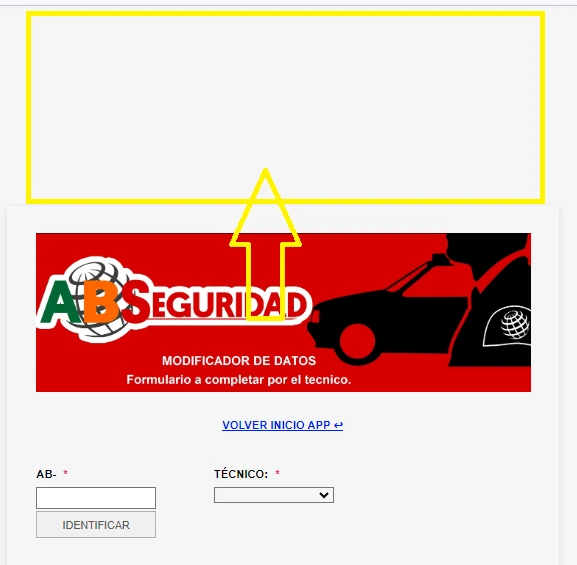
Me sucede que en el formulario https://form.jotform.com/230515249114650 en la parte superior, me queda un espacion en blanco, y no puedo quitarlo, no hay ningun elemento que produzca dicho espacio, en el resto de los formulario no me pasa. Aguardo ayuda.
Saludos.

-
 Ravi Jotform Support
Hello Augusto,
Thanks for reaching out to Jotform Support. Unfortunately, our Spanish Support agents are currently busy helping other Jotform users. I'll try to assist you in English using Google Translate, but you can reply in whichever language you feel comfortable using. Or, if you'd prefer to receive support in Spanish, let us know, and we can have them do that. But you'd have to wait until they're available again.
When I checked your form, I was able to replicate the issue. Please add the below CSS Code in your form to remove the additional space above the form.
.form-all {

  margin-top: 0px !important;

}
Let me show you how to add the CSS code in your form:
- In Form Builder, Click on the Paint Brush icon on the top right corner of the screen.
- Go to the Style menu.
- Scroll down to the end and add above CSS code in the Inject Custom CSS section.
- After adding the code, Click on Save.
We also have a guide How to Inject Custom CSS Codes that you can check out.
I have made changes in the cloned form. Here is the link to the clone form. If needed you can clone my form to check the CSS code and its placement. We also have a guide on How to Clone an Existing Form From a URL that you can check out.
Reach out again if you need any other help.