

Modèles d'applications pour ressources humaines

Application de Pointage des heures
Abandonnez les feuilles de présence en papier grâce à notre application gratuite de pointage des heures d'entrée et de sortie ! Les employés peuvent pointer à leur arrivée ou à leur départ de leur poste en utilisant l'application sur une tablette ou un ordinateur de l'entreprise. En tant que propriétaire du compte, vous recevrez des notifications instantanées pour chaque nouvelle soumission de formulaire, vous saurez donc si un employé est en retard ou part avant l'heure prévue. Vous pouvez consulter toutes les entrées sous forme de tableau, de calendrier ou de carte en utilisant le modèle de liste de pointage Punch disponible sur Jotform Tables. Personnalisez votre application de pointage des heures d'entrée et de sortie en seulement quelques minutes. Sans aucun codage, vous pouvez utiliser notre interface de glisser-déposer pour ajouter de nouveaux formulaires, inclure un lien vers votre feuille de présence, mettre à jour le texte et le design de l'application, intégrer des liens, et bien plus encore. Lorsque votre application est prête à être utilisée, gardez-la ouverte sur un appareil de l'entreprise pour que les employés puissent l'utiliser en commençant leur service. Simplifiez la gestion des employés avec une application de pointage des heures d'entrée et de sortie pour votre entreprise.
Accéder à la catégorie :Human Resources Apps
Application de candidature
Une application de candidature est utilisée par les équipes RH pour publier des postes vacants pour l'entreprise et collecter des candidatures à partir de n'importe quel appareil. Quels que soient les postes pour lesquels vous recrutez, trouvez rapidement les meilleurs candidats grâce à notre application gratuite de candidature. Cette application prête à l'emploi comprend des formulaires de demande d'emploi distincts pour divers postes de direction ainsi que des possibilités de stage. Vous recevrez des soumissions instantanément, prêtes à être visualisées et partagées dans votre compte Jotform. Personnalisez ce modèle d'application de candidature en quelques clics. Aucun codage requis - il suffit de glisser-déposer pour créer et ajouter de nouveaux formulaires de demande d'emploi, mettre à jour le texte fourni, télécharger une image d'arrière-plan différente et même inclure la marque de votre entreprise. Lorsque vous êtes prêt à le partager, intégrez le lien dans la page Carrières de votre entreprise afin que les employés potentiels puissent télécharger l'application sur leur smartphone, tablette ou ordinateur. Facilitez le processus de candidature pour les candidats et votre équipe RH avec une application de candidature entièrement personnalisée pour votre entreprise.
Accéder à la catégorie :Human Resources Apps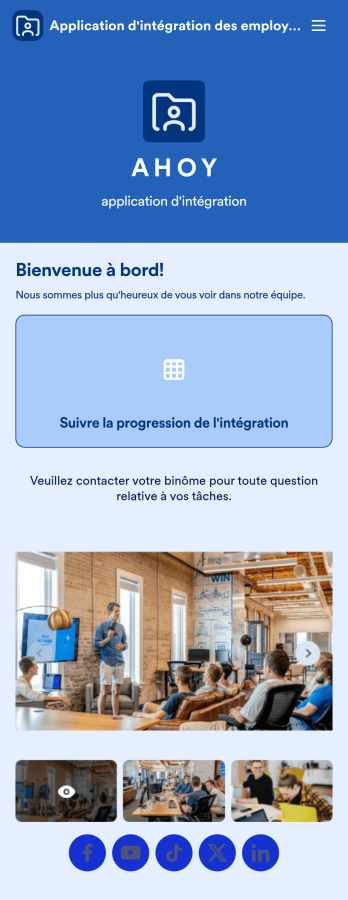
Application d'intégration des employés
Une application d'intégration des employés facilite l'intégration d'un nouvel employé dans votre entreprise en mettant à disposition d'importantes ressources internes sur n'importe quel appareil. Simplifiez la période de transition et intégrez avec succès les nouvelles recrues grâce à une application d'intégration des employés entièrement personnalisée, optimisée par Jotform. Cette application mobile prête à l'emploi comprend un tableau pour suivre la progression de l'intégration, des photos d'entreprise et des liens sociaux, ainsi qu'une page séparée avec les coordonnées de l'équipe. Les nouveaux employés peuvent télécharger l'application sur leur appareil mobile ou leur ordinateur pour un accès facile à tout moment. Personnalisez cette application d'intégration des employés pour votre entreprise en quelques clics. Sans codage, vous pouvez utiliser notre outil de création par glisser-déposer pour ajouter des formulaires et des tableaux, intégrer des liens, télécharger des documents et des vidéos de formation, créer de nouvelles pages, mettre à jour les polices et les couleurs, et bien plus encore. Lorsque votre application est prête à être utilisée, elle peut être envoyée directement aux nouvelles recrues via des invitations par e-mail ou le lien de l'application. L'intégration réussie des employés peut être la clé du succès de l'entreprise. Commencez donc avec une application d'intégration des employés efficace et facile à utiliser, adaptée à votre entreprise.
Accéder à la catégorie :Human Resources AppsÀ propos des Modèles d'applications pour ressources humaines
Les applications RH sont des solutions mobiles et web conçues pour optimiser et structurer les opérations des ressources humaines dans de nombreux secteurs. Elles couvrent un large éventail de fonctions, du recrutement au suivi des performances, en passant par l’intégration des collaborateurs et la gestion de la conformité réglementaire. En automatisant les tâches répétitives et en centralisant les données des employés, elles renforcent l’efficacité organisationnelle, sécurisent les processus et contribuent à un environnement de travail plus engageant. Des domaines tels que la santé, l’éducation ou encore les entreprises privées peuvent en tirer parti grâce à des outils adaptés à leurs enjeux spécifiques et à des flux de travail fluides en conditions réelles.
Jotform, grâce à son générateur d’applications no code, permet aux entreprises de créer des applications RH personnalisées sans compétences techniques avancées. S’appuyant sur la technologie des applications web progressives (PWA), les applications conçues avec les Applis Jotform peuvent être installées directement depuis un navigateur web, sans téléchargement sur un magasin d’applications, et sont optimisées pour les appareils iOS, Android, ainsi que les tablettes et les ordinateurs de bureau. La gestion centralisée des données dans les Tableaux Jotform facilite l’accès et l’organisation des informations RH. Cette approche technologique aide les professionnels des ressources humaines à optimiser leurs processus et à améliorer l’efficacité opérationnelle globale.
Pourquoi utiliser des applications RH ?
- Les applications RH améliorent considérablement l'efficacité opérationnelle en automatisant les tâches routinières telles que la planification, la gestion des congés et le traitement des salaires. Cette automatisation libère un temps précieux pour les professionnels des ressources humaines et leur permet de se concentrer sur des initiatives stratégiques qui favorisent la croissance de l'entreprise.
- Ces applications offrent une gestion centralisée des données et garantissent que toutes les informations des employés sont stockées en un seul endroit. Cette centralisation réduit les risques de perte de données, simplifie l’accès aux informations et améliore les processus de prise de décision.
- Avec les applications RH, les entreprises peuvent améliorer l'engagement de leurs employés grâce à des mécanismes de communication et de feedback simplifiés. Ces applications facilitent les interactions directes entre les équipes RH et les employés et favorisent une culture de travail plus inclusive et plus réactive.
- Les applications RH facilitent le respect des lois et réglementations du travail grâce à des fonctionnalités automatisées de suivi et de production de rapports. Elles garantissent ainsi le respect des exigences légales et minimisent le risque d'amendes coûteuses et de litiges juridiques.
- Ces applications s'intègrent parfaitement aux systèmes d'entreprise existants, facilitent l'échange de données et la synchronisation des flux de travail, améliorent la fonctionnalité globale des opérations RH et favorisent un environnement professionnel cohérent.
Problèmes courants résolus par les applications RH
- Les services RH sont souvent confrontés à une gestion de volumes importants de données sur les employés. Les applications RH résolvent ce défi en offrant des capacités centralisées de stockage et de récupération des données, qui rendent les informations facilement accessibles et gérables.
- Les professionnels des ressources humaines ont souvent du mal à garantir la conformité avec des lois du travail en constante évolution. Ces applications fournissent des alertes automatisées et des fonctionnalités de rapports qui aident les entreprises à respecter les exigences légales et à réduire tout risque de problèmes de conformité.
- Les problèmes de communication entre les services RH et les employés peuvent parfois entraîner des malentendus et une baisse de motivation. Les applications RH améliorent les canaux de communication, car elles fournissent une seule plateforme pour gérer les feedbacks, les annonces et les interactions directes, afin d'améliorer la satisfaction globale des employés.
- La gestion des processus de recrutement peut s'avérer chronophage et inefficace. Les applications RH simplifient le recrutement en automatisant le suivi des candidats et la planification des entretiens. Elles permettent ainsi aux équipes RH de se concentrer sur la sélection des meilleurs candidats pour leur entreprise.
Des fonctionnalités adaptées à de nombreux cas d’utilisation
- Pour la gestion des plannings des employés, l’interface par glisser-déposer permet aux responsables RH d’ajuster et d’attribuer facilement les horaires. Elle favorise ainsi une gestion efficace des effectifs et réduit les conflits d’emplois du temps.
- Pour faciliter les processus de recrutement, les applications RH automatisent les flux de travail afin de rationaliser le suivi des candidats et la communication, et améliorer ainsi l'efficacité globale des processus d'embauche.
- En mettant en place des notifications push, les équipes RH peuvent garantir une communication rapide avec les employés concernant les mises à jour des politiques, les rappels et les annonces importantes, améliorant ainsi l'engagement et la conformité.
- Les intégrations de solutions de paiement, telles que Stripe et PayPal, permettent aux entreprises de traiter efficacement la paie au sein de l'application, de simplifier les transactions financières et de réduire les charges administratives.
- Les options de partage (via un lien direct, par email ou à l'aide d'un code QR) offre un grande flexibilité pour distribuer l'accès à l'application, impliquer plus facilement les employés et les parties prenantes dans les processus RH.
- Le mode hors ligne garantit l'accès et la mise à jour des données RH même sans connexion Internet, ce qui est essentiel pour les activités sur site et en cas de travail à distance.
- Le stockage centralisé des données dans les Tableaux Jotform permet une gestion complète des données, offre aux équipes RH une vue d'ensemble complète des informations sur les employés et facilite la prise de décisions éclairées.
Comment créer une application RH
- Choisissez un modèle adapté en filtrant par catégorie la liste des modèles ou partez de zéro.
- Personnalisez votre application à l'aide de l’interface intuitive par glisser-déposer afin de l’adapter précisément aux besoins RH et aux flux de travail propres à votre organisation.
- Partagez votre application à l'aide d'un lien, d'un code QR ou une intégration pour diffuser facilement l’application au sein de votre organisation et garantir son accessibilité à tous les utilisateurs.
Principaux cas d'utilisation des applications RH
- Pour les managers : les applications de ressources humaines mettent à disposition des outils complets pour superviser et optimiser la performance des équipes. Elles permettent de gérer facilement les plannings, d’approuver les demandes de congés et de suivre l’évolution des collaborateurs dans des tableaux de bord centralisés. Grâce à un accès en temps réel aux données RH essentielles, les managers peuvent prendre des décisions éclairées, et favoriser ainsi la productivité des équipes et leur alignement sur les objectifs de l'entreprise.
- Pour les équipes : les équipes bénéficient de fonctionnalités de communication et de collaboration améliorées grâce aux applications de ressources humaines. Les employés peuvent soumettre des demandes de congés, faire un suivi de leurs performances et recevoir les annonces de l’entreprise directement via l’application. Cela favorise un engagement accru des collaborateurs, car ils peuvent accéder facilement aux ressources nécessaires pour accomplir efficacement leurs tâches et rester informés des actualités de l’entreprise.
- Pour les clients : si les clients n’interagissent pas directement avec les applications RH, ils bénéficient indirectement de l’amélioration de l’efficacité et de la qualité de service qu’elles permettent au sein de l’organisation. En rationalisant leurs opérations RH, les entreprises peuvent se concentrer davantage sur la fourniture de produits et services exceptionnels et garantir ainsi que leurs clients sont satisfaits et reviennent.
En bref
Les applications de ressources humaines jouent un rôle essentiel dans la modernisation des opérations RH en proposant un ensemble complet de fonctionnalités qui permettent d'optimiser les processus et d’améliorer l’efficacité organisationnelle. Grâce au générateur d’applications no code et à la technologie des applications web progressives (PWA), les entreprises peuvent concevoir des applications personnalisées pour répondre à des problématiques RH spécifiques et optimiser la gestion des flux de travail. Ces applications favorisent une meilleure communication, le respect des réglementations et la gestion des données, et contribuent ainsi à une main-d’œuvre plus productive et plus engagée. Les applications RH aident les entreprises à atteindre leurs objectifs stratégiques tout en renforçant leur position concurrentielle sur le marché.
FAQ
1) Créer et utiliser des applications RH sur Jotform est-il gratuit ?
Créer et utiliser des applications de ressources humaines sur la plateforme est gratuit avec le forfait Débutant. Celui-ci permet aux utilisateurs d’explorer les principales fonctionnalités des Applis Jotform et de concevoir une application RH fonctionnelle sans frais. Toutefois, pour accéder à des fonctionnalités plus avancées et à des limites d’utilisation supérieures, il peut être nécessaire de passer à l’un des forfaits payants proposés par Jotform.
2) Les données et les paiements collectés via l'application sont-ils sécurisés ?
Absolument. Les données et les paiements collectés via les applications sont sécurisés. La plateforme met en œuvre des mesures de sécurité avancées, notamment le chiffrement des données et le respect des exigences du RGPD, afin de protéger l’ensemble des informations traitées. Cet engagement en matière de sécurité offre une tranquillité d’esprit aux entreprises qui gèrent des données RH sensibles ou qui réalisent des paiements via l’application.
3) Ai-je besoin de compétences en programmation pour créer une application de ressources humaines avec Jotform ?
Non. Nul besoin de compétences en programmation pour créer une application de ressources humaines avec Jotform. Le générateur d’applications no code de la plateforme permet aux utilisateurs de concevoir et de personnaliser des applications grâce à une interface simple par glisser-déposer. Cette approche intuitive rend la création d’applications accessible à tous, quel que soit son niveau d’expertise technique.
4) Can I collect payments for services directly through the app?
Oui. Il est possible de collecter des paiements pour des services directement depuis l’application grâce à des solutions de paiement intégrées telles que Stripe et PayPal. Ces intégrations permettent de réaliser des transactions financières fluides au sein de l’application et facilitent la gestion de la paie ou d’autres processus de paiement.
5) Jotform permet-il de collecter des données hors ligne au sein des applications RH ?
La plateforme prend en charge la collecte de données hors ligne pour les applications de ressources humaines, et permet aux utilisateurs d’accéder aux informations et de les mettre à jour même sans connexion Internet. Cette fonctionnalité est particulièrement utile pour les personnes qui travaillent à distance ou pour les opérations sur site lorsque l’accès à un réseau fiable est limité.
6) Are Jotform Apps compatible with both iOS and Android devices?
Les Applis Jotform sont entièrement compatibles avec les appareils iOS et Android. En tant qu’applications web progressives (PWA), elles peuvent être installées directement depuis un navigateur web, sans téléchargement depuis un magasin d’applications, pour une expérience fluide sur tous les types d’appareils.
7) Comment les applications RH améliorent-elles l'engagement des employés ?
Les applications de ressources humaines renforcent l’engagement des employés et offrent des plateformes dédiées aux feedbacks, à la communication et à l’accès aux ressources internes. Ces outils favorisent les interactions directes entre les équipes RH et les collaborateurs, et contribuent à instaurer une culture d’entreprise plus inclusive et réactive, qui valorise les contributions et les avis des employés.
8) Quels sont les avantages d'une gestion centralisée des données dans les applications RH ?
La gestion centralisée des données dans les applications RH présente de nombreux avantages, notamment une meilleure précision des informations, un accès simplifié aux données et des capacités améliorées de prise de décision. En regroupant toutes les données des employés au même endroit, les entreprises peuvent rationaliser les processus RH, réduire leur charge administrative et conserver des dossiers complets pour répondre aux exigences de conformité et de reporting.