-
 OKHome2026
Hi,
Kami mengalami kendala sebagai berikut :
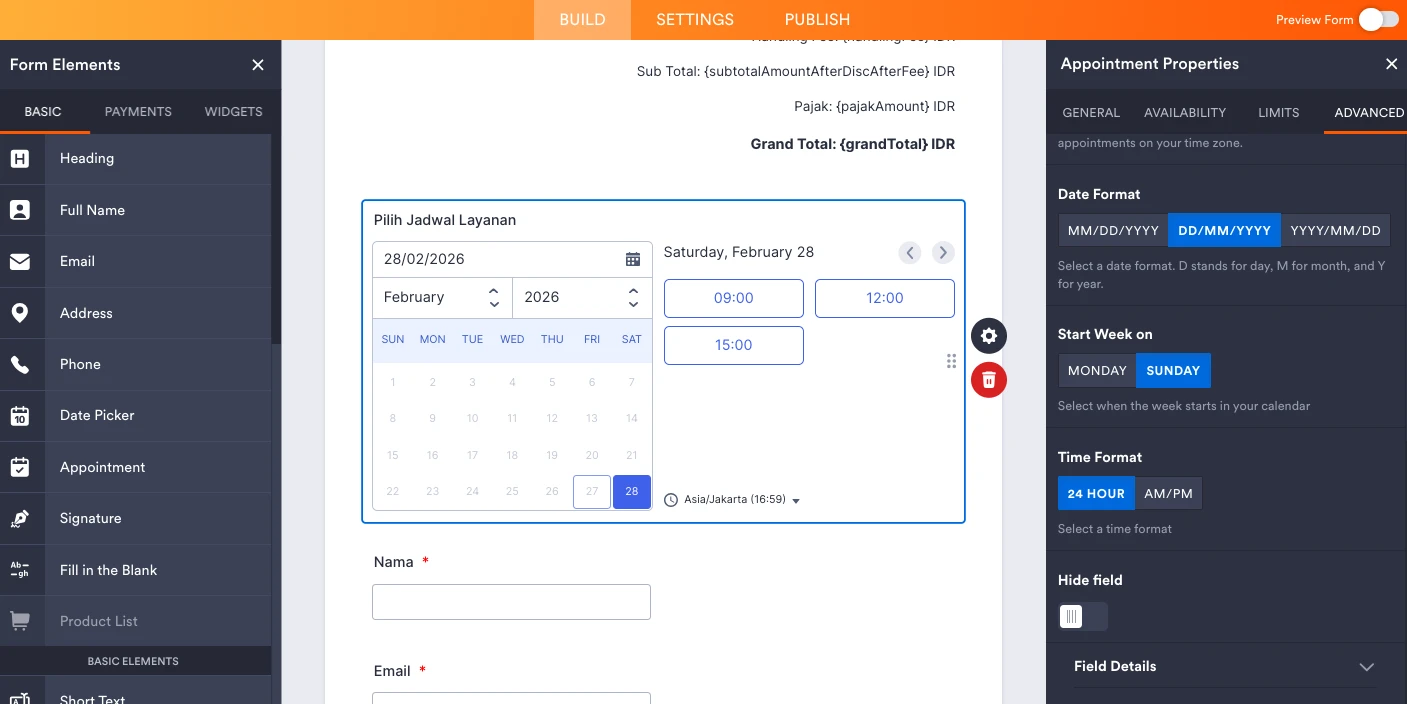
Field Appointment ‘Pilih Jadwal Layanan’ muncul di Form Builder dan Hide field = OFF, sudah coba matikan semua Conditions, clear cache, dan tes di browser lain, tapi di link live https://form.jotform.com/251880805807463 tetap tidak muncul Page URL: https://form.jotform.com/251880805807463
 -
 Podo: Spesialis Dukungan
Hi okhome2025,
Thanks for reaching out to Jotform Support. I'm an AI assistant here to assist you.
Masalah field Appointment 'Pilih Jadwal Layanan' yang tidak muncul di live form meskipun Hide field sudah OFF dan kondisi sudah dimatikan, biasanya terkait dengan pengaturan visibilitas field atau logika kondisional yang masih aktif menyembunyikan field tersebut.
Berikut beberapa langkah yang bisa Anda coba untuk mengatasi masalah ini:
- Periksa kembali semua aturan Conditional Logic yang mungkin masih menyembunyikan field tersebut berdasarkan jawaban tertentu.
- Bersihkan cache browser Anda dan juga cache form dari pengaturan akun Jotform Anda.
- Coba akses form menggunakan browser atau perangkat lain untuk memastikan masalah bukan dari cache atau browser tertentu.
Jika Anda baru saja menghapus field dan ingin mengembalikannya, Anda juga bisa menggunakan fitur Revision History untuk mengembalikan form ke versi sebelumnya di mana field tersebut masih ada.
Semoga langkah-langkah ini membantu Anda menemukan dan menampilkan field Appointment di form live Anda.
Give it a try and let us know how it goes.
-
OKHome2026
Tidak ada yang kami ubah.
Ini tiba-tiba hilang untuk beberapa form.
Tidak hanya form tersebut, namun form yang lainnya juga. -
Podo: Spesialis Dukungan
Hi okhome2025,
One of our Support Team members will take it from here to follow up shortly.
-
 Hasan
HasanHi okhome2025,
Our Indonesian Support agents are busy helping other Jotform users right now, so I'll try to help you in English using Google Translate, but you can reply in whichever language you feel comfortable using. Or, if you'd rather have support in Indonesian, let us know and we can have them do that. But, it might take a while until they're available again.
Now, coming back to your question, I cloned and checked your form. The issue happens because the Appointment field is placed under a Section Collapse element. Currently, it appears there is an unexpected behavior with the Section Collapse element; when it is conditionally shown, it does not automatically show the Appointment field inside it.
To fix this right away, you just need to add a new condition block to explicitly show the Appointment field whenever your specific locations are selected.
Here is the entire condition setup you need to add:
Give it a try and let us know how it goes.
-
OKHome2026
Hi Hasan,
Thank you for guide.
I've created the condition to explicitly show the Appointment field. But still it doesn't appear in live form https://form.jotform.com/251880805807463 -
OKHome2026
We have several forms that have similar elements (use the Appointment field) and conditions.
It also happened to those forms. You can check :
1. https://form.jotform.com/222691845521458
2. https://form.jotform.com/252031077793457
3. https://form.jotform.com/251182492819463
4. https://form.jotform.com/251190646592461
5. https://form.jotform.com/251881182814460 -
 Jessica Jotform Support
Hai OKHOME Inc,
Saya telah menyalin formulir Anda dan mengujinya, dan mengalami kendala yang sama, jadi saya membuat tiket dan meneruskan masalah ini ke tim pengembang kami. Meskipun kami tidak tahu persis kapan masalah ini akan diperbaiki, kami akan kembali memberi tahu Anda di thread ini ketika kami memiliki informasi terbaru.
-
OKHome2026
Hi Jotform Team,
It's been 2 weeks and there is no update. The appointment field still doesn't appear in live form.
Do you have any alternative for the appointment field? -
Jessica Jotform Support
Hai OKHOME Inc,
Saya telah menghubungi tim terkait dan tim kami masih menyelidiki lebih lanjut. Sebagai alternatif untuk kolom Janji Temu, Anda dapat mempertimbangkan untuk menggunakan widget Perencana Janji Temu Mingguan kami.
Beri tahu kami jika Anda memiliki pertanyaan lebih lanjut.