

Modelos de Apps Educacionais

App de Quiz
Um app de quiz permite responder perguntas e enviar resultados a partir de qualquer dispositivo. Seja para sua turma, um evento no trabalho ou um grupo de amigos, comece com o App de Quiz gratuito da Jotform! O modelo já vem com quatro quizzes prontos que você pode preencher e compartilhar facilmente. E, pelo editor com recurso arraste-e-solte, dá para criar novos quizzes. Todas as respostas são sincronizadas na hora com sua conta Jotform, facilitando a correção. Personalizar seu App de Quiz é simples: arraste e solte para criar quizzes, adicionar tabelas para visualizar resultados, inserir links e documentos, criar páginas e botões, enviar fotos e vídeos, e muito mais. Quando estiver pronto, baixe o app no seu dispositivo favorito e compartilhe com outras pessoas por link ou convite por e-mail. Leve seus quizzes online para outro nível com um app personalizado que funciona em qualquer lugar.
Ir para Categoria:Entertainment Apps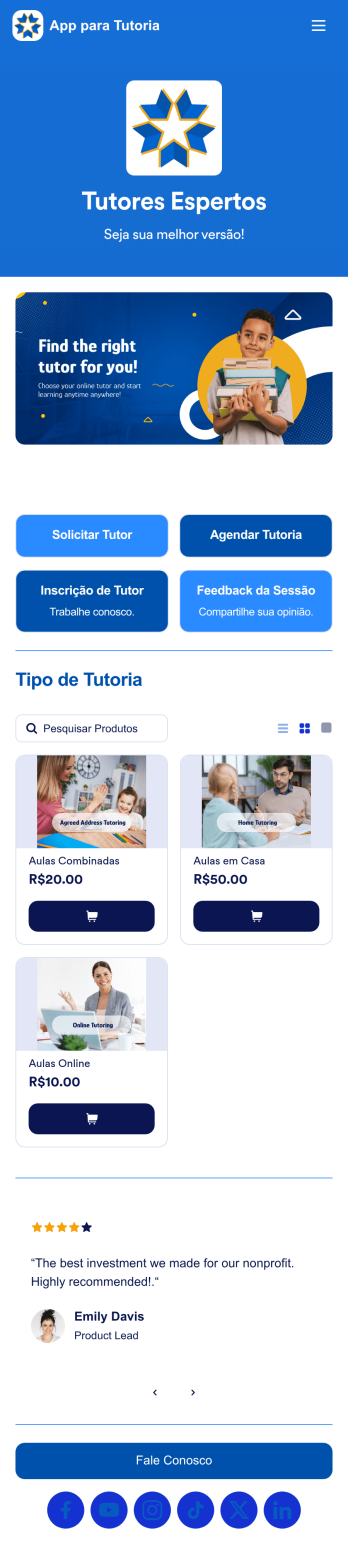
App para Tutoria
Um app ajuda agências a contratar tutores e agendar sessões com alunos. Este App para Tutoria gratuito vem com um formulário para solicitação de tutor, no qual o aluno informa seus dados e a área de estudo desejada, além de um formulário para agendamento após o tutor ser definido. Também inclui um formulário de candidatura para novos tutores e um formulário de feedback para que os alunos avaliem as sessões online. Quer deixar o app com a cara da sua agência? É simples: use o editor com recurso arraste-e-solte para ajustar os formulários, incluir seu logo, personalizar a tela inicial e muito mais — sem precisar programar nada. Depois, é só compartilhar o link para que os alunos acessem e baixem o app no celular, tablet ou computador. Conecte alunos e tutores com rapidez e praticidade usando este App para Tutoria totalmente personalizável.
Ir para Categoria:Apps para Inscrições em Cursos e Treinamentos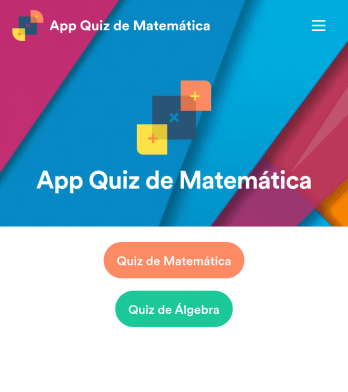
App Quiz de Matemática
Crie testes de matemática para seus alunos e compartilhe tudo em um app gratuito baixável pela Jotform. Seja professor ou tutor, você pode montar quizzes que funcionam perfeitamente em qualquer dispositivo — computador, tablet ou celular — e receber as respostas na hora. O app já vem com testes prontos que calculam a pontuação automaticamente. Você pode usar esses quizzes como base, editar ou adicionar os seus. Depois, é só compartilhar o app com sua turma. As respostas ficam salvas com segurança na sua conta Jotform, prontas para visualização no Jotform Tabelas ou transformar em relatórios pelo Criador de Relatórios. Personalizar o App Quiz de Matemática é simples usando o editor com recurso arraste-e-solte. Troque o ícone ou a tela inicial, adicione novos quizzes ou atualize os existentes, inclua links, documentos e imagens — e configure cálculos para gerar notas automaticamente. Economize tempo (e papel!) com um App Quiz de Matemática gratuito da Jotform.
Ir para Categoria:Education AppsSobre Modelos de Apps Educacionais
Apps Educacionais são aplicativos móveis e web especializados, desenvolvidos para otimizar e aprimorar processos educacionais em diversos contextos. Esses apps atendem a diferentes necessidades operacionais, como matrícula de alunos, organização de horários, gestão de tarefas e comunicação entre educadores e estudantes. Setores que se beneficiam desses apps incluem escolas, universidades, consultorias educacionais e centros de treinamento, onde os fluxos de trabalho geralmente envolvem o gerenciamento de grandes volumes de dados, a garantia de uma comunicação eficaz e o acompanhamento eficiente do progresso educacional.
Jotform Apps oferece um criador de apps no-code especialmente desenvolvido para a criação de apps educacionais dinâmicos. Utilizando a tecnologia Progressive Web App (PWA), esses apps podem ser instalados diretamente por meio de qualquer navegador, sem a necessidade de uma loja de aplicativos, tornando-os acessíveis em iOS, Android, tablets e computadores. Com a gestão centralizada de dados usando Jotform Tabelas, educadores podem garantir que todas as informações estejam integradas e facilmente acessíveis, facilitando fluxos de trabalho mais eficientes e melhores processos de gestão educacional.
Por que usar Apps Educacionais?
- Apps educacionais oferecem uma plataforma centralizada para gerenciar dados dos alunos, o que simplifica o acompanhamento do progresso acadêmico e das tarefas administrativas. Isso garante que educadores e administradores possam focar mais no ensino e menos na burocracia.
- Esses apps oferecem canais de comunicação aprimorados entre alunos, professores e pais. Com recursos como notificações push, atualizações e lembretes importantes podem ser enviados instantaneamente, garantindo que todos permaneçam informados e engajados.
- A possibilidade de automatizar fluxos de trabalho nos apps educacionais pode reduzir significativamente o tempo gasto em tarefas repetitivas. Essa automação permite que educadores dediquem mais tempo ao desenvolvimento do currículo e à interação com os alunos.
- Apps educacionais oferecem integração com diversos sistemas de pagamento, possibilitando o processamento fluido de mensalidades e outras cobranças. Essa integração ajuda a otimizar as transações financeiras, garantindo que sejam seguras e eficientes.
- Ao oferecer uma ampla variedade de opções de personalização, os apps educacionais podem ser adaptados para atender às necessidades específicas de cada instituição. Essa flexibilidade permite a criação de experiências educacionais únicas, adequadas a diferentes ambientes de aprendizagem.
Problemas comuns solucionados por Apps Educacionais
- Um dos principais desafios na educação é a gestão de registros e dados dos alunos. Apps educacionais resolvem isso ao oferecer um banco de dados centralizado que permite o armazenamento e a recuperação fácil das informações, reduzindo a carga administrativa.
- A comunicação eficaz costuma ser um desafio nas instituições de ensino, com mensagens que se perdem ou se atrasam. Apps educacionais resolvem isso ao facilitar a comunicação instantânea por diferentes canais, garantindo que informações importantes cheguem rapidamente aos destinatários corretos.
- Muitas instituições de ensino enfrentam desafios com agendamento e alocação de recursos. Apps educacionais oferecem soluções ao disponibilizar ferramentas para organizar aulas com eficiência, gerenciar recursos das salas e garantir o uso adequado das instalações.
- O processamento de mensalidades e outras taxas pode ser um processo trabalhoso e sujeito a erros. Apps educacionais se integram a sistemas de pagamento seguros, permitindo transações financeiras automatizadas, sem erros, que são seguras e práticas para os usuários.
- Acompanhar os avanços tecnológicos pode ser desafiador para instituições de ensino. Apps educacionais ajudam escolas e universidades a se manterem atualizadas com as tecnologias mais recentes, oferecendo recursos modernos que aprimoram a experiência de aprendizagem.
Relacionando casos de uso aos recursos
- Para instituições que desejam otimizar seus processos de comunicação, o recurso de notificações push nos apps educacionais garante que todos os envolvidos recebam atualizações em tempo hábil. Esse recurso aumenta o engajamento e assegura que nenhuma informação importante seja perdida.
- Escolas que desejam gerenciar suas operações financeiras com mais eficiência podem se beneficiar das integrações de pagamento com plataformas como Stripe e PayPal. Essa funcionalidade permite o processamento seguro e prático de mensalidades e outras transações financeiras.
- Para atender a diferentes ambientes de aprendizagem, o recurso de opções de publicação oferece níveis distintos de acesso, como Público, Privado e Acesso na Empresa. Isso garante que o conteúdo educacional seja compartilhado com o público adequado, mantendo a privacidade e a segurança.
- Para instituições que precisam de acesso a dados em diferentes dispositivos, a compatibilidade do Jotform Apps com iOS, Android e computadores garante uma experiência integrada. Essa funcionalidade multiplataforma permite que educadores e alunos acessem os recursos necessários a qualquer hora e em qualquer lugar.
- A interface de arrastar e soltar é ideal para educadores com pouca experiência técnica, pois simplifica o processo de criação do app, permitindo personalização e atualizações com facilidade, garantindo que o conteúdo educacional permaneça relevante e envolvente.
Como criar um App Educacional
- Escolha um modelo relevante para a categoria a partir da lista de modelos ou comece do zero.
- Personalize usando a interface com recurso de arrastar e soltar para adaptar o app às suas necessidades educacionais.
- Compartilhe via link, QR code ou incorporação para distribuir seu app de forma eficiente a alunos e educadores.
Principais casos de uso dos Apps Educacionais
- Para gestores: Os modelos de apps educacionais oferecem aos gestores a possibilidade de supervisionar e otimizar processos administrativos nas instituições de ensino. Ao disponibilizar acesso centralizado a dados e ferramentas de comunicação, permitem que as operações ocorram de forma mais organizada e eficiente. A automação de tarefas rotineiras também possibilita que os gestores foquem no planejamento estratégico e na melhoria dos resultados educacionais.
- Para equipes: Equipes em ambientes educacionais, como comitês docentes ou grupos administrativos, se beneficiam de uma colaboração e comunicação aprimoradas através dos apps educacionais. Esses apps oferecem um espaço compartilhado onde os membros podem acessar documentos importantes, acompanhar o progresso de projetos e se comunicar com eficiência, resultando em mais integração e produtividade.
- Para clientes: Para alunos e pais, os apps educacionais oferecem uma forma prática e acessível de acompanhar conteúdos e se manter informados sobre o progresso acadêmico. Esses apps disponibilizam uma interface intuitiva onde é possível acessar horários, tarefas e atualizações importantes, promovendo uma comunidade educacional mais conectada e bem informada.
Resumindo os Apps Educacionais
Apps educacionais, desenvolvidos com o criador de apps no-code da Jotform, oferecem valor significativo ao aumentar a eficiência e a eficácia das operações educacionais. Eles disponibilizam uma plataforma centralizada para gerenciar dados, facilitar a comunicação e otimizar processos administrativos. Ao integrar tecnologia moderna e recursos personalizáveis, os apps educacionais permitem que instituições de ensino ofereçam experiências de aprendizagem de alta qualidade e mais envolventes aos alunos.
Perguntas Frequentes
1) É gratuito criar e usar apps educacionais na Jotform?
A Jotform oferece um plano Básico que permite aos usuários criar e utilizar apps educacionais gratuitamente. Esse plano é ideal para pessoas ou pequenas instituições de ensino que desejam explorar os recursos do Jotform Apps sem compromisso financeiro. Os usuários podem criar apps com funcionalidades básicas e conhecer os principais recursos da plataforma antes de decidir fazer upgrade para opções mais avançadas.
2) Os dados e pagamentos coletados através do app são seguros?
Sim, a segurança é uma prioridade para a Jotform, e todos os dados e transações de pagamento são protegidos com medidas avançadas de segurança, incluindo conformidade com o RGPD. A Jotform garante que informações sensíveis sejam criptografadas e armazenadas com segurança, oferecendo tranquilidade aos usuários que gerenciam dados educacionais e financeiros confidenciais.
3) Do I need any coding skills to create an Education Apps app with Jotform?
Não é necessário ter conhecimentos de programação para criar um app educacional usando Jotform. A interface intuitiva com recurso de arrastar e soltar da plataforma permite personalizar facilmente o app para atender a necessidades educacionais específicas. Essa acessibilidade possibilita que educadores e administradores foquem no conteúdo e na funcionalidade, em vez de nos detalhes técnicos.
4) Can I collect payments for services directly through the app?
Sim, Jotform Apps permite a coleta de pagamentos diretamente pelo app por meio de integrações como Stripe e PayPal. Essas integrações possibilitam que instituições de ensino processem mensalidades e outros pagamentos de forma segura e eficiente, oferecendo uma experiência integrada tanto para administradores quanto para usuários.
5) Jotform oferece suporte à coleta de dados offline em apps educacionais?
Sim, Jotform Apps oferece suporte à coleta de dados offline através do recurso Formulários Móveis. Essa funcionalidade é especialmente útil em ambientes educacionais onde o acesso à internet pode ser limitado, pois permite coletar dados offline e sincronizá-los quando a conexão estiver disponível, garantindo a continuidade da coleta de informações.
6) Are Jotform Apps compatible with both iOS and Android devices?
Os apps da Jotform são compatíveis com dispositivos iOS e Android, garantindo que os usuários tenham uma experiência consistente em diferentes plataformas. Essa compatibilidade permite que educadores e alunos acessem os apps educacionais em seus dispositivos preferidos, aumentando a acessibilidade e a praticidade.
7) Como os aplicativos de educação podem melhorar o engajamento dos alunos?
Apps educacionais aumentam o engajamento dos alunos ao oferecer conteúdo interativo e canais de comunicação instantânea. Recursos como notificações push mantêm os alunos informados e motivados, enquanto o conteúdo personalizável garante que os materiais de aprendizagem sejam relevantes e atrativos, promovendo uma experiência educacional mais interativa.
8) Os aplicativos para escola podem facilitar o aprendizado remoto?
Sim, os apps educacionais são fundamentais para facilitar o ensino remoto ao oferecer uma plataforma centralizada para entrega de conteúdo, comunicação e avaliação. Com recursos que garantem acessibilidade multiplataforma e integração de dados, esses apps permitem que educadores ofereçam experiências de aprendizagem completas aos alunos, independentemente de sua localização.