

Bilet Satış Uygulaması

Online Otobüs Bileti Satın Alım Uygulaması
Otobüs Bileti Satın Alım Uygulaması ile kullanıcılar gitmek istedikleri yere daha kolay, güvenli ve hızlı bir şekilde ulaşabilir. Online otobüs bileti satın alım uygulaması sayesinde, müşterileriniz her türlü akıllı telefon, tablet veya masaüstü bilgisayardan bilet alabilir. Online bilet satmayı bilmiyor musunuz? Müşteriler; varış noktası, gidiş tarihi ve genel iletişim bilgilerini girerek online satın alım yapabilir. Aynı zamanda uygulamanızı kullanarak bilet üzerinde yazılı olan kimlik veya bilet numarasıyla iptal işleminde bulunabilirler. Otobüs bilet alımları anlık senkronize edilir ve Jotform hesabınızda depolanır. Bu şekilde kontrol panelinizden filtreleyebilir, arayabilir ve gruplayabilirsiniz.Uygulama şablonunda değişiklik mi yapmak istiyorsunuz? Jotform’un uygulama oluşturucusu ile sadece birkaç tıkla tamamen özelleştirilmiş bir uygulama yaratabilirsiniz. Basitçe form elemanlarını sürükleyip bırakın, yazı tipleri ve renkleri seçin, şirketinizin marka yazısını ekleyin, online ödeme almak için ödeme ağ geçitleriyle entegre edin ve daha fazlasını yapın — hem de kod yazmadan. Özelleştirilmiş uygulamanızı müşterilerinizle paylaşmak için web sitenize veya sosyal medya hesabınıza bir bağlantı ekleyin veya otobüs durağınızın dışına yapıştırmak için QR kod oluşturun. Jotform’un Online Otobüs Bileti Satın Alım Uygulaması ile müşterileriniz biletlerini kolayca alsın.
Kategoriye git:Bilet Satış Uygulaması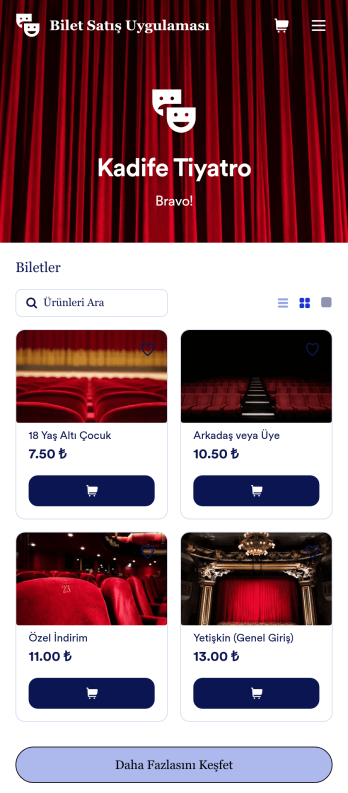
Bilet Satış Uygulaması Örneği
Jotform'un ücretsiz Bilet Satış Uygulaması ile kolayca online bilet satın. İster çekiliş, konser, oyun veya başka bir etkinlik türü için bilet satıyor olun, biletlerinizi, fiyatları, etkinliklerinizin açıklamalarını, fotoğraflarını ve daha fazlasını listelemek için bir online mağaza oluşturabilirsiniz. Uygulamanızı tercihlerinize göre özelleştirdikten sonra, iOS ve Android için indirilebilir bir uygulama olarak paylaşabilir veya herhangi bir internet tarayıcısında kullanmak üzere web sitenize yerleştirebilirsiniz. Bu Bilet Satış Uygulamasını tercihlerinize göre düzenlemek ister misiniz? Logonuzu yükleyerek, yeni bir uygulama simgesi, arka plan, yeni yazı tipleri veya renkler seçerek mağaza tasarımını değiştirmek için sürükleyip bırakmanız yeterli. Uygulama üzerinden verilen tüm bilet siparişleri Jotform hesabınızda güvenli bir şekilde saklanır, böylece onları güçlü bir online platformda takip edebilirsiniz!
Kategoriye git:Bilet Satış UygulamasıBilet Satış Uygulaması Hakkında
Bilet Satış Uygulamamız ile bilet satma işinizi dakikalar içinde online hale getirin. Kodlama bilgisine gerek kalmadan markanıza uyacak şekilde özelleştirmek için aşağıdan hazır bir online mağaza uygulaması seçin. Logonuzu eklemek, etkinliklerinizi ve biletlerinizi listelemek ve size özel bir görünüm ve his için uygulama simgesini ve renk düzenini değiştirmek için sürükleyip bırakmanız yeterlidir. Ardından, Jotform'a ek ücret ödemeden online ödeme kabul etmek için Google Pay ve Square gibi popüler platformlar da dahil olmak üzere 25'ten fazla ödeme yönteminden birini entegre edin. Jotform'un Bilet Satış Uygulamaları ile hem iOS hem de Android ile uyumlu biletlerinizi bugün satmaya başlayın.
Jotform Uygulamalar, Bilet Satış kategorisinde önde gelen kodlama gerektirmeyen bir uygulama oluşturucu olarak öne çıkar ve doğrudan tarayıcı üzerinden yükleme sunan çok yönlü bir çözüm için Progresif Web Uygulaması (PWA) teknolojisinden yararlanır. Bu, App Store'dan indirme ihtiyacını ortadan kaldırarak iOS, Android, tablet ve masaüstü bilgisayarlarda uyumluluk sağlar. Jotform Tablolar aracılığıyla merkezi veri yönetimi sayesinde işletmeler, büyük miktarda biletleme verisini zahmetsizce yönetebilir ve iş akışlarının yalnızca verimli değil aynı zamanda güvenli ve düzenli olmasını sağlayabilir. Bu işlevsellik, karar verme ve müşteri memnuniyetini artırmak için gerçek zamanlı verilere ve analizlere erişmesi gereken etkinlik organizatörleri için özellikle faydalıdır.
Bilet Satış Uygulamaları Neden Kullanılır?
- Bilet Satış Uygulamaları, bilet satışlarını yönetmek için kolaylaştırılmış bir yaklaşım sunar, elle yapılan süreçlere olan ihtiyacı ortadan kaldırır ve geleneksel yöntemlerle ilişkili hataları azaltır. Bu verimlilik, potansiyel katılımcılar daha sorunsuz bir işlem süreci deneyimledikçe artan satışlar ve müşteri memnuniyeti anlamına gelir.
- Yüksek hacimli işlemleri yönetme kapasitesiyle bu uygulamalar, her boyuttaki etkinlik için ölçeklenebilirlik sağlar. İster küçük bir atölye ister büyük bir konser düzenleyin, işletmeler fazla rezervasyon veya teknik aksaklık riski olmadan bilet dağıtımını güvenle yönetebilir.
- Jotform Uygulamalar aracılığıyla, etkinlik düzenleyicileri katılımcıları etkinlik güncellemeleri, değişiklikler veya promosyonlar hakkında bilgilendirmek için anlık bildirimler gibi güçlü özelliklerden yararlanabilir. Bu proaktif iletişim, müşterilerle daha iyi bir ilişki kurulmasını sağlar ve genel etkinlik deneyimini geliştirir.
- Stripe, PayPal ve Square gibi ödeme ağ geçitlerinin entegrasyonu, işletmelerin güvenli ve çeşitli ödeme seçenekleri sunmasına, geniş bir müşteri tercih yelpazesine hitap etmesine ve sorunsuz bir ödeme deneyimi sağlamasına olanak tanır.
- Yayınlama Seçenekleri'ni kullanarak işletmeler, bilet satış uygulamalarına kimlerin erişebileceğini kontrol edebilir ve uygulamanın kullanılabilirliğini halka açık, belirli şirketler veya özel gruplar için özelleştirebilir. Bu esneklik, münhasırlık veya sınırlı erişim gerektiren etkinlikler için çok önemlidir.
Bilet Satış Uygulamalarının Çözdüğü Yaygın Sorunlar
- Bilet satışlarındaki başlıca zorluklardan biri, envanter yönetimi ve aşırı satışın önlenmesidir; bu durum memnun olmayan müşterilere ve mali kayıplara yol açabilir. Bilet Satış Uygulamaları, bilet müsaitliğine gerçek zamanlı görünürlük sunarak bu sorunu ele alır ve doğru satış takibi ile müşteri memnuniyetini sağlar.
- Geleneksel biletleme yöntemleri, elle yapılan veri girişi ve erişimi nedeniyle genellikle müşteri hizmetleri yanıtlarının gecikmesine neden olur. Bu uygulamalar sayesinde tüm bilgiler merkezileştirilir ve kolayca erişilebilir hale gelir, böylece hızlı yanıt süreleri ve gelişmiş müşteri desteği sağlanır.
- Veri güvenliği, hassas müşteri bilgilerini işleyen kuruluşlar için önemli bir endişe kaynağıdır. Bilet Satış Uygulamaları, veri koruma düzenlemelerine uygunluğu sağlayarak hem şirketi hem de müşterilerini korumak için şifrelenmiş işlemler ve güvenli veri depolama sunar.
- Uygun araçlar olmadan pazarlama ve tanıtım çabaları dağınık ve verimsiz olabilir. Bu uygulamalar, anlık bildirimler ve sosyal medya paylaşımı gibi özellikler aracılığıyla hedefli pazarlama kampanyaları yapılmasını sağlayarak işletmelerin daha geniş bir kitleye etkili bir şekilde ulaşmasına yardımcı olur.
- Bilet satışlarını birden fazla platformda koordine etmek zahmetli ve hataya açık olabilir. Bilet Satış Uygulamaları, çeşitli satış kanallarıyla sorunsuz bir şekilde entegre olarak tüm platformlarda tutarlı ve doğru veri sağlar ve yönetim sürecini basitleştirir.
Kullanım Senaryolarını Özelliklerle Eşleştirme
- Küresel bir kitleye ulaşmak isteyen etkinlik organizatörleri için Yayınlama Seçenekleri özelliği, uygulamayı herkese açık olarak ayarlayıp doğrudan bağlantılar ve sosyal medya üzerinden kolayca erişilebilir hale getirme imkanı sunar. Bu sayede erişim genişler ve etkinlik görünürlüğü artar.
- Doğrudan satın alma deneyimi sunmayı hedefleyen işletmeler, Stripe ve PayPal gibi Ödeme Entegrasyonlarını uygulamalarına entegre ederek müşterilerin platformdan ayrılmadan işlemleri tamamlamasına olanak tanıyabilir; bu da kolaylığı artırır ve sepet terk oranlarını azaltır.
- Sürükle-Bırak Arayüzü, teknik uzmanlık gerektirmeden bilet satış uygulamalarını özelleştirmesi gereken kullanıcılar için idealdir. Bu özellik, uygulama düzenlerinde ve işlevlerinde hızlı değişiklikler yapılmasını sağlayarak benzersiz iş ihtiyaçlarının verimli bir şekilde karşılanmasını mümkün kılar.
- Mobil Formlar aracılığıyla kullanılabilen Çevrim Dışı Mod, internet bağlantısının güvenilir olmayabileceği etkinlikler için kritik bir özelliktir. Bilet satışlarının ve veri toplamanın kesintisiz devam etmesini sağlayarak olası satış kayıplarına karşı koruma sağlar.
- Anlık Bildirimler, katılımcıları etkinlikler, özel teklifler veya son dakika değişiklikleri hakkında zamanında güncellemelerle etkileşimde tutmak için güçlü bir araçtır. Bu, hedef kitleyi bilgilendirir ve yüksek düzeyde etkileşim sağlar.
- Markalı bir bilet satın alma deneyimine ihtiyaç duyan kuruluşlar için Mağaza Oluşturucu özelliği, uygulama içinde tamamen özelleştirilmiş bir mağaza vitrini oluşturulmasına olanak tanır. Bu, yalnızca marka kimliğini güçlendirmekle kalmaz, aynı zamanda tutarlı bir kullanıcı deneyimi de sunar.
- Jotform Tablolar aracılığıyla merkezileştirilmiş veri, sorunsuz veri yönetimi sağlar ve işletmelerin satışları takip etmesine, envanteri izlemesine ve müşteri verilerini tek bir platformdan analiz etmesine olanak tanıyarak stratejik karar almayı iyileştirir.
Bilet Satış Uygulaması Nasıl Oluşturulur
- Şablon Listesinden kategoriye uygun bir şablon seçin veya sıfırdan başlayın.
- İşletmelerin özel ihtiyaçlarına göre uygulamayı özelleştirmek için Sürükle-Bırak Arayüzünü kullanın.
- Uygulamayı istediğiniz kanallarda verimli bir şekilde dağıtmak için Bağlantı, QR Kodu veya Yerleştirme yoluyla paylaşın.
Bilet Satış Uygulamalarının Başlıca Kullanım Alanları
- Yöneticiler için Bilet Satış Uygulamaları: Bilet Satış Uygulamaları, yöneticilere tüm biletleme sürecini tek bir kullanımı kolay platformdan denetleme olanağı sağlar. Satışları gerçek zamanlı takip edebilir, envanteri yönetebilir ve müşteri davranışları hakkında içgörüler elde ederek bilinçli stratejik kararlar almalarına yardımcı olur. Uygulamanın merkezileştirilmiş veri özelliği operasyonları kolaylaştırır ve yöneticilerin etkinlik kalitesini artırmaya ve geliri maksimize etmeye odaklanmalarını sağlar.
- Ekipler İçin: Ekipler, sorunsuz iletişim ve koordinasyonu kolaylaştıran Bilet Satış Uygulamalarının iş birliği özelliklerinden faydalanır. Güncel satış verilerine ve müşteri bilgilerine paylaşımlı erişim sayesinde ekip üyeleri, başarılı etkinlik yürütmesini sağlamak için daha verimli çalışabilir. Entegre iş akışı otomasyonu, elle yapılan görevleri daha da azaltarak ekiplerin müşteri hizmetleri ve etkileşimine odaklanmasını sağlar.
- Müşteriler İçin: Müşteriler, kullanımı kolay arayüzler ve güvenli ödeme seçenekleri sayesinde Bilet Satış Uygulamaları ile sorunsuz bir satın alma deneyimi yaşar. Anlık bildirimler aracılığıyla anında güncelleme alma imkanı, onları etkinlik detayları ve özel promosyonlar hakkında bilgilendirir. Bu hizmet seviyesi genel deneyimlerini geliştirir, tekrar satın alımları ve olumlu tavsiye yoluyla yönlendirmeleri teşvik eder.
Bilet Satış Uygulamalarının Özeti
Bilet Satış Uygulamaları, etkinlik yönetimi süreçlerini kolaylaştırmak isteyen işletmeler için vazgeçilmez bir varlıktır. Jotform'un kodlama gerektirmeyen uygulama oluşturucusundan yararlanan kuruluşlar, hem operasyonel verimliliği hem de müşteri memnuniyetini artıran özelleştirilmiş, kullanıcı dostu uygulamalar oluşturabilir. Ödeme ağ geçitleri, merkezi veri yönetimi ve gerçek zamanlı bildirimler gibi gelişmiş özelliklerin entegrasyonu, tüm biletleme ihtiyaçları için kapsamlı bir çözüm sağlar. Sonuç olarak, işletmeler artan satışlar ve müşteri sadakatinin keyfini çıkarırken unutulmaz etkinlikler sunmaya odaklanabilir.
Sıkça Sorulan Sorular
1) Jotform'da Bilet Satış uygulamaları oluşturmak ve kullanmak ücretsiz mi?
Evet, Jotform kullanıcıların Bilet Satış uygulamaları oluşturmasına ve kullanmasına ücretsiz olarak olanak tanıyan bir Başlangıç planı sunmaktadır. Bu plan, küçük işletmelerin ve bireylerin başlangıç maliyeti olmadan bilet satışlarını verimli bir şekilde yönetmelerini sağlayan temel özelliklere erişim sunar. Başlangıç planı Jotform'un yetenekleri için harika bir giriş olsa da, daha karmaşık ihtiyaçları olan kuruluşlar ek özellikler ve daha yüksek yanıt limitleri sunan ücretli planlara geçebilir.
2) Uygulama aracılığıyla toplanan veriler ve ödemeler güvenli mi?
Kesinlikle. Jotform, verilerinizin ve işlemlerinizin güvenliğine öncelik verir. Bilet Satış uygulamaları aracılığıyla toplanan tüm veriler, gizli ve güvenli kalmasını sağlamak için yüksek seviyeli şifreleme ile korunur. Ayrıca Jotform, GDPR düzenlemelerine uyum sağlayarak işletmenizin yasal standartlar dahilinde faaliyet gösterdiğine dair gönül rahatlığı sunar. Stripe ve PayPal gibi entegre ağ geçitleri aracılığıyla işlenen ödemeler de endüstri standardı güvenlik protokolleriyle güvence altına alınır.
3) Jotform ile Bilet Satış uygulaması oluşturmak için kodlama bilgisine ihtiyacım var mı?
Jotform ile Bilet Satış uygulaması oluşturmak için kodlama bilgisine ihtiyaç yoktur. Platformun kullanımı kolay Sürükle-Bırak Arayüzü, kullanıcıların uygulamalarını zahmetsizce oluşturmasına ve özelleştirmesine olanak tanır. Bu kullanıcı dostu tasarım, teknik bilgisi olmayanların bile özel iş ihtiyaçlarına göre uyarlanmış profesyonel düzeyde uygulamalar oluşturabilmesini sağlar.
4) Can I collect payments for services directly through the app?
Evet, Stripe ve PayPal gibi entegre ödeme ağ geçitlerini kullanarak Bilet Satış uygulamanız üzerinden doğrudan ödeme alabilirsiniz. Bu entegrasyonlar, müşterilerin işlemlerini hızlı ve kolay bir şekilde tamamlamasına olanak tanıyan kesintisiz ve güvenli bir ödeme işleme deneyimi sunar. Bu işlevsellik yalnızca müşteri kolaylığını artırmakla kalmaz, aynı zamanda terk edilmiş sepet ve kaçırılan satış fırsatları olasılığını da azaltır.
5) Jotform, Bilet Satış uygulamaları için çevrim dışı veri toplamayı destekliyor mu?
Evet, Jotform çevrim dışı veri toplamayı destekler ve bilet satışlarınızın internet bağlantısı olmadan bile devam etmesini sağlar. Bu özellik, özellikle bağlantının güvenilir olmadığı yerlerde düzenlenen etkinlikler için faydalıdır. Mobil Formlar aracılığıyla kullanılabilen Çevrim Dışı Mod, verileri yakalamanıza ve depolamanıza olanak tanır; bu veriler bağlantı yeniden kurulduğunda uygulamanızla otomatik olarak senkronize edilir ve hiçbir verinin kaybolmaması sağlanır.
6) Are Jotform Apps compatible with both iOS and Android devices?
Evet, Jotform Uygulamaları, Aşamalı Web Uygulaması (PWA) teknolojisi sayesinde hem iOS hem de Android cihazlarla uyumludur. Bu, kullanıcıların uygulamayı doğrudan web tarayıcılarından yükleyip erişebileceği anlamına gelir; böylece App Store veya Google Play'den indirme ihtiyacı ortadan kalkar. Uygulamanın cihazlar arası uyumluluğu, akıllı telefonlar, tabletler ve masaüstü bilgisayarlarda tutarlı bir kullanıcı deneyimi sağlar.
7) Bilet Satış Uygulamaları yoğun zamanlarda yüksek hacimli bilet satışlarını nasıl yönetir?
Bilet Satış Uygulamaları, özellikle etkinlik lansmanları gibi yoğun dönemlerde büyük hacimli satışları verimli bir şekilde yönetmek için tasarlanmıştır. Uygulamalar, işlemlerin sorunsuz bir şekilde gerçekleştirilmesini sağlayan, sunucu aşırı yüklenmesini önleyen ve kesinti süresini en aza indiren güçlü arka uç sistemleri kullanır. Bu özellik, yüksek talep dönemlerinde bile müşterilerinizin kesintisiz bir satın alma deneyimi yaşamasını sağlar.
8) Bilet Satış Uygulamamın markalamasını özelleştirebilir miyim?
Evet, Jotform Bilet Satış Uygulamanızın markalamasını tamamen özelleştirmenize olanak tanır. Mağaza Oluşturucu özelliği ile şirketinizin logosunu, renk şemasını ve diğer marka ögelerini ekleyerek tutarlı ve tanınabilir bir marka varlığı oluşturabilirsiniz. Bu özelleştirme, marka kimliğinizi güçlendirir ve uygulamanızın genel pazarlama stratejinizle uyumlu olmasını sağlayarak müşterilerinize profesyonel ve tutarlı bir deneyim sunar.