iPad için Anket Uygulaması
Jotform'un iPad anket uygulaması, herhangi bir durum için profesyonel anketler oluşturmanın sorunsuz ve etkili bir yolunu size sunar. Bu kullanıcı dostu uygulama, iPad'lerinden veya diğer tablet cihazlarda anket formu oluşturmak ve göndermek, kullanıcı verilerini toplamak, raporlar oluşturmak ve sonuçları analiz etmek isteyen herkes için mükemmeldir. Jotform'un bu uygulamasıyla işlerinizi kolayca yürütün.
Şablonlar
Ücretsiz iPad Anket Şablonlarını Keşfedin
Nereden başlayacağınızı bilmiyor musunuz? Bu hazır şablonlardan birini seçin ve kendi tasarımlarınız ve anket sorularınızla özelleştirin. Ardından yanıtları toplamaya başlamak için tek yapmanız gereken, kitlenize anketinizi yollamanızdır.
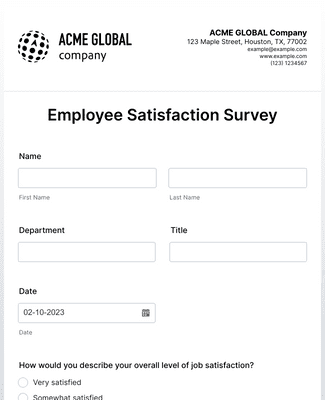
Çalışan Memnuniyet Anketi
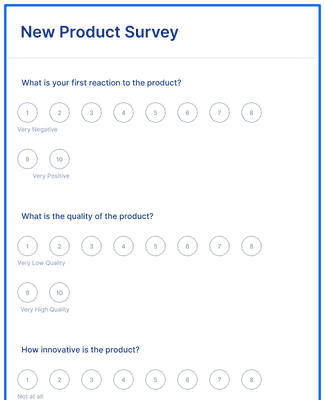
Yeni Ürün Anketi
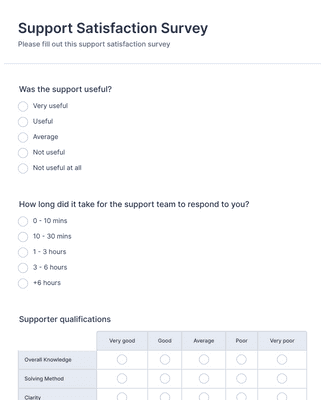
Destek Memnuniyet Anketi
Avantajlar
Anında Anket Oluşturun
Her Yerden Veriler Toplayın
Jotform'un mobil uyumlu formlarını kullanarak iPad, telefon veya masaüstü bilgisayardan anket yanıtları toplayın. Anketi bir bağlantı ile paylaşın veya bir web sitesine yerleştirin, böylece insanlar bulundukları yerden yanıt verebilir. Bu, ofis dışında anket yürütmeyi kolaylaştırır çünkü aynı form tüm cihazlarda çalışır.
Online Formlar Oluşturun ve Özelleştirin
Sürükle-bırak form oluşturucu ile iPad anketleri oluşturun, böylece ekipler hiçbir kod yazmadan sorular hazırlayabilir. Yazı tiplerini, renkleri ve marka varlıklarını kuruluşunuzun görünümüne uyacak şekilde güncelleyin. Bir anket, ödeme veya randevu alanları gibi belirli işlevlere ihtiyaç duyduğunda widget'lar ekleyin.
iPad Anketleri için Kullanışlı Araçlar
Jotform'un çevrim dışı formlarını kullanarak internet erişimi olmadan anket yanıtları toplayın; yanıtlar cihaza kaydedilir ve daha sonra senkronize edilir. Anketi ekranda kilitlemek ve bir iPad'i özel bir anket istasyonuna dönüştürmek için kiosk modunu kullanın. Bu araçlar, ekiplerin etkinliklerde, resepsiyon masalarında veya sahada tutarlı yanıtlar toplamasına yardımcı olur.
Bilgilerinizi Güvende Tutun
Anket yanıtlarını 256-bit SSL şifrelemesi ve Jotform'un güvenlik kontrolleri ile koruyun. Anketler hassas sağlık bilgileri topladığında GDPR ve CCPA gibi gizlilik ve uyumluluk ihtiyaçlarını destekleyen Jotform seçeneklerini kullanın ve HIPAA uyumlu özellikleri uygulayın. Bu, kuruluşların anket verilerini kişisel cihazlarda saklamak yerine kontrollü bir çalışma alanında yönetmesine yardımcı olur
Kullanıcı Görüşleri
Kullanıcılarımız Jotform hakkında ne diyor?
Sıkça Sorulan Sorular
Jotform ile ilgili tüm sorularınızı cevapladık. Sıkça sorulan soruların yanıtları için SSS bölümümüze göz atın veya daha fazla bilgi için destek ekibimizle iletişime geçin.
Bir e-posta anketi nasıl oluştururum?
Jotform ile e-posta anketi oluşturmak çok kolay! Bir e-posta anketi oluşturmak için aşağıdaki adımları izleyebilirsiniz:
Build a survey from scratch or use a ready-made template. Jotform offers hundreds of free survey templates to choose from, so you can get started in seconds.
Customize your survey questions. What do you want to ask your subscribers? Feel free to collect contact details, demographic information, and add unique question types that will help you gather the data you’re looking for.
Add the survey to your email. Copy and paste it into your email with a link.
Collect responses and analyze data. Once you share the email and the responses start rolling in, you’ll have the information you need to better understand your audience — and with Jotform’s analytics features, you can gain actionable insights from your data.
Bir e-postaya anket ekleyebilir misiniz?
Evet. Jotform ile ücretsiz olarak bir e-posta anketi oluşturabilirsiniz. Hiçbir kod yazmadan basitçe ücretsiz bir Jotform hesabı açın, yerleştirerek veya bir bağlantı ile kopyalayıp yapıştırarak e-posta anketini ekleyin ve yanıtları toplamaya başlamak için e-postayı abonelerinize gönderin. İncelemek istediğiniz anketi seçin.
Use the report feature in Jotform Tables, which allows you to view your data at a glance.
Generate more complex visual reports with Jotform Report Builder.
Share survey analysis reports with teammates or shareholders.
Jotform anketleri ücretsiz mi?
Evet. Ücretsiz planımız da dahil olmak üzere herhangi bir Jotform planında online bir anket oluşturabilirsiniz. Daha yüksek form yanıtı limitlerine sahip planlar da dahil olmak üzere farklı planlar hakkında daha fazla bilgi edinmek için Jotform'un fiyatlandırma sayfasını ziyaret edin.
Mailchimp aracılığıyla anketlerimi nasıl gönderirim?
Mailchimp aracılığıyla bir anket göndermek için Jotform'un güçlü anket platformuyla anketinizi oluşturmakla işe başlayın. Sürükle-bırak oluşturucumuzla veya özelleştirilmiş hazır bir anket şablonuyla anketinizi oluşturduktan sonra form bağlantısını e-postanıza CTA butonu olarak ekleyerek bir Mailchimp kampanyasına ekleyebilirsiniz. Kampanyanızı gönderdikten sonra aboneleriniz butona tıklayabilir ve anketinizi doldurabilirler. Tüm anket yanıtları, önemli bilgileri ortaya çıkarmak için form yanıtlarını görüntüleyip analiz edebileceğiniz Jotform hesabınıza doğrudan gönderilecektir.
Formumu web sitesine nasıl yerleştirebilirim?
With Jotform, you can embed a form in your website in a few easy clicks. To embed a form in your website
- Create a form with Jotform. Choose whether to build a form from scratch or get a head start with 20,000+ ready-made form templates. Add your survey questions and choose from unique question types.
- Get your embed code. Open your form in the Form Builder and go to the Publish tab. Select the Embed tab to find your embed code.
- Add the code to your website’s HTML. Copy the embed code and paste it directly into your website’s HTML. Jotform embed codes work with Wix, WordPress, Squarespace, and all other major website building platforms.
- Start collecting form responses. Once you’ve published your form, submissions will be sent to your secure Jotform account — easy to view and manage on any device.
Jotform'u WordPress'e nasıl bağlarım?
Jotform'u WordPress'e bağlamanın en kolay yolu, bir Jotform formunu WordPress sayfanıza kopyala-yapıştır ekleme koduyla eklemenizdir.
Create a survey with Jotform’s no-code drag-and-drop builder
Open your survey in the Form Builder and go to the Publish tab
Open the Embed tab and copy the embed code
Paste the embed code into your WordPress HTML to display the form on your website
Publish the
Jotform güvenli mi?
Evet. Jotform; GDPR ve CCPA uyumluluğu, 256 bit SSL bağlantısı, PCI DSS Seviye 1 sertifikası, diğer form şifreleme seçenekleri ve sağlık çalışanları için HIPAA uyumluluğu ile verilerinizi korur. Jotform'un güvenlik özellikleri hakkında daha fazla bilgi edinmek için güvenlik sayfamızı ziyaret edin.