-
 SoporteOperativo
Buenas tardes,
Se observa que mi cuenta de Jotform no logra enviar correos de notificacion de ningun formulario

Se requiere apoyo urgente
-
 Jotform Support Former Jotform Support
Hi SoporteOperativo
Our Spanish Support agents are busy helping other Jotform users right now, so I'll try to help you in English using Google Translate, but you can reply in whichever language you feel comfortable using. Or, if you'd rather have support in Spanish, let us know and we can have them do that. But, it might take a while until they're available again.
Now, coming back to your question, I've checked your email and it's not on the bounce list. Our developers are aware of the issue and are working to fix the issue as fast as they can. We'll get back to you as soon as we have an update.
Also, Can we ask for your permission to test the live form? Don't worry, you can disable that again after we're done checking things out. Let me show you how to do it:
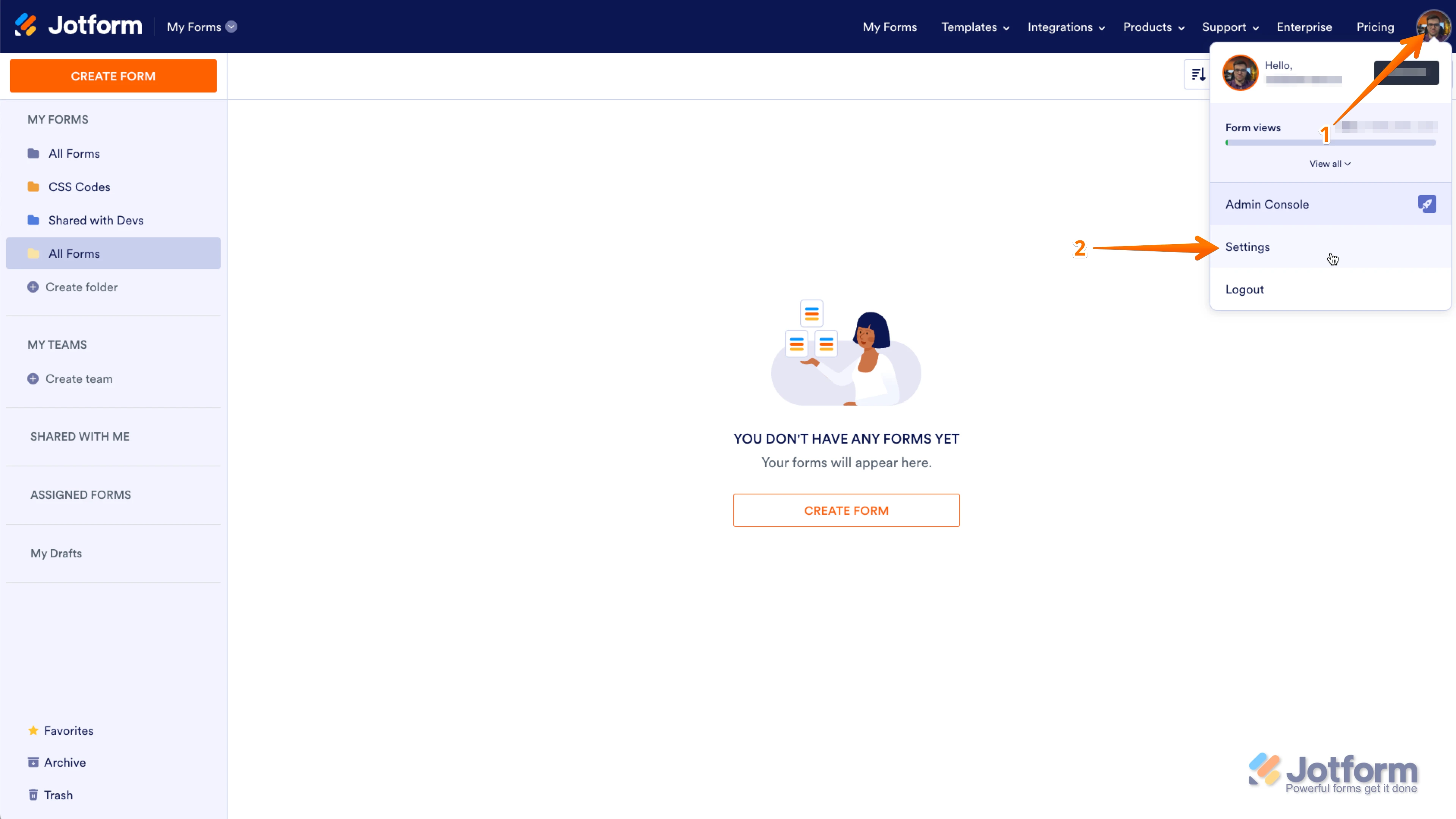
1. In the upper-right corner of your My Forms page, click on your Avatar/Profile Image icon.
2. In the small window that opens, click on Settings.
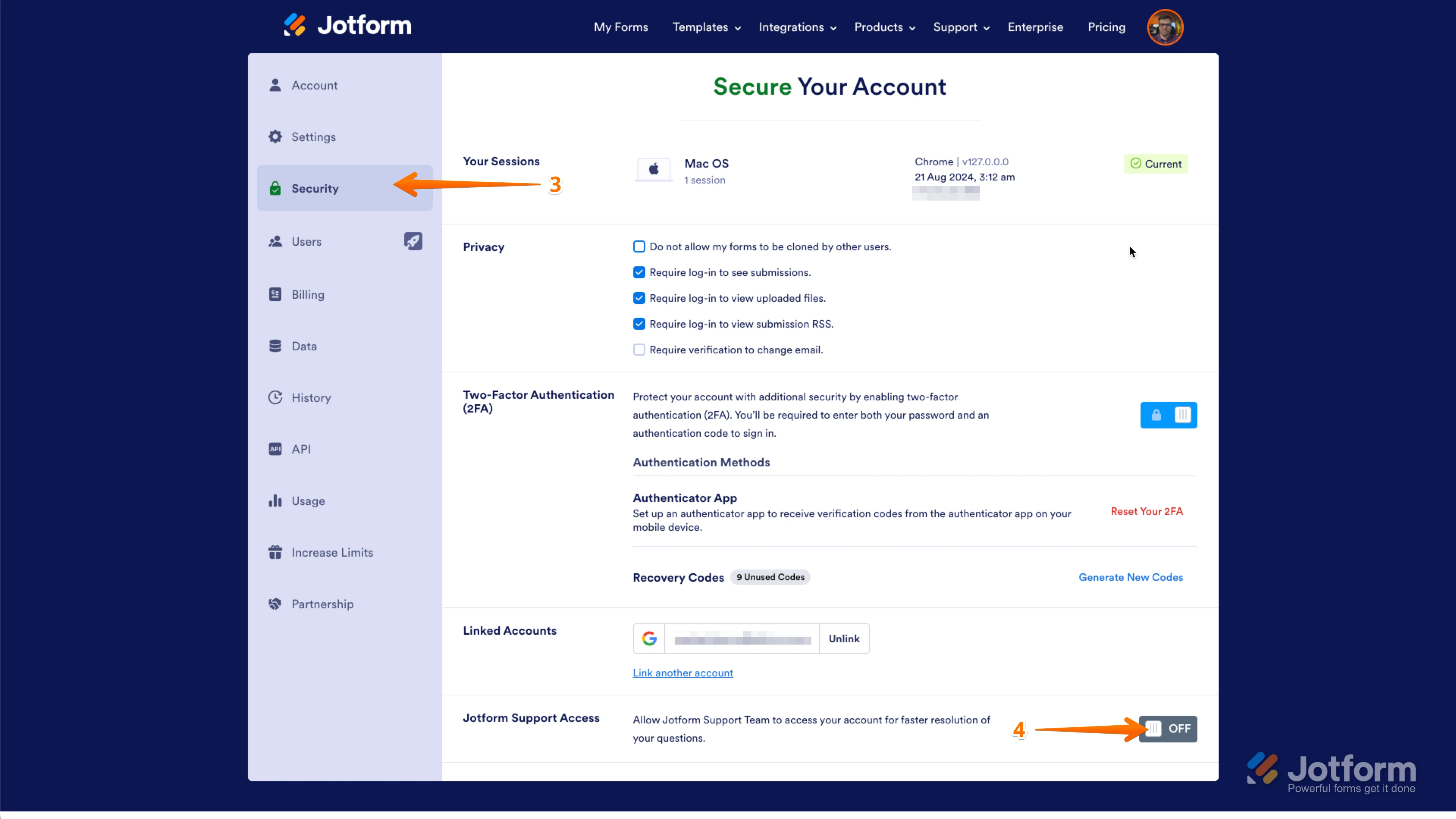
3. In the panel on the left, click on the Security tab.
4. Then, on the bottom-right side of the page, toggle Jotform Support Access to the On position.
After we hear back from you, we’ll have a better idea of what’s going on and how to help.
-
SoporteOperativo
Hi Allan,
The option was already ON. Please go ahead and test a life form if need it.
-
 Mahmoud Jotform Support
Hi SoporteOperativo,
Thanks for your patience. We had an issue with sending email notifications and it has been resolved by our developer Team. I tested one of my forms and I received the notification email. Could you try to test your form again now?
Let us know if you have any other questions.
-
SoporteOperativo
Hi Mahmoud,
The notifications are working now as expected.
Thxs
-
SoporteOperativo
Buenos dias,
Por favor su apoyo validando el siguiente correo eelectronico.
El usuario no logra recibir correos de notificaciones en su bandeja de correo
-
Jotform Support Former Jotform Support
Hi SoporteOperativo,
Our Spanish Support agents are busy helping other Jotform users right now, so I'll try to help you in English using Google Translate, but you can reply in whichever language you feel comfortable using. Or, if you'd rather have support in Spanish, let us know, and we can have them do that. But it might take a while until they're available again.
Now, coming back to your question, I’ve validated the email address jramos@xintech.pe and confirmed it's not on our bounce or unsubscribe lists. If the user isn’t receiving notification emails, they should check their spam folder and ensure emails from noreply@jotform.com aren't being filtered.
For those using a company or custom domain email, it's advisable to consult their IT team to allow Jotform emails. Setting up Custom SMTP in the Form or Workflow Builder can also help. Whitelisting Jotform's IP addresses and domains may prevent messages from being marked as spam.
Let us know if you need any more help.