-
 OperacionesSH
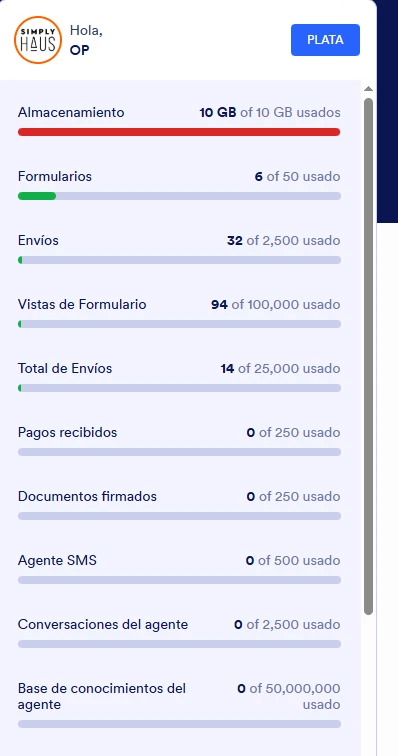
Me esta ocupando 10gb de almacenamiento, llevo eliminando todo toda la semana igualmente el cache, pero solo esta aceptando 10 envios y vuelve a llenarse, necesito ayuda, Gracias

-
 Jotform Support Former Jotform Support
Hi OperacionesSH,
Thanks for reaching out to Jotform Support. Our Spanish Support agents are busy helping other Jotform users right now, so I'll try to help you in English using Google Translate, but you can reply in whichever language you feel comfortable using. Or, if you'd rather have support in Spanish, let us know and we can have them do that. But, it might take a while until they're available again.
Now, coming back to your question, I checked your upload space usage and it's currently at 10 GB. To free up more upload space, you can delete submissions with files uploaded to them. Let me show you how to delete submissions:
1. In the Jotform Table, select the entries to delete.
2. Click on the Delete button in the upper-right corner.
3. Select Move to Trash.
After you already deleted the submissions, these are going to be stored on your Trashed Entries for the next 30 days which will still take up your upload space usage. In order to reactivate your account, you must also purge these submissions from the Trashed Entries. It's really easy, let me show you how:
1. Click on the Three Dots icon on the current table tab.
2. Select Trashed entries from the menu.
3. In the Trash panel on the right, choose the submissions to purge.
4. Select Delete Forever.
5. Select Delete in the confirmation dialog.
Give it a try and let us know if you need any help.
-
OperacionesSH
No funciona, llevo eliminando y vaciando papelear toda la semana y nada, no es primera vez que pasa
-
Jotform Support Former Jotform Support
Hola OperacionesSH,
Al revisar tu cuenta pude ver que tus formularios no tienen muchos envíos almacenados, y al revisar el uso total de tu cuenta pude ver que este espacio de almacenamiento ya se encuentra liberado. Este espacio usado coincide con el total de envíos que tienes en tus formularios al momento. Puedes revisarlo directamente a través de este enlace.
Haz la prueba y no dudes en hacernos saber si necesitas más ayuda.