-
 rcamavilca
Quisiera cargar en un formulario de pdf inteligente existente una imagen por defecto de una firma, como podria hacerlo
-
 Podo: Especialista de soporte
Hi Ricardo,
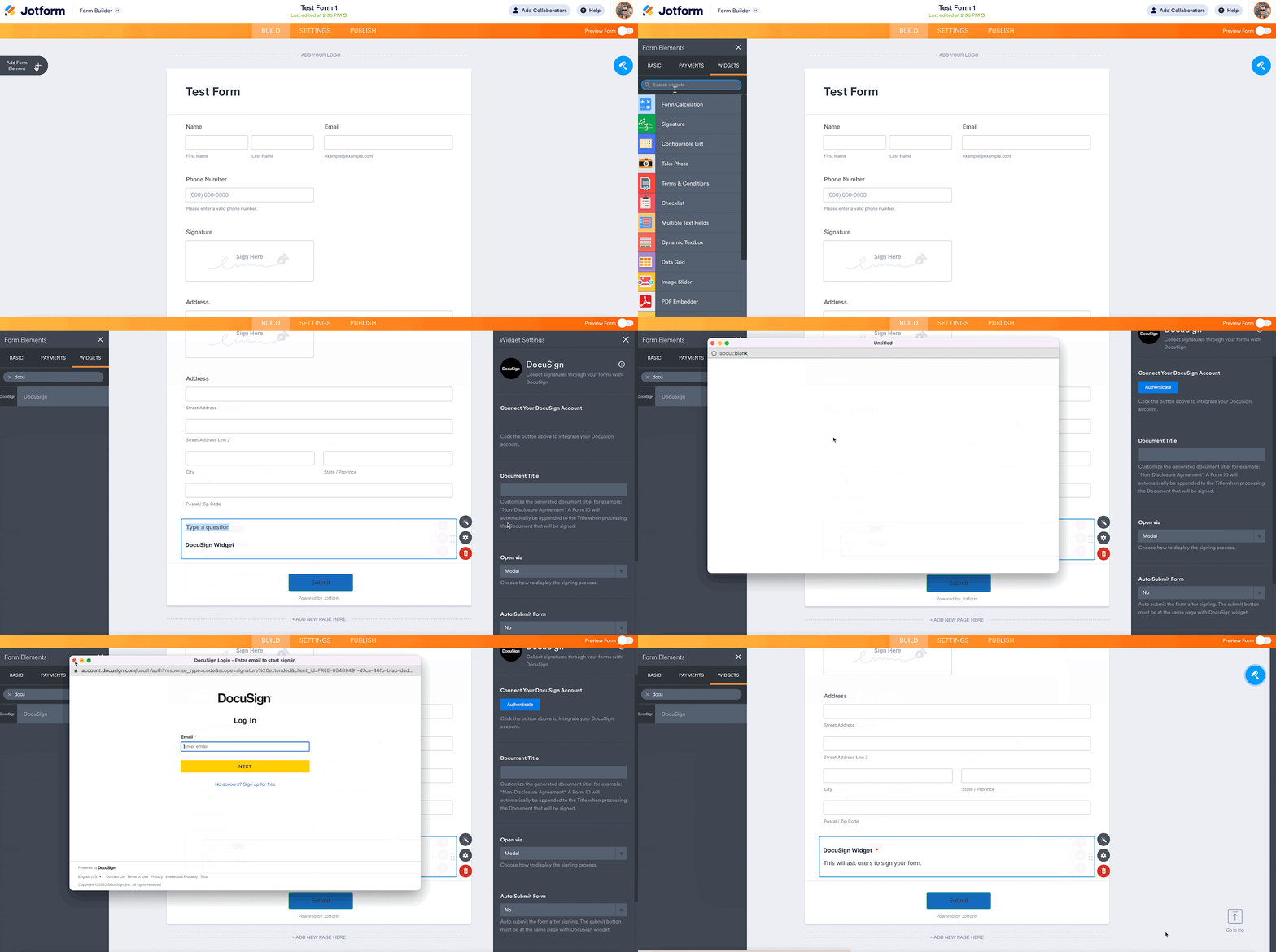
Thanks for reaching out to Jotform Support. Adding a default signature image to your existing smart PDF form can be done by using the DocuSign widget. Let me show you how:
1. Open your form in Form Builder and click on the Add Form Element menu on the left side of the page.
2. Under the Widgets tab, scroll down and add the DocuSign widget to your form.
3. Authenticate your DocuSign account and customize the other options as needed.
4. Click on Update Widget and that’s it.

If you want to connect Jotform and DocuSign via Zapier, you can check out this Setup Wizard.
Give it a try and let us know if you need any other help.
-
rcamavilca
mas que una firma solo quiero cargar una imagen
-
Podo: Especialista de soporte
Hola Ricardo,
En Jotform, no es posible cargar directamente una imagen como firma o cualquier otra imagen por defecto en un formulario inteligente PDF. La plataforma no permite subir imágenes manualmente como parte de los campos de firma o similares.
Sin embargo, puedes considerar otras opciones como insertar la imagen en el PDF original antes de subirlo a Jotform o usar widgets específicos para firmas digitales, aunque estos no permiten cargar una imagen fija sino que capturan firmas en tiempo real.
Si necesitas que la imagen aparezca siempre en el formulario, la mejor opción sería editar el PDF original para incluir esa imagen antes de convertirlo en un formulario inteligente en Jotform.
Espero que esta información te sea útil.
Déjanos saber si tienes alguna otra pregunta.
-
Rricardo
-
 Kyle Jotform Support
Hi rcamavilca,
Our Spanish Support agents are busy helping other Jotform users right now, so I'll try to help you in English using Google Translate, but you can reply in whichever language you feel comfortable using. Or, if you'd rather have support in Spanish, let us know and we can have them do that. But, it might take a while until they're available again.
Now, coming back to your question, I’ve gone ahead and moved your other question to a separate thread to keep things tidy, and someone from our Support Team will help you out with it here.
Reach out again if there’s anything else we can help you with.