-
 conexioncch
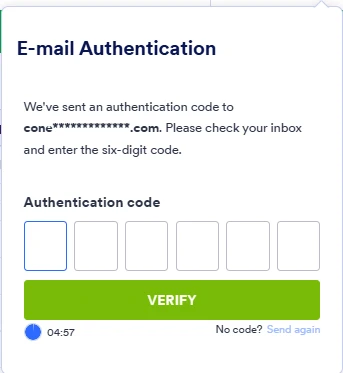
Constantemente me está pidiendo un codigo de verificación y a veces se cierra y dice que hubo error

-
 Podo: Especialista de soporte
Hi,
As I checked, you appear to be logged in. There seems to be no issue with accessing your account. If you have any other questions, let me know.
Let us know if you have any other questions.
-
conexioncch
Porque me saca de la sesión constantemente o porque me pide constantemente este codigo un mismo dia y en menos de una hora de haberla iniciado?
-
Podo: Especialista de soporte
Hi Conexión,
El sistema te puede pedir el código de verificación y cerrar la sesión constantemente por razones de seguridad, como protección contra accesos no autorizados o actividad sospechosa en la cuenta.
Si deseas cerrar sesión manualmente, aquí te muestro cómo hacerlo:
- En tu página de Workspace, haz clic en tu Avatar/Imagen de perfil en la parte superior derecha de la página.
- En la ventana que se abre, haz clic en Cerrar sesión.
Si el problema persiste, puede estar relacionado con configuraciones de seguridad o cookies en tu navegador.
Reach out again if there’s anything else we can help you with.
-
conexioncch
Necesito desactivar el tema de codigo de seguridad porque me atrasa un poco en el trabajo
-
Podo: Especialista de soporte
Hi Conexión,
Puedes desactivar la protección con código de seguridad siguiendo estos pasos:
- En el Form Builder, en la barra de navegación naranja en la parte superior, haz clic en Settings.
- Luego, haz clic en Show More Options.
- Desplázate hasta la sección de Password Protection y desmarca la opción Enable password protection.
Reach out again if there’s anything else we can help you with.
-
 Joseph Christian Jotform Support
Hi conexioncch,
Thanks for reaching out to Jotform Support. Our Spanish Support agents are busy helping other Jotform users right now, so I'll try to help you in English using Google Translate, but you can reply in whichever language you feel comfortable using. Or, if you'd rather have support in Spanish, let us know and we can have them do that. But, it might take a while until they're available again.
Now, coming back to your question, unfortunately, the authentication code cannot be disabled. Our system automatically sends an authentication code when it detects an unusual login. This happens to keep your account secure and usually triggers when multiple people are using the same account.
Remember that our standard plans (Free, Bronze, Silver, and Gold) are for single users only. Sharing login credentials is a violation of our Terms of Use. If multiple people need to work on a form, you can use the Form Collaboration feature. Also, if you want to share submission data, you can easily share your Jotform Tables with others using the Share button. Let me show you how:
1. On your Jotform Submissions Table, click on the Share button on the top-right side of the page.
2. Click on Share Settings and set your Table’s privacy options.
3. Now, click on Go Back in the top-right corner of the panel and use the Generated Link or the Invite by Email feature to invite people.
You can easily revoke the invites you’ve sent to others. Let me walk you through it:
1. While in Tables, click on the Share button to open Share Table.
2. Now, click on the avatars/icons of the people you invited next to the Shared with section.
3. Select the users that you want to revoke the access to by checking the boxes on the left, and click on Revoke.
4. Then, click on the Yes, Delete button. That’s it, you’re done.
Reach out again if you have any other questions.