Almacenamiento y Métricas: Consultas sobre límites, reinicios y documentación para planes de Jotform
-
 LEGAL_TECHNOLOGY
To whom it may concern:
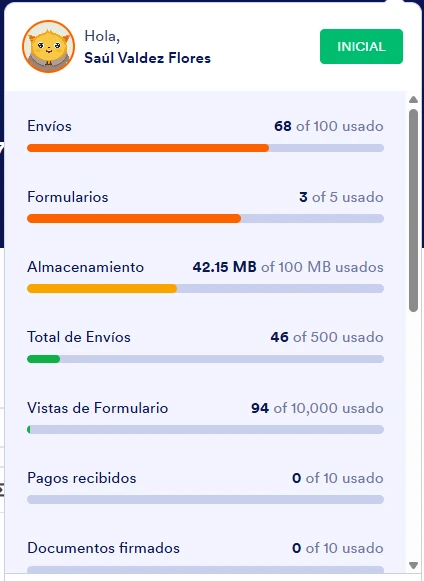
I'm still not entirely clear on the storage issue. I'm currently running tests and deleting the sample records to free up space so I can continue adjusting the form to my needs.
However, I already checked the options to delete shipments and empty the trash, and I don't see that the available space decreases.
If I upgrade to the next plan, will the storage continue to fill up indefinitely? In other words, will I eventually need to upgrade to a higher plan to have more storage capacity?
On the other hand, are metrics such as the number of submissions and form views reset monthly?
I've reviewed your videos and terms and conditions, but the information isn't entirely clear. Is there a manual or documentation that explains these points in more detail, as well as the limitations of the free and bronze plans?
Additionally, I'd like to know if you have a manual or guide for instructing the Podo AI. I've tried telling it not to make changes without prior explanation, but it still makes modifications without confirmation.I would appreciate it if contact could be made only via email.
I look forward to your comments.
Thank you.

-
 Adrian Besilla Jotform Support
Hi Saul,
Thanks for reaching out to Jotform Support. Our Spanish Support agents are busy helping other Jotform users right now, so I'll try to help you in English using Google Translate, but you can reply in whichever language you feel comfortable using. Or, if you'd rather have support in Spanish let us know and we can have them do that. But, it might take a while until they're available again.
Now, coming back to your question, regarding storage, your account has a fixed storage limit based on your plan, and it will continue to fill up as you receive submissions with uploaded files. To fully recover storage, you’ll need to permanently delete the submission data from the Trash as well. Once cleared completely, the available storage should update accordingly, although it may take a short time to reflect.
If you upgrade to a higher plan, you’ll receive a larger storage capacity. This space can still fill up over time if submissions, especially with file uploads, continue to accumulate. In that case, you would either need to regularly delete older submissions/files or consider upgrading again if you require more storage.
You can easily delete your trashed submissions in Jotform Tables. Let me show you how:
- In Jotform Tables , click on the Three Dots icon next to your form title in the tabs.
- Next, in the Dropdown menu , click on Trashed Entries to open the Trash menu .
- Then, in the Trash menu on the right, click on the Checkboxes to select the submissions you want to purge. To select all, click on the Select All button .
- Now, click on Delete Forever , and in the Confirmation window , click on the Delete button to confirm.
I separated your other question into a new thread so we can focus on it properly. You can view and follow it here.
Let us know if you need any more help.
-
LEGAL_TECHNOLOGY
Hola, gracias por responder tan pronto.
Ya me quedo claro como eliminar esos datos que hice para mis pruebas.
Una última duda ¿estos tickets se quedan guardados para futuras consultas de las respuesta que me favorecen mucho?
Nuevamente, gracias por el apoyo.
-
 Kevin Jotform Support
Hola saulvaldez,
Los tickets de soporte se guardan y puedes acceder a ellos cuando quieras. Para hacerlo puedes seguir estos pasos:
1. En la página de Mis Formularios, haz clic en la opción Soporte.
2. Ve a la opción Mis Consultas.
Déjanos saber si tienes alguna duda adicional.