-
 orbitasegura53
 -
 Frédéric Jotform Support
Hi orbitasegura53,
Welcome yo the Jotform Help Center. Our Spanish Support agents are busy helping other Jotform users right now, so I'll try to help you in English using Google Translate, but you can reply in whichever language you feel comfortable using. Or, if you'd rather have support in Spanish, let us know and we can have them do that. But, it might take a while until they're available again.
Now, coming back to your question, it’s easy to set up an Autoresponder Email for your form. To get going, here’s what you’ll do:
1. In Form Builder, in the orange navigation bar at the top of the page, click on Settings.
2. Then, in the menu on the left side of the page, click on Emails.
3. Now, click on Add Email, and then select Autoresponder Email.

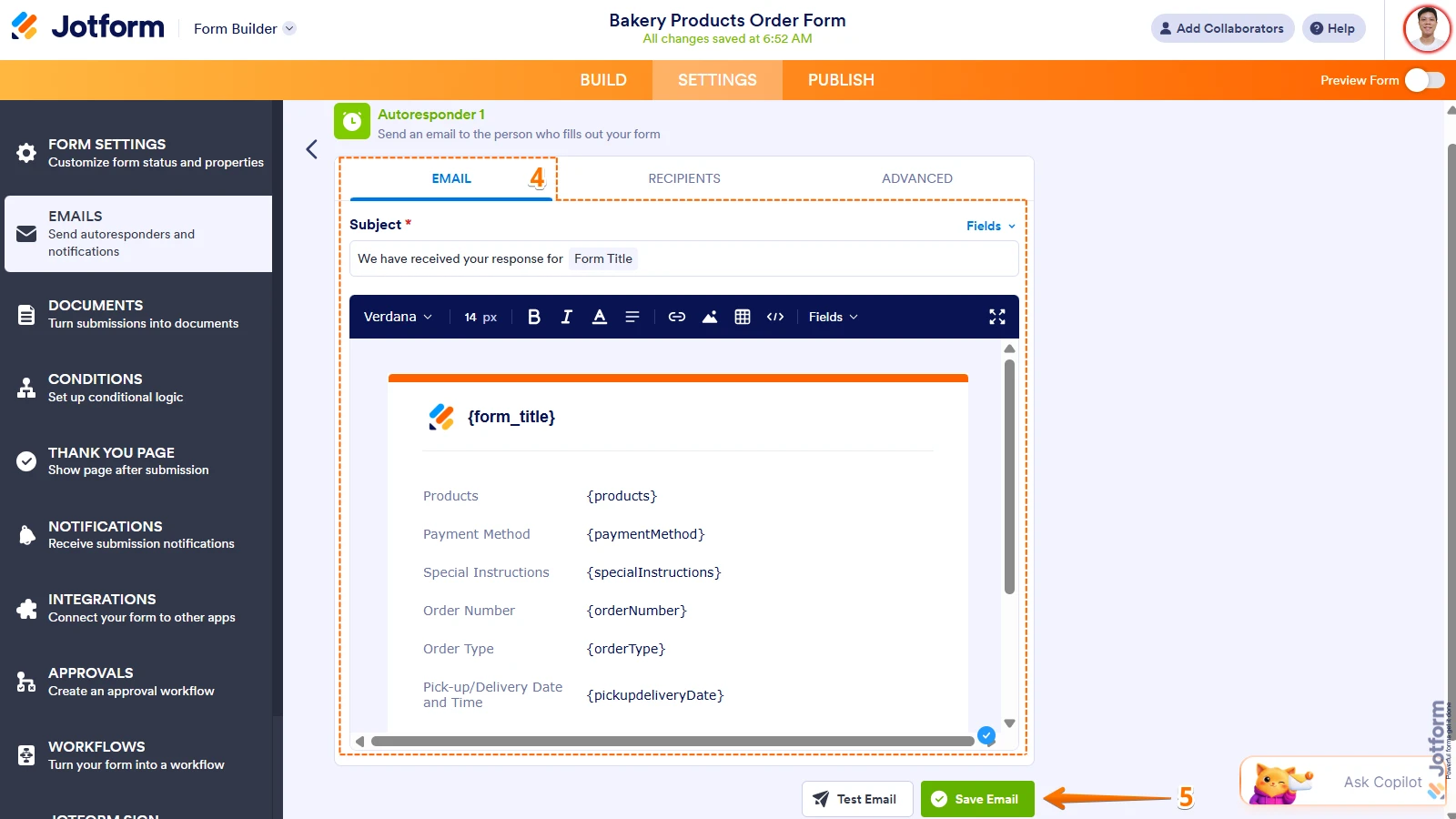
4. Next, under the Email tab, customize the email the way you want. If you want to attach a PDF, you can do it under the Advanced tab.
5. Then, click on Save Email at the bottom of the page.
Give it a try and let us know if you need any help.
-
orbitasegura53
Esta parte ya logramos realizarla, quedo perfecta, gracias por su ayuda