-
 orbitasegura53pero ahora nos surgió otra duda: cada que realizamos un formulario, nos habían indicado que en el link de edición ocultáramos los campos que no queríamos que se editaran, ya que si dejamos todos los campos para edición, pueden modificar cualquier campo y solo queremos que se cambien algunos. El problema está en que, al ocultar los campos en ese link de edición, al momento de editar, el sistema guarda los campos que se editaron y los demás que estaban ocultos y ya con información quedan en blanco y ya no se registran; es como si se hubieran eliminado, y ya no aparecen ni el pdf ni la base de datos de los envíos realizados.
 -
 Sonnyfer Enterprise Support
Hi Orbita,
Thanks for reaching out to Jotform Support. Our Spanish Support agents are busy helping other Jotform users right now, so I'll try to help you in English using Google Translate, but you can reply in whichever language you feel comfortable using. Or, if you'd rather have support in Spanish, let us know and we can have them do that. But, it might take a while until they're available again.
Now, coming back to your question, I understand you're hiding form fields so that you can answer them later when you edit the submissions, but you're still receiving them as empty in tables and PDFs. Can you point us to the form that you're working on and tell us the fields that appear blank even though you filled them out via the Edit Submission link?
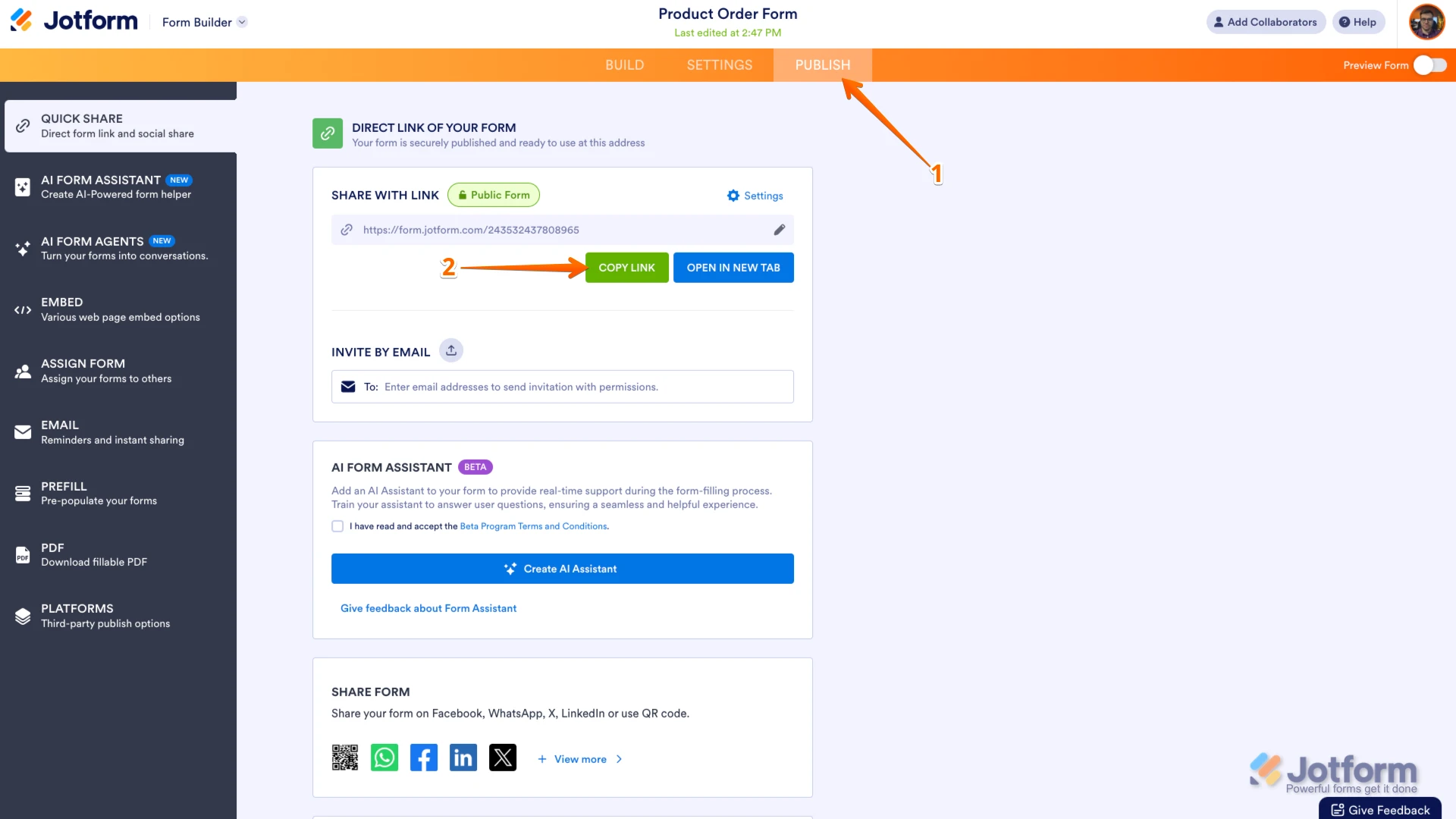
You can easily find your form's URL in Form Builder. Let me show you how:
- In Form Builder, in the orange navigation bar at the top of the page, click on Publish.
- In the Quick Share tab, click on Copy Link in the Share With Link section.
 Once you share the form URL with us, we’ll be able to help you better with this.
 -
orbitasegura53
Hola
El link del formulario es el siguiente
https://form.jotform.com/orbitasegura53/solicitud-de-creditoEl formulario se llena por 2 partes, en la primera se ocupa en el link que se acab de mostrar, y solo se llenan algunos campos, cuando presionamos el botón de Submit se envía un correo para la edición de los campos faltantes, pero para evitar que se cambien los datos ya que se llenaron con anterioridad, al apertura la edición, se ocultaron esos campos, y hasta ahí todo bien, se procede a llenar los campos visibles, pero al llenarlos y presionar nuevamente Submit se genera el pdf y se llena la base de de datos de envío en el sistema que para nosotros es importante, pero los datos que estaban ocultos ya no estan en la base de datos ni aparecen en el pdf que se genera, para que aparezcan deben estar visibles en la edición, solo así no se borran, pero corremos el riesgo de que sean modificado.
gracias por la ayuda -
Sonnyfer Enterprise Support
Hi Orbita,
Thanks for the additional information. I see you're using conditions to hide your fields. To prevent them from being cleared upon form submission, you can set the Clear Hidden Field Values to Don't Clear in Form Settings. Let me walk you through it:
- In Form Builder, click on Settings in the blue navigation bar at the top.
- Under the Form Settings section, click on the Show More button at the bottom.
- Look for Clear Hidden Field Values dropdown and set it to Don't Clear.
That's it. Keep us updated and let us know if you need any more help.
 Once you share the form URL with us, we’ll be able to help you better with this.