-
 ajmauro2025
Boa tarde.
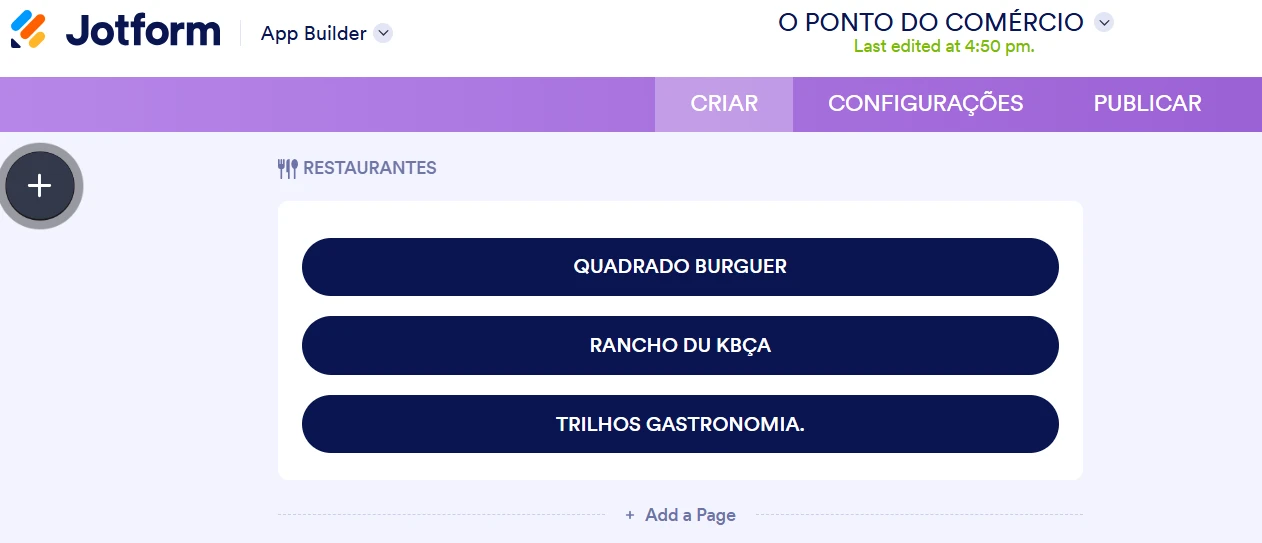
Os titulos de botões para direcionar para paginas exteriores estão sendo convertidos quando acionados no celular.

-
 Kris Jotform Support
Hi Alcione José,
Thanks for reaching out to Jotform Support. Our Portuguese Support agents are busy helping other Jotform users right now, so I'll try to help you in English using Google Translate, but you can reply in whichever language you feel comfortable using. Or, if you'd rather have support in Portuguese, let us know and we can have them do that. But it might take a while until they're available again.
Now, coming back to your question. I sent your app to my mobile device and visited the Restaurantres page. But was unable to replicate the issue. You can check out the screencast below for the actual navigation of the app:
Is this happening to multiple mobile devices? Can you share the make and model of the mobile device shown in the screen recording you shared with us? I suggest reinstalling the app and restarting the mobile device for now. Then check again.
Let us know if you have any other questions.
-
ajmauro2025
-
 Jotform Support Former Jotform Support
Hi ajmauro2025,
Thanks for providing your device model (Motorola G54 5G).
To keep our forum organized, I have moved your question about the Portuguese video courses to a new thread. You can check out our answer to that specific question here.
Coming back to the app buttons issue: now that we know you are using an Android device (Motorola), we will run some additional tests on our end using an emulator with similar specifications to try and replicate the error.
We will get back to you on this thread as soon as we have an update.
-
Jotform Support Former Jotform Support
Hi Alcione José,
Thank you for your patience. As promised, we tested your app using an Android emulator (Motorola), and the button titles displayed perfectly on our end without changing.
Based on the behavior in your screen recording, it appears this issue might be caused by the Auto-Translate feature built into your mobile web browser (like Google Chrome). It looks like your browser is detecting words like "Burguer" and automatically attempting to translate them to "Hambúrguer", rearranging the words to fit standard Portuguese grammar.
To see if this is the case, could you please try disabling the translation feature for this specific page on your mobile browser?
If you are using Google Chrome on Android:
- Open the app link.
- Tap the three-dot menu icon in the top right corner.
- Tap Translate.
- Tap the gear/settings icon at the bottom and select "Never translate this site" (or simply switch the language back to the original).
Give this a try and let us know if the buttons display correctly afterward!
-
ajmauro2025
Furkan, Bom dia.
Resolveu, Obrigado.