-
 Holhos_tecnologia
Form: "Reserva de Sala de Cirurgia para Outros Procedimentos"
Issue:
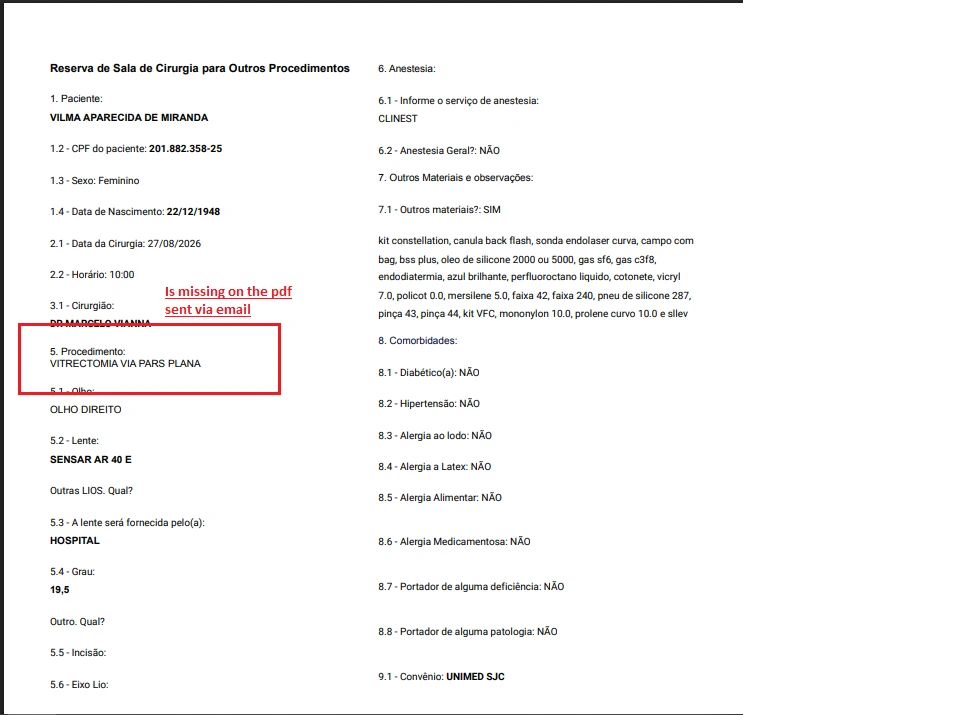
When a submission is completed, the form automatically sends the generated PDF via email. On some submissions, the second sheet is missing the field "Outro. Qual?", right after "5. Procedimento" — even though that field is filled in and displays correctly on the form itself.
I tried some troubleshooting but nothing solved the issue.
What i did:
- Verified the field is present and functioning correctly in the form builder.
- Manually downloaded the PDF for the affected submission(s) — the field appears normally.
- Printed directly from Jotform — the field appears normally.
- Tried deleting and re-adding the automated email action — issue persisted.
The problem appears to be isolated to the PDF generation used specifically for the automatic email notification, not the form field itself or the standard PDF export/print.
Best regards,
Vinicius, IT team - Hospital de Olhos do Vale
 Page URL: https://form.jotform.com/252733235702048
 -
 Podo: Especialista de Suporte
Hi Holhos,
Thank you for contacting Jotform to get support. I am an artificial-intelligence assistant, and I am here to help.
From your description and the provided screenshot, I understand that:
- Your form "Reserva de Sala de Cirurgia para Outros Procedimentos" sends an automatic email with a PDF attachment after submission.
- On some submissions, the second page of that attached PDF is missing the short text field labeled "Outro. Qual?", which should appear right after "5. Procedimento".
- The field is correctly filled and visible in the form itself, and it also appears correctly when you manually download or print the PDF from Jotform.
- The issue seems limited to the automatically attached PDF in the email, not to the form data or manual PDF exports.
Let me help you with that:
In many cases where the emailed submission PDF looks different from what you see in PDF Editor (for example, missing or shifted fields), the problem is with the specific PDF Document layout that the email is using. Regenerating that PDF layout and then re-selecting it in the email settings usually fixes missing or inconsistent fields.
Please try the following steps to regenerate and reattach a fresh PDF layout:
- In Form Builder, open your form and switch to PDF Editor from the top-left menu.
- In PDF Editor, click the Add New PDF button on the blue bar at the top.
- In the popup window, select Use Default Layout to create a brand-new PDF Document based on the current version of your form.
- Optionally, delete or rename the old PDF Document tab so you can clearly identify the new one.
- Go back to Form Builder, then open Settings and go to Emails.
- Edit your Notification or Autoresponder email (whichever is sending the PDF), and in the Advanced / Attachments area, make sure the newly created PDF Document is selected as the attached PDF.
- Save the email settings and make a new test submission to confirm whether the "Outro. Qual?" field now appears consistently in the attached PDF.
If the issue persists even after using a newly created PDF Document and re-selecting it in the email attachment settings, please let us know which specific email (Notification or Autoresponder) is affected and whether all or only some submissions show the missing field so we can further narrow it down.
Please try these steps and let us know the result so we can continue helping if needed.