

قوالب الموارد البشرية

جدول بيانات متابعة الإجازات و الإجازات المرضية
يتم استخدام جدول بيانات متابعة وقت الإجازات والإجازات المرضية لتتبع عدد الأيام التي لا يحضر فيها الموظف للعمل. سواء كنت تدير شركة ناشئة صغيرة أو تدير الموارد البشرية لشركة كبيرة، فإن جدول بيانات متابعة أوقات الإجازات والإجازات المرضية سيساعدك على متابعة موظفيك. عندما يطلب موظفوك إجازة، فقط قم بإدخال الاسم والقسم والوظيفة و تواريخ الإجازة والعودة وسبب الغياب في جدول البيانات. أو شارك عنوان URL مع موظفيك حتى يتمكنوا من إدخال المعلومات بأنفسهم. سيكون باستطاعتك عرض جدول بيانات متابعة وقت الإجازات والإجازات المرضية على أي جهاز، حتى بدون الوصول إلى الإنترنت. إن جدول بيانات متابعة وقت الإجازات والإجازات المرضية جاهز للاستخدام على الفور، لكن لا تتردد في قضاء بعض الوقت في تخصيصه وفقًا لاحتياجاتك. من خلال واجهة السحب والإفلات، فإنه من السهل إضافة المزيد من الصفوف والأعمدة وعلامات التبويب والتصنيفات لمساعدتك في تنظيم معلومات الموظف. يمكنك أيضًا إنشاء نموذج إجازة يقوم بملء جدول البيانات الخاص بك على الفور بمجرد إرسال الموظفين لطلباتهم! قم بإدارة حضور الموظفين وجعل عملية تتبع الإجازات مدفوعة الأجر الخاصة بك تتم بانسيابية و بشكل أكثر كفاءة من خلال جدول بيانات متابعة وقت الإجازات والإجازات المرضية.
انتقل إلى الفئة:قوالب الموارد البشرية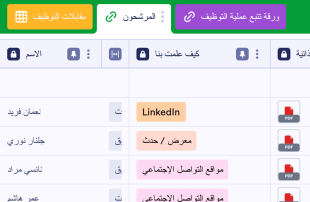
متتبع عملية التوظيف
يتم استخدام متتبع عملية التوظيف لتتبع طلبات التوظيف والمقابلات وتفاصيل الاتصال الخاصة بالمرشح عبر الإنترنت. قم بتحسين عملية التوظيف الخاصة بك باستخدام جدول تتبع عملية التوظيف المجاني هذا! فقط قم بإدخال معلومات المرشح يدويًا، أو ربط نموذج طلب الوظيفة عبر الإنترنت بمتتبع التوظيف الخاص بك لإضافة مرشحين جدد تلقائيًا! من خلال إضافة ملاحظات المقابلة إلى المرشحين الحاليين، يمكنك مقارنة نقاط القوة والضعف لاختيار الشخص المناسب للوظيفة. قم باستخدام علامات التبويب المخصصة و الأعمدة والصفوف ومقاييس التصنيف والتسميات المرمزة بالألوان لإدارة معلوماتك بالطريقة التي تناسبك أنت وشركتك بشكل أفضل. لماذا لا تقم بتبديل طريقة العرض إلى عرض التقويم لرؤية مواعيد المقابلة بسهولة؟ من خلال جمع طلبات التوظيف عبر الإنترنت وتنظيمها باستخدام بمتتبع عملية التوظيف المجاني الخاصة بنا، يمكنك عرض جميع طلبات التوظيف جنبًا إلى جنب ومقارنة المهارات المختلفة وتحديد أفضل مرشح لهذا الدور بسرعة.
انتقل إلى الفئة:قوالب الموارد البشريةحول قوالب الموارد البشرية
تُعد قوالب الموارد البشرية قوالب جداول متخصصة مصممة للمساعدة في تنظيم وإدارة السجلات المتعلقة بالموارد البشرية بكفاءة. من خلال نماذج Jotform، يمكن للمستجيبين تقديم مجموعة واسعة من المعلومات الخاصة بالموارد البشرية، مثل طلبات التوظيف، وتقييمات الموظفين، وطلبات الإجازات، ونماذج الملاحظات. تُعد هذه البيانات المرسلة مهمة لأقسام الموارد البشرية وشركات التوظيف والفرق المؤسسية التي تحتاج إلى إدارة ومعالجة أنواع مختلفة من مستندات الموارد البشرية بكفاءة. يعمل الجدول كقاعدة بيانات مركزية حيث تتم إدارة جميع المعلومات المجمعة بشكل منهجي، مما يوفر حلاً مبسطًا للتعامل مع تعقيدات بيانات الموارد البشرية دون الحاجة إلى نسخ السجلات أو نقلها يدويًا.
تعمل جداول Jotform كمركز رئيسي حيث يتم تسجيل وإدارة عمليات الإرسال من نماذج Jotform المتصلة تلقائيًا. يتم تسجيل كل استجابة يتم إرسالها من خلال نموذج كإدخال منفصل في الجدول المتصل، وتظهر عادةً كصف في عرض الجدول. يمكن للمستخدمين مراجعة عمليات الإرسال بطرق مختلفة، باستخدام ميزات مثل عرض التفاصيل للفحص المتعمق أو عرض التقويم للإدخالات المرتبطة بتواريخ محددة. تعمل ميزة البحث وعوامل التصفية على تحسين سهولة الاستخدام من خلال السماح بالعثور الفوري على سجلات معينة. يوفر الإدخال اليدوي واستيراد ملفات CSV أو Excel طرقًا إضافية لإدخال بيانات أخرى، ولكن سير العمل الأساسي يركز على الانتقال السلس من إرسال النموذج إلى إدارة الجدول، مما يضمن عملية فعّالة ومتكاملة من البداية إلى النهاية.
لماذا نستخدم قوالب الموارد البشرية؟
- من خلال إدارة عمليات إرسال النماذج داخل جداول Jotform، يمكن لفرق الموارد البشرية التخلص من الحاجة إلى الإدخال اليدوي للبيانات، مما يقلل بشكل كبير من الأخطاء ويوفر الوقت. وهذا يتيح لإدارات الموارد البشرية التركيز على المهام الأكثر استراتيجية بدلاً من الانغماس في الأعمال الإدارية.
- يتم تجميع الإجابات الواردة من نماذج Jotform تلقائيًا في مكان واحد، مما يضمن الاحتفاظ بجميع الردود معًا وإمكانية الوصول إليها بسهولة. وهذا يجنبك مشاكل تشتت المستندات ويضمن عدم إغفال أي شيء.
- بفضل خيارات البحث والتصفية الفعالة، يصبح العثور على سجلات أو مجموعات بيانات محددة أمراً سريعاً وسهلاً. وتُعد هذه الإمكانية مفيدة بشكل خاص عند التعامل مع كميات كبيرة من بيانات الموارد البشرية التي تتطلب الوصول إليها وتحديثها بشكل متكرر.
- تُصبح مراجعة تفاصيل الاستجابات بالكامل أكثر سهولة باستخدام العرض الجدولي والعرض التفصيلي، مما يوفر رؤى شاملة حول كل سجل. وتساعد عملية المراجعة الدقيقة هذه على اتخاذ قرارات مدروسة استنادًا إلى بيانات كاملة ودقيقة.
- تتحقق الكفاءة في تنسيق إجراءات المتابعة، مثل ترتيب المقابلات أو مراجعة ملاحظات الأداء، بفضل القدرة على تتبع التغييرات وإعداد التقارير حول البيانات التي تم جمعها. ويضمن ذلك اتخاذ جميع الخطوات اللازمة في الوقت المناسب، مما يعزز كفاءة عمليات الموارد البشرية بشكل عام.
المشكلات الشائعة التي تحلها نماذج الموارد البشرية
- يستغرق نسخ الاستجابات يدويًا من النماذج إلى جداول البيانات وقتًا طويلًا ويكون عرضة للأخطاء. وتعمل جداول Jotform على أتمتة هذه العملية، مما يضمن تسجيل جميع البيانات بدقة دون الحاجة إلى تدخل يدوي.
- تجعل الاستجابات المتفرقة عبر الأنظمة المختلفة من الصعب الحفاظ على نظرة عامة متماسكة لأنشطة الموارد البشرية. ومن خلال تجميع البيانات المقدمة في جدول واحد، توفر جداول Jotform عرضًا موحدًا يعزز الرؤية والتحكم.
- قد يكون العثور بسرعة على سجلات محددة أمرًا صعبًا عند التعامل مع حجم كبير من البيانات. وتسهّل إمكانات البحث والتصفية في جداول Jotform العثور على ما تحتاج إليه بالضبط في الوقت المناسب، مما يحسن الكفاءة ويسرّع الاستجابة.
- قد تؤدي عمليات المراجعة غير المتسقة إلى إغفال مهام الموارد البشرية المهمة أو سوء إدارتها. وبفضل العرض الموحد للبيانات والقدرة على تتبع التغييرات، تضمن جداول Jotform اتباع نهج متسق في إدارة البيانات، مما يقلل من مخاطر حدوث الأخطاء.
- قد يؤدي عدم وضوح ملكية السجلات إلى تأخير العمليات المهمة في مجال الموارد البشرية. وبفضل ميزات مثل «المكلفين» و«إعدادات الوصول»، توضح جداول Jotform المسؤوليات، مما يضمن إدارة كل قيد بشكل سليم واتخاذ الإجراءات اللازمة بشأنه.
مطابقة حالات استخدام عمليات إرسال النماذج مع ميزات Jotform Tables
- يتم إدراج طلبات التوظيف المقدمة عبر نماذج Jotform تلقائيًا في جداول Jotform، مما يتيح لفرق الموارد البشرية مراجعة المرشحين وإدارتهم بكفاءة في «عرض الجدول» أو «عرض التفاصيل». ويُسهّل هذا التكامل السلس اتخاذ القرارات بسرعة وتبسيط عمليات التوظيف.
- يمكن تنظيم طلبات إجازات الموظفين التي يتم جمعها عبر النماذج باستخدام عوامل التصفية وتجميع البيانات في جداول Jotform، مما يضمن تمكن مديري الموارد البشرية من متابعة جداول الإجازات والموافقة عليها بسهولة. ويحول هذا التنظيم دون حدوث تعارضات في الجداول الزمنية ويضمن سير العمليات بسلاسة.
- يمكن مراجعة ملاحظات أداء الموظفين وتحليلها باستخدام أنواع مختلفة من الأعمدة والصيغ البرمجية في جداول Jotform، مما يزود إدارة الموارد البشرية برؤى قابلة للتنفيذ لتطوير الموظفين. ويسهم هذا النهج التحليلي في إعداد خطط تحسين موجهة.
- تتيح إعدادات الوصول لفرق الموارد البشرية التحكم فيمن يمكنه عرض المدخلات في الجدول أو تعديلها أو إدارتها، مما يضمن أمن البيانات وصحة التعاون. ويعد هذا التحكم أمراً حاسماً في الحفاظ على سرية بيانات الموارد البشرية الحساسة وسلامتها.
- تسمح ميزة عرض التقارير لفرق الموارد البشرية من إنشاء تقارير شاملة استناداً إلى البيانات التي تم جمعها، مما يدعم التخطيط الاستراتيجي وتحليل القوى العاملة. وتتيح هذه الصلاحيات للمدراء تقديم ملخصات وافية للجهات المعنية، الأمر الذي يعزز اتخاذ قرارات قائمة على معرفة ودراسة.
كيفية استخدام قوالب الموارد البشرية مع نماذج Jotform
- ابدأ باستخدام قوالب الموارد البشرية أو أربط نموذج Jotform بجدول حالي للبدء في جمع البيانات الخاصة بالموارد البشرية. ومع بدء إرسال المستجيبين لنماذجهم، تظهر المدخلات الجديدة تلقائياً في الجدول المرتبط، مما يضمن عملية جمع بيانات سلسة وفعالة.
- قم بإعداد الجدول عبر تسمية الأعمدة وتحديد أنواعها المناسبة لتلائم بيانات الموارد البشرية الجاري إدارتها. اختر طرق العرض الملائمة، مثل عرض الجدول للحصول على نظرة عامة، وعرض التفاصيل للفحص الدقيق، وعرض التقارير لأغراض إعداد التقارير، بما يضمن تخصيص الجدول وفقاً لاحتياجاتك المحددة.
- قم بإدارة الطلبات التي تم جمعها من خلال الاستفادة من ميزات البحث والفلاتر وتجميع البيانات لتنظيم الإدخالات بكفاءة. قم بتعيين المهام باستخدام المكلفين، وتتبع التغييرات من خلال سجل المراجعات، واستخدم الجداول المرتبطة أو أزرار الإجراءات لمزيد من إدارة البيانات، مما يضمن اتباع نهج شامل في التعامل مع بيانات الموارد البشرية.
أهم حالات الاستخدام لقوالب الموارد البشرية
- لأصحاب النماذج: يتولى صاحب النموذج مسؤولية إنشاء نموذج Jotform المرتبط وصيانته. ويقوم بمراجعة الاستجابات الواردة لضمان دقة البيانات واكتمالها، مع إجراء أي تعديلات لازمة على بيانات الاستجابات. ومن خلال مراجعة التفاصيل والملفات المرفوعة داخل جداول Jotform، يحافظ على سجلات منظمة يسهل الوصول إليها وإدارتها. ويُعد هذا الدور أساسيًا لضمان معالجة جميع استجابات الموارد البشرية بكفاءة ودقة.
- للفرق: يؤدي أعضاء الفريق المصرح لهم دورًا مهمًا في إدارة سجلات الموارد البشرية وتنسيقها. ويمكنهم العثور بسهولة على الاستجابات باستخدام ميزة البحث والحفاظ على تحديث السجلات من خلال التعاون. ومن خلال الاستفادة من ميزات تعيين المسؤولين وإعدادات الوصول، يمكن لأعضاء الفريق تنسيق المسؤوليات وضمان معالجة كل استجابة بالشكل المناسب. كما يدعم سجل مراجعة التعديلات العمل المشترك من خلال توفير سجل واضح لجميع التغييرات التي أُجريت على البيانات.
- للمديرين: يستخدم المديرون جداول Jotform لمراقبة بيانات الموارد البشرية التي تم جمعها وتحليل الأنماط المرتبطة بفرقهم. ويمكنهم مراجعة تقدم المهام والمسؤولين عنها لضمان سير عمليات الموارد البشرية وفق الخطة. ومن خلال استخدام عرض التقارير وطرق العرض الأخرى ذات الصلة، يحصل المديرون على رؤى حول ديناميكيات القوى العاملة ونتائجها، مما يمكّنهم من الإشراف واتخاذ قرارات مدروسة استنادًا إلى بيانات شاملة.
قوالب تلخيص الموارد البشرية
توفر قوالب الموارد البشرية حلاً فعالاً لجمع وإدارة المعلومات الخاصة بالموارد البشرية من خلال نماذج وجداول Jotform. ومن خلال تسهيل التحويل التلقائي للبيانات المرسلة عبر النماذج إلى جداول منظمة، تعزز هذه القوالب الكفاءة والدقة في التعامل مع بيانات الموارد البشرية. وتوفر جداول Jotform مساحة عمل شاملة تتيح لفرق الموارد البشرية مراجعة البيانات المجمعة وتنظيمها واتخاذ الإجراءات اللازمة بشأنها، مما يضمن تبسيط العمليات واتخاذ قرارات مستنيرة.
الأسئلة الشائعة
1) هل استخدام قوالب الموارد البشرية مع Jotform Tables مجاني؟
تقدم Jotform باقة المبتدئين Starter، التي تتيح للمستخدمين البدء في استخدام قوالب الموارد البشرية مع جداول Jotform. توفر هذه الباقة إمكانية الوصول إلى الميزات الأساسية دون الحاجة إلى استثمار مسبق. ويمكن للمستخدمين استكشاف إمكانيات جداول Jotform وتحديد مدى ملاءمتها لاحتياجاتهم في مجال إدارة الموارد البشرية. وللحصول على ميزات أكثر تقدمًا، يمكن للمستخدمين التفكير في الترقية إلى باقة مدفوعة.
2) كيف تظهر عمليات الإرسال من نماذج Jotform في قوالب الموارد البشرية؟
تُدمج استجابات نماذج Jotform بسلاسة في قوالب الموارد البشرية من خلال جدول مرتبط. وتظهر كل استجابة للنموذج تلقائيًا كإدخال في الجدول المرتبط، مما يوفّر تدفقًا مستمرًا للبيانات. وتضمن ميزة التعبئة التلقائية هذه تسجيل الاستجابات في الوقت الفعلي، مما يتيح الوصول إليها وإدارتها على الفور.
3) هل يمكنني تعديل البيانات والبحث فيها وتصفيتها وتجميعها وإجراء العمليات الحسابية عليها في قوالب الموارد البشرية؟
نعم، توفر قوالب الموارد البشرية إمكانيات واسعة لإدارة البيانات. يمكن للمستخدمين تعديل البيانات المقدمة لضمان دقتها واكتمالها. وتتيح وظائف البحث والتصفية العثور بسرعة على إدخالات محددة، بينما تعمل ميزة تجميع البيانات على تنظيم المعلومات بشكل منطقي. ويمكن تطبيق الصيغ والحسابات لتحليل البيانات واستخلاص رؤى مفيدة، مما يعزز إدارة البيانات بشكل عام.
4) هل يمكنني تصدير البيانات الموجودة داخل الجداول بصيغة CSV أو Excel؟
بالتأكيد، تدعم «قوالب الموارد البشرية» تصدير البيانات بتنسيق CSV أو Excel. وتتيح هذه الميزة للمستخدمين إضافة معلومات موجودة بالفعل إلى جانب البيانات المرسلة عبر النماذج أو مشاركة البيانات مع أنظمة خارجية. ويضمن تصدير البيانات المرونة في إدارة البيانات، مما يسهل التعاون والتكامل مع الأدوات الأخرى.
5) ما هي طرق عرض Jotform Tables التي يمكنني استخدامها مع قوالب الموارد البشرية؟
تدعم قوالب الموارد البشرية عدة طرق عرض، بما في ذلك العرض الجدولي، والعرض التفصيلي، وعرض التقويم، وعرض التقارير. ويوفر العرض الجدولي نظرة عامة على جميع الإدخالات، بينما يتيح العرض التفصيلي مراجعة كل استجابة بشكل أكثر تفصيلًا. ويُعد عرض التقويم مناسبًا للسجلات المرتبطة بالتواريخ، في حين يساعد عرض التقارير على تلخيص البيانات لإجراء التحليلات الاستراتيجية. وتوفر كل طريقة عرض مزايا فريدة لمراجعة بيانات الموارد البشرية وتنظيمها.
6) هل يمكن للفرق التعاون في عمليات الإرسال ضمن قوالب الموارد البشرية؟
يمكن للفرق التعاون بفعالية في إنجاز المهام باستخدام قوالب الموارد البشرية من خلال الاستفادة من إعدادات الوصول والمكلفين بالمهام. وتضمن هذه الميزات حصول أعضاء الفريق المناسبين على حق الوصول إلى البيانات ذات الصلة، كما تضمن تحديد المسؤوليات بوضوح. ويتيح التتبع في الوقت الفعلي وسجل المراجعات للفرق العمل بشكل متناسق، مع الحفاظ على سجل محدث ودقيق لجميع أنشطة الموارد البشرية.
7) هل يمكنني ربط قوالب الموارد البشرية بالبيانات ذات الصلة أو بالتطبيقات الأخرى؟
نعم، تدعم قوالب الموارد البشرية الربط بالبيانات ذات الصلة من خلال الجداول المرتبطة وعمليات التكامل. ويمكن لأزرار الإجراءات أن تسهل التفاعل مع التطبيقات الأخرى، مما يؤدي إلى تبسيط سير العمل. وتعزز هذه القابلية للربط إدارة البيانات من خلال السماح بالتكامل عبر المنصات المختلفة، مما يضمن كفاءة وتماسك عمليات الموارد البشرية.
8) هل يمكنني إنشاء تقارير وملفات PDF وإدارة الملفات من قوالب الموارد البشرية؟
نماذج الفنيين هي نماذج رقمية متخصصة مصممة لتبسيط وتحسين سير العمل والمهام التشغيلية للفنيين في مختلف الصناعات. عادةً ما تُستخدم هذه النماذج لتسهيل جمع البيانات وإدارتها بسلاسة في حالات مثل صيانة المعدات، وإعداد تقارير الإصلاح، وتوثيق الخدمات. على سبيل المثال، يمكن للفني استخدام هذه النماذج لتسجيل تفاصيل الخدمة أو لجمع توقيعات العملاء بعد إتمام المهمة. ولا يساعد ذلك فقط في الحفاظ على سجلات شاملة، بل يضمن أيضًا جمع جميع البيانات الضرورية بدقة وكفاءة، وهو أمر بالغ الأهمية للنجاح التشغيلي ورضا العملاء.