

قوالب تعقب

سجل متابعة سير تقدم الطالب
قم بتسجيل ومراقبة أداء طلابك باستخدام سجل متابعة سير تقدم الطلاب المجاني عبر الإنترنت من Jotform! يعمل قالب الجدول المجاني هذا جنبًا إلى جنب مع نموذج تقييم أداء الطالب، والذي يمكنك ملؤه من أي جهاز لتعبئة الجدول تلقائيًا ببيانات المُدخلة. يمكنك أيضًا استيراد ملفات خارجية إلى الجدول لمساعدتك في تتبع جميع معلومات الطالب في مكان واحد يسهل الوصول إليه. إن سجل متابعة سير تقدم الطالب هذه مقسم إلى علامات تبويب مختلفة لكل طالب من طلابك على حدة، ولكن لا تتردد في تخصيص القالب ليعمل بشكل أفضل بالنسبة لك. يمكنك إضافة صفوف وأعمدة، وإنشاء علامات تبويب للطلاب الجدد، وإعداد عوامل تصفية و معادلات متقدمة لتنظِّم لك بياناتك تلقائيًا. ستتمكن أيضًا من تبديل طريقة العرض من عرض الجدول إلى عرض التقويم أو عرض البطاقة أو عرض التحميل حتى تتمكن من رؤية بياناتك بالطريقة التي تريدها بالضبط. لن تكون إدارة بيانات الطلاب عبر الإنترنت معقدة بفضل استخدام سجل متابعة سير تقدم الطلاب المخصص عبر الإنترنت لفصلك الدراسي!
انتقل إلى الفئة:قوالب تعقب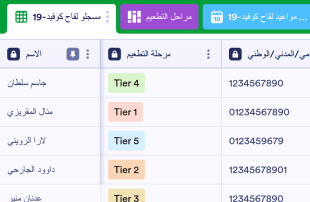
متتبع تطعيمات كوفيد-19
تستخدم المنظمات الطبية متتبع تطعيم كوفيد-19 لتتبع المرضى الذين تم تطعيمهم أو سيتم تطعيمهم. باستخدام متتبع تطعيم كوفيد-19 المجاني عبر الإنترنت من Jotform، يمكنك إدارة عمليات تسجيل لقاح فيروس كورونا في جدول احترافي عبر الإنترنت - واختيار عرض معلوماتك في جدول بيانات أو تقويم أو بطاقات سهلة القراءة. قم بجمع تسجيلات اللقاح من خلال نموذج تسجيل لقاح كوفيد-19 المرفق وشاهد المعلومات تظهر في الجدول تلقائيًا، وستكون جاهزة للعرض أو التحرير أو المشاركة مع زملاء العمل. تختلف عملية التطعيم لكل ممارسة، لذا بكل حرية يمكنك تخصيص قالب الجدول الخاص بك عن طريق إعادة ترتيب التنسيق وإضافة أعمدة جديدة وفرز المعلومات في علامات تبويب مختلفة وتعيين تسميات مرمزة بالألوان والمزيد. تأكد من ترقية حسابك للتوافق مع سياسات HIPAA للحفاظ على المعلومات الصحية والحساسة الخاصة بالمريض محمية! الكل حريص على الحصول على لقاحاتهم - لذلك قم بجعل العملية سلسة قدر الإمكان باستخدام متتبع تطعيمات كوفيد-19 عبر الإنترنت و التي يمكنك استخدامه على أي جهاز.
انتقل إلى الفئة:قوالب تعقبحول قوالب تعقب
قوالب التتبع هي قوالب جداول مخصصة حسب الفئة، مصممة لمساعدة مالكي النماذج وفرقهم على تنظيم وإدارة السجلات التي يتم جمعها من خلال نماذج Jotform. باستخدام هذه القوالب، يمكن للمؤسسات التعامل بكفاءة مع مجموعة متنوعة من عمليات الإرسال مثل السجلات والطلبات والتطبيقات والتسجيلات والملاحظات والطلبات وعمليات التفتيش. هذه الوظيفة مفيدة بشكل خاص للمتخصصين في مختلف الصناعات، بما في ذلك التعليم والرعاية الصحية وإدارة الفعاليات وخدمة العملاء. تضمن قوالب التتبع إدارة المعلومات التي تم جمعها بشكل فعال، مما يوفر نهجًا مبسطًا لإدارة عمليات الإرسال دون تحويل الجدول إلى نموذج أو تطبيق أو أداة لتتبع المهام.
تعمل جداول Jotform كمنصة أساسية حيث تتم تعبئة عمليات الإرسال من نماذج Jotform المتصلة تلقائيًا، مما يسمح بإدارة سلسة للبيانات الواردة. يصبح كل رد يتم إرساله من خلال نموذج Jotform إدخالًا في الجدول المتصل، ويمكن مراجعته في عرض الجدول أو العرض التفصيلي. يتمتع المستخدمون بالمرونة في تنظيم وتحليل عمليات الإرسال باستخدام البحث، والفلاتر، والتجميع، وأنواع الأعمدة، وعرض التقويم، وعرض التقارير، أو عرض التحميلات. بينما تتوفر الإدخالات اليدوية واستيراد ملفات CSV أو Excel لإضافة البيانات الموجودة، يظل التركيز الأساسي على أتمتة سير العمل من النموذج إلى الجدول، مما يضمن انتقالًا سلسًا من جمع البيانات إلى إدارتها.
لماذا تستخدم قوالب التتبع؟
- تلغي قوالب التتبع الحاجة إلى نقل البيانات يدويًا من خلال ملء Jotform Tables تلقائيًا بالردود الواردة من Jotform Forms. تضمن هذه الأتمتة التقاط جميع عمليات الإرسال بدقة وتقلل من احتمالية حدوث أخطاء بشرية.
- يتيح الاحتفاظ بجميع الردود في موقع مركزي الوصول السريع والفعال إلى البيانات. ويوفر هذا النهج المركزي الوقت والجهد عند الحاجة إلى العثور على سجلات محددة لمراجعتها أو إعداد التقارير عنها.
- تعمل إمكانية البحث عن الإدخالات وتصفيتها وتجميعها في قوالب التتبع على تبسيط عملية العثور على نقاط بيانات محددة وتحليلها. وتضمن هذه الوظيفة إمكانية الوصول بسرعة إلى السجلات استنادًا إلى معايير محددة.
- تتيح مراجعة تفاصيل عمليات الإرسال الكاملة، بما في ذلك الملفات المرفقة، داخل Jotform Tables لمالكي النماذج اتخاذ قرارات مستنيرة استنادًا إلى بيانات شاملة.
- يتم تبسيط تنسيق إجراءات المتابعة وتتبع التغييرات في عمليات الإرسال من خلال Jotform Tables، مما يعزز التواصل والمساءلة داخل الفرق.
- تصبح إعداد التقارير حول البيانات التي تم جمعها أكثر كفاءة باستخدام قوالب التتبع، مما يتيح إنشاء الرؤى والإحصاءات اللازمة لاتخاذ قرارات مستنيرة.
المشكلات الشائعة التي تحلها قوالب التتبع
- يستغرق نسخ عمليات الإرسال يدويًا إلى جداول البيانات وقتًا طويلًا ويكون عرضة للأخطاء. تعمل قوالب التتبع على أتمتة هذه العملية من خلال استيراد ردود النماذج مباشرة إلى Jotform Tables.
- قد تؤدي الردود المتفرقة عبر منصات أو مستندات مختلفة إلى عدم الكفاءة. تعمل قوالب التتبع على توحيد جميع عمليات الإرسال في مكان واحد، مما يجعل الوصول إليها سهلًا.
- تُعد صعوبة العثور على السجلات بسرعة تحديًا شائعًا تعالجه قوالب التتبع، والتي توفر إمكانات قوية للبحث والتصفية.
- قد تنتج عمليات المراجعة غير المتسقة عن نقص السياق أو عدم اكتمال البيانات. ومع قوالب التتبع، يتم تنظيم جميع المعلومات ذات الصلة وتصبح متاحة بسهولة لإجراء مراجعة شاملة.
- تتم معالجة صعوبة مراجعة الملفات المرفوعة وعدم وضوح المسؤولية عن عمليات الإرسال من خلال التنسيق المنظم لقوالب التتبع، التي تدعم التحليل الشامل للبيانات والتعيين الواضح للمسؤوليات.
مطابقة حالات استخدام عمليات إرسال النماذج مع ميزات Jotform Tables
- عند جمع بيانات تسجيل الفعاليات من خلال نموذج Jotform، تظهر عمليات الإرسال تلقائيًا في الجدول المتصل، مما يضمن حصول منظمي الفعاليات على وصول فوري إلى معلومات الحضور.
- يمكن تنظيم عمليات الإرسال المتعلقة بملاحظات العملاء باستخدام عرض الجدول أو العرض التفصيلي، مما يسمح لفرق خدمة العملاء بتحليل الردود وتحسين تقديم الخدمة بكفاءة.
- يمكن لمتخصصي الرعاية الصحية استخدام عوامل التصفية وتجميع البيانات لإدارة سجلات المرضى، مما يضمن سهولة الوصول إلى المعلومات المهمة لإجراء التقييمات الطبية والمتابعات.
- تسهّل إعدادات الوصول والمكلّفون تعاون الفريق من خلال السماح للموظفين المصرح لهم فقط بتعديل السجلات، مع الحفاظ على سجل واضح للتغييرات والتعيينات.
- يتم تبسيط إنشاء التقارير من بيانات الاستطلاعات التي تم جمعها من خلال استخدام عرض التقارير، مما يمكّن فرق التسويق من تقديم النتائج بتنسيق منظم واحترافي.
كيفية استخدام قوالب التتبع مع نماذج Jotform
- ابدأ باختيار قالب Jotform Tables ذي الصلة بالفئة، أو جدول فارغ، أو الجدول المتصل بنموذج Jotform موجود. سيجمع نموذج Jotform المعلومات الخاصة بالفئة، وستظهر الردود الجديدة تلقائيًا في الجدول المتصل.
- قم بتهيئة الجدول لمراجعة عمليات الإرسال من خلال تسمية الأعمدة، واختيار أنواع الأعمدة المناسبة، واختيار طرق العرض ذات الصلة مثل عرض الجدول، والعرض التفصيلي، وعرض التقويم، وعرض الملفات المرفوعة، أو عرض التقارير بما يتناسب بشكل أفضل مع البيانات التي تتم إدارتها.
- إدارة عمليات الإرسال بفعالية باستخدام البحث، وعوامل التصفية، والتجميع، والصيغ، وإعدادات الوصول، والمكلّفين، وسجل المراجعات، والجداول المرتبطة، وأزرار الإجراءات، أو المخرجات، اعتمادًا على الاحتياجات المحددة لفئتك.
أهم حالات استخدام قوالب التتبع
- لمالكي النماذج: يستفيد مالكو النماذج من قوالب التتبع من خلال وجود عملية مبسطة لمراجعة الردود الواردة. ويمكنهم تعديل بيانات الإرسال، والتحقق من التفاصيل أو الملفات المرفوعة، والحفاظ على تنظيم السجلات داخل Jotform Tables. ويضمن ذلك تحديث جميع المعلومات وسهولة الوصول إليها، مما يساعد في اتخاذ القرارات وإدارة البيانات.
- للفِرق: يمكن لأعضاء الفريق المصرح لهم العثور على الإدخالات والحفاظ عليها بكفاءة باستخدام قوالب التتبع. ويمكنهم تنسيق المسؤوليات باستخدام المكلّفين، مما يضمن إكمال المهام بواسطة الأشخاص المناسبين. بالإضافة إلى ذلك، تدعم إعدادات الوصول وسجل المراجعات العمل المشترك من خلال توفير سجل تدقيق واضح للتغييرات والحفاظ على سلامة البيانات.
- للمديرين: يستخدم المديرون قوالب التتبع لمراقبة البيانات التي تم جمعها ومراجعة الأنماط الخاصة بكل فئة. ومن خلال التحقق من التقدم والمسؤولية، يمكنهم ضمان سير العمليات بسلاسة. ويوفر عرض التقارير وطرق العرض الأخرى ذات الصلة إشرافًا يساعد المديرين على اتخاذ قرارات مستنيرة استنادًا إلى تحليل شامل للبيانات.
تلخيص قوالب التتبع
توفر قوالب التتبع حلاً قيّمًا لجمع وإدارة المعلومات الخاصة بالفئات من خلال نماذج Jotform وجداول Jotform. من خلال أتمتة عملية جمع الردود وتوفير أدوات قوية لتنظيم البيانات وتحليلها، تعمل هذه القوالب على تحسين الكفاءة والدقة. تعمل جداول Jotform كمركز أساسي لإدارة عمليات الإرسال، مما يسمح للمستخدمين بتبسيط سير العمل والتركيز على اتخاذ القرارات المستندة إلى البيانات.
الأسئلة الشائعة
1) هل استخدام قوالب التتبع مع جداول Jotform مجاني؟
يوفر Jotform خطة Starter التي تتيح للمستخدمين البدء في استخدام قوالب التتبع مع جداول Jotform. توفر هذه الخطة الوصول إلى الميزات الأساسية، مما يجعلها خيارًا مناسبًا للأفراد والفرق الصغيرة. بالنسبة لأولئك الذين لديهم احتياجات أكثر تقدمًا، تتوفر خطط إضافية، ولكن لم يتم توضيح تفاصيل حول الحدود والحصص هنا.
2) كيف تظهر عمليات الإرسال من نماذج Jotform في قوالب التتبع؟
تظهر الاستجابات الواردة من نماذج Jotform تلقائيًا في قوالب التتبع بفضل الارتباط بينها. وبمجرد أن يرسل المجيب نموذجًا، تُسجّل الاستجابة كإدخال في الجدول المرتبط، ما يضمن تدفق البيانات بسلاسة. وتستمر الاستجابات المستقبلية في تعبئة الجدول تلقائيًا، مع الحفاظ على مجموعة سجلات محدثة.
3) هل يمكنني تعديل البيانات والبحث عنها وتصفيتها وتجميعها وإجراء الحسابات عليها في قوالب التتبع؟
نعم، تتيح لك قوالب Tracker تحرير البيانات المرسلة وتنظيمها باستخدام أدوات متنوعة مثل البحث والمرشحات وتجميع البيانات. كما يمكنك تطبيق الصيغ والحسابات لمعالجة البيانات بشكل أعمق. ورغم أن هذه الميزات تعزز إدارة البيانات، إلا أنها لا تؤدي إلى أتمتة عمليات اتخاذ القرار.
4) هل يمكنني تصدير البيانات الموجودة داخل الجداول بصيغة CSV أو Excel؟
يمكن تصدير البيانات الموجودة في قوالب التتبع كملفات CSV أو Excel، مما يوفر مرونة في إدارة البيانات. وتتيح هذه الإمكانية إضافة المعلومات الموجودة إلى الجدول أو استخدام التصدير للتحليل وإعداد التقارير خارجيًا. ويكون تكامل عمليات الإرسال من النماذج المتصلة مع البيانات المستوردة يدويًا سلسًا.
5) ما طرق عرض Jotform Tables التي يمكنني استخدامها مع قوالب التتبع؟
تدعم قوالب التتبع عدة طرق عرض، بما في ذلك عرض الجدول، والعرض التفصيلي، وعرض التقويم، وعرض التقارير، وعرض الملفات المرفوعة. ويُعد عرض الجدول مثاليًا للحصول على نظرة عامة واسعة على جميع الإدخالات، بينما يتيح العرض التفصيلي تحليل السجلات الفردية بشكل متعمق. ويساعد عرض التقويم في تتبع التواريخ، ويساعد عرض التقارير في إنشاء تقارير منظمة، بينما يُعد عرض الملفات المرفوعة مفيدًا لإدارة المرفقات بكفاءة.
6) هل يمكن للفرق التعاون في عمليات الإرسال باستخدام قوالب التتبع؟
يمكن للفرق التعاون بفعالية في عمليات الإرسال باستخدام قوالب التتبع من خلال الاستفادة من إعدادات الوصول وتعيين المهام لأعضاء محددين في الفريق. ويساعد التتبع في الوقت الفعلي وسجل المراجعات في إدارة العمل المشترك، مما يضمن أن تكون التغييرات شفافة وسهلة التتبع. وتعزز هذه البيئة التعاونية إنتاجية الفريق ودقة البيانات.
7) هل يمكنني ربط قوالب التتبع بالبيانات ذات الصلة أو بالتطبيقات الأخرى؟
تدعم قوالب التتبع الجداول المرتبطة وعمليات التكامل، مما يتيح لك الاتصال بالبيانات ذات الصلة أو بتطبيقات الجهات الخارجية. وتوفر أزرار الإجراءات وظائف إضافية لتشغيل مهام محددة، مما يعزز سير العمل. ويضمن هذا الاتصال إمكانية أن تكون قوالب التتبع جزءًا من استراتيجية أوسع لإدارة البيانات.
8) هل يمكنني إنشاء التقارير وملفات PDF وإدارة الملفات من قوالب التتبع؟
يمكنك إنشاء تقارير مفصلة باستخدام عرض التقارير وإنشاء ملفات PDF لأغراض المشاركة أو الأرشفة. ويتيح لك عرض الملفات المرفوعة إدارة الملفات المرتبطة ببيانات الجدول، مما يضمن سهولة الوصول إلى جميع المستندات ذات الصلة. وعلى الرغم من أن كل فئة لا تتطلب جميع الإمكانات، فإن هذه الميزات تعزز إدارة البيانات التي تم جمعها وعرضها.