

جداول بيانات التسويق

رزنامة وسائل التواصل الاجتماعي
يتم استخدام رزنامة وسائل التواصل الاجتماعي لتخطيط وجدولة منشورات وسائل التواصل الاجتماعي مسبقًا. سواء كنت مدونًا أو مؤثرًا على الأنستجرام أو مديرًا لوسائل التواصل الاجتماعي لفريق التسويق، اجعل علامتك التجارية هي الموضوع الرائج التالي من خلال قالب رزنامة وسائل التواصل الاجتماعي المجاني. كل ما عليك فعله هو ملء النموذج بمعلومات حول المنشور القادم، وتحديد نوع المحتوى المناسب وقنوات التواصل الاجتماعي، وتقديم تفاصيل وقت وتاريخ النشر. سيقوم قالب رزنامة وسائل التواصل الاجتماعي هذا بعد ذلك بفرز كل تسجيل في جدول بيانات منسق بالألوان فيمكنك بعد ذلك عرضه بتنسيقه الافتراضي أو في صورة تقويم - مثالي للعرض على أي جهاز أو المشاركة والمناقشة مع فريق المحتوى الخاص بك. تمامًا كما أن كل منشور على وسائل التواصل الاجتماعي مصمم خصيصًا ليلائم علامتك التجارية، فإن رزنامة وسائل التواصل الاجتماعي يجب أن تناسب احتياجاتك أيضًا. لتخصيص قالب رزنامة وسائل التواصل الاجتماعي المجاني هذا، ببساطة قم باستخدام منشئ النماذج الخاص بنا لإضافة أو تغيير حقول النموذج التي ستؤثر على الأعمدة في جدول البيانات الخاص بك. يمكنك أيضًا تحديد كيفية ترميز العناوين المختلفة بالألوان وحتى إضافة علامات تبويب للإصدارات القادمة والعطلات الغريبة وأخر الصيحات على الإنترنت. قم بتنظيم إستراتيجية التسويق الخاصة بك لوسائل التواصل الاجتماعي بشكل أفضل من خلال رزنامة وسائل التواصل الاجتماعي الخاص بنا - واستعد للانتشار السريع!
انتقل إلى الفئة:التسويق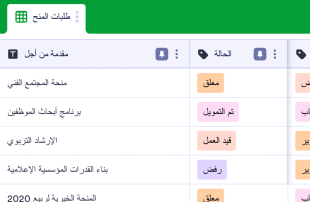
جدول بيانات تتبع المنح
جدول بيانات تتبع المنح هو جدول بيانات عبر الإنترنت يُستخدم لتتبع طلبات المنح. يمكنك استخدام جدول بيانات تتبع المنح المجاني عبر الإنترنت الخاص بـ Jotform لمراقبة حالة طلبات المنح السارية، وإدارة تفاصيل جهات الاتصال، وتنظيم المعلومات للتقدم بطلب للحصول على المنح عندما تحتاج إلى الحصول على مبلغ التمويل المناسب. يمكنك حتى تبديل طريقة العرض إلى عرض التقويم لضمان عدم تفويت أي موعد نهائي مهم! قم بتخصيص جدول بيانات تتبع المنح هذا لحفظ جميع معلوماتك بشكل مثالي. قم بإضافة صفوف وأعمدة، وتحديث أسماء وألوان العلامات، وإعادة تنسيق التصميم ليتناسب مع تفضيلاتك. يمكنك أيضًا استخدام ميزة الحساب السريع الخاصة بنا لإضافة إجماليات مبالغ المنح المطلوبة والمبالغ المستلمة تلقائيًا!بواسطة حفظ معلومات المنح بطريقة منظمة في جدول بيانات احترافي عبر الإنترنت، يمكنك مساعدة منظمتك الغير ربحية على أن تصبح أكثر كفاءة، والتقدم لطلب الحصول على المزيد من المنح، وتأمين المزيد من التمويل لتحقيق أهدافك.
انتقل إلى الفئة:التسويقحول التسويق
تُعد أوراق التسويق قوالب جداول مخصصة لفئات معينة ومصممة للمساعدة في تنظيم وإدارة السجلات المتعلقة بالأنشطة التسويقية. يستخدم مالكو النماذج نماذج Jotform لجمع مجموعة واسعة من المعلومات، بما في ذلك إجابات الاستبيانات، وملاحظات العملاء، وتسجيلات الفعاليات، وطلبات التسجيل في العروض الترويجية. تُعد هذه البيانات المرسلة مهمة لفرق التسويق والشركات والمتخصصين الذين يحتاجون إلى التعامل مع الطلبات، وتحليل البيانات، والحفاظ على تفاعل العملاء. تكمن قوة أوراق التسويق في قدرتها على تحويل استجابات النماذج المجمعة إلى سجلات منظمة بشكل جيد داخل جداول Jotform، مما يضمن سهولة الوصول إلى المعلومات المهمة وإدارتها.
تعمل جداول Jotform كمركز رئيسي حيث تظهر عمليات الإرسال من نماذج Jotform المتصلة تلقائيًا. تصبح كل استجابة يتم إرسالها من خلال النموذج إدخالًا في الجدول المرتبط، ويمكن مراجعتها في عرض الجدول أو عرض التفاصيل. يتيح هذا الإعداد للمستخدمين تنظيم وتحليل عمليات الإرسال باستخدام ميزات قوية مثل البحث، والتصفية، وتجميع البيانات، وطرق العرض المختلفة مثل عرض التقويم وعرض التقارير. وعلى الرغم من دعم الإدخال اليدوي واستيراد ملفات CSV أو Excel، يظل التركيز الأساسي على دمج استجابات النماذج في الجداول بسلاسة. يعزز سير العمل المتكامل هذا الكفاءة من خلال تبسيط العملية بدءًا من جمع البيانات وحتى إدارتها بشكل شامل.
لماذا نستخدم أوراق التسويق؟
- تلغي قوالب جداول التسويق الحاجة إلى نقل البيانات يدويًا، إذ تضمن ظهور جميع استجابات نماذج Jotform تلقائيًا في الجداول المرتبطة. ويقلل ذلك من الأخطاء ويوفر وقتًا ثمينًا.
- إن تجميع كل الطلبات في جدول مركزي يسهل عملية البحث عن السجلات وإدارتها، مما يتيح لفرق التسويق الحفاظ على التنظيم والكفاءة.
- بفضل توفر معلومات مفصلة عن المشاركات بسهولة، يمكن للفرق مراجعة التفاصيل الكاملة لكل مشاركة، بما في ذلك المرفقات والملفات التي تم تحميلها، مما يضمن عدم إغفال أي بيانات مهمة.
- تساعد القدرة على تصفية الطلبات والبحث فيها بسرعة المستخدمين على العثور على سجلات محددة، مما يسهل اتخاذ قرارات أفضل ويؤدي إلى تقليل وقت الاستجابة.
- من خلال استخدام جداول Jotform لتنسيق إجراءات المتابعة، يمكن لفرق التسويق ضمان عدم ترك أي استفسار أو ملاحظة من العملاء دون رد، مما يسهم في تحسين مستوى رضا العملاء بشكل عام.
- تتيح ميزات التتبع في الوقت الفعلي وسجل التعديلات للفرق مراقبة التغييرات والاحتفاظ بسجل دقيق لجميع عمليات الإرسال والإجراءات المتخذة.
المشكلات الشائعة التي تحلها قوالب جداول التسويق
- يستغرق نسخ الاستجابات يدويًا من النماذج إلى جداول البيانات وقتًا طويلًا ويكون عرضة للأخطاء. وتعالج قوالب جداول التسويق ذلك من خلال استيراد استجابات النماذج تلقائيًا إلى جداول منظمة.
- قد يؤدي تشتت الاستجابات عبر منصات متعددة إلى حدوث ارتباك وانخفاض الكفاءة. وتجمع قوالب جداول التسويق جميع البيانات في مكان مركزي واحد، مما يسهل على الفرق متابعة استجاباتها وإدارتها بكفاءة.
- قد يمثل العثور على سجلات محددة وسط كم هائل من البيانات تحديًا. بينما تتيح إمكانيات البحث والتصفية في جداول Jotform للمستخدمين العثور بسرعة على المعلومات التي يحتاجون إليها.
- قد تؤدي عمليات المراجعة غير المتسقة إلى ضياع الفرص أو إغفال بعض المعلومات. ومن خلال استخدام الأعمدة وأنواعها المختلفة، يمكن للفرق توحيد إجراءات مراجعة البيانات وضمان دقة هذه العملية.
- قد تكون إدارة عمليات تحميل الملفات الكبيرة أمراً مرهقاً. وتوفر خاصية «عرض التحميلات» في جداول Jotform طريقة مبسطة لمراجعة جميع المستندات التي تم تحميلها والمرتبطة بعمليات إرسال النماذج والوصول إليها.
مطابقة حالات استخدام عمليات إرسال النماذج مع ميزات Jotform Tables
- بالنسبة للحملات التسويقية التي تتلقى عددًا كبيرًا من عمليات التسجيل، يقوم النموذج المرتبط بتعبئة الجدول تلقائيًا، مما يضمن جمع البيانات في الوقت المناسب وبشكل منظم.
- أصبحت مراجعة تعليقات العملاء أكثر كفاءة بفضل ميزات «عرض الجدول» و«عرض التفاصيل»، مما يتيح إجراء تحليل تفصيلي للردود وتصنيفها.
- باستخدام ميزة البحث والمعايير، يمكن لفرق التسويق فرز الإدخالات لتحديد أولوية استفسارات العملاء أو ملاحظاتهم العاجلة، مما يسهم في تبسيط سير عملها.
- تساعد إعدادات التخصيص والوصول على تنسيق المسؤوليات بين أعضاء الفريق، مما يضمن معالجة جميع الطلبات المقدمة من قبل الموظفين المعنيين.
- توفر ميزة «عرض التقارير» رؤى حول البيانات التي تم جمعها، مما يمكّن مديري التسويق من إعداد تقارير تسلط الضوء على المؤشرات والاتجاهات الرئيسية من أجل التخطيط الاستراتيجي.
كيفية استخدام أوراق التسويق مع نماذج Jotform
- ابدأ باختيار قالب مناسب من قوالب جداول التسويق أو اربط إعدادًا في جداول Jotform بنموذج Jotform موجود. ومع وصول استجابات جديدة، ستظهر تلقائيًا في الجدول المرتبط، مما يسهّل جمع البيانات وتنظيمها.
- قم بتكوين الجدول لإدارة عمليات الإرسال بفعالية من خلال تسمية الأعمدة، واختيار أنواع الأعمدة المناسبة، واختيار طرق العرض مثل «عرض الجدول» أو «عرض التحميلات» بما يتناسب مع نوع البيانات التي يتم التعامل معها.
- قم بإدارة الطلبات المقدمة بكفاءة باستخدام ميزات مثل البحث، والمرشحات، وتجميع البيانات، والصيغ. استخدم إعدادات الوصول وتعيين المسؤولين لتسهيل التعاون بين أعضاء الفريق وتتبع سجل المراجعات لضمان المساءلة.
أهم حالات استخدام أوراق التسويق
- لأصحاب النماذج: يستفيد أصحاب النماذج من قوالب جداول التسويق من خلال مراجعة الاستجابات الواردة مباشرةً من نماذج Jotform المرتبطة. ويمكنهم تعديل بيانات الاستجابات لتصحيح الأخطاء أو تحديث المعلومات عند الحاجة. ومن خلال مراجعة التفاصيل والملفات المرفوعة، يضمن أصحاب النماذج تسجيل كل معلومة بدقة والاحتفاظ بها. ويساعد تنظيم السجلات في جداول Jotform على الحفاظ على رؤية شاملة لجميع البيانات التي تم جمعها، مما يسهل اتخاذ قرارات أفضل وإجراء المتابعات اللازمة.
- للفرق: يستخدم أعضاء الفريق المصرح لهم قوالب جداول التسويق للعثور على الاستجابات وإدارتها بكفاءة. ومن خلال تنسيق المسؤوليات باستخدام تعيين المسؤولين، يضمنون معالجة كل إدخال من قِبل عضو الفريق المناسب. وتدعم إعدادات الوصول وسجل مراجعة التعديلات العمل المشترك من خلال توفير الشفافية والمساءلة. وتساعد هذه البيئة التعاونية الفرق على الحفاظ على التوافق وسرعة الاستجابة للبيانات والمهام الواردة.
- للمديرين: يستفيد المديرون من قوالب جداول التسويق لمراقبة البيانات التي تم جمعها ومراجعة الأنماط المرتبطة بأنشطتهم التسويقية. ويمكنهم متابعة تقدم المهام والتحقق من المسؤولين عنها لضمان وضوح جميع المسؤوليات. ومن خلال استخدام عرض التقارير أو طرق العرض الأخرى ذات الصلة، يحصل المديرون على رؤى حول البيانات، مما يتيح لهم الإشراف على العمليات واتخاذ قرارات مدروسة بشأن الاستراتيجيات التسويقية وتوزيع الموارد.
ملخصات أوراق التسويق
توفر «أوراق التسويق» طريقة مبسطة وفعالة لجمع وإدارة المعلومات الخاصة بالتسويق من خلال نماذج وجداول Jotform. وتكمن القيمة الخاصة بهذه الفئة في التكامل التلقائي لإجابات النماذج في جداول منظمة، حيث يمكن مراجعة السجلات وإدارتها بسهولة. وتعمل جداول Jotform على تعزيز الإنتاجية من خلال توفير أدوات للبحث عن البيانات المجمعة وتصفيتها وتجميعها وإعداد التقارير عنها، مما يضمن تمكن فرق التسويق من التركيز على الأنشطة الاستراتيجية بدلاً من إدخال البيانات.
الأسئلة الشائعة
1) هل استخدام قوالب جداول التسويق مع جداول Jotform مجاني؟
توفر Jotform خطة المبتدئين Starter التي تتيح للمستخدمين البدء باستخدام قوالب جداول التسويق مع جداول Jotform. وتوفر هذه الخطة الميزات الأساسية اللازمة لإدارة الاستجابات بفعالية، كما تتيح للمستخدمين استكشاف إمكانات جداول Jotform دون تكبّد أي تكاليف مبدئية. وللاستفادة من ميزات أكثر تقدمًا وتلبية احتياجات الاستخدام الأعلى، يمكن للمستخدمين استكشاف خيارات الخطط الأخرى.
2) كيف تظهر الاستجابات من نماذج Jotform في قوالب جداول التسويق؟
تظهر الاستجابات من نماذج Jotform تلقائيًا في قوالب جداول التسويق عند ربط النموذج بجدول Jotform. وبمجرد إرسال المستجيب للنموذج، تُضاف استجابته كإدخال أو صف في الجدول المرتبط. وتضمن عملية التعبئة التلقائية استمرار وصول الاستجابات الجديدة إلى الجدول، مما يحافظ على مركزية جميع البيانات وتحديثها باستمرار.
3) هل يمكنني تعديل البيانات والبحث فيها وتصفيتها وتجميعها وإجراء العمليات الحسابية عليها في قوالب جداول التسويق؟
نعم، يمكنك تعديل الاستجابات والاستفادة من ميزات متنوعة لتنظيم البيانات في قوالب جداول التسويق. وتتيح الأعمدة وأنواعها المختلفة تصنيف البيانات وإدارتها بفعالية. كما تساعدك ميزة البحث على العثور على إدخالات محددة، بينما تتيح عوامل التصفية وتجميع البيانات فرز المعلومات وتحليلها بكفاءة. ويمكن تطبيق الصيغ والعمليات الحسابية لإجراء التحليلات اللازمة للبيانات واستخلاص الرؤى منها.
4) هل يمكنني تصدير البيانات الموجودة داخل الجداول بصيغة CSV أو Excel؟
يتم دعم تصدير البيانات من «أوراق التسويق» بتنسيق CSV أو Excel، مما يتيح لك إضافة المعلومات الموجودة إلى البيانات المرسلة من النماذج المرتبطة. وتُعد هذه الميزة مفيدة لإنشاء نسخ احتياطية أو مشاركة البيانات مع الأطراف المعنية الخارجية. ويضمن التصدير توفر خيارات مرنة لمعالجة البيانات وإعداد التقارير خارج نطاق نظام Jotform.
ما طرق العرض في جداول Jotform التي يمكنني استخدامها مع قوالب جداول التسويق؟
في «أوراق التسويق»، يمكنك الاستفادة من ميزات «عرض الجدول»، و«عرض التفاصيل»، و«عرض التقويم»، و«عرض التقارير»، و«عرض الملفات المُحمَّلة». وتتيح لك خاصية «عرض الجدول» الاطلاع على جميع الإدخالات بتنسيق يشبه جدول البيانات، بينما توفر ميزة «عرض التفاصيل» معلومات متعمقة عن كل عملية إرسال. وتعد خاصية «عرض التقويم» مفيدة للإدخالات المرتبطة بالتواريخ، بينما تساعد ميزة «عرض التقارير» في تلخيص البيانات لأغراض التحليل، أما ميزة «عرض الملفات المُحمَّلة» فتنظم أي ملفات تم تحميلها لتسهيل الوصول إليها ومراجعتها.
6) هل يمكن للفرق التعاون في تقديم المشاركات في «أوراق التسويق»؟
يمكن للفرق التعاون بفعالية باستخدام «أوراق التسويق» من خلال ميزات مثل إعدادات الوصول وأدوات التعاون والمكلفين بالمهام. كما أن التتبع في الوقت الفعلي وسجل المراجعات يعززان الشفافية والمساءلة بين أعضاء الفريق. وتضمن هذه الإمكانيات حصول جميع المعنيين على صلاحيات الوصول اللازمة للمشاركة في إدارة ومعالجة الطلبات المقدمة، مع الحفاظ على سلامة البيانات.
هل يمكنني ربط قوالب جداول التسويق ببيانات ذات صلة أو بتطبيقات أخرى؟
نعم، يمكن ربط «أوراق التسويق» بالبيانات ذات الصلة من خلال الجداول المرتبطة وعمليات التكامل المختلفة. ويمكن استخدام أزرار الإجراءات لأداء وظائف محددة، على الرغم من أن عمليات التكامل المحددة تعتمد على الاتصالات المتاحة التي توفرها Jotform. وتتيح هذه الميزات التفاعل السلس مع التطبيقات ومصادر البيانات الأخرى، مما يعزز تنوع ووظائف جداولك.
هل يمكنني إنشاء التقارير وملفات PDF وإدارة الملفات من قوالب جداول التسويق؟
تتيح لك «أوراق التسويق» إنشاء تقارير شاملة باستخدام «عرض التقارير». وبالإضافة إلى ذلك، تتوفر ميزة إنشاء ملفات PDF لإنتاج مستندات تلخص بيانات الجداول. وتساعد خاصية «عرض التحميلات» في إدارة ومراجعة الملفات المرتبطة بالطلبات المقدمة، كما يمكن دمج المستندات الموقعة عند الضرورة. وتدعم هذه الإمكانيات مجموعة واسعة من احتياجات التوثيق وإعداد التقارير في إطار الأنشطة التسويقية.