

أوراق السجل

قالب سجل دفع الإيجار
سِجل دفع الإيجار هو دفتر الحسابات الذي يحتفظ بسجلات مدفوعات الإيجار الخاصة بالمستأجرين. سواءً أكنت مالك عقار أو مدير عقارات، قم بإدارة معلومات دفع الإيجار وبيانات الاتصال بالمستأجر بخبرة في قاعدة بيانات احترافية عبر الإنترنت باستخدام قالب سجل دفع الإيجار المجاني من Jotform. ببساطة قم بإدخال معلومات دفع الإيجار يدويًا، وتحميل البيانات الموجودة كملف CSV أو Excel ، أو قم باستخدام نموذج لقبول مدفوعات الإيجار في نفس الوقت عبر الإنترنت وتحديث جدول البيانات الخاص بك تلقائيًا! قم بتخصيص سجل دفع الإيجار هذا عن طريق تحديث التصميم بأنواع الأعمدة المحددة مسبقًا، والعناوين المرمزة بالألوان، وخيار فصل المعلومات في علامات تبويب مختلفة. قم بتبديل طريقة عرض البيانات بين جدول بيانات وبطاقة وتقويم للاطلاع على معلومات دفع الإيجار حسب ملف تعريف المستأجر أو حسب تاريخ استحقاق الايجار - أو حتى قم باستخدام معادلاتنا و حساباتنا لإضافة إجمالي مدفوعات الإيجار التي ستتلقاها تلقائيًا! قم بتنظيم أفضل لمدفوعات الإيجار من المستأجرين لديك باستخدام قالب سجل دفع الإيجار المجاني من Jotform Tables.
انتقل إلى الفئة:أوراق السجل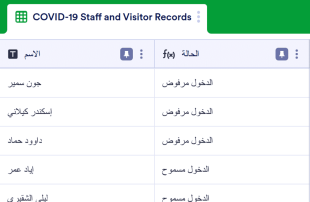
صحيفة سجل كوفيد-19
يتم استخدام صحيفة سجل كوفيد-19 من قبل مؤسسات الرعاية الصحية لتتبع كل شخص يدخل المبنى، مما يجعل تتبع الاتصال أسهل ويعمل على تقليل انتشار كوفيد-19. احتفظ بسجل شامل للزوار باستخدام صحيفة سجل كوفيد-19 المجانية عبر الإنترنت من Jotform! قم بملء الجدول يدويًا، أو اطلب من الأشخاص القيام بإدخال معلوماتهم في نموذج كوفيد-19 للموظفين وسجل الزوار المرفق مع الجدول. سيتم بعد ذلك ملء البيانات المُدخلة تلقائيًا في جدولك عبر الإنترنت، ليسهل الوصول إليها ومشاركتها على أي جهاز. هل تحتاج إلى تغيير شيء ما في قالب الجدول هذا؟ تتيح لك واجهتنا سهلة الاستخدام إعادة ترتيب التصميم وإضافة صفوف وأعمدة وتقسيم المعلومات إلى علامات تبويب مختلفة والمزيد. يمكنك أيضًا تبديل طريقة عرض بين العرض كجدول بيانات والعرض كتقويم والعرض كبطاقة لرؤية معلوماتك بالطريقة التي تناسبك بشكل أفضل - بالإضافة إلى إمكانية اختيار التوافق مع إجراءات HIPAA للحفاظ على وحماية البيانات المرضية الحساسة. قم بالترقي من استخدام السجلات الورقية وكن أكثر كفاءة باستخدام صحيفة سجل كوفيد-19 المجانية عبر الإنترنت.
انتقل إلى الفئة:أوراق السجلحول أوراق السجل
تُعد سجلات المتابعة قوالب جداول مخصصة لفئات معينة ومصممة لتنظيم وإدارة السجلات بكفاءة. من خلال نماذج Jotform، يمكن للمستجيبين إرسال أنواع مختلفة من المعلومات التي تشمل الطلبات، والتسجيلات، والملاحظات، وعمليات التفتيش، أو أي بيانات أخرى خاصة بفئة معينة تتناسب مع احتياجاتهم. تُعد هذه البيانات المرسلة مهمة لمالكي النماذج، الذين قد يشملون المتخصصين في الأعمال، والمؤسسات التعليمية، ومقدمي الرعاية الصحية، أو الجهات الحكومية، حيث يحتاجون إلى عملية مبسطة لإدارة هذه المعلومات. يعمل الجدول المتصل كمركز لإدارة هذه البيانات المجمعة، مما يضمن تنظيم جميع عمليات الإرسال بشكل منهجي وإمكانية الوصول إليها للمراجعة واتخاذ الإجراءات اللازمة.
تُعد جداول Jotform المنصة التي يتم من خلالها استقبال وإدارة عمليات الإرسال من نماذج Jotform المتصلة تلقائيًا. بمجرد أن يرسل المستجيب نموذجًا، تظهر استجابته كإدخال في الجدول المتصل بالنموذج، وعادةً ما تكون على شكل صف في عرض الجدول. يمكن لمالكي النماذج مراجعة هذه الإدخالات في عرض الجدول أو التعمق في التفاصيل باستخدام عرض التفاصيل. تصبح عملية تنظيم ومراجعة عمليات الإرسال أكثر كفاءة من خلال ميزات مثل البحث، والتصفية، والتجميع، وأنواع الأعمدة المختلفة. وعلى الرغم من توفر خيارات الإدخال اليدوي أو استيراد البيانات عبر ملفات CSV وExcel، فإن سير العمل الأساسي يعتمد على الانتقال السلس من نماذج Jotform إلى جداول Jotform، مما يضمن إدارة منظمة وسهلة لعمليات الإرسال.
لماذا نستخدم أوراق التسجيل؟
- من خلال استخدام «أوراق السجل»، يمكن لمالكي النماذج التخلص من العملية المملة المتمثلة في نقل البيانات يدويًّا من النماذج إلى جداول البيانات. وهذا لا يوفر الوقت فحسب، بل يقلل أيضًا من مخاطر حدوث أخطاء أثناء إدخال البيانات.
- إن تجميع كل الردود على النماذج في مكان واحد يتيح للفرق العثور على المعلومات التي تحتاجها والوصول إليها بسرعة دون الحاجة إلى البحث في الملفات أو رسائل بريد إلكتروني المتناثرة.
- أصبحت مراجعة تفاصيل الطلبات الكاملة أمراً سهلاً، حيث يتم ملء كل طلب تلقائيًا بجميع المعلومات المطلوبة، مما يسهل تحديد أي بيانات ناقصة أو تناقضات.
- يصبح تنسيق المتابعة مع المشاركين في الاستطلاع أسهل عندما تكون جميع التفاصيل الضرورية متوفرة ومنظمة، مما يتيح التواصل في الوقت المناسب وبشكل دقيق.
- يمكن تتبع التغييرات التي تطرأ على المشاركات بمرور الوقت من خلال ميزة «سجل المراجعات»، مما يضمن الشفافية والمساءلة بشأن أي تعديلات يتم إجراؤها.
المشاكل الشائعة التي تحلها أوراق التسجيل
- قد يؤدي نسخ الاستجابات (الادخالات المرسلة) يدويًّا إلى جداول البيانات إلى حدوث أخطاء وتناقضات. أما مع جداول Jotform، فيتم تسجيل الادخالات المرسلة تلقائيًّا، مما يضمن سلامة البيانات.
- تجعل الردود المتناثرة عبر منصات متعددة من الصعب الحصول على رؤية شاملة. وتعمل «أوراق السجل» على تجميع كل المشاركات في مكان واحد، مما يسهل الوصول إليها ومراجعتها.
- قد يكون العثور على سجلات محددة أمراً صعباً في ظل وجود كميات ضخمة من البيانات. وتتيح إمكانيات البحث والتصفية المتوفرة في جداول Jotform العثور على إدخالات محددة بسرعة وكفاءة.
- عندما تفتقر الطلبات المقدمة إلى السياق، قد يؤدي ذلك إلى سوء الفهم أو التأخير. ومن خلال تجميع كل البيانات ذات الصلة في جدول واحد مترابط، يتم الحفاظ على السياق، وتصبح القرارات أكثر استنارة.
مطابقة حالات استخدام عمليات إرسال النماذج مع ميزات Jotform Tables
- يتم إدخال الطلبات الواردة التي يتم إرسالها عبر نماذج Jotform تلقائيًا في الجداول المرتبطة بها، مما يتيح لمالكي النماذج الاطلاع على حالة كل طلب وتفاصيله في لمح البصر.
- باستخدام «عرض الجدول» أو «عرض التفاصيل»، يمكن لمالكي النماذج مراجعة الطلبات المقدمة بدقة، لضمان عدم إغفال أي بيانات مهمة واتخاذ جميع إجراءات المتابعة اللازمة.
- تساعد إعدادات الوصول والمكلفون على إدارة مسؤوليات الفريق من خلال تحديد المسؤول عن كل إدخال بوضوح، مما يعزز التعاون والمساءلة.
- لأغراض إعداد التقارير، تتيح خاصية «عرض التقرير» إنشاء ملخصات مرئية، مما يتيح لصانعي القرار استيعاب الاتجاهات والنتائج بسرعة.
- عند التعامل مع البيانات التي تتطلب مزيدًا من التحليل، يمكن أن يوفر استخدام الصيغ والحسابات داخل جداول Jotform رؤى أعمق ويدعم اتخاذ القرارات الاستراتيجية.
كيفية استخدام أوراق التسجيل مع نماذج Jotform
- ابدأ باختيار قالب مناسب من قوالب جداول Jotform، أو جدول فارغ، أو جدول مرتبط بنموذج Jotform موجود مسبقًا. سيقوم نموذج Jotform بجمع المعلومات الخاصة بالفئة، وستظهر الردود الجديدة تلقائيًا في الجدول المرتبط.
- يقوم مالك النموذج بتهيئة الجدول لمراجعة البيانات المرسلة من خلال تسمية الأعمدة، واختيار أنواع الأعمدة المناسبة، واختيار طرق العرض ذات الصلة مثل «عرض الجدول» أو «عرض التفاصيل» أو «عرض التقويم» أو «عرض الملفات المرفوعة» أو «عرض التقرير» بما يتناسب بشكل أفضل مع احتياجاته في إدارة البيانات.
- تتم إدارة الاستجابات (الادخالات) باستخدام ميزات مثل البحث والفلاتر والتجميع لتنظيم البيانات بكفاءة. وتتم الاستفادة من إعدادات الوصول والمسؤولين وسجل المراجعات للحفاظ على التحكم والتعاون، بينما تدعم أزرار الإجراءات والمخرجات تنفيذ المهام الضرورية.
أهم حالات استخدام أوراق التسجيل
- لأصحاب النماذج: يستفيد أصحاب النماذج من استخدام قوالب سجلات المتابعة من خلال توفير طريقة منظمة لمراجعة الاستجابات الواردة وإدارتها. ويمكنهم تعديل بيانات الاستجابات مباشرةً داخل جداول Jotform لضمان دقتها. كما يمكنهم بسهولة مراجعة التفاصيل أو الملفات المرفوعة المرتبطة، بينما تساعدهم طرق العرض المتنوعة وخيارات التصفية على الحفاظ على تنظيم السجلات. ويسهم هذا التنظيم في تسهيل المتابعة واتخاذ قرارات تستند إلى البيانات.
- للفرق: يمكن للفرق العثور على الإدخالات وإدارتها بسهولة باستخدام ميزات البحث والتصفية في جداول Jotform. وتضمن إمكانية تعيين المسؤولين وضوح توزيع المسؤوليات، بينما تدعم إعدادات الوصول وسجل مراجعة التعديلات العمل التعاوني. ويساعد هذا النهج المتكامل الفرق على العمل بكفاءة والحفاظ على الاتساق في جميع الاستجابات.
- للمديرين: يستخدم المديرون قوالب سجلات المتابعة لمراقبة البيانات التي تم جمعها وتحديد الأنماط الخاصة بكل فئة. كما يراجعون تقدم الإدخالات والمسؤولين عنها لضمان سير المهام وفق الخطة ووضوح المسؤوليات. ومن خلال استخدام عرض التقارير أو طرق العرض الأخرى ذات الصلة، يمكنهم الحصول على رؤى قيّمة حول البيانات، مما يدعم التخطيط الاستراتيجي والإشراف الفعّال.
تلخيص أوراق السجلات
توفر قوالب سجلات المتابعة حلًا فعّالًا لجمع المعلومات وإدارتها من خلال نماذج Jotform وجداول Jotform. ومن خلال أتمتة انتقال استجابات النماذج إلى جداول منظمة، يمكن لأصحاب النماذج وفرق العمل إدارة البيانات وتحليلها بكفاءة. وتوفر جداول Jotform الأدوات اللازمة لمراجعة الاستجابات وتنظيمها واتخاذ الإجراءات المناسبة بناءً عليها، مما يجعلها جزءًا أساسيًا من عملية إدارة المعلومات.
الأسئلة الشائعة
هل استخدام قوالب سجلات المتابعة مع جداول Jotform مجاني؟
توفر Jotform خطة المبتدئين Starter التي تتيح للمستخدمين استخدام قوالب سجلات المتابعة مع جداول Jotform. وتقدم هذه الخطة مستوى أساسيًا من الميزات، مما يجعلها خيارًا مناسبًا للراغبين في البدء بإدارة استجابات النماذج. وللاستفادة من ميزات أكثر تقدمًا وحدود أعلى للاستجابات، يمكن للمستخدمين استكشاف الخطط الأخرى التي تقدمها Jotform.
2) كيف تظهر البيانات المرسلة من نماذج Jotform في «أوراق السجل»؟
ترتبط الإرسالات الواردة من نماذج Jotform مباشرةً بجداول Jotform من خلال استخدام النماذج المرتبطة. وعندما يقوم أحد المشاركين بملء نموذج وإرساله، تُنقل معلوماته تلقائيًا إلى الجدول المرتبط. ويظهر كل إرسال كإدخال أو صف جديد، مما يضمن أن يتم ملء الردود المستقبلية تلقائيًا بالطريقة نفسها.
3) هل يمكنني تعديل البيانات في «أوراق السجلات» والبحث فيها وتصفيتها وتجميعها وحسابها؟
نعم، يمكنك تعديل الاستجابات مباشرةً داخل قوالب سجلات المتابعة، مما يتيح إجراء التحديثات والتصحيحات في الوقت الفعلي. كما تتضمن الجداول أعمدة وأنواع أعمدة قابلة للتخصيص بما يتناسب مع احتياجات بياناتك. وبالإضافة إلى ذلك، يمكنك استخدام البحث، وعوامل التصفية، وتجميع البيانات لتنظيم السجلات والعثور عليها بسهولة، بينما تساعدك الصيغ والعمليات الحسابية على تحليل البيانات بمزيد من العمق.
4) هل يمكنني تصدير البيانات الموجودة داخل الجداول بصيغة CSV أو Excel؟
توفر جداول Jotform إمكانية تصدير البيانات بتنسيقي CSV أو Excel، مما يتيح للمستخدمين استخدام بياناتهم خارج المنصة أو استيرادها إلى أنظمة أخرى لإجراء مزيد من التحليل. وتُعد ميزة التصدير مكملة لسير العمل الأساسي، الذي يعتمد على ظهور استجابات النماذج تلقائيًا في الجدول المرتبط.
ما طرق العرض في جداول Jotform التي يمكنني استخدامها مع قوالب سجلات المتابعة؟
تدعم «أوراق السجل» طرق عرض مختلفة في «جداول Jotform»، بما في ذلك «عرض الجدول» و«عرض التفاصيل» و«عرض التقويم» و«عرض التقرير». ويُعد «عرض الجدول» مثاليًّا لإلقاء نظرة شاملة على جميع الإرسالات، بينما يتيح «عرض التفاصيل» إجراء تحليل متعمق للمدخلات الفردية. ويُعد «عرض التقويم» مفيدًا لتتبع الإرسالات التي تتطلب سرعة في الإنجاز، بينما يوفر «عرض التقرير» ملخصات مرئية للبيانات التي تم جمعها.
6) هل يمكن للفرق التعاون في تقديم البيانات في «أوراق التسجيل»؟
يمكن للفرق التعاون بفعالية في إدارة الاستجابات باستخدام ميزات مثل إعدادات الوصول وتعيين المسؤولين. وتتيح هذه الأدوات توزيع المسؤوليات بوضوح والتحكم في الوصول إلى البيانات الحساسة. كما يعزز التتبع في الوقت الفعلي وسجل مراجعة التعديلات التعاون بين أعضاء الفريق من خلال إتاحة متابعة التغييرات فور حدوثها والاحتفاظ بسجل كامل لجميع التعديلات.
7) هل يمكنني ربط «أوراق السجلات» بالبيانات ذات الصلة أو بالتطبيقات الأخرى؟
يمكن ربط أوراق السجلات بالبيانات ذات الصلة من خلال الجداول المرتبطة، مما يتيح رؤية أكثر شمولية للمعلومات ذات الصلة. كما يمكن إعداد عمليات التكامل مع التطبيقات الأخرى باستخدام أزرار الإجراءات، مما يتيح تدفقًا سلسًا للبيانات بين الأنظمة دون الحاجة إلى نقل المعلومات يدويًّا.
8) هل يمكنني إنشاء تقارير وملفات PDF وإدارة الملفات من «أوراق السجل»؟
نعم، توفر جداول Jotform ميزات مثل عرض التقارير لإنشاء ملخصات البيانات وإنشاء ملفات PDF لأغراض التوثيق. كما يتيح لك عرض التحميلات إدارة الملفات المرتبطة بطلباتك، وعند الضرورة، يمكن دمج المستندات الموقعة لضمان اكتمال جميع الوثائق اللازمة وإمكانية الوصول إليها.