-
 inspeccionescycI am experiencing an issue where I need to free up space, but the link provided to do so does not work. I have already tried using the link as instructed, but it does not free up the space as expected. I have confirmed that I followed the steps, but the problem persists. I need someone from support to assist me with this issue.
 -
 Jotform Support Former Jotform Support
Hi inspeccionescyc,
Thanks for reaching out to Jotform Support. I checked your account and can see that your Upload Space is already at 10.28 GB / 10.00 GB. To free up some space, you will need to delete and purge your form submissions. Let me show you how:
- In Tables, select the submissions you want to delete by clicking the checkbox next to them.
- Click on the Delete button in the top-right corner of the screen.
- In the pop-up window, click on Move to Trash to confirm.

Next is to delete your trashed submissions in Jotform Tables. Let me show you how:
- In Jotform Tables, click on the Three Dots icon next to your form title in the tabs.
- In the Dropdown menu, click on Trashed Entries to open the Trash menu.
- Then, in the Trash menu on the right, click on the Checkboxes to select the submissions you want to purge. To select all, click on the Select All button.
- Now, click on Delete Forever, and in the Confirmation window, click on the Delete button to confirm.
Give it a try and let us know if you need any help.
-
inspeccionescyc
YA SE HIZO ESE PROCEDIMIENTO Y NO APARECE NADA EN LA PAPELERA, NO LIBERA EL ESPACIO, ESTA APLICACION NO ES NADA AMIGABLE PARA ELIMINAR Y GENERAR MAS ESPACIO, QUE MAS DEBO HACER
?????
TENGO MI EMPRESA BLOQUEADA POR ESTA APLICACION, REVISEN CORRECTAMENTE QUE ES LO HAY QUE HACER BIEN
-
inspeccionescyc
COMO ME PIDE QUE LIBERE MAS ESPACIO SI YA ELIMINE LA MAYORIA Y LOS QUEDAN SON HOJAS SENCILLAS???
-
Jotform Support Former Jotform Support
Hi inspeccionescyc,
Our Spanish Support agents are busy helping other Jotform users right now, so I'll try to help you in English using Google Translate, but you can reply in whichever language you feel comfortable using. Or, if you'd rather have support in Spanish, let us know and we can have them do that. But, it might take a while until they're available again.
Now, coming back to your question, I checked your account and can see that you still have few uploaded files for your Oferta comercial de inspección, and Segunda visita de inspección form. Can you go ahead and check if you can delete and purge your submissions for this form to free up your Upload Space?
Give it a try and let us know how it goes.
-
inspeccionescyc
No hay nada en envíos de oferta comercial y ya se eliminaron los de segunda visita los otros archivos son hojas sin imágenes no ocupan nunca 10g necesito una solución definitiva
-
Jotform Support Former Jotform Support
Hi inspeccionescyc,
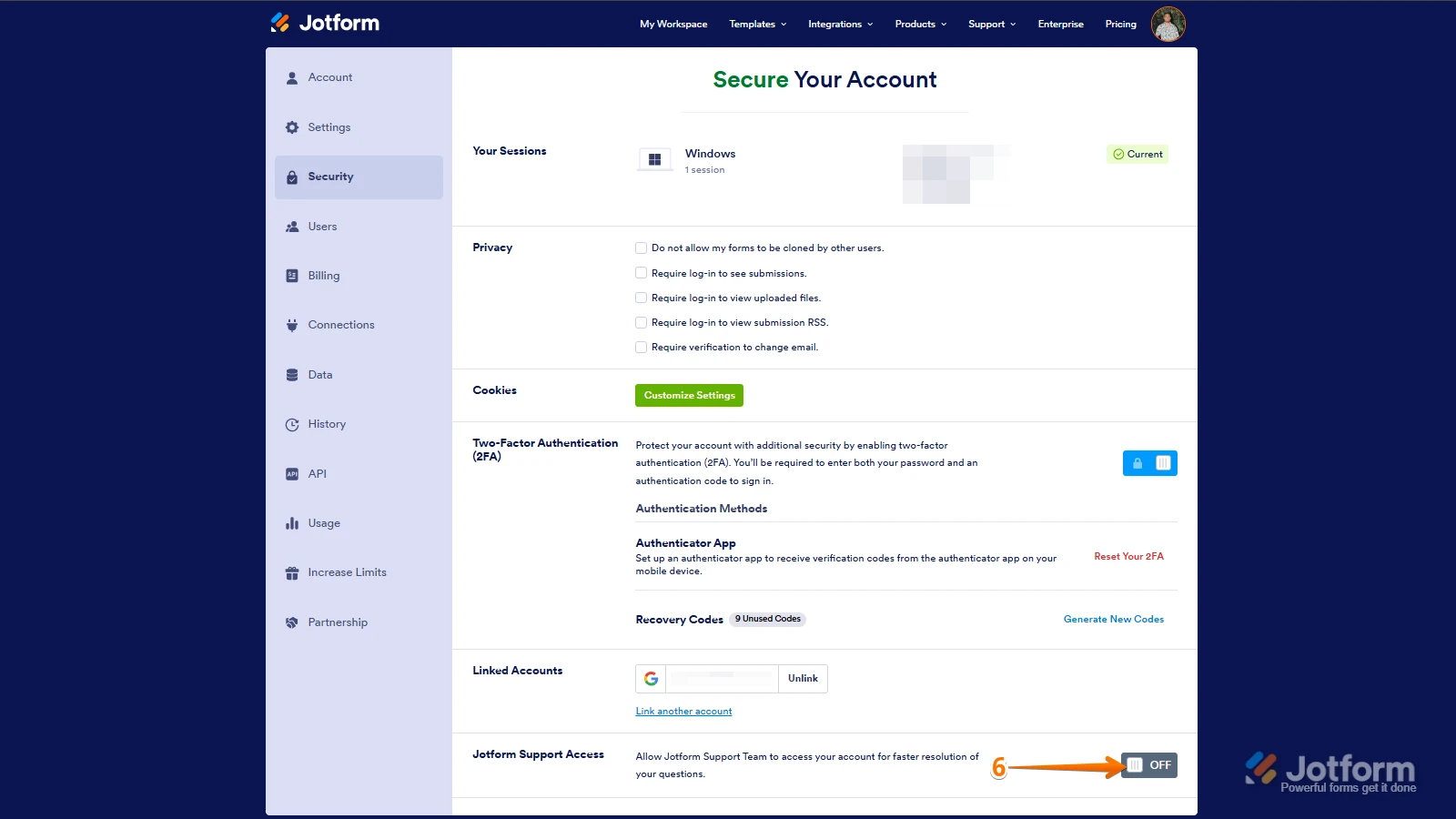
Let me take a look at this for you. To do that, we’ll need your permission to access your account. Don’t worry, you can turn it off again once we’re done. Let me show you how to do it:
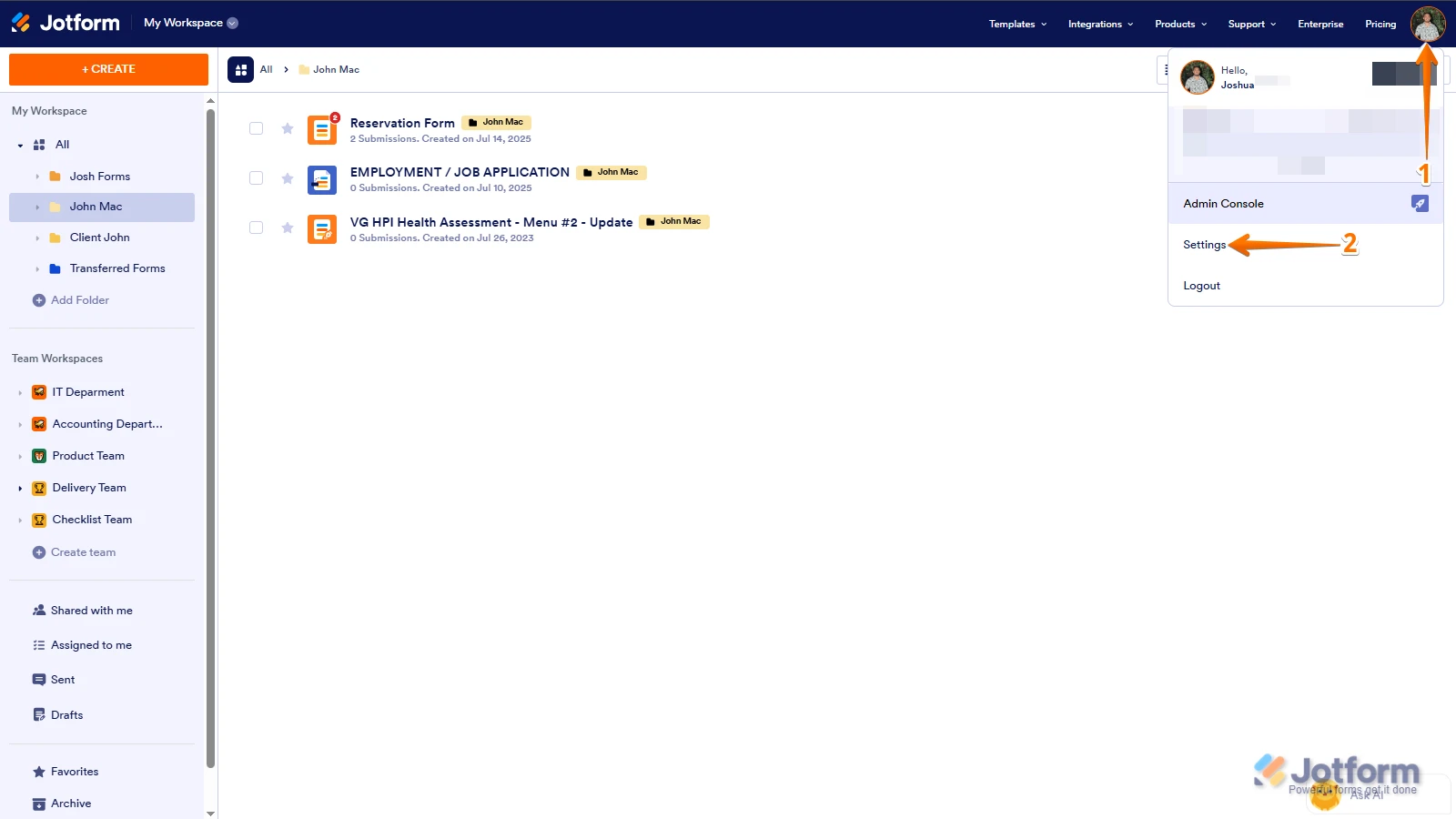
1. In the top-right corner of your Workspace page, click on your Avatar/Profile Image icon.
2. In the Dropdown menu that opens, click on Settings.
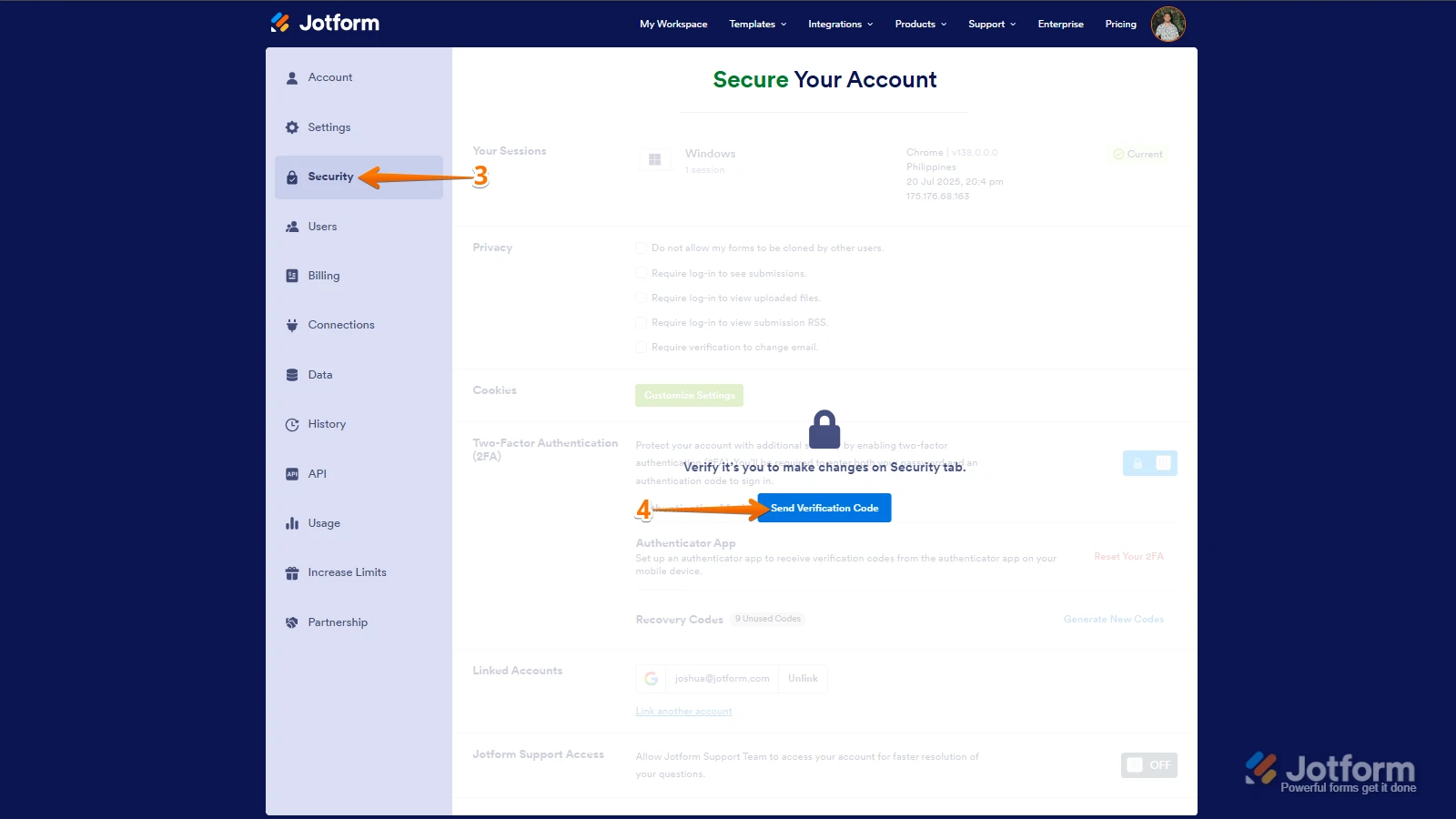
3. Next, in the panel on the left, click on the Security tab.
4. If you haven’t opened your Security page in a while, it’ll ask you to verify. To do that, click on Send Verification Code.
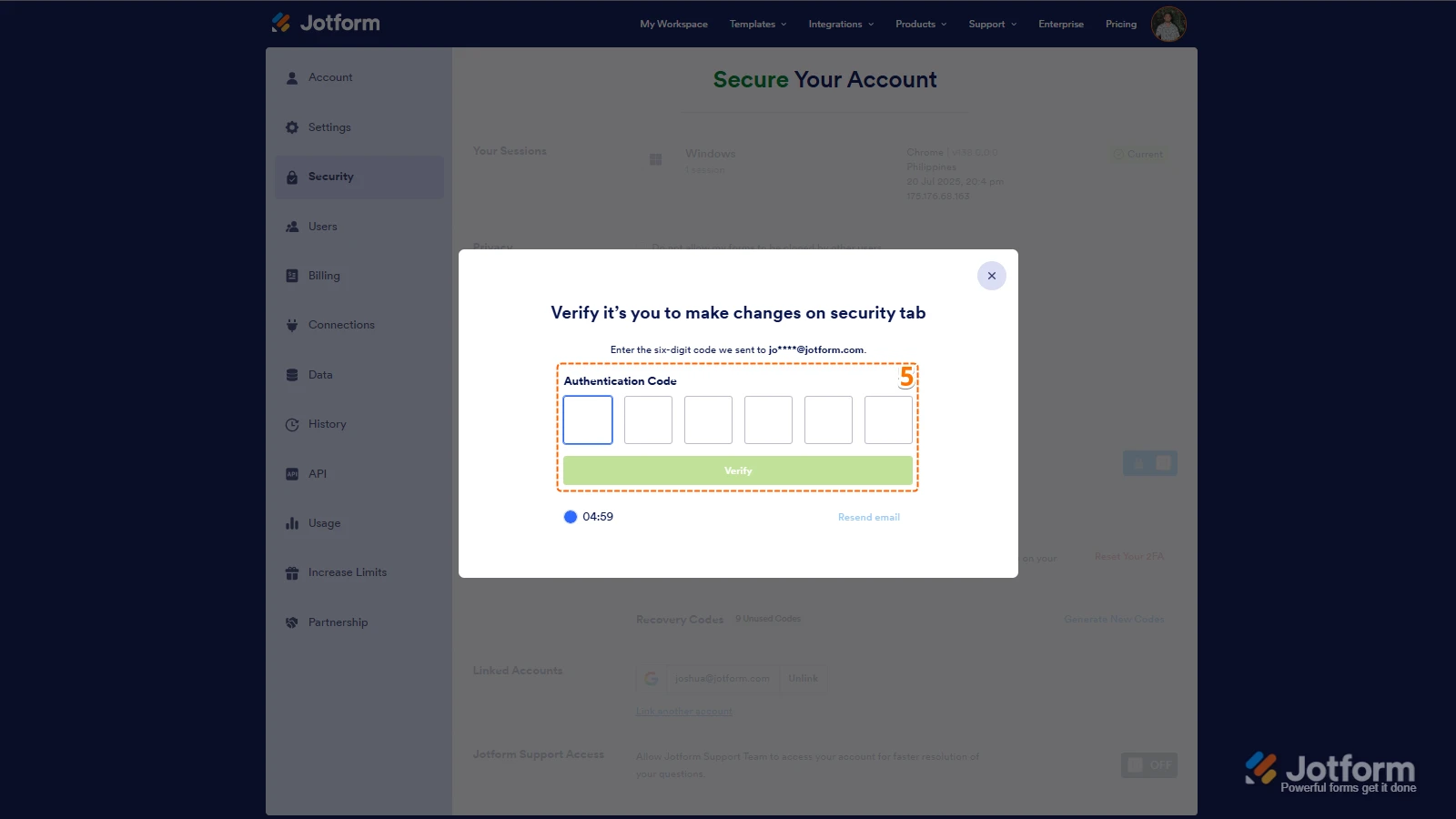
5. Then, enter the Verification Code you receive in your email.
6. Finally, at the bottom of the page, toggle the Jotform Support Access to the On position.
After we hear back from you, we’ll have a better idea of what’s going on and how to help. -
inspeccionescyc
ENVIO QUE YA TIENE ACCESO PARA PODER VERIFICAR LA SITUACION, ES URGENTE
-
Jotform Support Former Jotform Support
Hi inspeccionescyc,
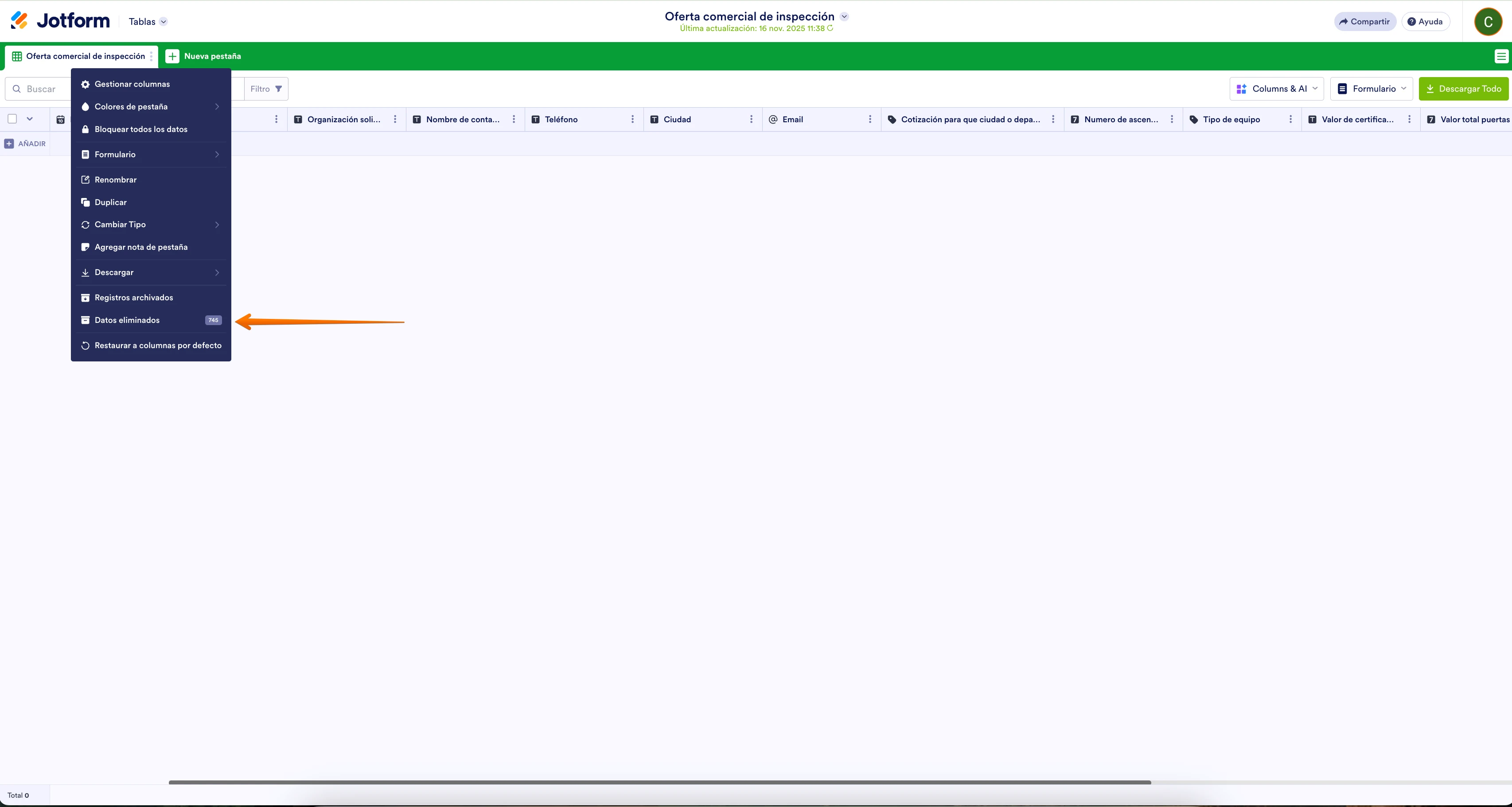
I checked your form and can see that you haven't purged yet your deleted entries for the Oferta comercial de inspección Form. See screenshot below:
To purge your deleted entries, you can follow the instruction I provided here.
Give it a try and let us know how it goes.
-
inspeccionescyc
LISTO YA SE ELIMINO PERO NO HA BAJADO LA CAPACIDAD SIGUE EN 10 G
-
inspeccionescyc
-
Jotform Support Former Jotform Support
Hi inspeccionescyc,
I checked your account and can see that your Upload Space is already at 5.66 GB / 10.00 GB. I've cleared your form cache, and you should be good to go.
Let us know if there’s anything else we can help you with.


 After we hear back from you, we’ll have a better idea of what’s going on and how to help.