-
 morse.tecnologiainteligenteahora tengo problemas de que no me llegan las notificaciones de whatsapp en este formulario
https://www.jotform.com/build/232856725026863/publish -
 Ronald Jotform Support
Hi morse.tecnologiainteligente,
Our Spanish Support agents are busy helping other Jotform users right now, so I'll try to help you in English using Google Translate, but you can reply in whichever language you feel comfortable using. Or, if you'd rather have support in Spanish, let us know and we can have them do that. But, it might take a while until they're available again.
Now, coming back to your question, I checked the Action logs for your WhatsApp integration and the notification was sent successfully. Take a look at the screenshot below to see the results:
 You can also check it on your end. Let me show you how:
- In Form Builder, in the orange navigation bar at the top of the page, click on Settings.
- In the menu on the left, click on Integrations and select the WhatsApp integration.
- Then, hover over the Action section and click on the Three Dots icon.
- In the dropdown menu, select See Action Logs.
-
morse.tecnologiainteligente
PERO NO ME LLEGAN, NO RECIBO NADA, O SERA POR QUE ME LLEGAN DE OTRO FORMULARIO ?
IGUAL ME PODRIAS DECIR COMO PUEDO ELIMINAR LOS NUMEROS EXTRAS QUE TIENE AHI? -
 Joeni Jotform Support
Hi Andres,
Can you explain a bit more about the different connections to your WhatsApp number? Do you mean that you have another form connected to the same WhatsApp number? Also, can you send us a screenshot of the extra number you want to removed so we can look into it? Our guide on How to Post Screenshots to Our Help Center will help you do that.
Once we hear back from you, we'll be able to help you better with this.
-
morse.tecnologiainteligente
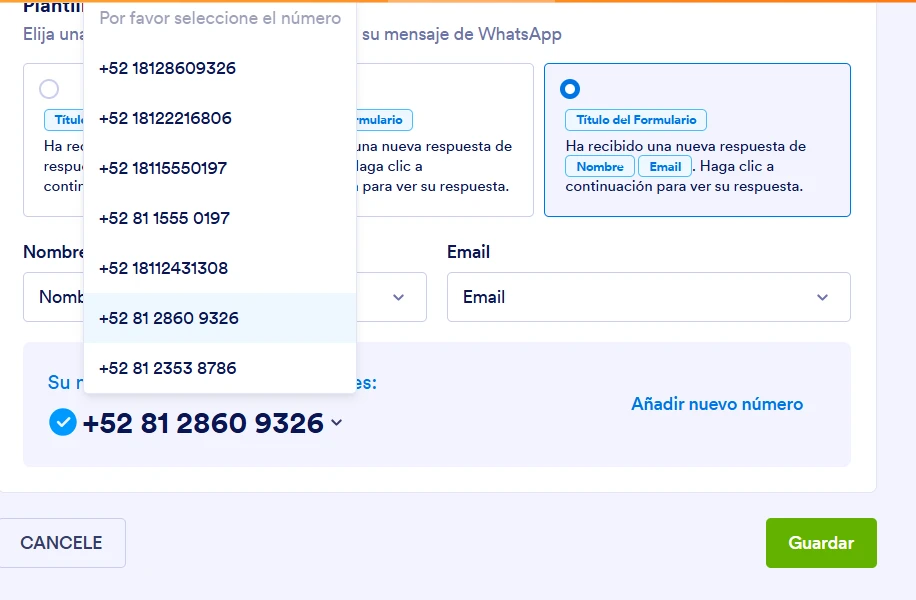
SI ME REFIERO A QUE TENGO OTRO FORMLARIO CONECTADO AL MISMO NUMERO DE WHATSAPP,
Y ADJUNTO IMAGEN PARA BORRAR LOS SIGUIENTES NUMEROS, SERIAN TODOS LOS QUE SALEN EN LALISTA
-
 Kyle Jotform Support
Hi Andres,
Since you have multiple forms connected to the same WhatsApp number, that can sometimes cause conflicts with notifications. Can you try deleting the existing WhatsApp integration action and then adding a new one so the connection is refreshed and only the correct number is linked? Let me show you how to delete the existing action:
- In Form Builder, in the orange navigation bar at the top of the page, click on Settings.
- In the menu on the left, click on Integrations and select the WhatsApp integration.
- Then, hover over the Action section and click on the Three Dots icon.
- In the dropdown menu, select See Action Logs.
Try that and reach out again if you need more help.
 You can also check it on your end. Let me show you how: