-
 coordinadorautorizaciones
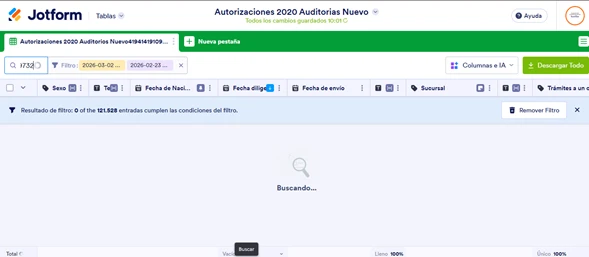
Buenos días, estamos presentando muchos inconvenientes por lentitud y dificultad para encontrar o consulta un radicado o registro, esta situación viene presentándose hace aproximadamente 2 semanas, esto nos esta causando mucho retrocesos en la gestión de tramites, por que no permite editarlo para darle respuesta. agradezco su apoyo y respuesta clara frente a lo que sucede.

-
 Jotform Support Former Jotform Support
Hola Yuleisma,
Gracias por contactarte con el Soporte de Jotform. ¿Esto sucede con un formulario en específico o con todos los formularios? Sería de gran ayuda si pudieras también compartir una captura de pantalla del reporte de consola del navegador cuando esto suceda.
Como medida adicional, he limpiado la memoria caché de tus formularios y te recomiendo hacer lo mismo con el caché y las cookies de tu navegador. También recomiendo probar desde otro navegador, usando otro dispositivo y conectándote a una red de internet diferente para ver si notas alguna diferencia.
Una vez tengamos tu respuesta, podremos seguir ayudándote con esto.
-
coordinadorautorizaciones
se coloca el numero a buscar y demorar demasiado para encontrar la informacion
-
 Christian Ice Jotform Support
Hi Yuleisma,
Our Spanish Support agents are busy helping other Jotform users right now, so I'll try to help you in English using Google Translate, but you can reply in whichever language you feel comfortable using. Or, if you'd rather have support in Spanish, let us know and we can have them do that. But, it might take a while until they're available again.
Now, coming back to your question, can you share your form link with me so I can take a closer look? You can easily find your form's URL in Form Builder. Let me show you how:
- In Form Builder, in the orange navigation bar at the top of the page, click on Publish.
- In the Quick Share tab, click on Copy Link in the Share With Link section.
Once you share the form URL with us, we’ll be able to help you better with this. -
coordinadorautorizaciones
-
Christian Ice Jotform Support
Hi Yuleisma,
Upon checking, your form has 43,125 submissions, which can significantly affect the loading time and filtering speed in the Inbox or Jotform Tables. When a large number of submissions accumulate, it requires more time and resources to load, search, and filter through all the data.
As a workaround, you can download your form submissions as an Excel file and then filter and analyze the data outside of Jotform. This can be a good way to manage large numbers of submissions more efficiently. You can easily download your form submissions as an Excel file. Here’s a quick how-to:
- On your Workspace page, select your form and click on Submissions in the upper-left corner.
- In Jotform Tables, click on Download All on the upper-right side of the page, and in the menu that opens, select Download as Excel.
You can open the downloaded document and view your submissions using a program like Microsoft Office. The columns will appear the same as they do in Jotform Tables. Check out the screenshot below to see how it'll look:
Take a look at our guide on How to Download Form Submissions as Excel/CSV/PDF for more details.
Give it a try and let us know if you need any help.

 Once you share the form URL with us, we’ll be able to help you better with this.