Widget Bilah Pengumuman untuk situs web Anda
Bagikan pembaruan penting di bagian atas, bawah, atau area sebaris situs web Anda. Widget Bilah Pengumuman Jotform mencakup templat untuk obral, pengiriman, peluncuran, acara, webinar, kupon, kebijakan, peringatan, dan kampanye pendaftaran, ditambah kontrol untuk posisi, jadwal, aturan halaman, tombol CTA, hitungan mundur, gambar yang diunggah, warna, gradien, dan CSS khusus.
Buat Sekarang — Gratis!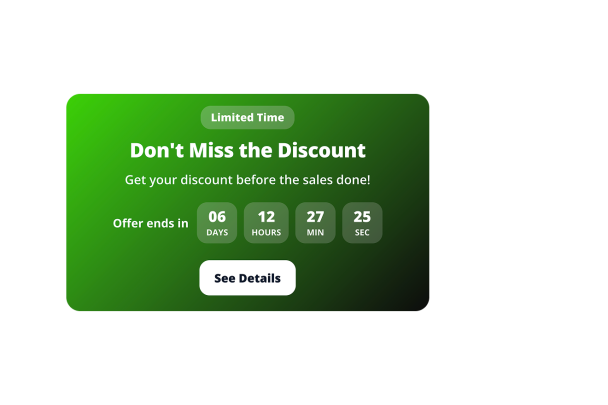

Cara membuat widget Bilah Pengumuman

Pilih templat pengumuman
Mulai dengan templat bilah pengumuman untuk penjualan, pembaruan, kupon, acara, pemberitahuan pengiriman, peluncuran, peringatan, atau pendaftaran.

Sesuaikan konten dan aturan tampilan
Edit teks, CTA, kupon, penghitung waktu, warna, latar belakang gambar yang diunggah, posisi atas atau bawah, tombol tutup, jadwal, aturan halaman, dan visibilitas seluler.

Sematkan di situs web Anda
Pratinjau bilah pengumuman, salin kode semat yang dihasilkan, dan tempatkan di halaman tempat pengunjung seharusnya melihat pesan tersebut.
Buat bilah pengumuman untuk setiap kampanye
Jelajahi template pengumuman
Gunakan templat untuk pengumuman obral, produk, pembukaan toko, gratis ongkos kirim, berita, pembaruan, Black Friday, Natal, kupon, acara, webinar, obral ulang tahun, komunitas, penangkapan prospek, kebijakan, minimalis, mengambang di bawah, info sebaris, dan peringatan layanan.

Tambahkan tindakan dan urgensi
Tampilkan tombol CTA, tautan teks, bilah yang dapat diklik, kode kupon, penghitung waktu mundur, dan pemisah sehingga pengunjung dapat bertindak dari pengumuman.

Kontrol penempatan dan penargetan
Pilih penempatan atas, bawah, atau sebaris, aktifkan tombol tutup, tampilkan bilah pada perangkat tertentu, jadwalkan jendela kampanye, dan cocokkan URL halaman ketika perujuk semat tersedia.

Sesuaikan dengan desain situs Anda
Sesuaikan warna, gradien, latar belakang gambar yang diunggah, kecerahan, tipografi, padding, penspasian, gaya tombol, ukuran responsif, branding, dan CSS khusus dengan cakupan tertentu.

Mengapa Widget Situs Web Jotform Unggul
Widget Jotform membuat situs web Anda lebih interaktif dan meningkatkan konversi. Ada banyak alat tersedia, dari peringkat bintang dan slider testimoni hingga popup bukti sosial dan sematan media. Tambahkan widget ke formulir atau halaman arahan Anda untuk kumpulkan data, menampilkan bukti, dan menangkap prospek — tanpa perlu pengkodean.
Tambahkan widget Jotform ke situs web Anda dengan kode semat yang sederhana. Kustomisasi widget, pratinjau tampilannya, dan tempel ke halaman apa pun yang mendukung HTML kustom atau blok semat, semuanya tanpa pengembang.
Gunakan Widget Situs Web Jotform untuk menangkap prospek, menampilkan umpan balik pelanggan, menampilkan bukti sosial, menyematkan media, atau menambahkan alat halaman web yang bermanfaat. Setiap widget membantu pengunjung berinteraksi dengan bisnis Anda langsung dari situs web Anda.
Jika Anda memerlukan bantuan untuk menyiapkan, menyesuaikan, menyematkan, atau memecahkan masalah widget Anda, tim dukungan pelanggan Jotform tersedia 24-7. Anda dapat melangkah maju dengan percaya diri, mengetahui bahwa bantuan tersedia saat Anda membutuhkannya.
Di mana menggunakan widget Bilah Pengumuman Anda
Gunakan bilah pengumuman di mana saja pengunjung membutuhkan pesan yang tepat waktu dan terlihat tanpa mengganggu halaman.
Toko e-commerce untuk mempromosikan diskon, pengiriman gratis, kode kupon, penawaran waktu terbatas, dan kampanye musiman.
Halaman produk dan peluncuran untuk mengumumkan fitur baru, koleksi, daftar tunggu, peluncuran produk, atau pembaruan layanan.
Halaman acara dan webinar untuk mendorong pendaftaran dengan tombol CTA, tautan, dan penghitung waktu mundur.
Blog dan pusat konten untuk menyoroti pendaftaran buletin, berita terbaru, perubahan kebijakan, atau penawaran terkait.
Halaman dukungan dan status untuk menampilkan peringatan layanan, jam libur, jadwal pemeliharaan, atau pemberitahuan penting.
Ubah prospek menjadi pelanggan yang membayar dengan Jotform Form Builder
Ubah keterlibatan menjadi tindakan dengan Jotform. Buat formulir canggih yang menangkap prospek, mengumpulkan pembayaran, dan mengotomatiskan tanggapan, semuanya di satu tempat. Setiap tanggapan masuk ke Kotak Masuk Jotform Anda, tempat Anda dapat menindaklanjuti atau terhubung dengan aplikasi favorit Anda.
Ayo Mulai — Gratis!
FAQ
Apa itu widget Bilah Pengumuman?
Widget Bilah Pengumuman menampilkan pesan singkat di bagian atas, bawah, atau area sebaris situs web Anda sehingga pengunjung dapat melihat promosi, peringatan, pembaruan, atau ajakan bertindak.
Berapa banyak templat yang disertakan?
Bisakah pengunjung menutup bilah?
Bisakah saya menjadwalkan kapan bilah muncul?
Bisakah saya menggunakan aturan tampilan halaman?
Bisakah saya menambahkan kupon atau hitungan mundur?