-
 contato_contato148
- o link do formulário: https://form.jotform.com/242613264676662
- que o erro “We cannot complete your request” aparece ao carregar o formulário e ao selecionar o Inventory, mesmo após: recriar o formulário com novos widgets, limpar cache da conta, limpar cache do navegador, testar em aba anônima e em outra conexão/dispositivo.
Page URL: https://form.jotform.com/242613264676662 -
 Podo: Especialista de Suporte
Olá contato_contato148,
Obrigado por entrar em contato com a Jotform para obter suporte; eu sou uma assistente de inteligência artificial e estou aqui para ajudar com o seu formulário.
Pelo que você descreveu, o erro “We cannot complete your request” aparece ao carregar o formulário e também ao interagir com o widget Inventory, mesmo depois de já ter recriado o formulário, limpado o cache da conta, cache do navegador, testado em aba anônima e em outra conexão/dispositivo.
De forma geral, mensagens desse tipo estão ligadas a problemas temporários de comunicação com o servidor ou a cache corrompido. As orientações oficiais para erros semelhantes (como “Request Failed. Please try again.” ou problemas de carregamento) são:
- Limpar o cache dos formulários na sua conta Jotform. Há um guia detalhado em How to Clear Your Form Caches.
- Limpar o cache do navegador e testar em outro navegador (por exemplo, se usa Chrome, testar em Firefox) e, se possível, em outra rede de internet.
- Desativar extensões do navegador temporariamente, principalmente bloqueadores de anúncios (ad-blockers) ou bloqueadores de script, pois podem impedir o carregamento correto de widgets.
Como você já adiantou que limpou cache da conta, do navegador, testou em aba anônima e em outra conexão/dispositivo, isso indica que o comportamento pode estar mais específico do seu formulário ou do widget Inventory em si.
Para avançarmos, poderia, por favor, confirmar mais dois pontos:
- Se o erro aparece imediatamente ao abrir o link do formulário, mesmo antes de qualquer interação, ou apenas depois de selecionar alguma quantidade no Inventory.
- Se o problema ocorre em todos os widgets Inventory do formulário ou apenas em um campo específico.
Com esses detalhes, conseguimos focar melhor se é algo ligado à configuração de um Inventory específico ou ao carregamento geral do formulário.
Por favor, nos conte esses detalhes para que possamos continuar a investigação e tentar chegar a uma solução.
-
contato_contato148
o Erro aparece ao abrir o formulário e ao interegir com o inventory.
Aparece aleatoriamente em campos distintos, depende do momento que você carrega a página. -
Podo: Especialista de Suporte
Olá contato_contato148,
Um especialista de suporte vai assumir este atendimento aqui na thread e responder em breve para continuar a investigação do erro no seu formulário.
-
 Mikhail Jotform Support
Hi contato_contato148,
Our Portuguese Support agents are busy helping other Jotform users right now, so I'll try to help you in English using Google Translate, but you can reply in whichever language you feel comfortable using. Or, if you'd rather have support in Portuguese, let us know and we can have them do that. But, it might take a while until they're available again.
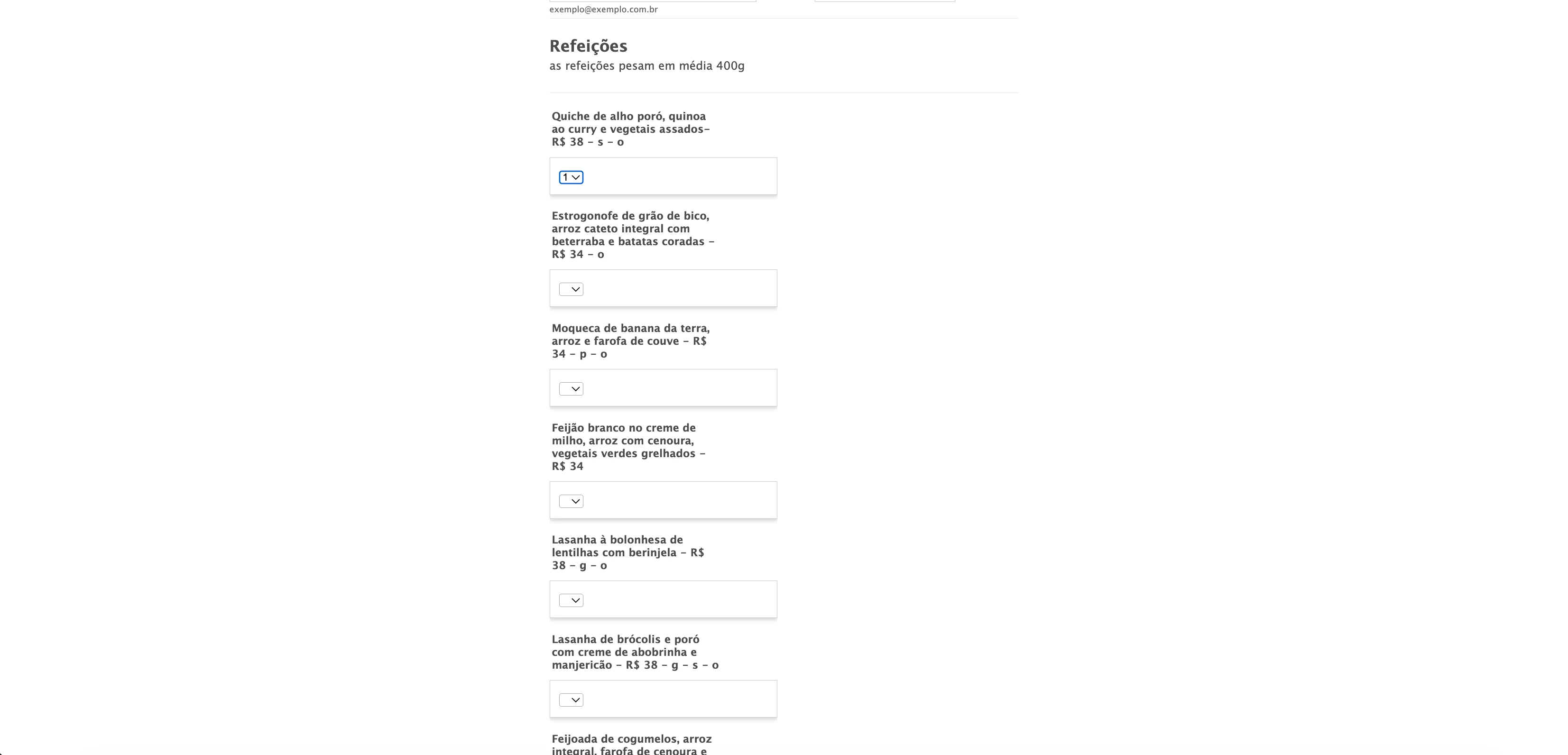
Now, coming back to your question, I opened your form and tested it to see if I could replicate the issue, but everything was working properly. Check out the screenshot below to see my results:

Can you try opening the form using a different network and browser and let us know how it goes?
Give it a try and let us know if you have any other questions.
-
contato_contato148
o erro continua acontecendo. pode tentar novamente?
Estou utilizando o chrome, no celular e no computador e em ambos não funciona. Sempre dá algum erro em alguma seleção.
-
contato_contato148
Tentei agora pelo firefox e apareceu o mesmo erro.
-
Mikhail Jotform Support
Hi contato_contato148,
I just tried to load your form again and I still wasn't able to replicate the issue. Check out the screencast below:
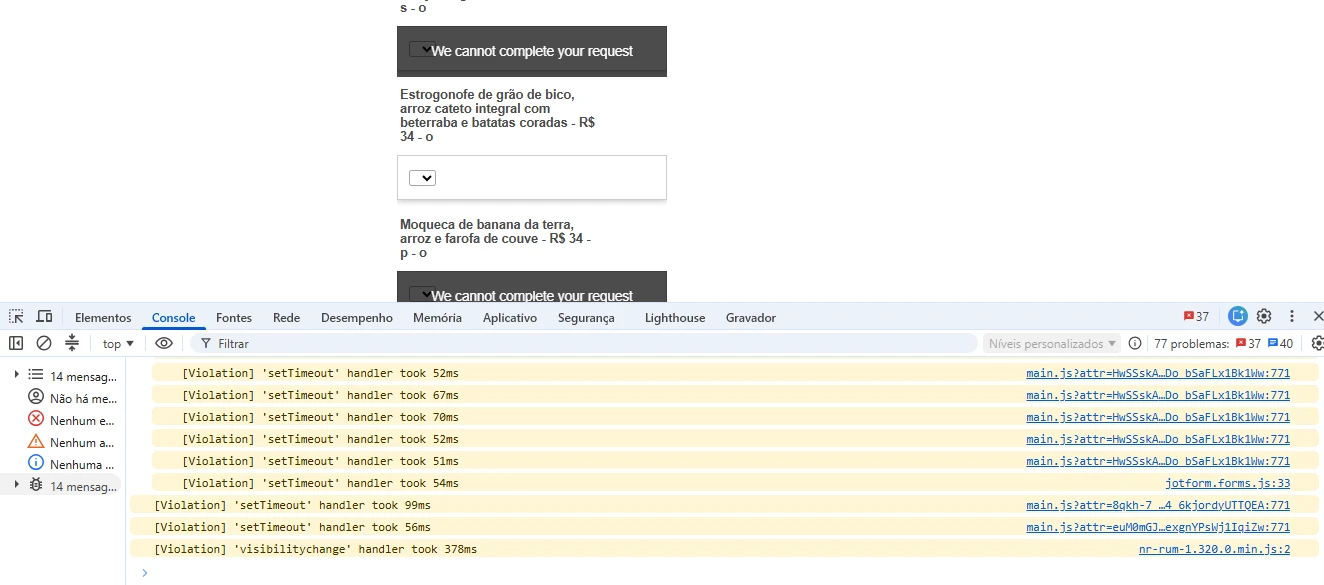
Can you provide us with a screenshot of your Console Log when experiencing the error? It would help us understand what is happening.
Once we hear back from you, we can get moving on a solution.
-
contato_contato148
-
contato_contato148
-
contato_contato148
-
contato_contato148
-
contato_contato148
-
contato_contato148
-
contato_contato148
o problema não está acontecendo só aqui, não seria o antivirus. Várias pessoas de diferentes lugares estão relatando o mesmo problema
-
 Kevin Jotform Support
Hi contato_contato148,
I tested the form again on our side, including interacting with the Inventory fields, but unfortunately, I’m still unable to reproduce the We cannot complete your request error. The form and Inventory fields are loading and working as expected in our tests:
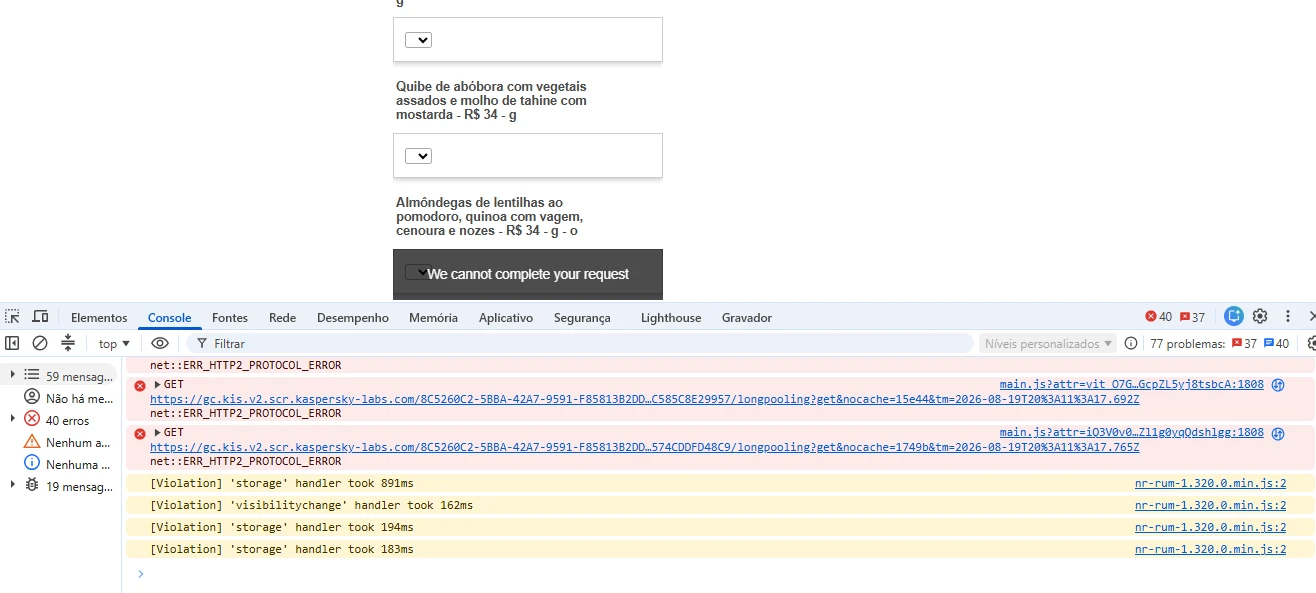
Now, from your screenshot I can see that the failed requests are being made to a Kaspersky Labs endpoint gc.kis.v2.scr.kaspersky-labs.com, followed by the error net::ERR_HTTP2_PROTOCOL_ERROR. This suggests that Kaspersky’s browser/security protection may be interfering with some of the requests made while the Inventory widget is loading or being used.
The yellow Violation messages shown in the console are performance warnings and do not appear to be the cause of the We cannot complete your request message. As a test, could you please temporarily disable Kaspersky's web/browser protection or its browser extension, if enabled. And try the form again? If the Inventory works normally with Kaspersky protection disabled, that would confirm that the security software is interrupting the request.
If the error still occurs with Kaspersky completely disabled, let us know. In that case, we can continue investigating this from the Jotform side. We appreciate you providing the Console information, as it gives us a much better direction for troubleshooting this issue.
Give it a try and let us know how it goes.
-
contato_contato148
Outras pessoas que não utilizam o antivirus estão tendo o mesmo problema. O problema não é com o bloquador do antivirus. De qualquer forma, desativei e o problema continuou.
-
contato_contato148
-
Kevin Jotform Support
Hi contato_contato148,
Thank you for confirming that disabling Kaspersky did not resolve the issue and that other users who don't use Kaspersky are experiencing the same behavior. This helps us narrow down the possible causes. Before we escalate this for further investigation, we’d like to collect a few additional details about the affected environment and the exact behavior. Could you provide the following?
- What device(s) are affected, and what operating system and version are they using, for example, Windows 11, macOS 15, Android 15, iOS 18?
- Provide the browser name and exact version for the affected device(s) (for example, Chrome 139.x or Firefox 142.x).
- Are you testing the form directly through the Jotform URL, or is it embedded on another website?
- Does the issue occur when you are logged into your Jotform account, logged out, or both?
- Does the error occur every time you open/interact with the form, or does it happen intermittently?
- Does the error occur with all Inventory fields, or only certain fields? You mentioned that different fields can be affected depending on when the form loads. If possible, please let us know whether you have noticed any specific pattern.
We have already confirmed that we cannot reproduce the issue consistently on our side, so these details will help us compare your environment with our tests and provide our team with enough information to investigate the behavior further.
Once you get back to us, we can take the next step toward solving this.
-
contato_contato148
- Windows 10, Android 15
- Chrome 151.0.7922.170
- Através da URL direto.
- Em ambos os casos
- De forma intermitente
- Não tem padrão, pode carregar todos ou não carregar nenhum inventory. Várias vezes tmabém não abre apenas um inventory ou alguns.
-
 Keenly Jotform Support
Hi contato_contato148,
I’ve gone ahead and reported this to our Developers so they can figure out what’s going on. We’ll be back with an update as soon as we can.
-
 Connor Product Triage Specialist
Hi contato_contato148,
We heard back from our developers that the issue has been resolved.
Reach out again if there's anything else we can do for you.






Sua Resposta
Something Went Wrong
An error occurred while generating the AI response. Please try again!