-
 CEPHAServices
How to create a condition "if the value of a field is between 1 and 5", then ...?
Thank you.
Comment créer une condition si valeur d'un champ est comprise entre 1 et 5, alors... ?
Merci.
-
 Carlos_C
Hello,
Thank you for contacting us.
After checking your request, I create a clone for you: https://form.jotform.com/201086793270052.
This is how it works:

There are 2 options, create a Number Field or a Short Text Field, as you can see in the example, when the numbers are between 1 and 5 it is showing a message.
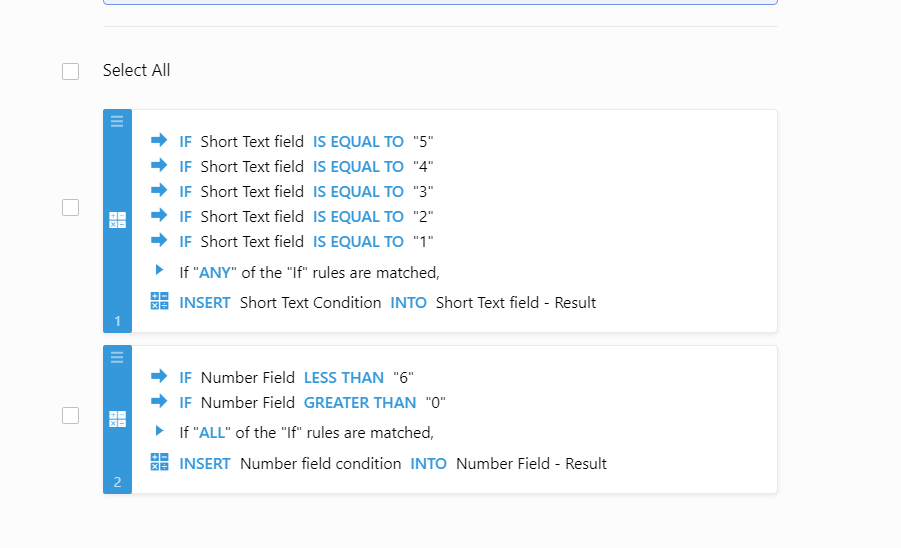
The conditions are:
As you can see with the Number field you have the ability to use the Less Than and Greater Than to create the range of number, with the Text this is not possible.
Complete guide: How-to-Clone-an-Existing-Form-from-a-URL.
If you need any further assistance, please let us know. We will be happy to help.
-
CEPHAServicesThank you !
[cid:image001.png@01D48CE3.BB587B70]
Bernard VIVIER
Commandité
CEPHA/Services SCS
Rue du Colâ 82
B 7973 Stambruges (BELOEIL)
Tél. +32 69 57 66 42
Fax : +32 69 56 16 95
Courriel : cepha@cepha.be
Please consider the environment before printing this e-mail!
This message and any attachments are confidential and intended solely for the addressees. If you receive this message in error, please delete it and immediately notify the sender. If the reader of this message is not the intended recipient, you are hereby notified that any unauthorized use, copying or dissemination is prohibited. E-mails are susceptible to alteration. Neither CEPHA/Services SCS nor any of its subsidiaries or affiliates shall be liable for the message if altered, changed or falsified.
Ce courriel et toute pièce jointe qu'il contient sont réservés au seul destinataire indiqué et peuvent renfermer des renseignements confidentiels et privilégiés. Si vous n'êtes pas le destinataire prévu, toute divulgation, duplication, utilisation ou distribution du courrier ou de toute pièce jointe est interdite. Si vous avez reçu cette communication par erreur, veuillez nous en aviser par courriel avec accusé de réception et détruire immédiatement le courrier et les pièces jointes. Merci. Les courriels sont susceptibles d'être modifiés. CEPHA/Services ne peut être tenu responsable si un courriel est modifié ou altéré.
Le 18 avr. 2020 à 23:23, Jotform > a écrit :
A new response has been received:
[JOTFORM]
Answered by Carlos_C
Hello,
Thank you for contacting us.
After checking your request, I create a clone for you: https://form.jotform.com/201086793270052.
This is how it works:
[https://cms.jotform.com/uploads/image_upload/image_upload/global/106216_fontcolor4977.gif]
There are 2 options, create a Number Field or a Short Text Field, as you can see in the example, when the numbers are between 1 and 5 it is showing a message.
The conditions are:
[https://cms.jotform.com/uploads/image_upload/image_upload/global/106217_Screenshot%20-%202020-04-18T152120.994.png]
As you can see with the Number field you have the ability to use theLess Than and Greater Than to create the range of number, with the Text this is not possible.
Complete guide: How-to-Clone-an-Existing-Form-from-a-URL.
If you need any further assistance, please let us know. We will be happy to help.
View this thread on browser »Unsubscribe Thread
1587245038
... -
 Amin_N
You're most welcome.
We're glad we could be of help.
Should you have any further inquiries, we will be more than happy to help.