Widget Slider Foto untuk situs web Anda
Buat slide gambar satu halaman untuk banner, sorotan produk, galeri gambar, pengumuman, dan bagian carousel promosi. Gunakan widget Slider Foto Jotform untuk menambahkan gambar atau video, judul, lencana, tombol CTA, tautan, overlay, putar otomatis, perulangan, transisi pudar atau slide, dan navigasi responsif tanpa menulis HTML slider.
Buat Sekarang — Gratis!

Cara membuat widget Penggeser Gambar
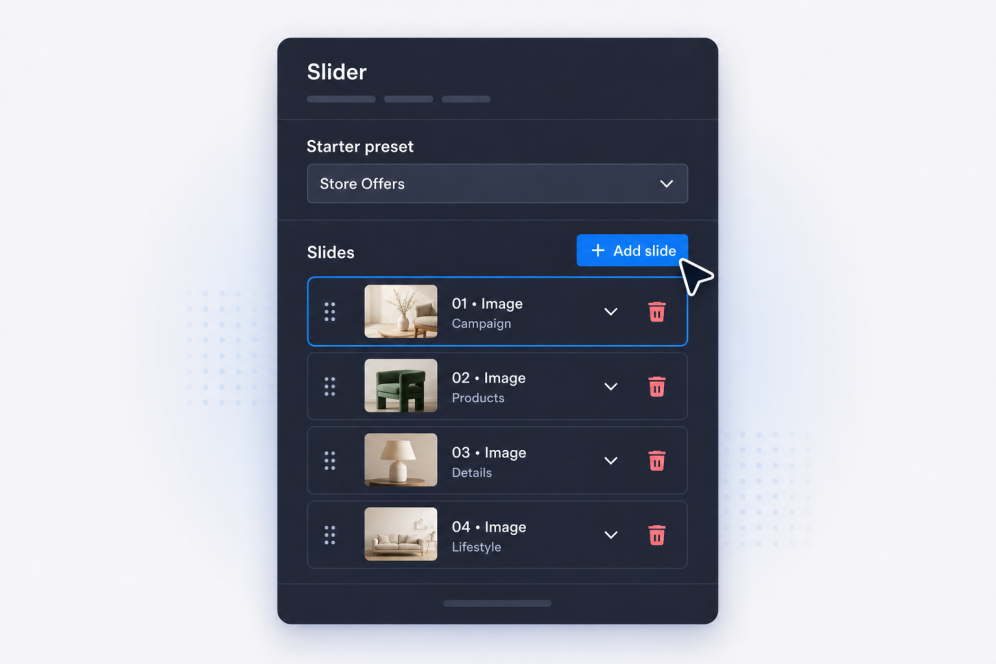
Tambahkan slide Anda
Buat slide dengan judul, teks isi, lencana, tombol, gambar, video, dan tautan tujuan untuk setiap banner, promosi, item galeri, atau pengumuman.
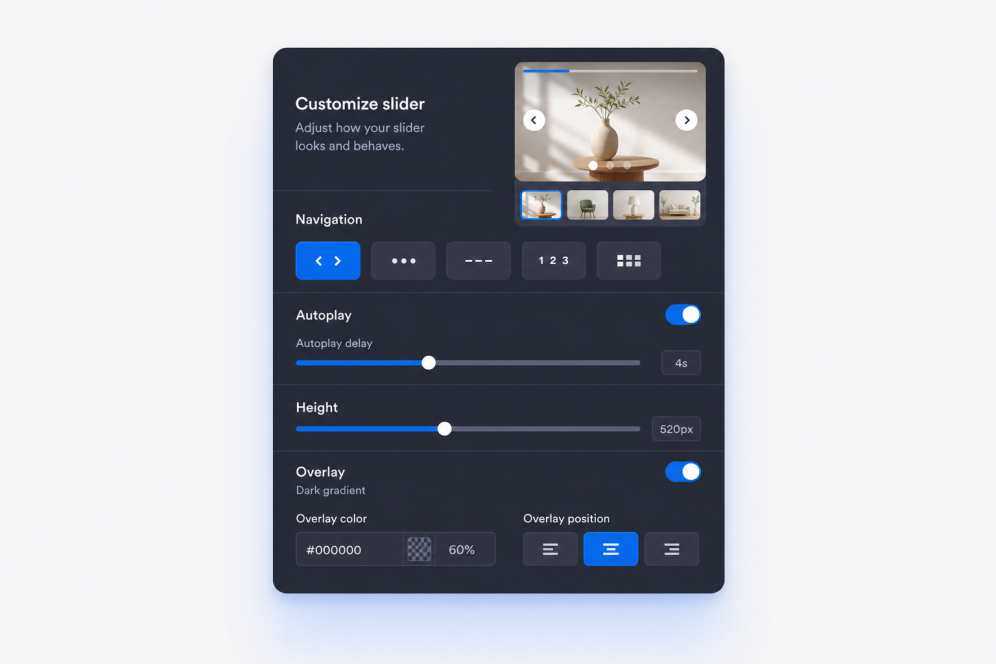
Atur tata letak dan gerak
Pilih di mana konten slide muncul, lalu atur transisi pudar atau slide, waktu putar otomatis, perilaku perulangan, dan kontrol navigasi.

Beri gaya dan sematkan
Sesuaikan lebar, tinggi, overlay, kesesuaian media, panah, penomoran halaman, warna, dan branding, lalu salin kode semat untuk menambahkan widget Slider Foto ke situs web Anda.
Bangun slide gambar yang sesuai dengan halaman Anda
Buat bagian slide yang kaya gambar
Ubah slide gambar web sederhana menjadi bagian situs web yang rapi. Setiap slide dapat menyertakan lencana, judul, deskripsi, tombol CTA, tautan, gambar, dan sumber video opsional untuk kampanye, galeri, atau sorotan produk.

Jaga konten banner tetap mudah dibaca
Tempatkan teks dan tombol di posisi terbaik pada setiap gambar atau video. Pemosisian konten yang fleksibel membantu setiap slide gambar untuk halaman situs web tetap jelas, baik slide digunakan sebagai banner hero, blok promo, atau cerita visual.

Kontrol gerak dan navigasi
Gunakan transisi slide atau pudar, putar otomatis, perulangan, panah, poin, angka, garis, atau penomoran halaman thumbnail. Bangun carousel banner yang dapat ditelusuri pengunjung secara manual atau ditonton secara otomatis tanpa kehilangan pesan utama.

Sesuaikan dengan desain situs web Anda
Sesuaikan lebar slider, tinggi, gaya kartu, padding konten, kekuatan overlay, prasetel tema, gaya tombol, warna, dan CSS khusus agar widget Image slider terasa seperti bagian alami dari halaman Anda.

Mengapa Widget Situs Web Jotform Unggul
Widget Jotform membuat situs web Anda lebih interaktif dan meningkatkan konversi. Ada banyak alat tersedia, dari peringkat bintang dan slider testimoni hingga popup bukti sosial dan sematan media. Tambahkan widget ke formulir atau halaman arahan Anda untuk kumpulkan data, menampilkan bukti, dan menangkap prospek — tanpa perlu pengkodean.
Tambahkan widget Jotform ke situs web Anda dengan kode semat yang sederhana. Kustomisasi widget, pratinjau tampilannya, dan tempel ke halaman apa pun yang mendukung HTML kustom atau blok semat, semuanya tanpa pengembang.
Gunakan Widget Situs Web Jotform untuk menangkap prospek, menampilkan umpan balik pelanggan, menampilkan bukti sosial, menyematkan media, atau menambahkan alat halaman web yang bermanfaat. Setiap widget membantu pengunjung berinteraksi dengan bisnis Anda langsung dari situs web Anda.
Jika Anda memerlukan bantuan untuk menyiapkan, menyesuaikan, menyematkan, atau memecahkan masalah widget Anda, tim dukungan pelanggan Jotform tersedia 24-7. Anda dapat melangkah maju dengan percaya diri, mengetahui bahwa bantuan tersedia saat Anda membutuhkannya.
Di mana menggunakan widget Slider Foto Anda
Tambahkan slider di mana saja halaman Anda memerlukan visual yang berputar, pesan promosi, atau cara ringkas untuk menampilkan beberapa konten dalam satu bagian.
Bagian hero halaman beranda untuk merotasi kampanye, peluncuran produk, penawaran musiman, dan pengumuman penting.
Bagian slide gambar promosi untuk menyoroti penjualan, penawaran waktu terbatas, pesan kupon, atau CTA unggulan.
Halaman produk dan koleksi untuk menggabungkan fotografi produk, manfaat, dan tautan pembelian dalam slide gambar banner.
Halaman portofolio dan studi kasus untuk memandu pengunjung melalui gambar proyek, hasil, testimoni, dan poin bukti.
Halaman acara dan webinar untuk menampilkan pembicara, jadwal, sponsor, dan perintah pendaftaran dalam slide gambar satu halaman.
Halaman arahan untuk membuat slide gambar situs web berbasis cerita yang membawa pengunjung melalui gambar, pesan, dan ajakan bertindak.
Ubah prospek menjadi pelanggan yang membayar dengan Jotform Form Builder
Ubah keterlibatan menjadi tindakan dengan Jotform. Buat formulir canggih yang menangkap prospek, mengumpulkan pembayaran, dan mengotomatiskan tanggapan, semuanya di satu tempat. Setiap tanggapan masuk ke Kotak Masuk Jotform Anda, tempat Anda dapat menindaklanjuti atau terhubung dengan aplikasi favorit Anda.
Ayo Mulai — Gratis!
FAQ
Apa itu widget Slider Foto?
Sebuah widget Slider Foto menampilkan beberapa slide di dalam satu semat situs web. Setiap slide dapat menggabungkan gambar atau video dengan teks, lencana, tautan, dan tombol CTA.
Bisakah saya menggunakannya sebagai slider banner situs web?
Bisakah saya membuat slide gambar untuk situs web saya?
Bisakah saya menggunakan gambar dan video dalam slider yang sama?
Bisakah setiap slide memiliki teks dan tautan yang berbeda?
Bisakah saya mengontrol di mana teks muncul?
Apakah mendukung transisi pudar dan slide?
Bisakah slider diputar otomatis dan berulang?
Gaya navigasi apa saja yang tersedia?
Bisakah saya mengubah ukuran slider?
Apakah saya memerlukan HTML slider untuk disematkan?
Platform situs web mana yang mendukung widget Slider Foto?
Bisakah saya mendapatkan bantuan untuk menyiapkan widget Slider Foto saya?
Apakah widget Slider Foto gratis?