-
 smcfmc
Olá,
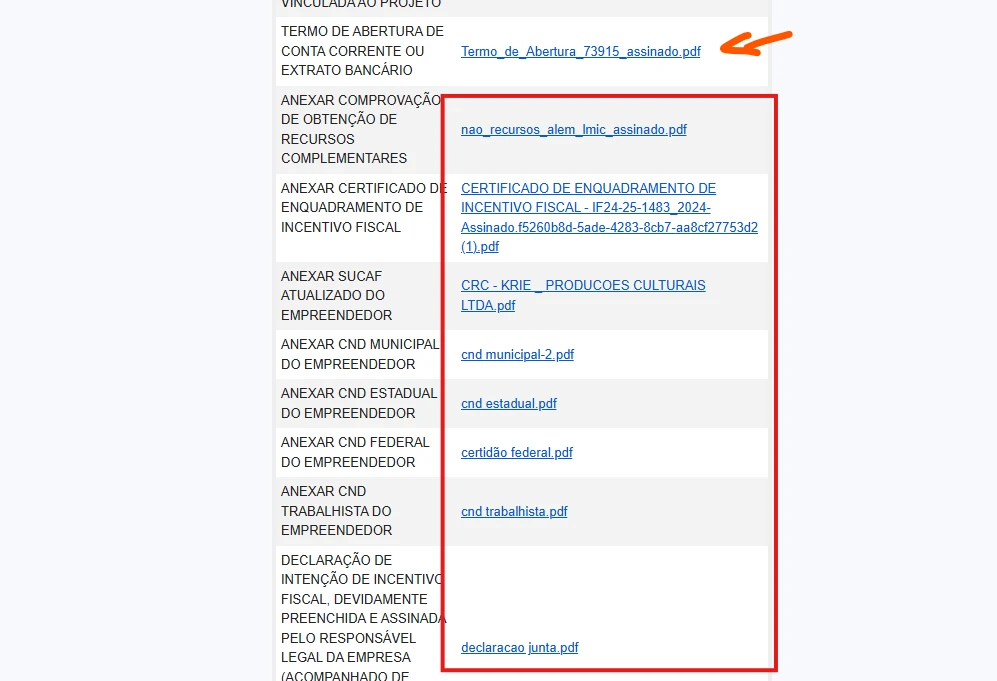
Tenho um formulário onde, anteriormente, era possível fazer download de arquivos enviados por meio dos links constantes no e-mail de notificação de envio sem a necessidade de estar logado na plataforma.
A partir de hoje, ao clicar nos links desse e-mail é solicitado login na plataforma.
Não há forma de realizar esse download do jeito antigo, sem estar logado?
Desde já agradeço Page URL: https://form.jotform.com/253165368055662
 -
 Podo: Especialista de Suporte
Olá,
Anteriormente, era possível fazer o download dos arquivos enviados por meio dos links nos e-mails de notificação sem precisar estar logado. Contudo, atualmente, para baixar esses arquivos, o login na plataforma Jotform é exigido devido a configurações de privacidade que restringem o acesso direto.
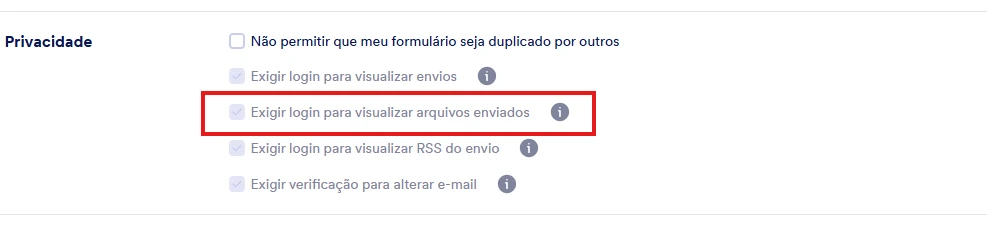
Para voltar a permitir o download dos arquivos sem login, é necessário alterar as configurações de privacidade do seu formulário. Você pode desabilitar a exigência de login para visualizar os arquivos enviados, seguindo o guia oficial da Jotform sobre Como desabilitar o login para visualizar arquivos enviados.
Além disso, uma alternativa para facilitar o acesso aos arquivos é incluir links de download direto nos e-mails de notificação usando a tag {pdf-link} para PDFs, ou configurar o envio de anexos em PDF, lembrando que há limitações de tamanho para anexos.
Se preferir, você também pode baixar os arquivos diretamente pelo Jotform Inbox ou Jotform Tables, onde é possível baixar os arquivos individualmente ou em lote.
Se precisar, posso ajudar a guiá-lo pelo processo de alteração dessas configurações.
Fique à vontade para perguntar.
Let us know if you have any other questions.
-
smcfmc
Essa opção está inabilitada para mim.
-
Podo: Especialista de Suporte
Olá,
Se a opção para desabilitar o login para visualizar os arquivos enviados está inabilitada para você, isso pode ocorrer por algumas razões, como:
- Você precisa fazer essa alteração na versão Desktop do Jotform, pois essa configuração não está disponível no aplicativo móvel.
- Para alterar essa configuração, é necessário verificar sua conta com um código de verificação enviado por e-mail para garantir a segurança.
- Se sua conta possui formulários com conformidade HIPAA, essa opção não pode ser desabilitada por questões de privacidade e segurança.
Let me show you how to disable the login requirement if the option is enabled for your account:
- Acesse a página do Workspace e clique na sua foto de perfil/avatar no canto superior direito.
- Selecione Configurações (Settings) para abrir a página de configurações da conta.
- Vá até a aba Segurança (Security) e clique em "Enviar Código de Verificação" para receber o código no seu e-mail.
- Insira o código de verificação para confirmar as alterações.
- Desmarque a opção "Exigir login para visualizar arquivos enviados" na seção de privacidade.
Se a opção continuar inabilitada, pode ser devido a restrições específicas da sua conta ou plano.
Se precisar, posso ajudar a verificar ou orientar em outras alternativas para acessar os arquivos.
Fique à vontade para perguntar.
-
smcfmc
Preciso de alternativas para fazer download dos arquivos sem estar logado.
Adicionalmente gostaria de saber o motivo da restrição de desabilitar essa opção para minha conta.
E como saber se meu formulário tem conformidade HIPAA? -
Podo: Especialista de Suporte
Olá,
Vou ajudar com suas dúvidas sobre download de arquivos sem login, restrições e conformidade HIPAA.
Alternativas para download sem estar logadoSe a opção de desabilitar o login está inabilitada, você pode usar estas alternativas para acessar os arquivos:
- Baixar os arquivos diretamente pelo Jotform Inbox, onde é possível selecionar e baixar arquivos individualmente ou em lote.
- Utilizar o Jotform Tables para acessar e baixar os arquivos enviados.
- Incluir links de download direto nos e-mails de notificação usando a tag {pdf-link} para PDFs, ou configurar o envio de anexos em PDF (com limitações de tamanho).
A restrição para desabilitar a exigência de login pode ocorrer por motivos como:
- Configurações de segurança da conta que exigem verificação para alterações.
- Se sua conta possui formulários com conformidade HIPAA, essa opção não pode ser desabilitada por questões de privacidade e segurança.
- Possíveis restrições específicas do seu plano ou conta.
Formulários com conformidade HIPAA são configurados para garantir a segurança e privacidade dos dados sensíveis. Se sua conta ou formulário é HIPAA-compliant, você terá limitações como a exigência de login para visualizar arquivos enviados.
Para confirmar, verifique as configurações da sua conta ou entre em contato com o administrador da conta para saber se o HIPAA está habilitado.
Se precisar de mais ajuda para navegar nessas opções ou entender melhor sua conta, estou à disposição.
Give it a try and let us know how it goes.
-
smcfmc
Preciso de assistência de suporte humano, pois eu sou o administrador da conta e não faço ideia se meus formulários tem com conformidade HIPAA.
Novamente, essa restrição não havia até ontem para esse formulário. O que ocorreu para isso mudar hoje?
Preciso voltar ao que era antes. Todas as alternativas que você me passou exigem que se esteja logado na plataforma para fazer o download. -
Podo: Especialista de Suporte
Olá,
Entendo sua situação e que você precisa de assistência humana para resolver essa questão sobre a conformidade HIPAA e a mudança na restrição de download dos arquivos.
Um dos membros da nossa equipe de suporte irá assumir este atendimento e entrará em contato com você em breve para ajudar a resolver o problema.
-
 Brandon Customer Success Manager
Hi there,
I would be happy to help you via Google Translate. In order to check if forms are HIPAA compliant, you can Enable HIPAA Compliance via this guide. However, this requires a Gold level subscription, so this may not be feasible for your situation.
That said, our team has noticed this issue and the development team is looking into it. The Jotform team will notify you when there is an update.
-
Brandon Customer Success Manager
Hi there,
Thank you for waiting! Our team has reverted the changes that led to this issue occurring. Try using the functionality again. The users may need to update their settings again in order for this to work. -
 Connor Product Triage Specialist
Hi smcfmc,
As your account is verified and allowed to collect sensitive information under our Terms of Use, certain security settings are required in line with our policies, applicable data protection standards, and relevant regulations. For this reason, these settings cannot be disabled. If you need to share your documents or submissions with others for your operational needs, you can share the access link or invite users via email to your Tables/Inbox.
Reach out again if you have any other questions.
-
Connor Product Triage Specialist
Hi smcfmc,
As your account is verified and allowed to collect sensitive information under our Terms of Use, certain security settings are required in line with our policies, applicable data protection standards, and relevant regulations. For this reason, these settings cannot be disabled. If you need to share your documents or submissions with others for your operational needs, you can share the access link or invite users via email to your Tables/Inbox.
Reach out again if you have any other questions.
-
smcfmc
Hi, thank you for your response.
I am experiencing again an issue that had previously occurred with forms on the platform.
When a form is submitted, I receive the notification email as expected. However, in cases where file uploads are included, the link provided in the email no longer allows direct download. Instead, when clicking the link, it requires login to the platform.
This behavior had already happened before. I contacted support at the time, and it was resolved — according to a message from the support agent Brandon on April 1st. After that, the links worked normally for a period, allowing direct download without requiring login.
However, the issue has now returned.
I understand the importance of security policies and compliance. However, this current behavior significantly impacts our workflow, since many recipients of these emails are external users and do not have (and should not need) accounts on the platform just to download submitted files.
Could you please:
- Review what was previously adjusted in my account when this was fixed;
- Check if there is any configuration, permission, or alternative method that allows secure but direct access to uploaded files via email links;
- Suggest a practical workaround that does not require every recipient to log in.
At the moment, the suggested solution (sharing access via Tables/Inbox) is not feasible for our use case.
I appreciate your help and look forward to a workable solution.
-
 Rehan Support Team Lead
Hi smcfmc,
I've gone ahead and reached out to our relevant team to check on your account. We’ll get back to you as soon as we get an update from them.
-
 Siera Fraud & Abuse Ops. Specialist
Hi smcfmc,
Because several of your form(s) like the one titled Informações e documentos para abertura de conta Pessoa Física_LPG involve collecting sensitive information, your account was subject to User Verification Process (KYC). As you successfully completed the identity verification process and are allowed to collect Personally Identifiable Information (PII) on your forms, your account falls under a stricter security framework. Security settings such as the “Require Log-in to See Submissions” setting are required for your account and cannot be disabled as part of our compliance with applicable data protection requirements.
At the moment, we don’t have a way to apply this setting on a per-form basis, which means it also affects forms that do not collect sensitive data. When an account is allowed to collect sensitive information, these security settings are applied at the account level and cannot be configured separately for individual forms.
If you need to share submission data with others, you may consider the following options in addition to sharing your Tables:
- integrating Google Sheets and/or Google Drive with the relevant forms
- using a separate Jotform account for forms that do not collect sensitive information, where these restrictions would not apply
- removing the identity verification under the Data section of the Account Settings.
I understand this is a change from your previous workflow and I appreciate your understanding as we apply these measures to ensure compliance with data protection requirements.
-
smcfmc
Hi, thanks for your explanation.
I’d like to clarify one point to avoid unintended issues:
If I remove the identity verification (KYC) from my account, but still have forms where sensitive personal data is entered (such as identification documents), is there a risk that these forms will be automatically disabled or restricted?
My concern is ensuring compliance while also allowing easier access to submissions (without requiring login for all forms).
Since maintaining separate accounts is not a viable option for me, would you recommend removing KYC in this case, or is it safer to keep the verification and rely on alternative methods for accessing submission data, such as Google Drive or Google Sheets integrations?
Thanks in advance for your guidance.
-
 Camila Jotform Support
Hi smcfmc,
I've gone ahead and reached out to our relevant team about this. I’ll let you know as soon as there’s a reply.
-
Siera Fraud & Abuse Ops. Specialist
Hi smcfmc,
If you remove the verification from your account, but still collect sensitive information, you'll be required to complete the verification again. You may consider the other options that were previously suggested like Google Drive, especially if you need to share uploaded files.
Let us know if you have any other questions.
-
smcfmc
Hi,
Following your previous guidance, we decided to enable uploaded files as attachments in the submission notification emails, since this was the only alternative that seemed compatible with our workflow requirements.
However, we have now encountered another major limitation: attachments are apparently restricted to a maximum size of 5 MB.
Unfortunately, this does not meet our operational needs, as many of the uploaded files we receive exceed this size limit. As a result, the attachments are not included in the notification emails, which brings us back to the original problem of requiring platform login to access the files.
I would also like to clarify why the Google Drive / Google Sheets alternatives are not viable for our use case.
We manage several different forms, each with different recipients depending on the subject and workflow involved. Centralizing uploads into a shared Google Drive would either:
- require granting access to a very large number of users to the same Drive structure, creating security and organizational concerns; or
- require maintaining multiple Drive integrations for different recipients and workflows, which would become extremely complex and difficult to manage.
Because of this, the current alternatives do not adequately replace the previous functionality, where recipients could securely access uploaded files directly through the notification email links without requiring a Jotform account login.
At the moment, the workflow impact is significant, especially because many recipients are external users who should not need platform accounts simply to download submitted files.
Could you please advise whether:
- there is any way to increase or bypass the attachment size limitation;
- there is any secure temporary-link mechanism available for uploaded files;
- or whether your team is considering a more flexible approach for verified accounts that need to collect sensitive information while still sharing submissions with external recipients.
I appreciate your assistance and look forward to a practical solution.
Best regards,
-
 Kyle Jotform Support
Hi smcfmc,
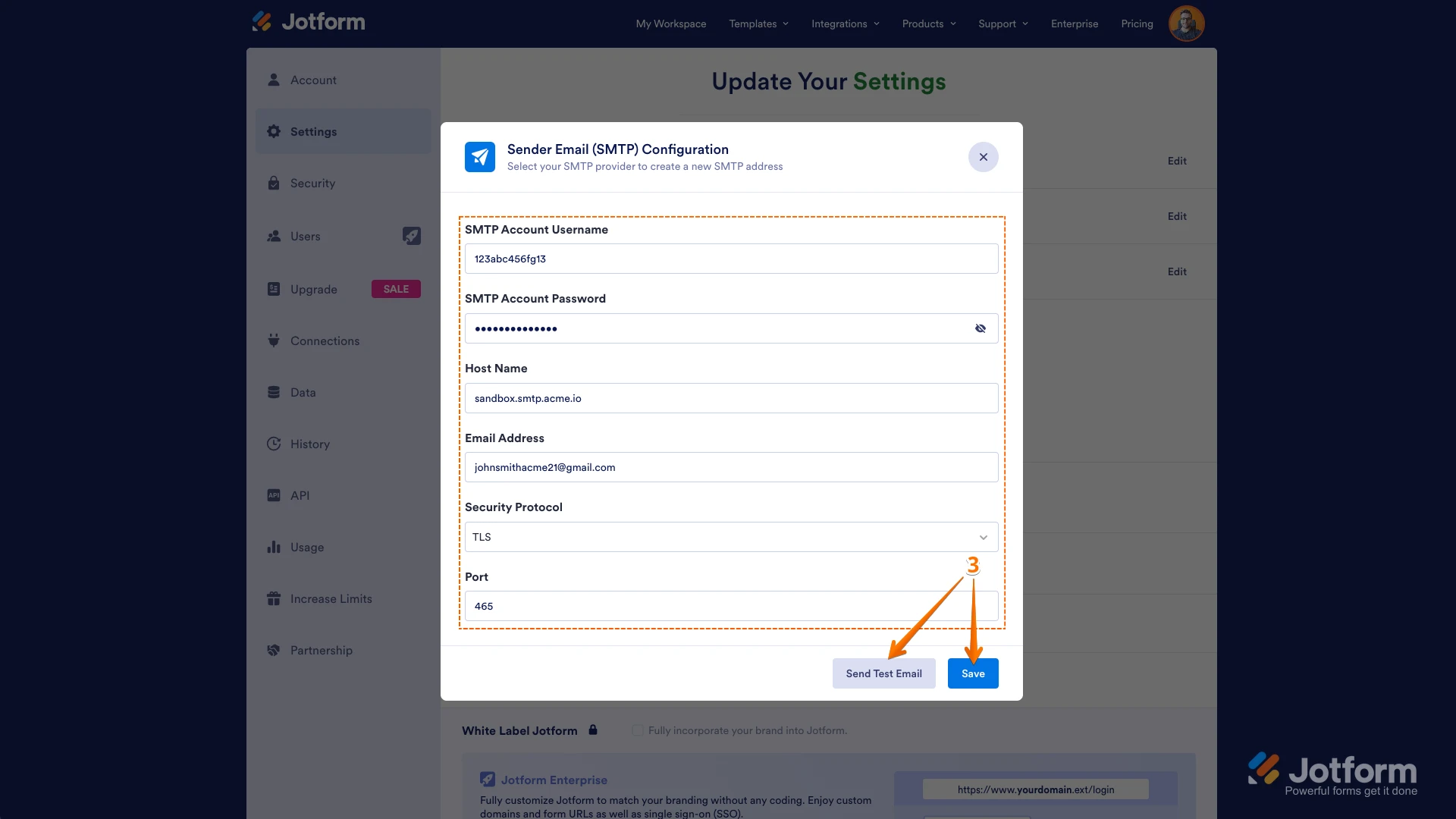
The 5 MB cap for attachments in notification emails is a system limit and cannot be bypassed when using Jotform’s default sender. Larger files will always require platform access. As a workaround, using a custom SMTP server as your Sender Email allows you to bypass this restriction, since the attachment size limit then depends on your email provider’s rules rather than Jotform’s default 5 MB threshold.
This setup can help ensure larger uploaded files are delivered directly to recipients while maintaining compliance. You can easily set up a custom SMTP to use your email sender as provider. Let me walk you through it:
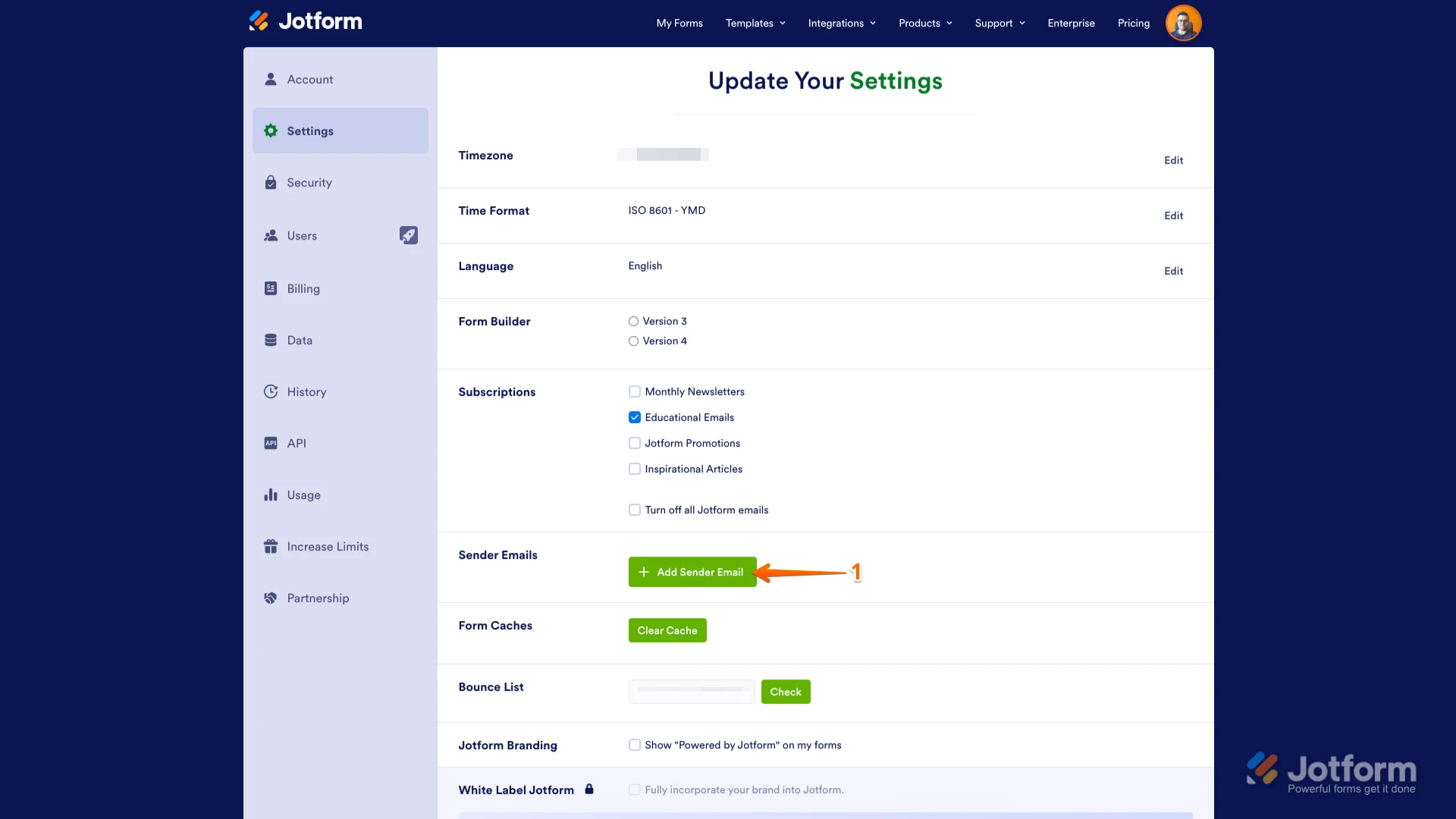
1. Go to the Settings page while logged in to your Jotform account and click on Add Sender Email in the Sender Emails section.
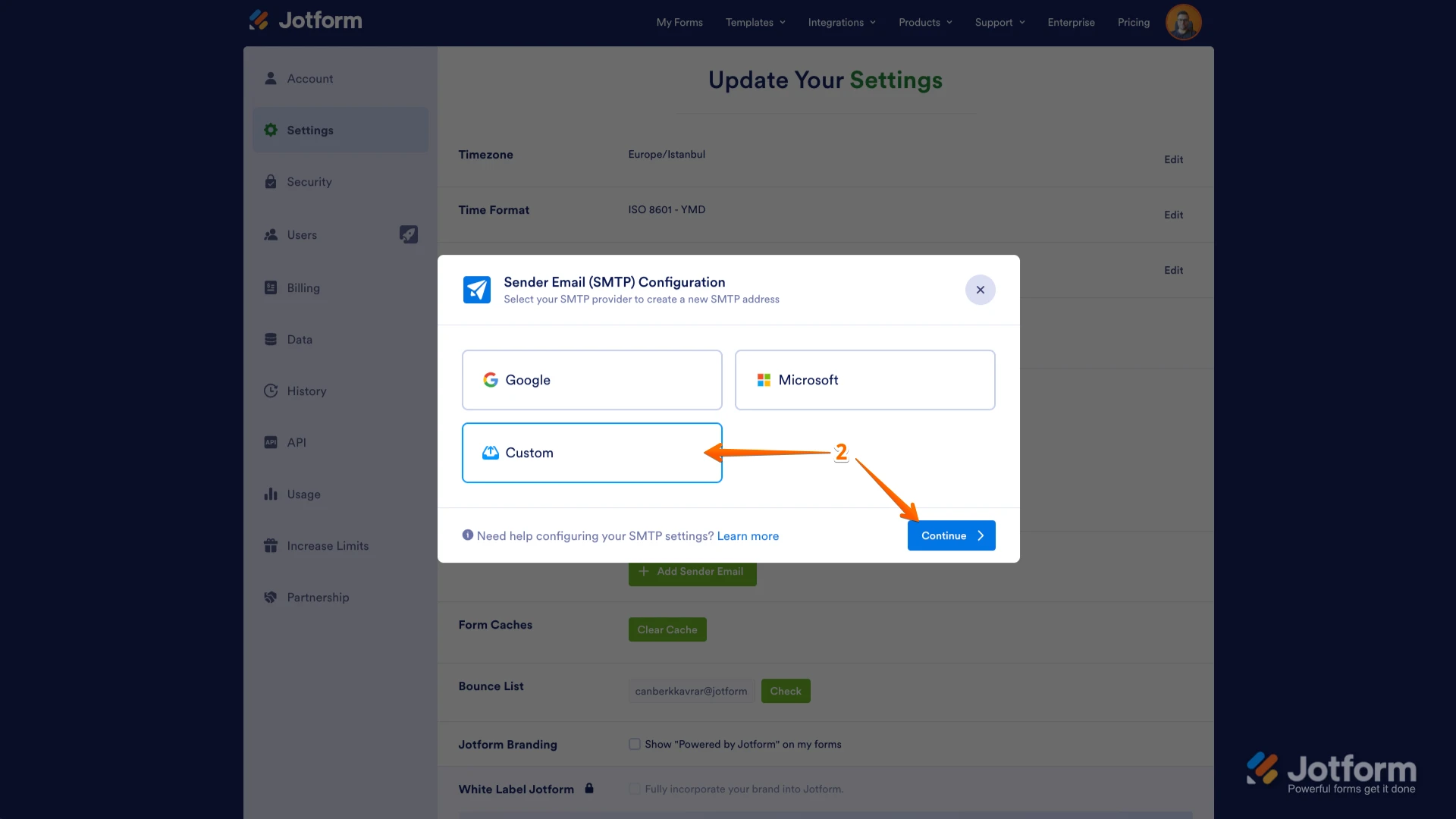
2. In the window that opens, select Custom and click on the Continue button.
3. Enter your email provider's details, click on Send Test Email to check if it’s set up correctly, and then click on Save.
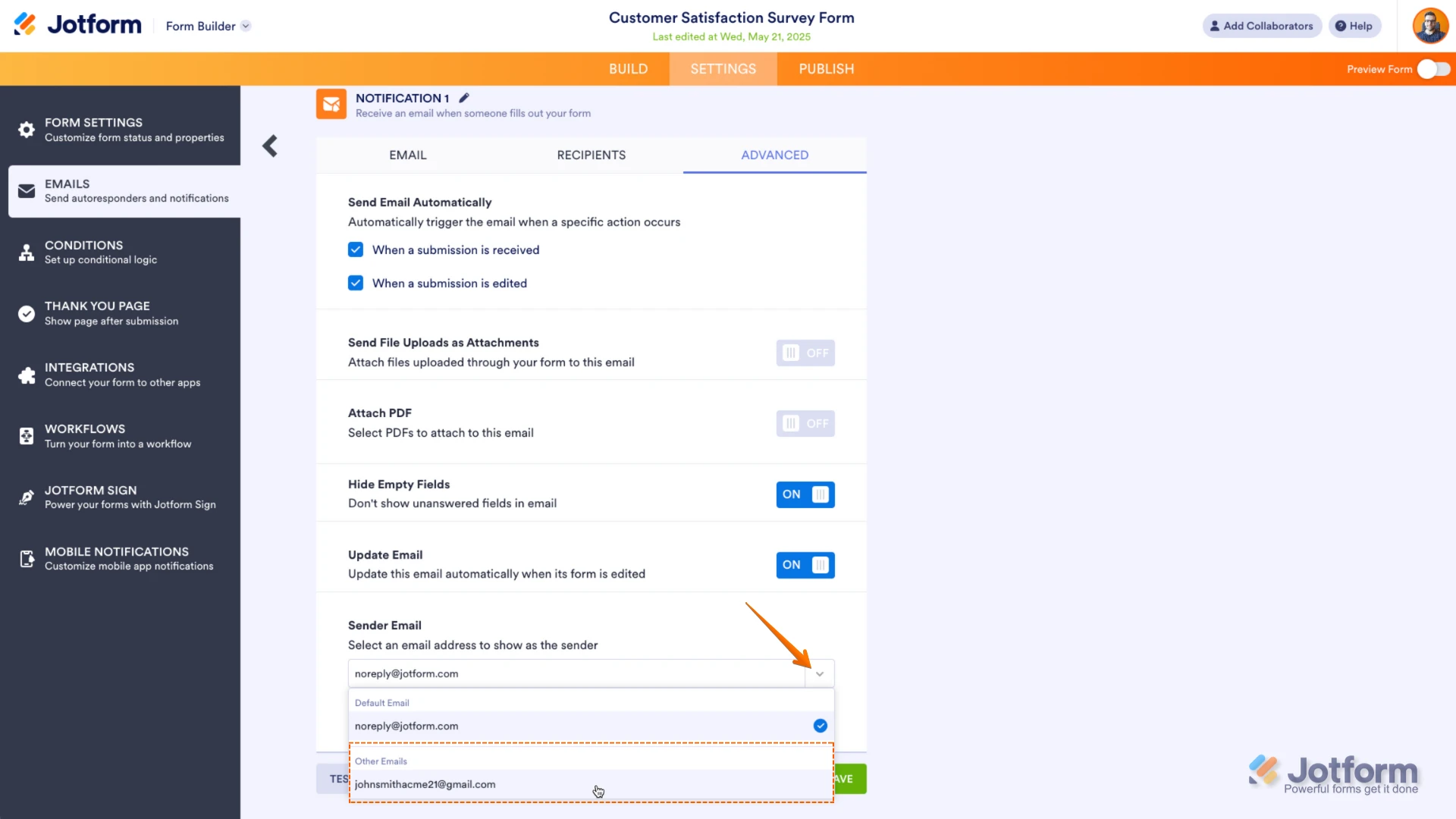
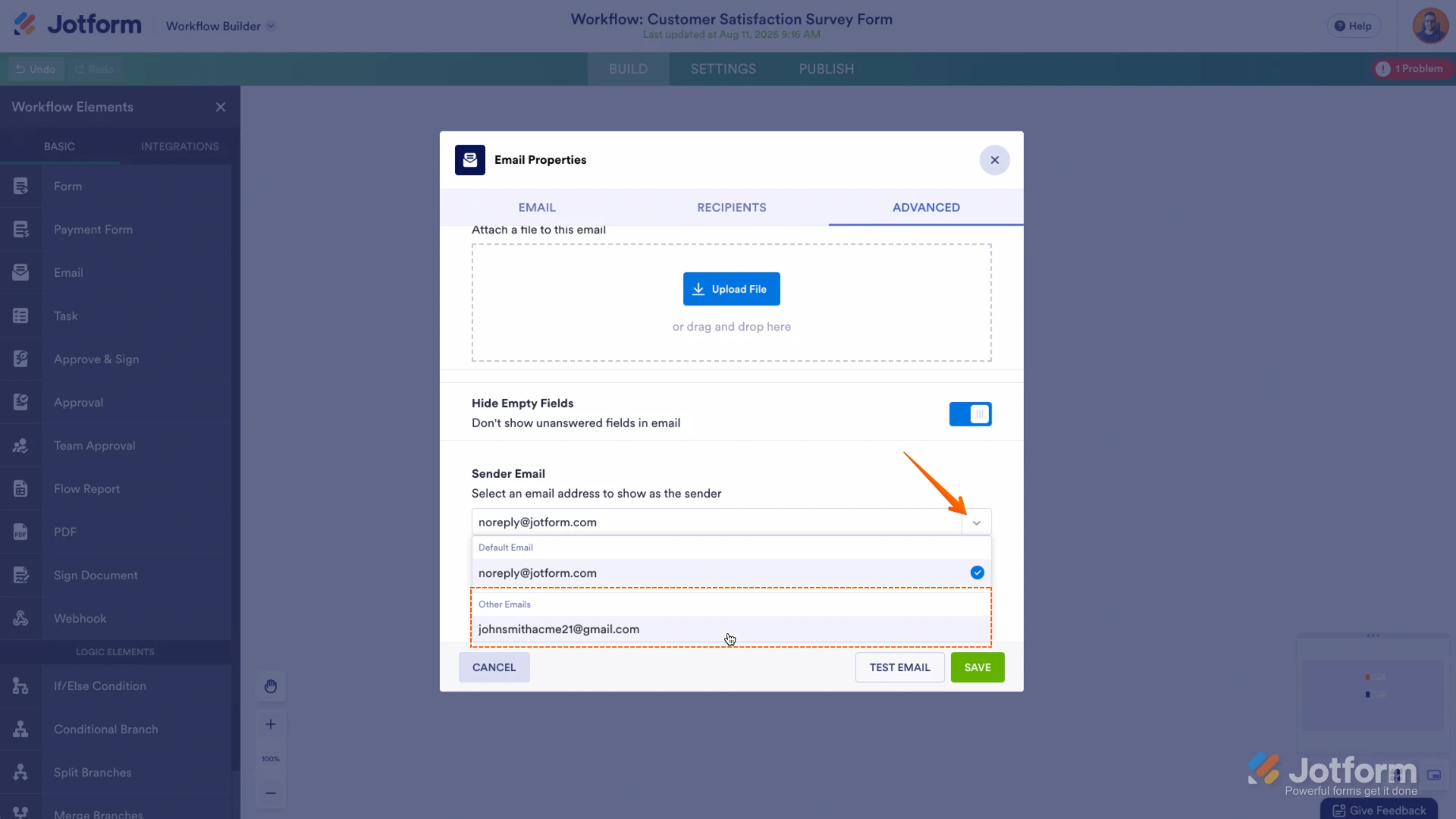
Now you should select your custom SMTP in your email properties under email settings in Form Builder, and if you’re using Workflow Builder, do the same there. Check below to see how it looks in Form Builder:And here’s how it looks in Workflow Builder:Give it a try and let us know if you need any help.


 Now you should select your custom SMTP in your email properties under email settings in Form Builder, and if you’re using Workflow Builder, do the same there. Check below to see how it looks in Form Builder:
 And here’s how it looks in Workflow Builder:
 Give it a try and let us know if you need any help.