-
 Robert_Jobst
Dear Sir or Madam,
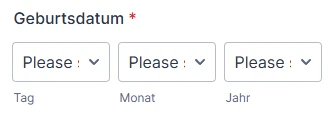
We are encountering an issue with our form where the underlying code specifies "Bitte Tag wählen" (Please select day), yet the form itself displays "Please" in English.
What can I do to ensure it appears in German?

-
 Podo: Support-Mitarbeiter
Hi Robert,
Thanks for reaching out to Jotform Support. I'm an AI assistant here to assist you.
It’s easy to make sure your form appears in German by setting and translating the form language. Let me walk you through it:
1. Open your form in Form Builder, and in the orange navigation bar at the top of the page, click on Settings.
2. Click on Show More Options, scroll down to the Form Languages section, and click on Edit.
3. In the Form Language section, click on the Downward Arrow icon and select German (or your desired main language) as your form's main language.
4. In the Translations section, click on Add Language if needed, and select any additional language you want it translated to.
5. Click on Add under the Dropdown menu and make sure the date field placeholders and other texts are correctly translated to German where they haven’t been automatically translated.
6. Then, click on the Form Warnings tab to see or edit any untranslated warnings (such as date placeholders or validation messages). Changes are saved automatically when you add or edit any text.
Give it a try and let us know how it goes.
-
Robert_Jobst
No fix.The field is still described in English.
-
Podo: Support-Mitarbeiter
Hi Robert,
Let me help you with that.
From what you describe, the general form language is already set to German, but the date field text is still in English. For date fields, you can override many of the texts directly in the field’s own settings, independent of the global language.
Let me walk you through what you can adjust on the date element itself:
- Open your form in Form Builder and click on the Date Picker field that is showing the English text.
- Click on the gear icon (field properties) next to that Date Picker to open its settings.
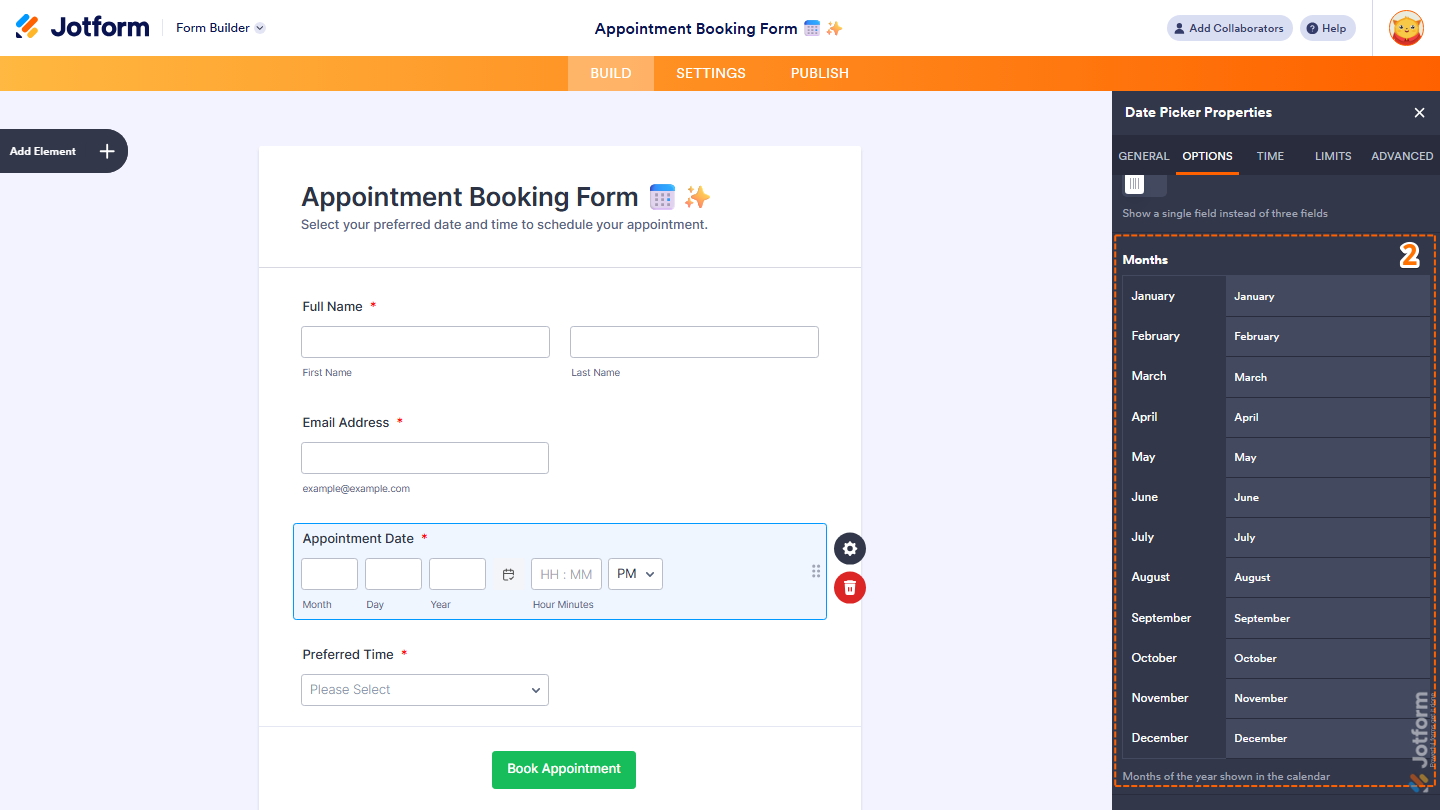
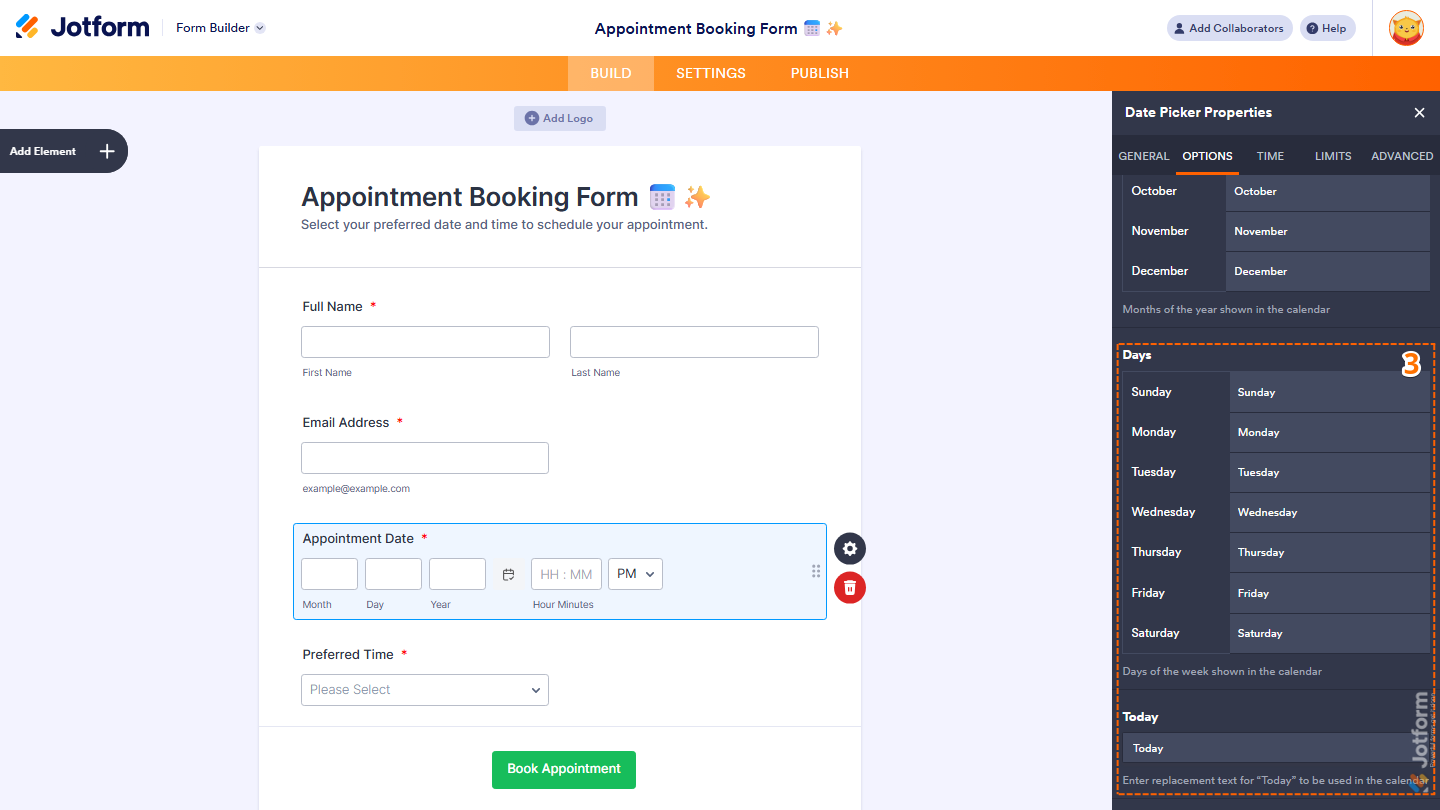
- Go to the Options tab and scroll through the settings there. In this area you can customize:
- Months – change each month name to its German version (e.g., “January” → “Januar”).
- Days – change each weekday name to German (e.g., “Monday” → “Montag”).
- Today – replace the “Today” button text with a German label such as “Heute”.
These controls let you localize the visible calendar texts. If the specific placeholder you mean is still only showing “Please” and there is no editable text for it in the Date Picker’s properties or in the Form Warnings/Translations area, then this particular part of the widget may not be fully translatable and will continue to appear in English.
In that case, one alternative is to use the Localized Calendar widget, which is designed to support multiple languages and regional formats directly in its own settings (including language and date format), and may better match your German localization needs.
Let us know if you have any other questions.
-
Robert_Jobst
That is not the goal!
-
Podo: Support-Mitarbeiter
Hi Robert,
One of our Support Team members will take it from here to follow up shortly.
Reach out again if you need any other help.
-
 Royce Jotform Support
Hi Robert,
I tested it and had the same issue, so I created a ticket and escalated this to our Developers. We’ll follow up as soon as we have any news. As a workaround for that, you can use the Date Picker element instead. You can clone my demo form, or you can do it on your end. Here’s how:
1. In Smart PDF Forms, click on Add Element in the upper-left part of the screen.
2. Then, in the Form Elements menu that opens, drag and drop the Date Picker element to your form.
3. Next, enter your preferred label in the Date Picker field.
4. Now, click on the Gear icon in the right part of the Birth Date Picker widget.
5. After that, in the Birth Date Properties menu that opens, click on the Advanced tab in the upper-right part of the screen.
6. Finally, while still in the Birth Date Properties menu, under the Advanced tab, toggle the Hide Field section off in the right part of the screen.
After that, you can follow the steps shared by our Podo Support Specialist for setting up the Date Picker field in your form. Take a look at the screenshot below to see my results:
Give it a try and let us know if you need any help.