-
 Khaledabdallah418Thank you for your help. I have another issue I need assistance with.
I created a project in Asana that I intend to connect with my Jotform form. However, I cannot find the project in the integration bar when setting up the connection.
I have already tried the following troubleshooting steps:
Checking if the project is set to private (I even gave every user admin access)
Clearing my browser cache
Re-authenticating the Asana connection
Changing the connected team
Unfortunately, none of these steps resolved the issue.Additionally, I have two questions regarding the Asana integration:
Is it possible to combine multiple Jotform fields in the Asana task name? For example, I would like the task name to display: Project Number – Client Name – Unique ID. Is there a workaround to achieve this?
Can the same Jotform field be used multiple times in Asana? For example, I would like to map "Project Number" to both the Asana task name and a custom Asana field called "Project Number." -
 Kris Jotform Support
Hi Khaled,
Thanks for reaching out to Jotform Support. Usually, the issue with integrations where fields aren't showing is if they're not correctly configured. For example, you're using the Number element, and in the integration, you've selected a field that's not equal.
Are you building the integration on a form, sign document, or Workflow? I can see those Jotform assets when I check your Jotform. Are you getting an error with the integration or isn't the field showing? Can you tell us which field you're mapping the project in?
To keep the conversation organized, I moved your other question about combining multiple form elements into one to its thread, and someone from our Support Team will help you with it here.
After we hear back from you, we’ll know what’s going on and how to help.
-
Khaledabdallah418
Hi Kris,
sorry if I didn't explain myself correctly. It's not the fields that aren't showing – it's the Asana project itself that I can't find.
[cid:image001.png@01DCAFAF.4B2C3C00]
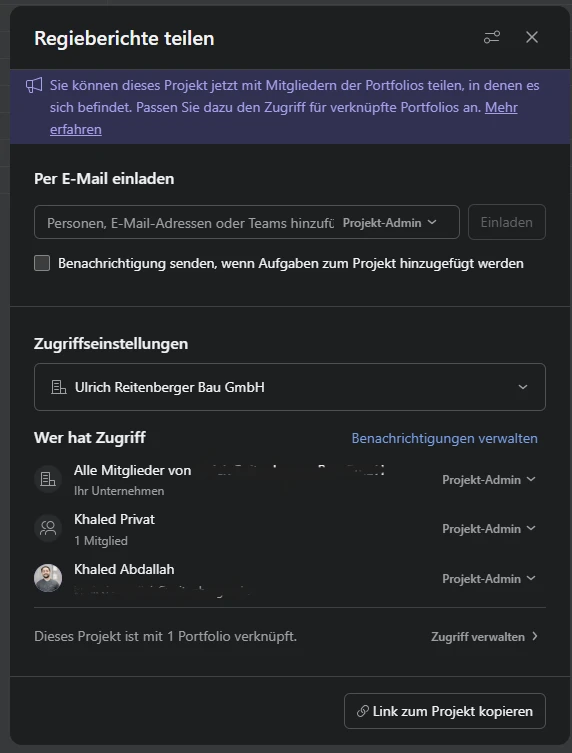
As you can see in the attached picture, I created a new team in Asana which only contains the project "Regieberichte." I'm trying to find this project, but it won't show up.
-
 Nikola Jotform Support
Hi Khaled,
We are unable to see your picture, as files attached inside an email will not be shown here on our forum. You need to open this thread and upload it. Let me show you how to post a screenshot to our Help Center:
1. On the Help Center page, scroll down to the Your Answer section and click on the Image icon.
2. Drag and drop your image into the Upload box, or click on it and select your file.
3. Then, click on the Add button in the bottom-right corner of the window.

4. To resize it, click on your screenshot and then click on one of the boxes in the corners, and drag inward.
5. Once you're finished, click on the Post Answer button at the bottom right of the Your Answer section.
Can you also share the URL of the form you are working on? You can easily find your form's URL in Form Builder. Let me show you how:
- In Form Builder, in the orange navigation bar at the top of the page, click on Publish.
- In the Quick Share tab, click on Copy Link in the Share With Link section.
Once we hear back from you, we'll be able to help you with this. -
Khaledabdallah418
-
 Joeni Jotform Support
Hi Khaled,
I cloned your BaupUR Haustechnik form to see if I could replicate the issue on my end, but everything is working as expected. Take a look at the screenshot below:
Could you check your Projects list to confirm that the project title was created correctly? Also, make sure you’re logged into the right Asana account before linking it to your form. Take a look at the screenshot below:Give it a try and let us know how it goes. -
Khaledabdallah418
Hi there,
I finally found the solution and wanted to share it so your team is aware for future reference.
In Asana, you have to make sure to add the team to the project directly – not just share the project with the team.
For example:
Asana project "Regiebericht" → Members: Khaled AND the "Khaled Privat" team.
Your engine doesn't look for projects that are shared with a team, but for projects where the team is actually added as a member. This distinction might be worth noting in your documentation.
At last, I got what I needed to keep going!
One more thing: While testing, I hit the maximum number of signed documents without realizing there was a limit. Could you please increase the signed document usage for my trial?Thank you for your help!
-
Joeni Jotform Support
Hi Khaled,
Thanks for sharing the solution you found for the Asana Integration project visibility. It's really helpful to know that the team needs to be added directly as a project member, rather than just having the project shared with them. We'll make sure to note this distinction for future reference and update our documentation accordingly.
I’ve gone ahead and moved your other question to a separate thread to keep things tidy, and someone from our Support Team will help you out with it here.
Reach out again and let us know if you have any other questions.

 Once we hear back from you, we'll be able to help you with this.
 Could you check your Projects list to confirm that the project title was created correctly? Also, make sure you’re logged into the right Asana account before linking it to your form. Take a look at the screenshot below:
 Give it a try and let us know how it goes.