

Plantillas de CRM

Plantilla para Base de Datos de Clientes
¡Maneje a sus clientes mejor que nunca con la Plantilla para Base de Datos de Clientes en línea de Jotform! ¡Está Plantilla para Base de Datos de Clientes trabaja de la mano con el Formulario de Generación y Liderazgo en Ventas, lo cual enviará cada solicitud de manera automática a una tabla en línea fácil de usar! ¡Para comenzar, simplemente inserte el formulario en su sitio web o compártala con su mercado objetivo y vea como nuevos clientes potenciales rellenan su Base de Datos de Clientes! Puede descargarlo como un PDF, CSV o un archivo de Excel y compartirlo con miembros de su equipo en un solo click. Está Plantilla para Base de Datos de Clientes está lista para que la use tal como está, pero siéntase libre de personalizarla para que se adapte mejor a sus necesidades. ¡No se necesita codificación — solo arrastre y suelte para crear nuevas pestañas, etiquetas, añadir filas y columnas, establezca filtros, adjunte archivos y fotos, agrupe los nuevos clientes potenciales en criterios específicos y más! Incluso puede cambiar la vista de hoja de cálculo a calendario y así poder ver las próximas reuniones o vista de tarjeta para ver a los nuevos clientes potenciales en tarjetas fáciles de leer. ¡Con una Base de Datos de Clientes personalizada que no requiere una codificación compleja, usted podrá pasar menos tiempo transfiriendo los contactos de manera manual y más tiempo creando mejores relaciones con sus clientes!
Ir a la categoría:Plantillas de CRM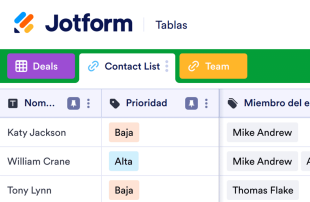
CRM simple
Un CRM simple es un sistema de gestión de relaciones comerciales fácil de usar que le proporciona una mayor productividad y rentabilidad. Utilice esta plantilla gratuita de CRM simple para registrar fácilmente las interacciones con clientes potenciales y actuales, mantener los datos de contacto de los contactos principales, asignar empleados a las interacciones comerciales y mucho más. Solo tiene que insertar el formulario de generación de clientes potenciales adjunto en su sitio web para empezar a recopilar información de contacto: ¡los nuevos clientes potenciales aparecerán automáticamente en su CRM simple! También puede introducir la información de contacto en la tabla manualmente. Personalice la plantilla para crear su propio CRM simple sin necesidad de programar. Simplemente arrastre y suelte para ajustar los elementos visuales, cambiar el texto, elegir nuevos colores para las etiquetas y añadir tantas columnas como sea necesario. Podrá ver y editar su CRM en cualquier dispositivo, y las entradas se pueden descargar, imprimir o compartir con solo unos clics. Mejore la forma en que gestiona su negocio con una plantilla de CRM simple que simplifica la forma en que realiza el seguimiento de las interacciones con los clientes y gestiona los clientes potenciales.
Ir a la categoría:Plantillas de CRMAcerca de Plantillas de CRM
CRM Templates are category-specific table templates designed to streamline the organization and management of records within Jotform Tables. When respondents submit information through Jotform Forms, it can include a variety of data types such as customer details, service requests, product orders, registration information, feedback, and inspection results. These submissions are crucial for form owners across various industries, including customer service teams, sales departments, education professionals, event organizers, and inspection agencies. With CRM Templates, these form owners can efficiently manage the collected information, ensuring that everything is organized and accessible in a structured manner. The focus is on managing the data effectively rather than treating the table as a form, app, or task tracker.
In Jotform Tables, submissions from connected Jotform Forms automatically populate, transforming each response into an entry that can be reviewed in various views like Table View or Detail View. This seamless integration allows for efficient organization and review of data through features like search, filters, and grouping, as well as different column types. Additional ways to introduce existing information include manual entry or importing data from CSV and Excel files, although these are secondary to the automatic form-to-table submission flow. The entire workflow is geared towards ensuring that data moves effortlessly from form submission to actionable insights within the table.
Why Use CRM Templates?
- By utilizing CRM Templates, form owners can eliminate the need for manual data transfer, as responses collected through Jotform Forms automatically populate the connected table. This leads to increased efficiency and reduced errors in data handling.
- Keeping all responses together in one place ensures that form owners can quickly locate any specific record or submission without sifting through scattered data across multiple platforms.
- Users can find records faster by leveraging search and filter functionalities within Jotform Tables, allowing them to pinpoint specific entries based on various criteria, thus saving time and improving data accessibility.
- Reviewing complete submission details is simplified with CRM Templates, where each entry can be expanded to view all associated information and any uploaded files, ensuring a comprehensive understanding of each submission.
- Coordinating follow-up actions becomes more streamlined as form owners can assign tasks, track changes, and collaborate in real-time, ensuring that every team member is on the same page and nothing falls through the cracks.
- Reporting on collected data is made easier, as CRM Templates allow for the creation of detailed reports that can highlight trends, patterns, and insights, providing form owners with actionable information to guide their decisions.
Common Problems Solved by CRM Templates
- Manually copying submissions into spreadsheets is a time-consuming process prone to errors. CRM Templates solve this by automatically populating tables with form submissions, ensuring data accuracy and reducing manual workload.
- Scattered responses across various platforms can lead to difficulty in tracking and managing data. CRM Templates centralize all submissions in one location, making it easier to maintain and organize records.
- Locating records can be challenging without a proper system. With CRM Templates, form owners can use features like search and filters to quickly find specific entries, enhancing efficiency and response times.
- Inconsistent review processes can lead to missed details or errors. CRM Templates provide a structured environment where submissions can be reviewed in Detail View or grouped by specific criteria to ensure thorough examination.
- Managing uploads such as files or documents can be cumbersome. CRM Templates include functionalities like Uploads View, which allows for easy review and management of associated files, providing context and clarity to each submission.
Matching Form Submission Use Cases to Jotform Tables Features
- Incoming customer inquiries submitted via Jotform Forms automatically appear in the connected table, making it easy for the customer service team to access and respond to each inquiry promptly, improving customer satisfaction.
- Sales orders collected through Jotform Forms can be organized using Table View, where column types like numbers and dates help in tracking order details, ensuring accurate and timely order processing.
- Teams handling project submissions can utilize search and filters to swiftly locate specific entries, enhancing the efficiency of project management and ensuring that no submission is overlooked.
- Managers can assign entries to team members using the assignee feature, facilitating clear responsibility allocation and enabling real-time tracking of submission handling, which is crucial for maintaining accountability.
- Using Report View, form owners can generate comprehensive reports that highlight key metrics and insights derived from collected submissions, empowering them to make informed decisions based on reliable data.
How to Use CRM Templates with Jotform Forms
- Start with a category-relevant Jotform Tables template, a blank table, or the table connected to an existing Jotform Form. The Jotform Form is responsible for collecting the category-specific information, and new responses will automatically appear in the connected table, ensuring a seamless data flow.
- The form owner configures the table for submission review by naming columns and selecting appropriate column types. They can also choose from various views like Table View, Detail View, Calendar View, Uploads View, or Report View to best suit their review needs.
- Managing submissions involves using features such as search, filters, grouping, formulas, access settings, assignees, revision history, linked tables, and action buttons. These capabilities help in organizing data, assigning tasks, and performing necessary actions on the collected submissions effectively.
Top Use Cases for CRM Templates
- For Form Owners: Form owners benefit from CRM Templates by efficiently reviewing incoming responses as they automatically populate in Jotform Tables. They can edit submission data to correct any discrepancies, check details or uploads to ensure completeness, and keep records organized using various views and features. This structured approach allows form owners to maintain a clear overview of all collected data, enabling them to manage their responsibilities with greater accuracy and ease.
- For Teams: Authorized team members use CRM Templates to find and maintain submissions, ensuring that every entry is up-to-date and accurately reflects the submitted information. They coordinate responsibility by assigning tasks to specific team members and use access settings to manage who can view or edit the data. Revision history supports shared work by allowing team members to track changes and ensure that everyone is working with the most recent data, facilitating smooth collaboration.
- For Managers: Managers utilize CRM Templates to monitor collected data and review category-specific patterns that may emerge from the submissions. They check progress or ownership of tasks by using views like Report View, which provides a comprehensive overview of the data. This oversight capability allows managers to make informed decisions, allocate resources effectively, and ensure that the team is aligned with organizational goals and objectives.
Summarizing CRM Templates
Las plantillas de CRM constituyen una valiosa solución para recopilar y gestionar información relacionada con categorías específicas a través de los formularios y las tablas de Jotform. Al automatizar el proceso de envío, los responsables de los formularios y sus equipos pueden enfocar sus esfuerzos en analizar los datos y actuar en consecuencia, en lugar de tener que gestionarlos de forma manual. Las tablas de Jotform constituyen un entorno sólido para revisar, organizar y colaborar en los envíos, lo que las convierte en una herramienta esencial para la gestión eficaz de datos en diversos contextos profesionales.
Preguntas Frecuentes
1) Is it free to use CRM Templates with Jotform Tables?
Jotform offers a Starter plan, which allows users to access essential features, including CRM Templates. This plan is designed to help users get started with managing form submissions within Jotform Tables. However, additional features and capabilities may be available in higher-tier plans.
2) How do submissions from Jotform Forms appear in CRM Templates?
Submissions from Jotform Forms automatically appear in the connected CRM Templates. Each form submission is transformed into an entry or row in the linked table, allowing for seamless integration of new data. This auto-population ensures that all future responses are captured efficiently.
3) Can I edit, search, filter, group, and calculate data in CRM Templates?
Yes, you can edit submissions and utilize various features like search, filters, data grouping, formulas, and calculations within CRM Templates. These capabilities allow you to organize and analyze your data effectively, ensuring that you can derive meaningful insights and maintain accurate records.
Casos de uso de hojas de presupuesto
Absolutely, CRM Templates provide the option to export data as CSV or Excel files. This feature allows you to add existing information alongside submissions collected through connected Jotform Forms. It facilitates offline data analysis and sharing with other stakeholders as needed.
5) Which Jotform Tables views can I use with CRM Templates?
CRM Templates support multiple views such as Table View, Detail View, Calendar View, Report View, and Uploads View. Each view offers unique advantages: Table View for a structured overview, Detail View for in-depth examination of entries, Calendar View for date-specific tracking, Report View for insights and metrics, and Uploads View for managing attached files.
6) Can teams collaborate on submissions in CRM Templates?
Yes, teams can collaborate on submissions using CRM Templates by leveraging access settings, collaboration features, assignees, real-time tracking, and revision history. These tools enable team members to work together efficiently, ensuring that everyone has the necessary permissions and information to contribute effectively.
7) Can I connect CRM Templates to related data or other applications?
CRM Templates allow for integration with related data through linked tables and action buttons. These features enable users to extend the functionality of their tables and connect with other applications, facilitating a more comprehensive data management approach.
8) Can I create reports, PDFs, and manage files from CRM Templates?
CRM Templates offer capabilities such as Report View for creating insights, PDF generation for document creation, and Uploads View for file management. These features provide a robust framework for handling various aspects of data reporting and documentation, catering to the specific needs of different categories.